Explains how the filtering mechanism identifies and excludes irrelevant routes from advertisements to individual routers.
A route filtering by TLOC color is a Cisco SD-WAN Controller feature that
reduces the number of advertised routes to routers by excluding irrelevant routes,
bases filtering on the colors of TLOCs associated with each device, and
advertises only routes compatible with one or more of the router’s TLOCs.
Route filtering by TLOC color allows Cisco SD-WAN Controllers to selectively advertise routes to individual routers. For each router, only the routes that match the color of one or more of its TLOCs are advertised, ensuring that only relevant routes are sent to each device.
Using route filtering, Cisco SD-WAN Controllers can reduce the number of routes they advertise to routers in the network by excluding routes that are not relevant to a particular device. The filtering is based on the colors of TLOCs on each device: for each individual router, the Cisco SD-WAN Controller advertises only routes that are compatible with one or more of the router's TLOCs.
How Cisco SD-WAN Controller route filtering by TLOC color works
Default behaviour: Cisco SD-WAN Controller route filtering by TLOC color is disabled by default.
Summary
Cisco SD-WAN Controllers apply the following logic when determining whether routes are compatible:
A TLOC with a public color can resolve a path to a route for a TLOC with a public color on a peer device.
A TLOC of a particular color can resolve a path to a route for a TLOC of the same color on a peer device.
A TLOC with a public color cannot resolve a path with a TLOC in a private color set.
Public colors include default, biz-internet, public-internet, lte, 3g, red, green, blue, gold, silver, bronze, custom1, custom2, and so on. Private colors include mpls, metro-ethernet, private1, private2, and so on.
For information about private and public TLOC colors, see Unicast Overlay Routing in the Cisco SD-WAN Routing Configuration Guide, Cisco IOS XE Release 17.x..
For example, if a router only has TLOCs with private colours, Cisco SD-WAN Controllers do not advertise public routes to the device. Similarly, if a router only has TLOCs with public colors, Cisco SD-WAN Controllers do not advertise private routes to the device.
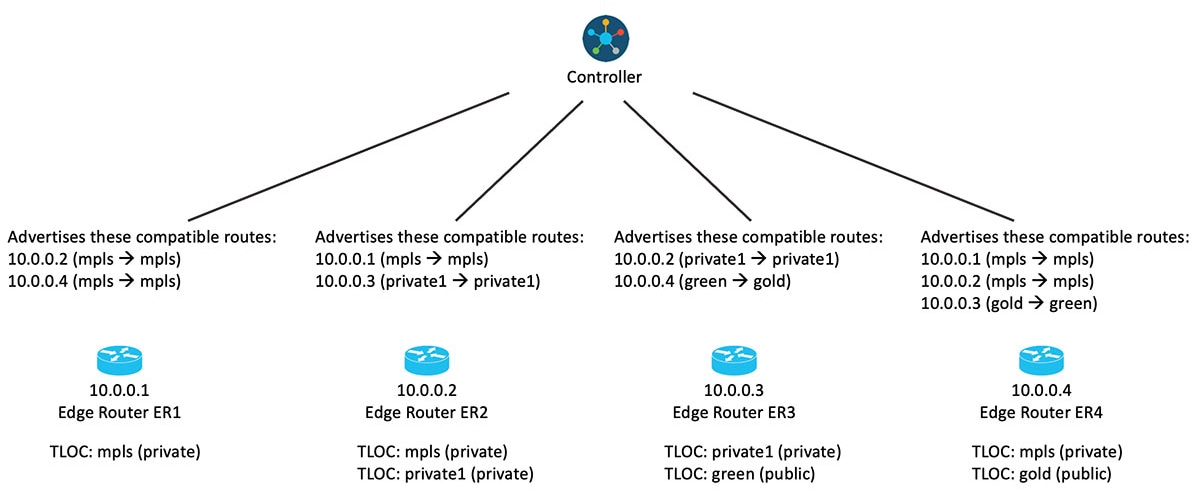
The following illustration provides further detail:
Workflow
Figure 1. Cisco SD-WAN Controller Route Filtering by TLOC Color, With the Feature Enabled
If you change the color assignment of a TLOC, the device updates the Cisco SD-WAN Controllers, enabling them to adjust the Cisco SD-WAN Controller route filtering by TLOC color accordingly.
What’s next
You can override the default logic if necessary and do one of the following:
Configure two TLOC colors to be compatible even if they are incompatible by default.
Configure two TLOC colors to be incompatible even if they are compatible by default.
This may be helpful in specific unconventional scenarios. See the tloc-color-compatibility command in Override Default TLOC Color Compatibility for Cisco SD-WAN Controller Route Filtering by TLOC Color Using a CLI Template.
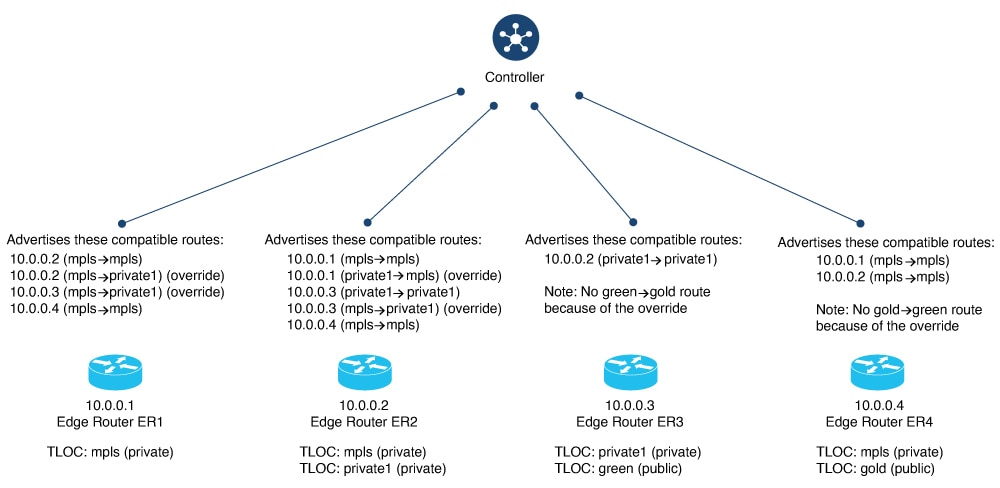
The following illustration shows an example of route filtering by TLOC color, with two overrides:
Configure green and gold to be incompatible.
Configure mpls and private1 to be compatible.
Figure 2. Cisco SD-WAN Controller Route Filtering by TLOC Color, With the Feature Enabled and Overrides
Routers in the network update Cisco SD-WAN Controllers when the status of their TLOCs changes. This may include reconfiguring a TLOC to a different color.
To account for temporary unavailability of a TLOC due to flapping, there is a dampening interval to delay reporting changes of TLOC status. By default, it is 60 seconds, but it can be configured to a value from 60 to 1200 seconds. For information, see Configure the Update Interval for Route Filtering by TLOC Color Using a CLI Template.
Benefits of Cisco SD-WAN Controller route filtering by TLOC color
Avoiding the send path limit: Cisco SD-WAN Controller route filtering by TLOC color helps prevent routers from reaching their send path limit (for example, a limit of 32 routes), even if there are more routes available for a particular prefix.
Prioritizing relevant routes: If the send path limit is set to a low value and many routes are available, filtering ensures that only relevant routes are advertised to the device. This prevents the send path limit from being reached with irrelevant routes and helps avoid routing failures.
Supported devices for Cisco SD-WAN Controller route filtering by TLOC color
Cisco IOS XE Catalyst SD-WAN devices supported for Cisco SD-WAN Controller route filtering by TLOC color.
Prerequisites for Cisco SD-WAN Controller route filtering by TLOC color
For Cisco SD-WAN Controllers to determine the compatibility of paths, the colors of TLOCs must be configured according to convention.
For example, a TLOC handling an MPLS connection must have the color mpls.
Restrictions for Cisco SD-WAN Controller route filtering by TLOC color
When you enable Cisco SD-WAN Controller route filtering by TLOC color in a network, ensure that all you enable it on all Cisco SD-WAN Controllers in the network.
Scenarios in which route filtering by TLOC color is enabled on some Cisco SD-WAN Controllers and disabled on others within the same network are not supported.