System Security Configuration Guide for Cisco 8000 Series Routers, IOS XR Releases

PDF

System Security Configuration Guide for Cisco 8000 Series Routers, IOS XR Releases

Software trust components

Want to summarize with AI?

Log in

Explains software trust mechanisms comprising secure boot, trusted software boot processes, secure iPXE server operations, and provides procedures to verify router secure boot status for comprehensive software integrity.


Software trust is a trustworthy systems component that

  • verifies Cisco-signed boot artifacts

  • authenticates network boot sources, and

  • prevents untrusted software from reaching runtime.

The second component in implementing a trustworthy system is to enable trust in software.

In Cisco IOS XR7, trust in the software is enabled through:

  • Secure Boot

  • Secure iPXE


Secure boot

Secure boot is a software integrity mechanism that

  • uses the TAm as the hardware trust anchor

  • verifies Cisco-signed boot artifacts before execution, and

  • rejects software images when signature verification fails.

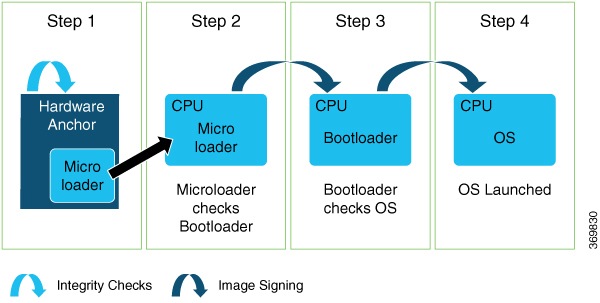
Cisco Secure Boot helps to ensure that the code that executes as part of the software image boot sequence on Cisco routers is authentic and unmodified. Cisco IOS XR7 platforms support the hardware-anchored secure boot which is based on the standard Unified Extensible Firmware Interface (UEFI). This UEFI-based secure boot protects the microloader (the first piece of code that boots) in tamper-resistant hardware, establishing a root of trust that helps prevent Cisco network devices from executing tainted network software.

Figure 1. Secure boot

The intent of Secure Boot is to have a trust anchor module (TAm) in hardware that verifies the bootloader code. A fundamental feature of secure boot is the barrier it provides that makes it that it is extremely difficult or nearly impossible to bypass these hardware protections.

Secure boot ensures that the bootloader code is a genuine, unmodified Cisco piece of code and that code is capable of verifying the next piece of code that is loaded onto the system. It is enabled by default.

When secure boot authenticates the software as genuine Cisco in a Cisco device with the TAm, the operating system then queries the TAm to verify whether the hardware is authentic. It verifies by cryptographically checking the TAm for a secure unique device identifier (SUDI) that comes only from Cisco.

The SUDI is permanently programmed into the TAm and logged by Cisco during Cisco’s closed, secured, and audited manufacturing processes.

Feature history

The feature history table lists release support for this feature.

Table 1. Feature History Table

Feature Name

Release Information

Feature Description

Secure Boot Status

Release 25.4.1

Introduced in this release on: Fixed Systems (8700 [ASIC: K100], 8010 [ASIC: A100])(select variants only*)

*This feature is supported on:

  • 8711-48Z-M

  • 8011-32Y8L2H2FH

  • 8011-12G12X4Y-A/D

Secure Boot Status

Release 25.1.1

Introduced in this release on: Fixed Systems (8700 [ASIC: K100], 8010 [ASIC: A100])(select variants only*)

*This feature is supported on:

  • 8712-MOD-M

  • 8011-4G24Y4H-I

Secure Boot Status

Release 24.4.1

Introduced in this release on: Fixed Systems (8200 [ASIC: Q100, Q200, P100], 8700 [ASIC: P100, K100])(select variants only*); Modular Systems (8800 [LC ASIC: Q100, Q200, P100])(select variants only*)

*This feature is supported on:

  • 8212-48FH-M

  • 8711-32FH-M

  • 88-LC1-36EH

  • 88-LC1-12TH24FH-E

  • 88-LC1-52Y8H-EM

Secure Boot Status

Release 24.3.1

Introduced in this release on: Fixed Systems (8200 [ASIC: Q100, Q200, P100](select variants only*)

*This feature is supported on Cisco 8202-32FH-M routers.

Secure Boot Status

Release 7.8.1

You can now verify whether the router is securely booted up with an authentic Cisco software image. We have introduced a show command to verify the secure boot status of the router. If the software image was tampered with, then the secure boot fails, and the router does not boot up. Before this release, there was no provision on the router to verify the secure boot status.

The feature introduces these:

Secure Boot on NCS-57D2-18DD-SYS

Release 7.8.1

You can ensure that the code that executes on Cisco routers is authentic and unmodified. Cisco hardware-anchored secure boot feature protects the microloader, the first piece of code that boots up, in a tamper-resistant hardware. This functionality thereby establishes a root of trust that helps to prevent Cisco routers from executing tainted network software.

This feature is now extended to the following variant of Cisco NCS 5700 Series Router:

  • NCS-57D2-18DD-SYS

Support for Secure Boot

Release 7.4.1

Support for Secure Boot is now extended to the following Cisco NCS 540 router variant:

  • N540-24Q8L2DD-SYS


How trusted software boots

Booting the System with Trusted Software

Summary

The key components involved in the process are:

  • Trusted Anchoring Module (TAm): Provides certificates used to verify signatures on boot artifacts.

  • Bootloader and BIOS/UEFI: Initiates the hardware and verifies initial signatures on boot artifacts.

  • Kernel and Initrd: Loads operating system components and imports certificate keys for runtime verification.

  • Signature verification infrastructure: Validates digital signatures using Cisco RSA 2048-bit keys and SHA-256 hashes.

Trusted software boot ensures system integrity by verifying each boot component against a Cisco-signed digital signature. This process prevents unauthorized software from running during the boot sequence, safeguarding the device and its runtime environment.

Workflow

The process involves these stages.

  1. Verification of boot artifacts: At boot time, the system checks all boot artifacts using certificates stored in Cisco’s dbCisco or dbxCisco UEFI stores, anchored in TAm.
  2. Bootloader and package verification: The bootloader (including GRUB, PXE, netboot) and initial RAM disk (Initrd) are verified and executed if their signatures are valid.
  3. Kernel launch and service startup: The kernel launches, followed by the init process, then all required services. RPM packages are installed only after signature verification.
  4. Signature verification on installation: When installing Cisco IOS XR software (from disk or via GISO), each RPM package containing system boot components undergoes signature verification. BIOS updates use capsule updates for authenticated changes.
  5. Detailed boot verification sequence:
    • TAm verifies signatures on the bootloader (BIOS/PXE) using hash-based methods like LDWM and SHA-256.

    • The bootloader verifies GRUB and configuration files using Cisco RSA 2048-bit keys and SHA-256.

    • GRUB checks detached signatures (SHA-256) on configuration files.

    • GRUB verifies the kernel and Initrd signatures.

    • The kernel and Initrd fetch and import certificates from TAm into their respective keyrings.

    • The kernel verifies module signatures and IMA signatures when binaries are loaded or executed.

    • Digital signatures for grub.cfg, kernel modules, and IMA files are validated using Cisco RSA 2048-bit public keys.

Result

The device boots only after all artifact verifications succeed, ensuring that only Cisco-signed and authenticated software components run in the Cisco IOS XR runtime environment. If any signature verification fails, the boot process is halted and the image is rejected.


How secure iPXE servers work

Before downloading a network boot image from the iPXE server, the Cisco router must verify the authenticity and security of the server using certificates.

Summary

The key components involved in the process are:

  • iPXE server: Acts as an HTTP image repository, discovered via DHCP, and supports HTTPS with self-signed certificates.

  • Cisco router: Discovers and authenticates the iPXE server prior to downloading boot images.

  • Certificate infrastructure: Includes the root certificate chain and the Simple Certificate Enrollment Protocol (SCEP) for exchanging certificates.

Secure iPXE servers enable routers to perform certificate-based authentication before downloading network boot images, ensuring a trusted boot process.

Workflow

These stages describe how secure iPXE servers work.

  1. Discovery: The Cisco router locates the iPXE server via DHCP.
  2. Authentication preparation: The router downloads the iPXE server’s self-signed certificates.
  3. Certificate verification: Using SCEP, the router acquires the root certificate chain and checks if it is self-signed to validate trust.
  4. Authentication: The root certificate chain is used to authenticate the iPXE server.
  5. Channel establishment: Once authentication succeeds, a secure HTTPS channel is established between the router and the iPXE server.
  6. Image download: The router can now download Bootstrapper protocol (Bootp), ISO, binaries, and scripts across the secure channel.

Result

The router downloads the network boot image only after successfully authenticating the iPXE server using certificate-based verification.


Verify the secure boot status of your router

Ensure the router’s security integrity by checking secure boot status and verifying that only authorized Cisco software images are running.

Secure boot validation confirms that the router’s startup process is protected and the system has not been tampered with or corrupted. Only supported Cisco IOS XR platforms offer secure boot verification.

Before you begin

Confirm that the router is running a supported Cisco IOS XR release and platform variant.

Procedure

Use the show platform security integrity log secure-boot status to verify the secure boot status.

Example:

Router# show  platform security integrity log secure-boot status
Wed Aug 10 15:39:17.871 UTC

+--------------------------------------+
   Node location: node0_RP0_CPU0
+--------------------------------------+
Secure Boot Status: Enabled
Router#

Use the show platform security integrity log secure-boot status command to verify the secure boot status of the router. If the router boots securely, then the show command output displays the status as "Secure Boot Status: Enabled". If the router does not support this secure boot verification functionality, then the status is displayed as "Not Supported".

If the software image was tampered with, then the secure boot fails and the router does not start. The system displays corresponding error logs at various stages of boot process. For example,

Example:

Bad signature file...
/initrd.img verification using Pkcs7 signature failed.
error: Security Violation: /initrd.img failed to load.
System halting...

The router’s secure boot status is confirmed. If "Enabled" is shown, your device booted securely with an authentic Cisco software image. If secure boot failed, the router does not start, and error logs indicate security violations.