System Security Configuration Guide for Cisco 8000 Series Routers, IOS XR Releases

PDF

System Security Configuration Guide for Cisco 8000 Series Routers, IOS XR Releases

Lawful intercept

Want to summarize with AI?

Log in

Explains how lawful intercept uses SNMPv3 provisioning and mediation devices to deliver authorized communication intercepts to law enforcement agencies.


Lawful intercept is a capability that

  • allows service providers to perform authorized surveillance on an individual or target

  • uses RFC 3924 architecture and SNMPv3 provisioning to secure communication with the mediation device, and

  • replicates intercepted communication for delivery to a law enforcement agency.

Table 1. Feature History Table

Feature Name

Release Information

Feature Description

Lawful intercept

Release 26.2.1

Introduced in this release on: Fixed Systems (8700 [ASIC: K100]) (select variants only*); Modular Systems (8800 [LC ASIC: K100]) (select variants only*)

This feature requires egress feature capability on supported platforms. Use the hw-module profile edge-mode CLI command to enable the feature.

The feature introduces these changes:

CLI:

  • hw-module profile edge-mode

  • show hw-module profile edge-mode

*This feature is now supported on:

  • 8711-48Z-M

  • 8712-MOD-M

  • 88-LC1-48Y8H-EM

Lawful intercept

Release 26.1.1

Introduced in this release on: Centralized Systems (8400 [ASIC: K100])(select variants only*)

*This feature is supported on Cisco 8404-SYS-D routers.

Lawful intercept

Release 25.4.1

Introduced in this release on: Fixed Systems (8010 [ASIC: A100])(select variants only*)

*This feature is supported on:

  • 8011-32Y8L2H2FH

  • 8011-12G12X4Y-A/D

Lawful intercept

Release 25.1.1

Introduced in this release on: Fixed Systems (8010 [ASIC: A100]) (select variants only*)

*This feature is supported on Cisco 8011-4G24Y4H-I routers.

Lawful intercept

Release 24.4.1

Introduced in this release on: Fixed Systems(8200, 8700)(select variants only*); Modular Systems (8800 [LC ASIC: P100])(select variants only*).

This feature is now enabled on the following hardware thus allowing service providers to perform surveillance on an individual (or target) as authorized by a judicial or administrative order and share the communication intercepts with law enforcement agencies.

*This feature is now supported on:

  • 8212-48FH-M

  • 8711-32FH-M

  • 8712-MOD-M

  • 88-LC1-12TH24FH-E

  • 88-LC1-52Y8H-EM

  • 88-LC1-36EH

Lawful intercept

Release 24.2.1

You can now enable Lawful Intercept (LI) by installing and activating the LI package to enable service providers to perform surveillance on an individual (or target) as authorized by a judicial or administrative order and share the communication intercepts with law enforcement agencies.

This feature is supported on Cisco 8800 series routers that have the 88-LC1-36EH line card installed.


Lawful intercept benefits

Use this topic to understand the operational benefits provided by lawful intercept.

Lawful intercept provides these benefits:

  • Allows multiple law enforcement agencies to run a lawful intercept on the same router without each agency knowing about the others.

  • Does not affect subscriber services on the router.

  • Supports wiretaps in both the input and output directions.

  • Supports wiretaps of Layer 3 traffic.

  • Cannot be detected by the target.


Lawful intercept prerequisites

Use this topic to identify the requirements that must be met before implementing lawful intercept.

Meet these prerequisites before implementing lawful intercept:

  • Use the router as the content Intercept Access Point (IAP) router in the lawful interception operation.

  • Provision the router before configuring lawful intercept.

  • Use a loopback interface for lawful intercept taps when possible. A loopback interface provides advantages over other interface types.

  • Configure the management plane to enable SNMPv3 so that the mediation device can communicate with the router through a physical interface, preferably a loopback interface.

  • Enable View-based Access Control Model (VACM) views for the SNMP server.

  • Provision the mediation device. For detailed mediation device information, see the documentation for the mediation device vendor.

  • Use CISCO-TAP2-MIB to set up communication between the router acting as the content IAP and the mediation device.

  • Use CISCO-IP-TAP-MIB to set up filters for the IP addresses and port numbers to be intercepted.

  • Ensure that the mediation device is reachable from the content IAP router through the global routing table, not through a VRF routing table.


Lawful intercept topology

Use this topic to understand the topology components used for voice and data interception.

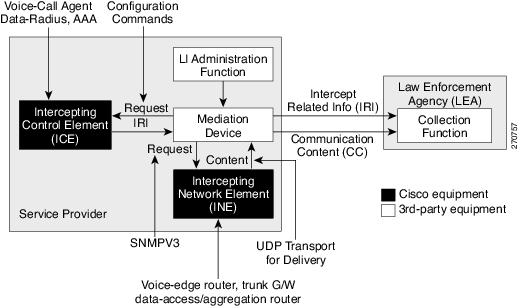
The lawful intercept topology contains intercept access points and interfaces for both voice and data interception.

  • The router is used as the content Intercept Access Point (IAP) router, or the Intercepting Network Element (INE), in the lawful interception operation.

  • The Intercepting Control Element (ICE) can be Cisco equipment or third-party equipment.

Figure 1. Lawful intercept topology for both voice and data interception

Lawful intercept restrictions

Use this topic to identify the limitations that apply to lawful intercept.

These restrictions apply to lawful intercept:

  • Deployment and configuration restrictions include:

    • Lawful intercept supports only pure IP over Ethernet packets.

    • A maximum of 512 mediation devices, 1024 IPv4 taps, and 512 IPv6 taps are supported.

    • One tap to multiple mediation devices is not supported.

    • After a route processor reload or failover, re-provision the mediation device and tap configuration.

    • Both IPv4 and IPv6 mediation devices are supported. Resolve ARP for the path to the mediation device and for the mediation device next hop.

    • Remove the SNMP configuration while deactivating the LI RPM.

  • Packet and interface restrictions include:

    • LI statistics are not supported.

    • Although original packets can be fragmented, LI packets cannot be fragmented. Ensure that the egress interface MTU to the mediation device supports the captured packet size.

    • LI supports Layer 3 taps for Layer 3 interface types, including physical and bundle interfaces, but LI traffic cannot be transmitted over the management interface.

  • Unsupported LI features include:

    • IPv4 or IPv6 multicast tapping.

    • Per-interface tapping.

    • Tagged packet tapping.

    • Replicating one tap to multiple mediation devices.

    • Layer 2 flow tapping.

    • SRv6 traffic.

    • RTP encapsulation.

    • Using LI and SPAN on the same interface.


Restrictions on configuring LI with other features

Use this topic to understand the restrictions that apply when configuring LI with other ACL-dependent features.

Apply these restrictions when configuring LI with ACL-dependent features such as BGP Flow Specification (BGPFS), QoS-ACL, Security SPAN ACL, QoS Policy Propagation via BGP (QPPB), Policy-Based Routing (PBR), Peering QoS, and Layer 2 ACL for packets with Layer 3 payloads:

  • If LI is the first feature configured on the system, add up to three additional ACL-dependent features at the interface or global level. Configuring more features generates an IOS message for features such as QPPB, QoS-ACL, Security-ACL, and BGPFS.

  • If LI is already enabled on the router, configuring SPAN with an ACL on an interface causes the configuration to be rejected.

  • If three ACL-dependent features are already configured on interfaces when the LI RPM is installed, LI attempts to tap ingress traffic on all interfaces.

  • If four ACL-dependent features are configured on specific interfaces while other interfaces have fewer than three, LI taps traffic on the interfaces with fewer than three features and bypasses the interfaces with four features.