System Security Configuration Guide for Cisco 8000 Series Routers, IOS XR Releases

PDF

System Security Configuration Guide for Cisco 8000 Series Routers, IOS XR Releases

Cisco MASA service

Want to summarize with AI?

Log in

Explains how the Cisco Manufacturer Authorized Signing Authority service creates ownership vouchers, supports router authentication, and provides web, REST, and gRPC interactions.


The Cisco Manufacturer Authorized Signing Authority (MASA) service is a service that

  • creates ownership vouchers (OVs) for a Cisco IOS XR router, which together with the owner certificate (OC) certify that the router belongs to a given customer

  • supports secure ZTP workflows and securely booting a device on a 5G cell site over a third-party Ethernet service, and

  • allows customers to download OVs and view their logging and audit information.

The MASA service also enables Cisco Account teams to assign device serial numbers to customers and view the logging, verification, and audit details of OVs.

Table 1. Feature History Table

Feature Name

Release Information

Feature Description

Extend Device Ownership

Release 25.4.1

Introduced in this release on: Fixed Systems (8010 [ASIC: A100])(select variants only*)

*This feature is supported on:

  • 8011-32Y8L2H2FH

  • 8011-12G12X4Y-A/D

Extend Device Ownership

Release 25.1.1

Introduced in this release on: Fixed Systems (8700 [ASIC: K100], 8010 [ASIC: A100])(select variants only*)

*This feature is supported on:

  • 8712-MOD-M

  • 8011-4G24Y4H-I

Extend Device Ownership

Release 24.4.1

Introduced in this release on: Fixed Systems (8200 [ASIC: P100], 8700 [ASIC: P100])(select variants only*); Modular Systems (8800 [LC ASIC: P100])(select variants only*)

*This feature is supported on:

  • 8212-48FH-M

  • 8711-32FH-M

  • 88-LC1-36EH

  • 88-LC1-12TH24FH-E

  • 88-LC1-52Y8H-EM

Extend Device Ownership

Release 7.10.1

Your router can now run in a dual-ownership mode wherein you can securely migrate the operating system from Cisco IOS XR to third-party software such as SONiC. You can only install the signed SONiC image authorized by Cisco using an ownership voucher (OV) and authenticated variables (AV) on the router. This authorization prevents tampering with the software using unauthorized third-party images.

Cisco MASA Service

Release 25.4.1

Introduced in this release on: Fixed Systems (8010 [ASIC: A100])(select variants only*)

*This feature is supported on:

  • 8011-32Y8L2H2FH

  • 8011-12G12X4Y-A/D

Cisco MASA Service

Release 25.1.1

Introduced in this release on: Fixed Systems (8700 [ASIC: K100], 8010 [ASIC: A100])(select variants only*)

*This feature is supported on:

  • 8712-MOD-M

  • 8011-4G24Y4H-I

Cisco MASA Service

Release 24.4.1

Introduced in this release on: Fixed Systems (8200 [ASIC: P100], 8700 [ASIC: P100])(select variants only*); Modular Systems (8800 [LC ASIC: P100])(select variants only*)

*This feature is supported on:

  • 8212-48FH-M

  • 8711-32FH-M

  • 88-LC1-36EH

  • 88-LC1-12TH24FH-E

  • 88-LC1-52Y8H-EM

Cisco MASA Service

IOS XR 7.8.1

The Cisco Manufacturer Authorized Signing Authority (MASA) service creates ownership vouchers (OVs) for a Cisco IOS XR router. These OVs along with the owner certificate (OC) certify that the router belongs to a given customer. Use cases where OVs and OCs are required include secure ZTP workflows and securely booting up your device on a 5G cell site over a third-party ethernet service. You can use the MASA service to download, and view logging and audit of OVs for the routers you own. This service also enables Cisco’s Account teams to assign the serial number of a device to customers and view details of the logging, verification, and audit of OVs.


How MASA authenticates routers

The authentication flow identifies and authenticates the router when it boots and checks whether the network can be trusted.

Summary

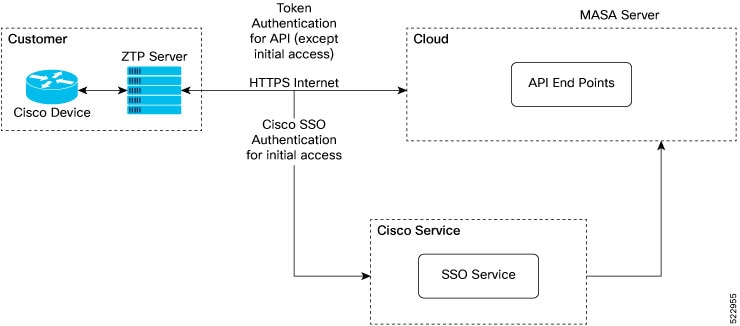
The authentication flow involves these components:

  • The Cisco device boots and communicates with the customer's ZTP server.

  • The ZTP server accesses MASA through the Internet using HTTPS.

  • MASA authenticates the user, verifies the request, and generates OVs.

The router validates the received OV and verifies the signature on onboarding information with the OC received during bootstrapping.

Workflow

Figure 1. Components of the authentication flow
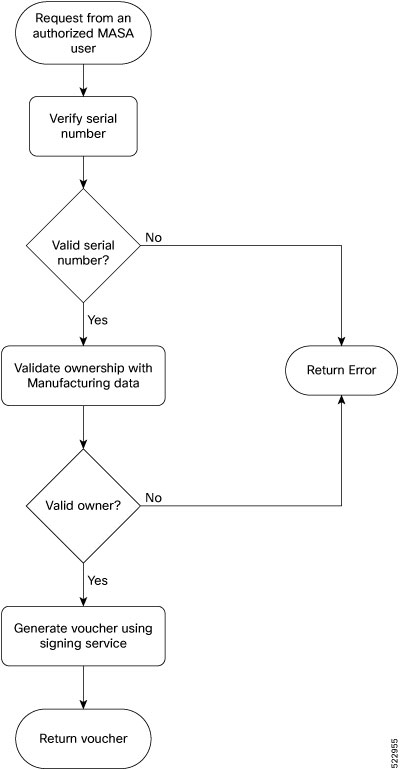
Figure 2. Workflow to obtain ownership vouchers

These stages describe how the service obtains an OV:

  1. The customer or ZTP server authenticates to the MASA service. Initial access uses Cisco SSO; subsequent API access can use a token.

  2. The ZTP server sends a request to the MASA API through the HTTPS Internet connection.

  3. MASA verifies the authenticated user and the router serial number.

  4. MASA generates the OV and returns it to the customer or ZTP server.

  5. The ZTP server provides the OV to the device, which validates the OV and the onboarding information before provisioning.

Result

The router receives an ownership voucher that supports authentication of the router and its trusted network.


Ownership voucher use cases

Use this reference to identify when MASA ownership vouchers are required.

These use cases show how ownership vouchers apply:

Secure Zero Touch Provisioning bootstrapping

Secure ZTP bootstraps a router over an untrusted network. MASA provides an OV that authenticates the router and ensures connectivity between the router and network. For more information, see the Secure Zero Touch Provisioning chapter in the System Setup and Software Installation Guide for Cisco 8000 Series Routers.

Note

MASA can help generate OVs for Cisco routers only.

Application Hosting on XR

Cisco IOS XR Application Hosting provides an IOS XR container for applications that augment XR features.

  • Customer Apps are developed by Cisco customers and cannot be signed by Cisco.

  • Partner Apps are developed by partners and are signed by Cisco.

  • Cisco Apps are developed by Cisco and are signed by Cisco.

MASA can work with the Golden ISO Tool (gisobuild.py) to provide OVs for secure workflows that onboard third-party RPMs on routers running Cisco IOS XR. For more information, see the Application Hosting Guide for Cisco 8000 Series Routers.

Extended device ownership

An extended OV moves the state of the Cisco Trusted Platform Module (TPM) and platform keys to allow customized control on the router. It transfers Unified Extensible Firmware Interface (UEFI) database ownership from Cisco generic mode to an extended mode owned by Cisco and the customer, allowing third-party images to be installed. For more information, see the Migrate from Cisco IOS XR to SONiC on Cisco 8000 Series Routers.

Deploy router using Bootz

Bootz is a secure zero-touch provisioning solution for data centers. It automates network-device setup, authenticates devices with the Bootz server, and protects remote configuration from unauthorized access. Bootz uses MASA to issue OVs that authenticate network devices. For more information, see the Deploying Router Using Bootz Protocol chapter in the System Setup and Software Installation Guide for Cisco 8000 Series Routers.


MASA entities and permissions

Use this reference to identify the MASA role and access requirements for each voucher operation.

These entities interact with the MASA server:

  • Organization: A group in MASA specific to a Cisco customer. Data and access are available only to members of that group.

  • Admin: One or more initially designated organization members who can invite members, set access restrictions, and adjust organization settings.

  • User: A non-admin organization member who can interact with MASA after an Admin invites the user. New users have view-only access by default.

Before interacting with MASA, you must be an authorized user with a Cisco account and an active invitation. Initial authentication uses Cisco SSO at masa.cisco.com. For later sessions, generate access keys called tokens. Tokens can be passed in API headers, can have a custom validity period of up to six months, and can be revoked at any time. Token scope is limited to the user's role.

This example shows a token in the header of a REST API call:

Authorization: Bearer 637c98ddcc58c75f679a94d7f244777be05c6600923c4549bc5669b26e04f2bcgAAAAABjfRr9hqndFqbuqes9OvcfgucApgxpmm9qoVmUidYEs-_Aziu7yue-10dazZ3Rxk6vJHYD2Je7Z-IOD1Zc7kYSuBTX06GcQvF2e3nSM-_F9BoltjxAHcXkoMgbqS4APFGi16LiWRyP2b1_0rZO-EaTKFLEldTLfMAmovPDkZZ5vbBwRS058PZN1vB3IZIZjftYYYi9H_grazfwnAImjKbQC6tjQw==

The ZTP server must be able to access the Internet. The MASA application is served through HTTPS.

Table 2. User permissions

Type

Regular User

Admin

Invite other People into the organization

Not allowed

Allowed by default

Add or remove permissions for other users

Not allowed

Allowed by default

View all existing vouchers

Allowed by default

Allowed by default

Request new vouchers

Permission can be provided by Admin

Allowed by default

Download vouchers

Permission can be provided by Admin

Allowed by default

Archive vouchers

Permission can be provided by Admin

Allowed by default


MASA web application interactions

MASA web application interactions are web-based voucher-management activities that

  • authenticate authorized users through Cisco SSO

  • request ownership vouchers by using a PDC and router serial numbers, and

  • manage generated ownership vouchers according to assigned user permissions.

Table 3. Feature History Table

Feature Name

Release Information

Feature Description

Pre-upload Pinned-Domain Certificate

Release 25.4.1

Introduced in this release on: Fixed Systems (8010 [ASIC: A100])(select variants only*)

*This feature is supported on:

  • 8011-32Y8L2H2FH

  • 8011-12G12X4Y-A/D

Pre-upload Pinned-Domain Certificate

Release 25.1.1

Introduced in this release on: Fixed Systems (8700 [ASIC: K100], 8010 [ASIC: A100])(select variants only*)

*This feature is supported on:

  • 8712-MOD-M

  • 8011-4G24Y4H-I

Pre-upload Pinned-Domain Certificate

Release 24.4.1

Introduced in this release on: Fixed Systems (8200 [ASIC: P100], 8700 [ASIC: P100])(select variants only*); Modular Systems (8800 [LC ASIC: P100])(select variants only*)

*This feature is supported on:

  • 8212-48FH-M

  • 8711-32FH-M

  • 88-LC1-36EH

  • 88-LC1-12TH24FH-E

  • 88-LC1-52Y8H-EM

Pre-upload Pinned-Domain Certificate

Release 24.1.1

You can now pre-upload your Pinned-Domain Certificate (PDC) credentials before requesting OVs Ownership Vouchers (OVs) from the MASA server, thus making the voucher request process easier.


Request ownership vouchers through the MASA web application

Request and manage ownership vouchers for Cisco routers through the MASA web application.

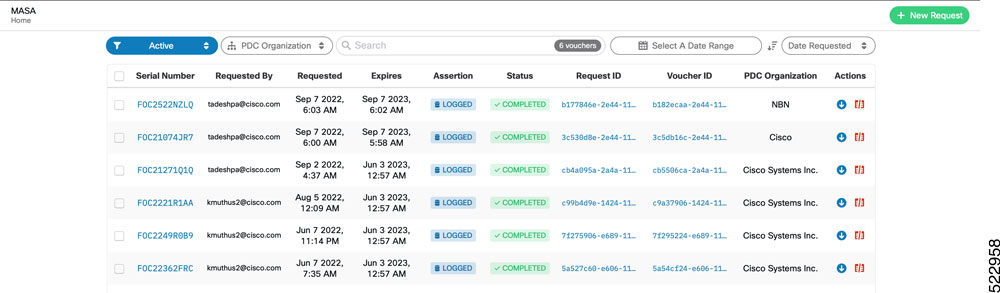
The MASA Home page displays recent-request status and links to recently generated ownership vouchers. Your assigned permissions determine which voucher actions are available.

Before you begin

  • Have an authorized MASA user account, Cisco account, and invitation.

  • Have the router serial number and a pinned-domain certificate (PDC).

Procedure

  1. Sign in to the MASA web application.

    Example:

    Figure 3. Sign in page—MASA web application
    1. Go to masa.cisco.com.

    2. Click Sign in using Cisco SSO.

    3. Enter your username and password.

    4. Accept the End User License Agreement.

    The MASA Home page displays recent requests and download links.

  2. Open the new request form.

    Example:

    Click New Request on the top right of the Home page.

    Figure 4. Home page—MASA web application
  3. Enter the PDC and router serial numbers.

    Example:

    Paste the PDC content or browse to the .pem file. You can pre-upload the certificate before requesting the OV and select it by enabling use pre-uploaded certificate. Enter the serial number of one or more routers. Always use the serial number of the RP.

    Figure 5. New Request page

    The request contains the certificate and router identifiers that MASA uses to generate OVs.

  4. Manage the generated ownership vouchers from the Home page.

    Example:

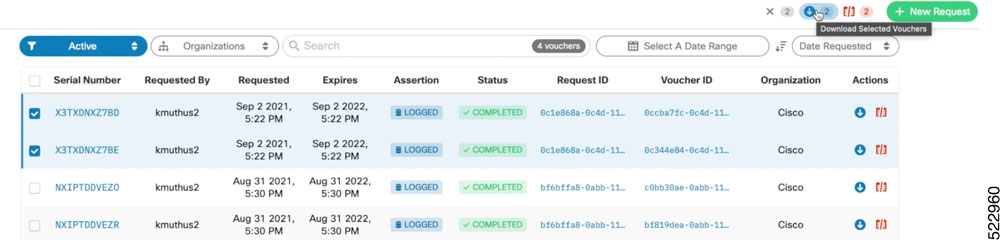
    Depending on your permissions, download or regenerate OVs, view details of past requests, filter, sort, group, and archive requests.

    Figure 6. Home page with new OVs displayed

The MASA web application generates and displays the requested ownership vouchers.


MASA REST APIs

Use these API references to interact programmatically with the MASA service.

The OpenAPI documentation contains the paths, formats, and structures of the MASA APIs.

Figure 7. MASA API documentation
Table 4. Ownership-voucher REST endpoints

Method and path

Purpose

POST /request/ov

Requests an ownership voucher.

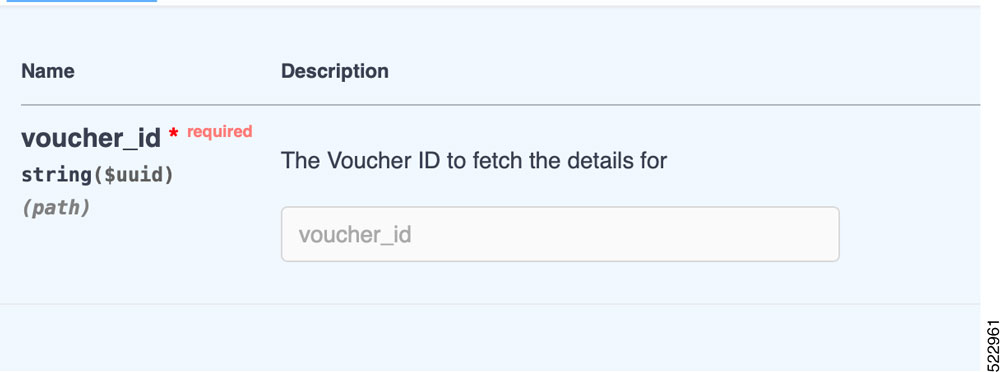
GET /voucher/{voucher_id}

Fetches details about an already generated voucher.

This response shows the information returned for a generated voucher:

{
  "ok": true,
  "voucher": {
    "req_id": "3fa85f64-5717-4562-b3fc-2c963f66afa6",
    "voucher_id": "3fa85f64-5717-4562-b3fc-2c963f66afa6",
    "requested_at": "2022-08-31T09:43:39.719Z",
    "created_at": "2022-08-31T09:43:39.719Z",
    "expires_at": "2022-08-31T09:43:39.719Z",
    "last_renewal_at": "2022-08-31T09:43:39.719Z",
    "assertion": "logged",
    "status": "completed",
    "serial_number": "T8I52J1IKOM",
    "pdc_organization": "Cisco Systems",
    "requested_by": "user1@cisco.com"
  }
}

“serial_number” is the serial number of the RP. You can provide up to 20 serial numbers in a single request.


MASA gRPC integration

MASA gRPC integration is an API integration that

  • provides gRPC access to MASA APIs in addition to HTTP

  • uses Protocol Buffers for efficient, type-safe, and consistent communication between services, and

  • supports group, user-role, domain-certificate, and ownership-voucher operations.

Table 5. Feature History Table

Feature Name

Release Information

Feature Description

Interaction with MASA through gRPC

Release 25.4.1

Introduced in this release on: Fixed Systems (8010 [ASIC: A100])(select variants only*)

*This feature is supported on:

  • 8011-32Y8L2H2FH

  • 8011-12G12X4Y-A/D

Interaction with MASA through gRPC

Release 25.1.1

Introduced in this release on: Fixed Systems (8700 [ASIC: K100], 8010 [ASIC: A100])(select variants only*)

*This feature is supported on:

  • 8712-MOD-M

  • 8011-4G24Y4H-I

Interaction with MASA through gRPC

Release 24.4.1

Introduced in this release on: Fixed Systems (8200 [ASIC: P100], 8700 [ASIC: P100])(select variants only*); Modular Systems (8800 [LC ASIC: P100])(select variants only*)

*This feature is supported on:

  • 8212-48FH-M

  • 8711-32FH-M

  • 88-LC1-36EH

  • 88-LC1-12TH24FH-E

  • 88-LC1-52Y8H-EM

Interaction with MASA through gRPC

Release 24.1.1

From this release, you can use the gRPC protocol to interact with MASA APIs in addition to the current HTTP protocols. Through structured serialization of data with gRPC's Protocol Buffers, the communication between services is made more efficient, type-safe, and consistent.


MASA gRPC APIs

Use this reference to select a MASA gRPC API for a supported operation.

gRPC is available in addition to HTTP. Structured serialization with gRPC Protocol Buffers makes communication between services more efficient, type-safe, and consistent.

Table 6. MASA gRPC APIs

RPC

Description

rpc GetGroup

Returns the domain-certificates (keyed by id), serials, and user/role mappings for that group.

rpc AddUserRole

Assigns a role to a user in a named group. Username is unique to an Org ID.

rpc RemoveUserRole

Removes a role from a user in a named group. Username is unique to an Org ID.

rpc GetUserRole

Returns the roles that the user is assigned in the group. Username is unique to an Org ID. A user can only view roles of another user in the group that it has a role assigned to.

rpc CreateDomainCert

Creates the certificate in the group.

rpc GetDomainCert

Reveals the details of the certificate.

rpc DeleteDomainCert

Deletes the certificate from the database.

rpc GetOwnershipVoucher

Issues an ownership voucher.

For more information on gRPC, see Use gRPC Protocol to Define Network Operations with Data Models in the Programmability Configuration Guide for Cisco 8000 Series Routers.