System Security Configuration Guide for Cisco 8000 Series Routers, IOS XR Releases

PDF

System Security Configuration Guide for Cisco 8000 Series Routers, IOS XR Releases

Security template framework for TLS applications

Want to summarize with AI?

Log in

Describes reusable security templates that centralize certificate authentication, Transport Layer Security (TLS) controls, and compliance settings for multiple Cisco IOS XR applications.


A security template is a named configuration bundle for TLS-enabled applications that

  • centralizes and standardizes security policy configuration,

  • encapsulates certificate authentication policies, TLS protocol controls, and compliance mode settings, and

  • provides a reusable source of truth that multiple applications can reference instead of embedding security settings locally.

The framework supports TLS version and cipher-suite control, elliptic-curve and digital-signature selection, certificate onboarding through SCEP, file-based methods, and Certz profiles, and dynamic change notifications for registered applications.

Table 1. Feature History Table

Feature Name

Release Information

Feature Description

Security template framework for TLS enabled applications

Release 25.4.1

Introduced in this release on: Fixed Systems (8200 [ASIC: Q100, Q200, P100], 8700 [ASIC: P100, K100], 8010 [ASIC: A100]); Centralized Systems (8600 [ASIC: Q200]); Modular Systems (8800 [LC ASIC: Q100, Q200, P100])

Security templates reduce misconfiguration risks and operational overhead by centralizing and standardizing security policy configuration for TLS-enabled applications. A security template bundles certificate authentication policy, TLS controls, and compliance mode settings. It acts as a single source of truth that applications reference, avoiding local embedding of security settings. This template defines how certificates are handled and controls various aspects of the TLS handshake.

The feature introduces these changes:

CLI:

Key terminologies

Term

Description

Certificate authentication policy

Rules that specify how certificates authenticate servers or clients, including trust-anchor selection and certificate validation settings.

Common Criteria (CC) mode

An enhanced security mode that enforces stricter compliance-focused behavior.

Certz profile

A profile that provides identity certificates, private keys, and certification authority bundles from a centralized certificate management service.

Benefits and use cases

The security template framework provides these benefits:

  • Centralized security management for templates used by multiple applications

  • Flexibility for Common Criteria mode, certificate authentication policies, and future security policies

  • Simplified configuration by reducing application-specific settings

  • Consistency and compliance through uniform policy application

  • Extensibility for additional fields and configurations

  • Operational efficiency through automated notifications and faster updates

Use cases include these activities:

  • Managing TLS settings for syslog

  • Supporting web-scale environments with many root certification authorities and custom certificate validation needs

  • Enforcing advanced cryptographic policies for each application, such as application-specific elliptic curves and signature algorithms
Restriction for security template

Use security templates only with syslog messages sent over TLS.


Configuration guidelines for security template framework

Manage TLS policies centrally

Apply these guidelines when you create, assign, and maintain security templates for TLS-enabled applications:

  • Centralize security policy configuration for TLS-enabled applications using reusable security templates. This standardizes certificate authentication, TLS controls, and compliance settings across services, reducing operational overhead and misconfiguration risk.

  • Use a unique name for each security template and make it the application’s single source of truth instead of embedding security settings locally.

  • Enable Common Criteria (CC) mode when enhanced compliance is required.

  • Configure certificate authentication policies for identity certificates and peer trust anchors. Prefer a Certz profile when available because it takes precedence over individual trustpoints.

  • When both standalone trustpoint and security template are configured under a syslog server, use the trustpoint specified in the security template because it overrides the standalone trustpoint.

  • Register applications to receive and handle security-template update notifications so that changes apply dynamically and consistently.


How the security template framework works

As organizations deploy more TLS-enabled applications, centralized management helps control certificate authorities, protocol versions, cipher suites, and compliance requirements.

Summary

The framework coordinates these components:

  • Security template infrastructure: Stores and manages templates and their application to Cisco IOS XR services.

  • Applications such as syslog: Reference and enforce the settings in named security templates.

  • Trustpoints and Certz profiles: Provide certificate and key material for authentication and trust validation.

  • Notification and change management: Updates registered applications when templates or certificate material changes.

Workflow

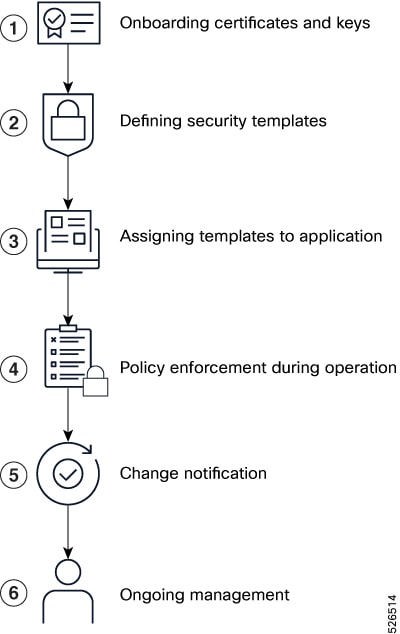
Figure 1. Security template process
Vertical six-stage security template workflow showing certificate and key onboarding, template definition, application assignment, policy enforcement, change notification, and ongoing management.

These stages describe how applications use the security template framework:

  1. Administrators onboard certificates and keys by configuring trustpoints with methods such as SCEP or file import. They can also configure Certz profiles for certificate lifecycle management.

  2. An administrator defines a named security template through the command-line interface, specifying TLS versions, cipher suites, certificate authentication policies, trust anchors, identity sources, and compliance modes.

  3. An administrator assigns the template to applications so that the applications reference the template instead of embedding their own security settings.

  4. Each application registers with the security template infrastructure, provides a callback for configuration-change notifications, and initializes its Secure Sockets Layer (SSL) or TLS context through library APIs.

  5. During operation, applications use the template parameters for certificate validation, TLS negotiation, and compliance enforcement.

  6. When a template or associated certificate material changes, the infrastructure notifies registered applications. Applications can reinitialize sessions or contexts to apply the new configuration.

  7. Administrators update templates, rotate certificates, and audit compliance centrally while changes propagate to consuming applications.

Result

The framework provides centralized, consistent, and scalable security-policy management across Cisco IOS XR applications, reducing operational overhead and misconfiguration risk while supporting secure, compliant communications.


Configure a security template

Centralize and standardize security policies, certificate authentication, and TLS controls for applications running on Cisco routers.

Understand the security-template mode, certificate authentication policy, TLS settings, and mutual authentication before you configure the template.

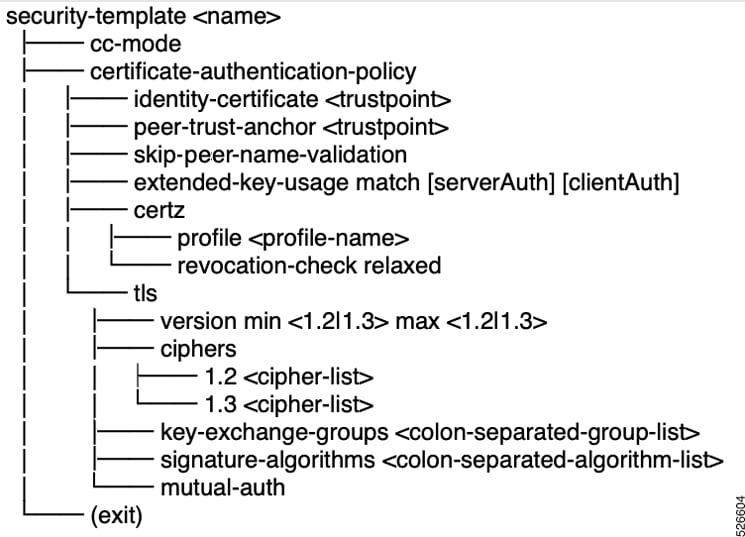
Figure 2. Security-template CLI structure
CLI hierarchy showing security-template mode, Common Criteria mode, certificate authentication policy, Certz profile, TLS settings, cipher suites, key-exchange groups, signature algorithms, mutual authentication, and exit.
  • Security template mode: Defines a template with a unique name.

  • Common Criteria (CC) mode: Enables stricter, compliance-focused behavior.

  • Identity certificate: Specifies the trustpoint for the leaf certificate and its chain.

  • Peer trust anchor: Specifies the trustpoint that validates incoming server or client certificates. It takes precedence over a peer identity when both are configured.

  • Skip peer name validation: Disables hostname verification against a certificate’s DNS Subject Alternative Name (SAN) or subject Common Name (CN). Use it only in a lab or controlled environment.

  • Extended key usage match: Validates the serverAuth and clientAuth certificate extensions.

  • Certz profile: Sources the identity certificate, private key, and certification authority bundle from a gNSI Certz profile. A configured Certz profile takes precedence over trustpoints.

  • Certz revocation method relaxed: Prevents authentication failure when the certificate revocation list bundle does not contain a revocation list for a certificate in the verified chain.

  • TLS settings: Control the minimum and maximum TLS versions, allowed cipher suites, key-exchange groups, signature algorithms, and mutual TLS authentication.

Before you begin

Before you begin, configure the trustpoints or Certz profiles required for certificate management and confirm that the application supports security-template integration.

Procedure

  1. Enter security-template mode by defining a unique template name.

    Example:

    Router(config)# security-template template1
  2. Enable Common Criteria mode when enhanced compliance is required.

    Example:

    Router(config-security-template)# cc-mode
  3. Enter certificate-authentication-policy mode and configure certificate settings.

    Example:

    Router(config-security-template)# certificate-authentication-policy
    Router(config-certificate-authentication-polic)# peer-trust-anchor trustpoint1
    Router(config-certificate-authentication-polic)# identity-certificate CA2
    Router(config-certificate-authentication-polic)# extended-key-usage match serverAuth
    Router(config-certificate-authentication-polic)# skip-peer-name-validation
    Router(config-certificate-authentication-polic)# certz-profile certz1
    Router(config-certificate-authentication-polic)# commit

    Configure the identity certificate, peer trust anchor, and optional peer-name validation, extended-key-usage, and Certz settings as required.

  4. Enter TLS configuration mode and set protocol and cryptographic parameters.

    Example:

    Router(config-certificate-authentication-polic)# tls
    Router(config-tls)# ciphers 1.2 AES256-GCM-SHA384:ECDHE-RSA-AES128-GCM-SHA25 1.3 TLS_AES_256_GCM_SHA384:TLS_AES_128_GCM_SHA256
    Router(config-tls)# version min 1.2 max 1.3
    Router(config-tls)# key-exchange-groups P-256:P-384:X25519
    Router(config-tls)# signature-algorithms rsa_pss_rsae_sha256:rsa_pss_rsae_sha384:rsa_pss_rsae_sha512:rsa_pkcs1_sha256:rsa_pkcs1_sha384:rsa_pkcs1_sha512
    Router(config-tls)# commit

    Set the minimum and maximum TLS versions, allowed cipher suites, key-exchange groups, signature algorithms, and optional mutual authentication.

  5. Apply the security template to a supported application.

    Example:

    Router(config)# logging tls-server TEST
    Router(config-logging-tls-peer)# severity debugging
    Router(config-logging-tls-peer)# trustpoint tp
    Router(config-logging-tls-peer)# address ipv4 10.105.230.83
    Router(config-logging-tls-peer)# security-template template1

    When a standalone trustpoint and a security template are both configured under a syslog server, the trustpoint in the security template overrides the standalone trustpoint.

  6. Register the application with the security template infrastructure.

    Register the application to receive change notifications and apply updates dynamically. The security template then enforces unified security policies and TLS parameters across referenced applications.

The application uses the configured security template for consistent certificate, TLS, and compliance behavior.

What to do next

After configuration, monitor application logs and debug output. Update the security template when you rotate certificates or change policies so registered applications can adapt dynamically.