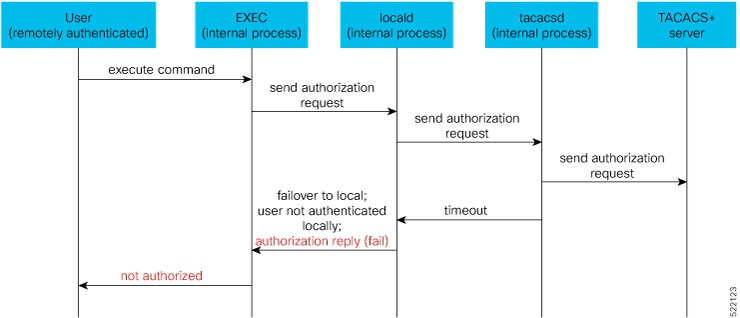
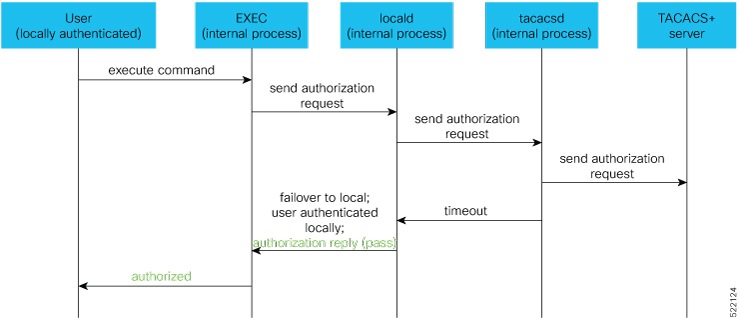
Explains local command authorization, illustrating its operation, configuration for user accounts, and integration with TACACS+ including behaviors for local fallback scenarios.
A local command authorization feature with user accounts is a local authorization mechanism that
-
permits command execution for locally authenticated users when TACACS+ authorization is unavailable or not required
-
prevents local users from being locked out when a TACACS+ server is unreachable, and
-
ensures that remote users cannot bypass TACACS+ authorization by using the local fallback method; the local option can be used as a fallback after TACACS+ or as the only command authorization method.
Feature history
|
Feature Name |
Release Information |
Feature Description |
|---|---|---|
|
Command Authorization Using Local User Account |
Release 25.4.1 |
Introduced in this release on: Fixed Systems (8010 [ASIC: A100])(select variants only*) *This feature is supported on:
|
|
Command Authorization Using Local User Account |
Release 25.1.1 |
Introduced in this release on: Fixed Systems (8700 [ASIC: K100], 8010 [ASIC: A100])(select variants only*) *This feature is supported on:
|
|
Command Authorization Using Local User Account |
Release 24.4.1 |
Introduced in this release on: Fixed Systems (8200 [ASIC: P100], 8700 [ASIC: P100])(select variants only*); Modular Systems (8800 [LC ASIC: P100])(select variants only*) *This feature is supported on:
|
|
Command Authorization Using Local User Account |
Release 7.5.1 |
This feature allows locally authenticated users—authenticated by the AAA server internal to the router—to run all XR VM commands even if a remote TACACS+ AAA server is not reachable for authorization. It prevents a complete router lockdown. The feature also prevents remotely authenticated users—authenticated using a remote AAA server (say, TACACS+ server)—from running any non-permitted commands on the router, and thus prevents misuse of user privileges. This feature modifies the aaa authorization commands default command to include the local option for XR VM command authorization. |
Local command authorization behavior
Currently, when a user tries to execute a command on XR VM, the router checks to see whether the user has required permissions to execute it. The router does this authorization process in two steps. First, the system compares the task-IDs of the user with the required task-IDs for the command. If the user has all required task-IDs, and if AAA authorization is configured, then the system sends an authorization request to the local or remote AAA server, based on that configuration. Based on the response from the AAA server, the system allows or rejects the command execution. If authorization is not configured or if it configured with option none, then the system bypasses authorization check and allows user to execute the command.
Similarly, the existing remote authorization process using TACACS+ server has two options - remote authorization using tacacs+ and none. The authorization process using TACACS+ option uses an external TACACS+ server for authorization. The authorization using none option allows the user to execute the command without any authorization check. TACACS+ authorization has the advantage of fine-tuning authorization rules and providing more control on system access that cannot be otherwise done locally. However, if the remote server is not reachable, a user who leverages TACACS+ authorization might get into an unpredictable state of router, as mentioned in these scenarios:
-
Remote authorization using TACACS+ with failover option as none (that is, with the aaa authorization commands default group tacacs+ none configuration)
If TACACS+ server is not reachable, then the system bypasses the authorization check and allows user to execute the command. A user who does not have permission to execute certain commands due to additional authorization rules on the TACACS+ server, then gets permission to execute those commands in this scenario. This action introduces a privilege escalation.
-
Remote authorization using TACACS+ without any failover option (that is, with the aaa authorization commands default group tacacs+ configuration)
If TACACS+ server is not reachable, then the system does not authorize the command at all. Because the user then cannot execute any command, the router gets locked out.
With the introduction of command authorization using local user account feature in Cisco IOS XR Software Release 7.5.1, locally authenticated users can execute commands even if a TACACS+ server is not reachable. This behavior is similar to the behavior with the failover option none, with the only difference that only locally authenticated users can execute commands in this case. This functionality thereby prevents a complete lockdown of the router as mentioned in one of the previously existing scenarios mentioned earlier. At the same time, the feature also prevents users who are authenticated remotely (that is, TACACS+ authenticated users) from executing any non-permitted command on the router. This behavior in turn helps to prevent any sort of misuse of user privileges on the router.