System Security Configuration Guide for Cisco 8000 Series Routers, IOS XR Releases

PDF

System Security Configuration Guide for Cisco 8000 Series Routers, IOS XR Releases

RADIUS with DTLS protection

Want to summarize with AI?

Log in

Explains how Cisco IOS XR uses Datagram Transport Layer Security as the RADIUS transport protocol to protect UDP-based RADIUS communication with encryption and peer authentication.


A RADIUS DTLS protection feature is a secure transport feature that

  • uses Datagram Transport Layer Security to protect RADIUS packets exchanged between the Cisco IOS XR RADIUS client and the RADIUS server

  • allows RADIUS to continue operating over UDP while adding encryption and peer authentication, and

  • is configured per RADIUS server host by using the DTLS server option and a trustpoint.

Feature history

Table 1. Feature History Table

Feature Name

Release Information

Feature Description

RADIUS with DTLS Protection

Release 25.4.1

Introduced in this release on: Fixed Systems (8010 [ASIC: A100])(select variants only*)

*This feature is supported on:

  • 8011-32Y8L2H2FH

  • 8011-12G12X4Y-A/D

RADIUS with DTLS Protection

Release 25.1.1

Introduced in this release on: Fixed Systems (8700 [ASIC: K100], 8010 [ASIC: A100])(select variants only*)

*This feature is supported on:

  • 8712-MOD-M

  • 8011-4G24Y4H-I

RADIUS with DTLS Protection

Release 24.4.1

Introduced in this release on: Fixed Systems (8200 [ASIC: P100], 8700 [ASIC: P100])(select variants only*); Modular Systems (8800 [LC ASIC: P100])(select variants only*)

*This feature is supported on:

  • 8212-48FH-M

  • 8711-32FH-M

  • 88-LC1-36EH

  • 88-LC1-12TH24FH-E

  • 88-LC1-52Y8H-EM

RADIUS with DTLS Protection

Release 24.2.11

You can now secure communication for RADIUS packets by using Datagram Transport Layer Security (DTLS) as the transport layer for the RADIUS protocol. The RADIUS protocol continues to operate over UDP but now benefits from the added security provided by DTLS. Utilizing DTLS enables the manual distribution of long-term proof of peer identity through TLS-PSK cipher suites and the option to use X509 certificates in a PKI infrastructure.

In the absence of DTLS, RADIUS packets may be subject to potential security vulnerabilities, including data exposure, replay attacks, weak authentication, and encryption vulnerabilities, especially when transmitted across untrusted networks.

The feature introduces these changes:

CLI:

YANG Data Models:

  • New Xpath for Cisco-IOS-XR-um-aaa-cfg.yang

  • New Xpath for Cisco-IOS-XR-aaa-lib-cfg.yang

(see GitHub, YANG Data Models Navigator)

RADIUS DTLS behavior

Traditionally, RADIUS has been used for Authentication, Authorization, and Accounting (AAA). To meet modern security demands, it is important to enhance its encryption and authentication. By addressing these areas, RADIUS's resilience against threats and overall network security are improved.

Datagram Transport Layer Security (DTLS) is now utilized as the transport protocol for RADIUS to enhance security. This modification allows RADIUS to function over UDP while benefiting from DTLS's encryption and peer authentication features.
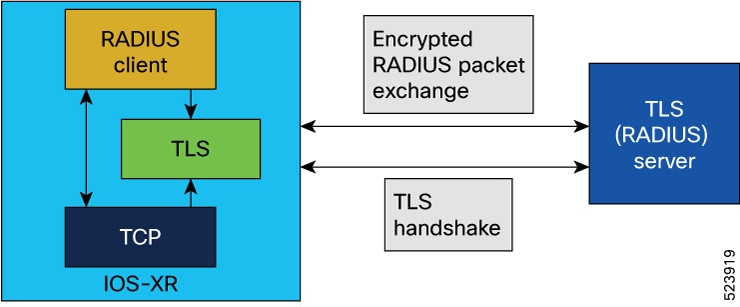

Security and deployment benefits of RADIUS DTLS protection

The security and deployment benefits of RADIUS DTLS protection include:

  • TLS-PSK cipher suites: Enable the secure distribution of long-term proof of peer identity by manually sharing a pre-shared key (PSK) between peers. This establishes a secure TLS connection without relying on traditional Public Key Infrastructure (PKI), making it ideal for environments where certificates are impractical.

  • X.509 certificate support: Provides robust identity verification using PKI and X.509 certificates. This approach standardizes certificate management, increases security, and facilitates trust across diverse, distributed environments.

  • Replay protection: Prevents retransmission attacks by ensuring each packet is uniquely authenticated and cannot be reused maliciously.

  • Transport reliability: Enhances data encryption and ensures reliable delivery of RADIUS messages, reducing the risk of dropped or corrupted packets during transport.

How to use this reference

Use this information to compare the advantages of TLS-PSK cipher suites, X.509 certificates, replay protection, and failover behavior for RADIUS over DTLS. Apply these benefits when selecting a RADIUS transport mode in environments requiring strong peer identity and secure, encrypted packet exchange.


How RADIUS with DTLS protection works

RADIUS over DTLS enhances the security of traditional RADIUS communications, especially when traffic traverses untrusted networks or roaming environments. By using DTLS (Datagram Transport Layer Security), session confidentiality, message integrity, and improved session control are achieved over standard UDP transport.

Summary

The key components involved in the process are:

  • RADIUS client: Initiates RADIUS communications, establishes DTLS sessions, handles RADIUS packet creation, and manages session monitoring.

  • RADIUS server: Accepts DTLS session requests, processes authentication and accounting packets, and maintains session security.

  • DTLS layer: Provides encryption, decryption, and integrity for RADIUS packets, and manages session health via heartbeats and watchdogs.

RADIUS with DTLS protection secures RADIUS communications by establishing a DTLS session for encrypted transport, maintaining session context, and optimizing packet handling and session monitoring.

Workflow

These stages describe how RADIUS with DTLS protection works.

  1. Establish DTLS session: The RADIUS client initiates a secure DTLS session with the RADIUS server, using a UDP socket that it creates for communication.

  2. Store DTLS context: Once the DTLS connection is successful, the DTLS context is preserved within the connection and then stored in the RADIUS context for the specified server, ensuring a secure channel for subsequent traffic.

  3. RADIUS packet handling: The RADIUS client constructs standard RADIUS packets. Instead of sending these via UDP, it hands them to the DTLS layer, which encapsulates them for secure transport. The standard packet format remains unchanged.

  4. Secure data transmission: RADIUS packets are transmitted over DTLS, ensuring data confidentiality and integrity through encryption and decryption.

  5. Optimized RADIUS session control: The RADIUS client performs Path MTU discovery before sending traffic; it uses different sockets for RADIUS/UDP and RADIUS/DTLS traffic. DTLS heartbeats and application-layer watchdogs track session health. The client proactively closes idle or unresponsive sessions and terminates sessions if packet validation fails or invalid authenticators are detected.

Result

RADIUS with DTLS protection enables secure, reliable authentication and accounting by retaining the standard RADIUS packet format while using DTLS for confidentiality, integrity, and advanced session monitoring.


Requirement: Use supported RADIUS DTLS behavior

Follow these requirements when deploying RADIUS over DTLS on Cisco IOS XR routers:

  • RADIUS/DTLS is supported only for IPv4.

  • The default destination port for RADIUS/DTLS is UDP/2083. There are no separate ports for authentication, accounting, or dynamic authorization changes. The source port can be arbitrary.

  • Use DTLS as a transport protocol only when you configure it administratively. If the server is unresponsive and DTLS is enabled, the client does not fall back to RADIUS/UDP.

  • Create separate AAA server groups for DTLS-capable and non-DTLS servers, as server group failover will only process packets on DTLS-capable servers within a group. If a server group mixes DTLS and non-DTLS servers, processing stops when a non-DTLS server is encountered, and the client starts over with another group.

  • Do not use RADIUS over DTLS for BNG use cases.

  • Ensure that RADIUS over DTLS uses only the following ciphers:

    • ECDHE-ECDSA-AES256-GCM-SHA384

    • ECDHE-ECDSA-AES128-GCM-SHA256

    • ECDHE-ECDSA-AES256-SHA384

    • ECDHE-ECDSA-AES128-SHA256

    • ECDHE-RSA-AES256-GCM-SHA384

    • ECDHE-RSA-AES128-GCM-SHA256

    • ECDHE-RSA-AES256-SHA384

    • ECDHE-RSA-AES128-SHA256

    • AES256-SHA256 and AES128-SHA256


Configure RADIUS with DTLS protection

Protect RADIUS packets over DTLS by configuring the RADIUS server host to use DTLS and a specified trustpoint.

Use this task when your RADIUS server supports DTLS and the router must send RADIUS packets through the DTLS transport to enhance security.

Before you begin

Ensure the trustpoint is configured before enabling DTLS for the RADIUS server host.

Procedure

  1. Configure the RADIUS server host with DTLS protection.

    Example:

    Router# configure
    Router(config)#radius-server host 209.165.201.1 auth-port 2083 acct-port 2083
    Router(config-radius-host)#dtls-server trustpoint test
    Router(config-radius-host)#commit
  2. Review the RADIUS DTLS running configuration.

    Example:

    Router# show running-config
    radius-server host 209.165.201.1 auth-port 2083 acct-port 2083
     dtls-server trustpoint test
    !
  3. Verify that DTLS is enabled for the RADIUS server.

    Example:

    Router#show radius
    Tue May 28 09:00:45.207 UTC
    Global dead time: 0 minute(s)
    Number of Servers: 1
    
    Server: 209.165.201.1/2083/2083  is UP
      Address family: IPv4
      Total Deadtime: 0s Last Deadtime: 0s
      Timeout: 5 sec, Retransmit limit: 3
      Quarantined: No
      Authentication:
        0 requests, 0 pending, 0 retransmits
        0 accepts, 0 rejects, 0 challenges
        0 timeouts, 0 bad responses, 0 bad authenticators
        0 unknown types, 0 dropped, 0 ms latest rtt
        Throttled: 0 transactions, 0 timeout, 0 failures
        Estimated Throttled Access Transactions: 0
        Maximum Throttled Access Transactions: 0
    
        Automated TEST Stats:
            0 requests, 0 timeouts, 0 response, 0 pending
     dtls:enabled
      Accounting:
        0 requests, 0 pending, 0 retransmits
        0 responses, 0 timeouts, 0 bad responses
        0 bad authenticators, 0 unknown types, 0 dropped
        0 ms latest rtt
        Throttled: 0 transactions, 0 timeout, 0 failures
        Estimated Throttled Accounting Transactions: 0
        Maximum Throttled Accounting Transactions: 0
    
        Automated TEST Stats:
            0 requests, 0 timeouts, 0 response, 0 pending

    Verify that DTLS is enabled using the show radius command.

The RADIUS server host is configured with DTLS protection. The show radius output indicates that DTLS is enabled, ensuring secure communication for RADIUS packets.