System Security Configuration Guide for Cisco 8000 Series Routers, IOS XR Releases

PDF

System Security Configuration Guide for Cisco 8000 Series Routers, IOS XR Releases

System logging over Transport Layer Security (TLS)

Want to summarize with AI?

Log in

Describes how Cisco 8000 Series Routers use Transport Layer Security (TLS) to send system log messages to a remote syslog server over a trusted channel.


Secure logging over Transport Layer Security (TLS) is a method that

  • sends system log messages from the router to a remote syslog server through an encrypted and authenticated channel

  • preserves logs outside the router because the router’s local logging buffer is limited and does not retain logs across reboots, and

  • replaces unsecured User Datagram Protocol (UDP) transport with a channel that authenticates the server and client, encrypts transferred syslog data, and verifies data integrity.

Secure logging components

The router acts as the TLS client, and the remote syslog server acts as the TLS server. TLS runs over Transmission Control Protocol (TCP), so the router completes the TCP handshake before it begins the TLS handshake.

Secure logging uses RFC 5425, Transport Layer Security Transport Mapping for Syslog.
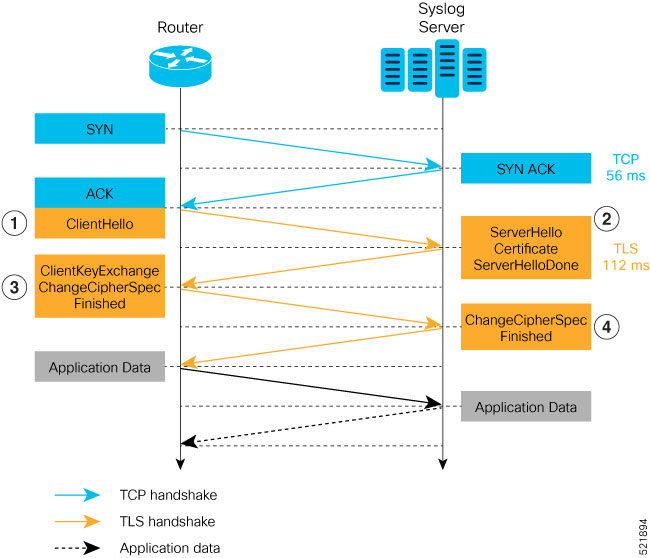

How the TLS handshake establishes secure logging

The router must complete a TCP handshake with the remote syslog server before it can establish the TLS session.

Summary

The secure-logging handshake involves these participants and messages:

  • Router: Acts as the TLS client and starts the handshake.

  • Syslog server: Acts as the TLS server and provides its certificate.

  • Certification authority: Validates the server certificate presented to the router.

Workflow

Figure 1. TLS handshake
Sequence diagram showing a router and syslog server completing a TCP handshake, exchanging TLS handshake messages, and then exchanging application data.

These stages describe how the TLS session is established after the TCP handshake completes:

  1. The router sends a Client Hello message to begin the TLS handshake.

  2. The server sends its TLS certificate, which contains its public key, to support secure-connection establishment.

  3. The router validates the server certificate with the certification authority and checks the certificate validity. It then sends a Change Cipher Spec message to indicate that subsequent messages use the negotiated key and algorithm.

  4. The server decrypts the message with its private key and sends an encrypted Change Cipher Spec message with the session key.

  5. Both endpoints complete the TLS handshake and can exchange encrypted application data.

Result

The router and syslog server establish a trusted TLS session for secure syslog transport.


Restrictions for syslogs over TLS

When you configure the remote syslog server on the router, specify only one identifier for a remote syslog server: its hostname or its IPv4 or IPv6 address. A single server identifier gives the TLS configuration one unambiguous endpoint identity.

When you configure a hostname, ensure that the server certificate’s Subject Alternative Name (SAN) matches the hostname. If the SAN matches but the Common Name (CN) does not, TLS session setup fails.


Configure syslogs over TLS

Configure secure transport for syslog messages sent to a remote server.

You can identify the remote server by its IPv4 or IPv6 address or by its hostname. Configure only one identifier. The logging severity determines which syslog messages the router sends.

Before you begin

Before you begin, obtain the trustpoint and certification authority enrollment information required for the TLS channel.

  • Choose the remote server identifier and logging severity.

  • Confirm that the server certificate name matches the configured hostname when you use a hostname.

Procedure

  1. Configure the trustpoint for the TLS channel.

    Example:

    Router# conf t
    Router(config)# crypto ca trustpoint tp
    Router(config-trustp)# subject-name CN=new
    Router(config-trustp)# enrollment terminal
    Router(config-trustp)# rsakeypair k1
    Router(config-trustp)# commit

    You can use enrollment url SCEP-url or enrollment terminal for certification authority enrollment.

  2. Configure the remote syslog server with its IPv4 or IPv6 address.

    Example:

    Router(config)# logging tls-server TEST
    Router(config-logging-tls-peer)# severity debugging
    Router(config-logging-tls-peer)# trustpoint tp
    Router(config-logging-tls-peer)# address ipv4 10.105.230.83
    Router(config-logging-tls-peer)# commit

    Replace the address with the IPv4 or IPv6 address of your remote syslog server.

  3. Configure the remote syslog server with its hostname instead of an address when hostname-based identification is required.

    Example:

    Router(config)# logging tls-server TEST
    Router(config-logging-tls-peer)# severity debugging
    Router(config-logging-tls-peer)# trustpoint tp
    Router(config-logging-tls-peer)# tls-hostname xyz.cisco.com
    Router(config-logging-tls-peer)# commit
  4. Map the remote syslog server hostname to its IP address.

    Example:

    Router(config)# domain ipv4 host xyz.cisco.com 10.105.230.83
    Router(config)# domain name cisco.com
    Router(config)# commit
  5. Verify the TLS connection and certificate information.

    Example:

    Router# show lpts bindings brief
    @ - Indirect binding; Sc - Scope
    Location Clnt Sc L3 L4 VRF-ID Interface Local-Address,Port Remote-Address,Port
    ---------- ---- -- ---- ------ --------- ------------ --------------------------------------
    0/RP0/CPU0 TCP LR IPV4 TCP default any 5.10.18.5,35926 10.105.230.83,6514
    
    Router# show logging
    Syslog logging: enabled (0 messages dropped, 0 flushes, 0 overruns)
    Console logging: level debugging, 185 messages logged
    Monitor logging: level debugging, 94 messages logged
    Trap logging: level informational, 0 messages logged
    Logging to TLS server 10.105.230.83, 66 message lines logged
    Buffer logging: level debugging, 183 messages logged
    Log Buffer (2097152 bytes):
    ...................
    
    Router# show crypto ca certificates
    Trustpoint : tp
    ==================================================
    CA certificate
    Serial Number : B5:68:C8:96:A4:7C:1A:BA
    Subject:
    CN=cacert,OU=SPBU,O=CSCO,L=BGL,ST=KA,C=IN
    Issued By :
    CN=cacert,OU=SPBU,O=CSCO,L=BGL,ST=KA,C=IN
    Validity Start : 05:39:51 UTC Tue Aug 13 2019
    Validity End : 05:39:51 UTC Mon Aug 08 2039
    CRL Distribution Point
    http://10.105.236.78/crl_xxx/crl.der
    SHA1 Fingerprint:
    03BD57E04A2AA4648A84F515A46EF99CCF488387
    • Port 6514 is the default port for syslog over TLS. In the show lpts bindings brief output, confirm that port 6514 is associated with the syslog server address.

    • Use show logging to confirm the TLS server address and sent-message count.

    • Use show crypto ca certificates to inspect certification authority certificate details.

The router sends syslog messages to the remote server through a configured TLS channel.

What to do next

When the TLS channel comes up, confirm these console messages:

RP/0/RP0/CPU0: syslogd[148]: %SECURITY-XR_SSL-6-CERT_VERIFY_INFO : SSL Certificate verification: Peer certificate verified successfully
RP/0/RP0/CPU0: syslogd[148]: %OS-SYSLOG-5-LOG_NOTICE : Secure Logging: Successfully established TLS session , server :10.105.230.83