System Security Configuration Guide for Cisco 8000 Series Routers, IOS XR Releases

PDF

System Security Configuration Guide for Cisco 8000 Series Routers, IOS XR Releases

SSH port forwarding

Want to summarize with AI?

Log in

Explains how SSH tunneling carries application TCP/IP traffic through an encrypted channel between a local client and a remote application server.


SSH port forwarding is a tunneling method that

  • accepts application traffic on a local client port

  • carries that traffic through an encrypted SSH connection, and

  • delivers it to a specified host and port through the SSH server.

Port forwarding protects otherwise insecure TCP/IP connections without modifying the application workflow. It can support legacy applications, VPN implementations, and intranet access across firewalls. The feature is disabled by default.

SSH port-forwarding model

An application on a local host can use an SSH client to connect securely to an application server on a remote host. The SSH server and application server can reside on the same router. In a data-center deployment, the SSH server can reside on one router and the application server can reside on another device.
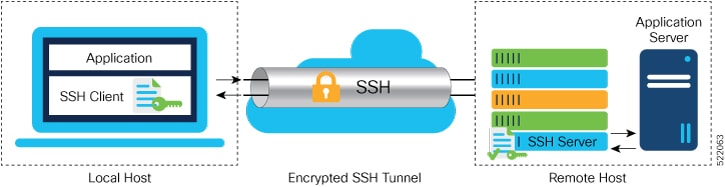
Figure 1. SSH port forwarding
An application on a local SSH client reaches a remote application server through an encrypted SSH tunnel and SSH server.

When port forwarding is enabled, the local application connects to a port on which the SSH client listens. The SSH client forwards the application traffic through an encrypted tunnel to the SSH server. The SSH server then connects to the application server, whether it resides on the same router or elsewhere in the same data center. This flow secures the complete application communication without requiring changes to the application or the user's workflow.

Table 1. Feature History Table

Feature Name

Release Information

Feature Description

SSH Port Forwarding with CiscoSSH

Release 25.4.1

Introduced in this release on: Fixed Systems (8010 [ASIC: A100]) (select variants only*)

*This feature is supported on:

  • 8011-32Y8L2H2FH

  • 8011-12G12X4Y-A/D

SSH Port Forwarding with CiscoSSH

Release 25.1.1

Introduced in this release on: Fixed Systems (8700 [ASIC: K100], 8010 [ASIC: A100]) (select variants only*)

*This feature is supported on:

  • 8712-MOD-M

  • 8011-4G24Y4H-I

SSH Port Forwarding with CiscoSSH

Release 24.4.1

Introduced in this release on: Fixed Systems (8200 [ASIC: P100], 8700 [ASIC: P100]) (select variants only*); Modular Systems (8800 [LC ASIC: P100]) (select variants only*)

*This feature is supported on:

  • 8212-48FH-M

  • 8711-32FH-M

  • 88-LC1-36EH

  • 88-LC1-12TH24FH-E

  • 88-LC1-52Y8H-EM

SSH Port Forwarding with CiscoSSH

Release 7.3.2

This release introduces SSH port forwarding with CiscoSSH, an OpenSSH-based implementation of SSH. CiscoSSH replaces Cisco IOS XR SSH, which is the older SSH implementation that existed prior to this release.

SSH Port Forwarding with Cisco IOS XR SSH

Release 7.3.15

With this feature enabled, the SSH client on a local host forwards the traffic coming on a given port to the specified host and port on a remote server, through an encrypted SSH channel. Legacy applications that do not otherwise support data encryption can leverage this functionality to ensure network security and confidentiality to the traffic that is sent to remote application servers.

This feature introduces the ssh server port-forwarding local command.


How SSH port forwarding works

The sample topology forwards local port 5678 through Router-1 to port 23 on Router-2.

Summary

The client command uses ssh -L local-port:remote-server-hostname:remote-port username@sshserver-hostname . The local port belongs to the client host; the remote host and port identify the application server; the SSH server hostname identifies the router that receives the tunnel request.

Workflow

Figure 2. Sample topology for SSH port forwarding
An SSH client forwards local port 5678 through Router-1 at 192.168.0.1 to port 23 on Router-2 at 192.168.0.2.

These stages describe local SSH port forwarding:

  1. The client requests the tunnel using the command
    ssh -L local-port:remote-server-hostname:remote-port username@sshserver-hostname
    .
  2. The SSH server on Router-1 accepts the TCP/IP packet and opens a socket to Router-2 on port 23.

  3. After the SSH connection is established, the server connects the forwarded channel to the new socket.

  4. The server forwards incoming client data on that channel to the remote socket.

  5. When the client closes the connection, the server closes the socket and forwarded channel.

Result

The local application communicates with the remote application server through an encrypted, port-forwarded local connection.


SSH port forwarding restrictions

Review these restrictions before enabling SSH port forwarding.

SSH port forwarding has these restrictions and guidelines:

  • Cisco IOS XR software supports SSH port forwarding only when the router functions as an SSH server, not when it functions as an SSH client. The SSH client on the end host must support SSH port forwarding or tunneling.

  • The application server must be reachable in the same VRF in which the current SSH connection between the server and client is established.

  • The port numbers do not need to match. You can map any port on the SSH server to any port on the client.

  • If an SSH client requests port forwarding when the feature is not enabled on the SSH server, port forwarding fails and the router displays an error message on the console.

  • The port-forwarded channel closes if a connectivity problem occurs or if the SSH server receives an improperly formatted SSH packet from the client.


Enable SSH port forwarding

Allow a compatible end-host SSH client to tunnel application traffic through the router.

Before you begin

Ensure that the remote application server is reachable in the VRF used by the SSH connection.

Procedure

  1. Enable local port forwarding and commit the configuration.

    Example:

    Router# configure
    Router(config)# ssh server port-forwarding local
    Router(config)# commit
  2. Verify the running configuration.

    Example:

    Router# show running-configuration
    ssh server port-forwarding local
  3. Verify the forwarded session and server state.

    Example:

    Router# show ssh
    connection type
    port-forwarded-local
    Router# show ssh server
    Port Forwarding := local

    A successful connection also generates a SECURITY-SSHD-6-PORT_FWD_INFO_GENERAL Syslog message. A request made while forwarding is disabled generates SECURITY-SSHD-3-PORT_FWD_ERR_GENERAL Syslog message.

The server accepts supported local port-forwarding requests and reports them as port-forwarded local sessions.