System Security Configuration Guide for Cisco 8000 Series Routers, IOS XR Releases

PDF

System Security Configuration Guide for Cisco 8000 Series Routers, IOS XR Releases

Device ownership

Want to summarize with AI?

Log in

Explains the ownership certificates, ownership vouchers, and serial numbers used to establish trusted relationships between Cisco IOS XR routers and their management networks.


Device ownership establishment (DOE) is a process that

  • establishes a device’s first trusted connection with the device management service (network) and vice versa

  • validates the router to the network and the network to the router, and

  • validates third-party application signatures before installation and enables protected operations such as Reimage Protection and customer key-package installation.

Ownership artifacts

Device ownership establishment uses these artifacts:

  • Owner Certificate : The owner certificate (OC) is an X.509 certificate [RFC5280] that identifies an owner, such as an organization. A certificate authority (CA) can sign the OC. The OC contains the owner certificate and all intermediate certificates leading to the pinned-domain-cert (PDC) specified in the OV.

  • Ownership Voucher : The ownership voucher (OV) [RFC8366] securely identifies the owner known to the manufacturer. The device manufacturer signs the OV. The OV verifies that the OC has a chain of trust leading to the trusted PDC included in the OV. Cisco's Manufacturer Authorized Signing Authority (MASA) service issues OVs.

  • Serial Number : The serial number (SN) is typically in the format LLLYYWWSSSS. LLL represents the manufacturing location, YY and WW represent the year and week of manufacture, and SSSS is the unique router code. Find the SN at the bottom of the router or run show platform security device-info location location .

DOE is required to enable or disable Reimage Protection and to install and enable a customer key package for third-party application onboarding.
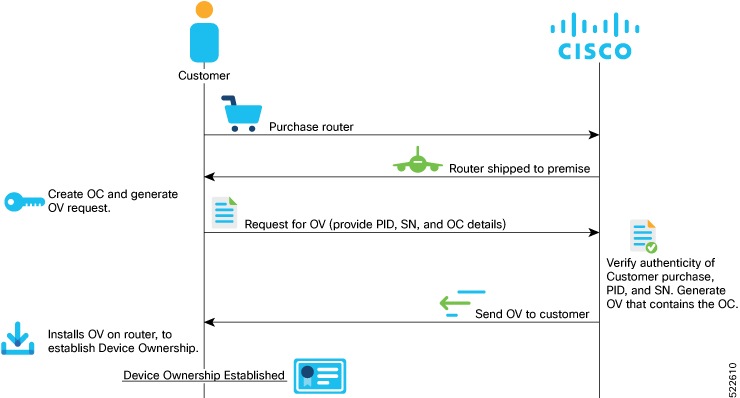

How device ownership is established

Device ownership establishment (DOE) validates the router to the network and the network to the router.

Summary

The ownership establishment process uses these artifacts:

  • The customer creates an OC and requests an OV for each router serial number.

  • Cisco verifies the artifacts and generates the OV.

  • The customer installs the artifacts and the router validates the OV and OC chain.

The resulting trust relationship supports secure third-party application and key-package operations.

Workflow

Figure 1. Workflow for device ownership establishment

These are the stages involved in establishing device ownership:

  1. The customer creates the OC using OpenSSL commands. The router later verifies that the OC chains to the PDC included in the OV.

  2. The customer creates an OV request for each router serial number and sends the request to Cisco with the serial number.

    • Reference scripts for creating OCs are available at GitHub.

  3. Cisco verifies the authenticity of the artifacts and generates the OVs.

    • Modifying the .vcj output file can cause processing delays and errors.

    • If duplicate .vcj files are generated for a serial number or card, the first valid file is applied and duplicates are rejected.

    • Multiple .vcj files can be archived in a flat TAR file and provided to the GISO script or XR interfaces.

Result

Cisco generates ownership vouchers that the customer can install on the router for ownership validation.


Install and verify device ownership

Install the OV and OC on the router and verify the resulting device-ownership state.

The installation command requires a TAR file of OVs, with each OV representing a route processor. You can include an OV for the chassis or maintain a single TAR file for the route processors you purchased.

The OC must have a trust chain leading to the PDC in the OV, and the command accepts only the latest OV. The OC and OV can also be included in a GISO.

Before you begin

  • Have the OC and the OV TAR file available on the router.

  • Ensure that the OC trust chain leads to the PDC in the OV.

Procedure

  1. Install the OV and OC on the router.

    Example:

    Router# platform security device-ownership /disk0:/testing2/deliverable/bulk_ovs.tar.gz /disk0:/testing2/oc-single.cms location all
    

    The router validates the OC chain and adds the PDC and OC to a special trust point as CA certificates.

  2. Verify that device ownership is established.

    Example:

    Router# show platform security device-ownership
    Performing operation on all nodes..
    =========================
    Location : 0/RP0/CPU0
    =========================
    
    Trustpoint : device_ownership
    ==================================================
    CA certificate
    Certificate:
    Data:
    Version: 3 (0x2)
    Serial Number:
    f6:20:61:bd:db:22:30:74
    ...truncated...
    
    Router# show logging
    ownership_app[66652]: %SECURITY-OWNERSHIP-6-INFO: Device ownership established.

    Device ownership is established, enabling secure validation between the router and network.

The router establishes device ownership and is ready for secure validation with its management network.


Clear device ownership

Clear the PDC, OC, and artifacts such as key packages associated with an OV.

Clear device ownership uses the consent token workflow. For more information, see Consent tokens.

Clearing device ownership uses the consent-token workflow and affects every application that depends on the OC.

Before you begin

  • Enable the customer consent-token key.

  • Ensure that the required consent-token response is available.

Procedure

  1. Generate a clear-device-ownership challenge for the router location.

    Example:

    Router# clear device-ownership challenge customer location 0/RP1/CPU0
    Do you want to clear the device ownership [Y/N]? Y
    Tue Feb 10 05:20:07.811 UTC
    +--------------------------------------+
    Node location: node0_RP1_CPU0
    +--------------------------------------+
    Challenge string:
    2G6nKAAAAQYBAAQAAAAFAgAEAAABAAMACLb98TiegyWHBAAQul/tEEkiuKEBi2va2ScFMgUABAAAAAUGAARhYmNkBwAEYWJjZAgABzg4MDAtUlAJAAtGT0MyMzAyUDhLMw==
    +--------------------------------------+ 
  2. Submit the challenge response for the router location.

    Example:

    Router# clear device-ownership response location 0/RP1/CPU0
    ***************************************************************
    Please enter challenge response string for node location node0_RP1_CPU0
    ***************************************************************

    The router processes the consent-token response.

  3. Verify that device ownership is cleared.

    Example:

    Router# show platform security device-ownership
    No platform ownership information found.

Device ownership is cleared.

What to do next

After you clear device ownership, applications that depend on the OC do not function.


Security profiles for Cisco IOS XR software

Security profiles for Cisco IOS XR software are configurable security settings that

  • support classic ZTP, secure ZTP, third-party RPM signature verification, and partner RPM GISO

  • provide different security levels for IOS XR system integrity and protection, and

  • let you select and override profile settings based on your business needs.

Table 1. Feature History Table

Feature Name

Release Information

Feature Description

Security profiles for Cisco IOS XR software

Release 26.1.1

Introduced in this release on: Fixed Systems (8200 [ASIC: Q100, Q200, P100], 8700 [ASIC: P100, K100], 8010 [ASIC: A100]); Centralized Systems (8600 [ASIC:Q200]) ; Modular Systems (8800 [LC ASIC: Q100, Q200, P100])

This feature supports different security profiles to ensure integrity and protection of the IOS XR system when transitioning between security profiles.

The supported security profiles are Strict, Default, and Relaxed.

Each security profile supports user-configurable security parameters or security levels. The profiles are added using the ownership voucher (OV).

Table 2. Cisco IOS XR security profiles

Security profile

Purpose

Strict

Enables all security features. This profile corresponds to the High security level to enable security features. For more information, see Install Owner and Partner RPMs using IOS XR Install Infrastructure in Cisco IOS XR Setup and Upgrade Guide for Cisco 8000 Series Routers.

Default

All security features have a default value, which exists from releases prior to Cisco IOS XR Release 26.1.1.

Relaxed

Sets the security level of the device to Low where certain security checks are not enforced, such as verifying signatures of owner RPMs. For more information, see Install Owner and Partner RPMs using IOS XR Install Infrastructure in Cisco IOS XR Setup and Upgrade Guide for Cisco 8000 Series Routers.

Note

From Cisco IOS XR Release 26.1.1, when using the Cisco MASA web interface to create OVs, select the same security profile setting for all cards (serial numbers) that are part of, or are intended to be part of, the same chassis. The MASA interface does not enforce this because the cards and their corresponding OVs may belong to, or be intended for, different chassis with different security requirements.