System Security Configuration Guide for Cisco 8000 Series Routers, IOS XR Releases

PDF

System Security Configuration Guide for Cisco 8000 Series Routers, IOS XR Releases

Port-based authentication methods

Want to summarize with AI?

Log in

Explains how 802.1X and MAB control access to network services according to client capabilities, authentication parameters, and authentication results on Cisco 8000 Series Routers.


Port-based authentication methods are access-control mechanisms that

  • authenticate a client before allowing it to use network services

  • use an authenticator port to control client traffic, and

  • support 802.1X-capable and non-802.1X-capable devices.

802.1X uses EAP-based authentication. MAB uses a client MAC address as an authentication parameter and can support devices that do not support 802.1X.

This table summarizes the authentication methods covered in this chapter.

Table 1. Port-based authentication methods

Method

Authentication parameter

Typical use

802.1X

EAP credentials or certificates

Authenticate devices that support IEEE 802.1X before allowing normal traffic

MAB

Client MAC address

Authenticate devices that do not support 802.1X or use MAB as a fallback method


802.1X port-based authentication

802.1X port-based authentication is a Layer 2 network-access control method that

  • uses a client-server model to authenticate a client network device

  • controls a physical port before allowing normal traffic, and

  • allows access after the client successfully authenticates.

The client requests network access through an authenticator. The authentication server, typically a RADIUS server, verifies the client credentials and authorizes access.

Table 2. Feature History Table

Feature Name

Release Information

Feature Description

802.1X port-based authentication

Release 26.1.1

Introduced in this release on: Fixed Systems (8200 [ASIC: Q200, P100], 8700 [ASIC: P100, K100], Modular Systems (8800 [LC ASIC: Q100, Q200, P100])(select variants only*)

*This feature is extended to these hardware variants:

  • 8201

  • 8201-32FH

  • 8212-48FH-M

  • 8711-32FH-M

  • 8712-MOD-M

  • 8711-48Z-M

  • 8011-4G24Y4H-I

  • 8011-32Y8L2H2FH

  • 8011-12G12X4Y-A

Line cards:

  • 88-LC0-36FH-M

  • 88-LC1-36EH

  • 88-LC1-12TH24FH-E

  • 88-LC1-52Y8H-EM

802.1X port-based authentication

Release 25.1.1

Introduced in this release on: Fixed Systems (8200 [ASIC: P100], 8700 [ASIC: P100]); Modular Systems (8800 [LC ASIC: P100])

You can now secure network access by requiring client network devices to authenticate with encrypted digital certificates before gaining access. The 802.1X port-based authentication ensures that a port remains closed to all traffic until the connected client successfully completes authentication using the Extensible Authentication Protocol with TLS (EAP-TLS) encryption. This prevents unauthorized access and enforces secure, certificate-based communication, enhancing network security and integrity.


How 802.1X port-based authentication works

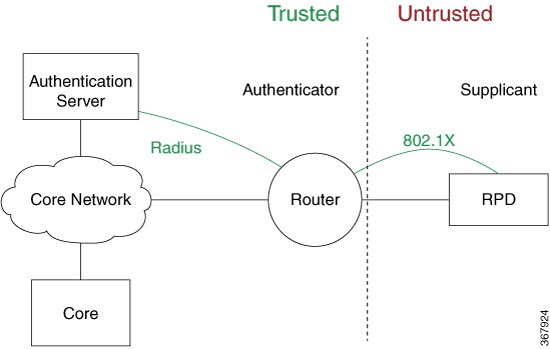
802.1X authentication is configured on a Cisco 8000 Series Router to prevent an unauthorized supplicant from accessing network services.

Summary

The authentication process includes these components:

  • The supplicant requests network access.

  • The authenticator controls access on the router port.

  • The authentication server validates the supplicant and authorizes access.

While the port is unauthorized, 802.1X access control allows only Extensible Authentication Protocol over LAN (EAPOL) packets. EAPOL frames can use EtherType 0x888E or the Cisco-defined EtherType 0x876F.

Workflow

Figure 1. Topology for IEEE 802.1X port-based authentication


These stages describe how the port processes a client:

  1. The router places the port in the Unauthorized state before the supplicant is authenticated.

    • The port blocks normal traffic to and from the supplicant.

    • The port permits EAPOL traffic.

  2. The supplicant exchanges authentication information with the authentication server through the authenticator.

  3. After successful authentication, the router moves the port to the Authorized state.

    • The router allows normal traffic from the authenticated client.

    • The router can periodically reauthenticate the client.

  4. If reauthentication fails, the router blocks the port and returns it to the Unauthorized state.

  5. If the link changes from up to down or the router receives an EAPOL-logoff frame, the router returns the port to the Unauthorized state.

Result

Only an authenticated client can send normal traffic through the controlled port.


802.1X protocols, roles, and prerequisites

Use this reference to identify the components required for 802.1X authentication.

802.1X port-based authentication supports these protocols:

  • EAP (Extensible Authentication Protocol) is a flexible authentication framework that supports multiple authentication methods.

  • EAP-TLS (Extensible Authentication Protocol with Transport Layer Security) uses TLS for encryption and mutual authentication between the client and server.

  • EAPOL (Extensible Authentication Protocol over LAN) carries EAP packets over a wired or wireless LAN.

The devices in an IEEE 802.1X network have these roles:

  • Authenticator: A router that facilitates authentication for clients on the same LAN.

  • Supplicant: A network device or client that seeks authentication from an authenticator on a point-to-point LAN segment.

  • Authentication server: A RADIUS server that verifies client credentials and authorizes access through the authenticator.

Before you configure 802.1X port-based authentication:

  • Install the K9sec RPM to enable the feature.

  • Configure supported EAP methods on the RADIUS or EAP server and supplicant when remote authentication is used.

  • Use EAP-TLS when the router operates as a local EAP server.

  • Configure a Certificate Authority (CA) server with a valid certificate.

  • Synchronize the supplicant, authenticator, and CA server with Network Time Protocol (NTP). Certificates might not be validated if the devices are not synchronized.


802.1X host modes and traffic behavior

Use this reference to select a host mode and understand port traffic before and after authentication.

The supported 802.1X host modes are:

  • Single-host: The port allows a single host or client to be authenticated and allows ingress traffic only from the authenticated peer. A security violation is detected if more than one client is present.

  • Multi-auth: This is the default host mode. Multiple hosts can independently authenticate through the same port, and ingress traffic is allowed from all authenticated peers. The router supports up to 20 clients using 802.1X in multi-authentication mode.

802.1X applies these traffic rules:

  • 802.1X port authentication must be configured on physical ports.

  • VLAN sub-interfaces must have preconfigured VLAN IDs.

  • All VLAN-tagged traffic is dropped until the port successfully authenticates the client.

  • No default VLAN assignment is provided for unauthenticated MAC addresses or untagged traffic.

  • Authenticated MAC addresses are validated at the main port, independent of VLAN assignment.

  • VLAN-tagged and untagged traffic is allowed only for authenticated MAC addresses.

  • Untagged EAPOL traffic is always allowed.

  • Port control is enforced only on ingress traffic.


802.1X usage guidelines and restrictions

Consider these restrictions and usage guidelines when implementing 802.1X port-based authentication:

  • Configure port authentication only on physical ports.

  • Supported modes are single-host and multi-auth.

  • Configure VLAN IDs before you use VLAN sub-interfaces.

  • All other untagged traffic is dropped until successful authentication.

  • 802.1X is not supported on the following hardware variants:

    • 8608-SYS

    • 8404-RSP1-48-EM

    • 8404-RSP1-2FH/4H


Configure 802.1X host modes

Configure single-host or multi-auth mode for an 802.1X-controlled port.

The default host mode is multi-auth. The host mode is configured under the authenticator mode in a dot1x profile.

Before you begin

Configure a dot1x profile before you configure the host mode.

Procedure

Configure the host mode in the dot1x profile.

Example:

Router# configure terminal
Router(config)# dot1x profile sample-profile
Router(config-dot1x-auth)# pae authenticator
Router(config-dot1x-auth-auth)# host-mode multi-auth
Router(config-dot1x-auth-auth)# commit

Replace multi-auth with single-host when the port must allow only one authenticated client.

The dot1x profile contains the selected 802.1X host mode.


Configure 802.1X with remote RADIUS authentication

Configure 802.1X port-based authentication with a remote RADIUS server.

The port remains unauthorized until the connected device successfully authenticates through the remote RADIUS server.

Before you begin

  • Verify that the RADIUS server is operational and reachable.

  • Obtain the pre-shared key for secure communication between the router and RADIUS server.

Procedure

  1. Configure the RADIUS server.

    Example:

    Router# configure terminal
    Router(config)# radius-server host 209.165.200.225 auth-port 1646 key sample-secret007
    Router(config)# radius-server vsa attribute ignore unknown
    Router(config)# commit
    Router# show run radius
  2. Configure the default 802.1X authentication method.

    Example:

    Router(config)# aaa authentication dot1x default group radius
    Router(config)# commit
    
  3. Verify the configuration using the show run aaa command.

    Example:

    
    Router# show run aaa

    Only the default AAA method is supported for 802.1X authentication.

  4. Configure the 802.1X authenticator profile.

    Example:

    Router(config)# dot1x profile sample-auth
    Router(config-dot1x-auth)# pae authenticator
    Router(config-dot1x-auth)# authenticator
    Router(config-dot1x-auth-auth)# timer reauth-time 3600
    Router(config-dot1x-auth-auth)# host-mode multi-auth
    Router(config-dot1x-auth-auth)# commit
    

    Verify the configuration using the show run dot1x command.

  5. Attach the 802.1X profile to the interface.

    Example:

    Router(config)# interface HundredGigE 0/3/0/0
    Router(config-if)# dot1x profile sample-auth
    Router(config-if)# commit
    

    Verify the configuration using the show run interface HundredGigE 0/3/0/0 command.

The interface uses 802.1X EAP-TLS authentication through the remote RADIUS server.


Configure 802.1X with local EAP authentication

Configure 802.1X port-based authentication with a locally hosted EAP server.

Local EAP authentication uses EAP-TLS with TLS version 1.2. A Master Session Key (MSK) is generated after successful authentication.

Before you begin

Obtain a Certificate Authority (CA), certificate enrollment information, and an EAP profile name.

Procedure

  1. Generate an RSA key pair.

    Example:

    Router# crypto key generate rsa <keypair-label>
  2. Configure a trustpoint.

    Example:

    Router(config)# crypto ca trustpoint <tp_name>
    Router(config-trustp)# enrollment url <ca-url>
    Router(config-trustp)# subject-name <x.500-name>
    Router(config-trustp)# rsakeypair <keypair-label>
    Router(config-trustp)# commit

    A trustpoint identifies the CA, stores CA-specific configuration parameters, and associates an enrolled identity certificate.

  3. Configure a domain name.

    Example:

    Router(config)# domain name <domain-name>

    The domain name is required for certificate enrollment.

  4. Authenticate and enroll the certificates.

    Example:

    Router# crypto ca authenticate <tp_name>
    Router# crypto ca enroll <tp_name>
  5. Ensure that the CA issues the required authentication certificates.

  6. Configure an EAP profile.

    Example:

    Router(config)# eap profile <profile_name>
    Router(config-eap)# identity <user-name>
    Router(config-eap)# method tls pki-trustpoint <tp_name>
    Router(config-eap)# commit
  7. Configure the local 802.1X authenticator profile.

    Example:

    Router(config)# dot1x profile sample-local-auth
    Router(config-dot1x-auth)# pae authenticator
    Router(config-dot1x-auth)# authenticator
    Router(config-dot1x-auth-auth)# eap profile <profile_name>
    Router(config-dot1x-auth-auth)# host-mode multi-auth
    Router(config-dot1x-auth-auth)# timer reauth-time 3600
    Router(config-dot1x-auth-auth)# commit
  8. Attach the 802.1X profile to an interface.

    Example:

    Router(config)# interface <interface-name>
    Router(config-if)# dot1x profile sample-local-auth
    Router(config-if)# commit

The router uses a local EAP server to authenticate connected devices with EAP-TLS and certificates.


Configure a router as an 802.1X supplicant

Configure the router as a supplicant in an 802.1X authentication environment.

Before you begin

Before you configure the router as an 802.1X supplicant:

  • Generate an RSA key pair for certificate-based authentication.

  • Configure a trustpoint with the appropriate CA.

  • Configure a domain name.

  • Obtain the CA certificate and enroll the device certificate.

  • Configure an EAP profile for authentication.

Procedure

  1. Configure the 802.1X supplicant profile.

    Example:

    Router(config)# dot1x profile sample-supp
    Router(config-dot1x-supp)# pae supplicant
    Router(config-dot1x-supp)# supplicant
    Router(config-dot1x-supp-supp)# eap profile <profile_name>
    Router(config-dot1x-supp-supp)# commit
  2. Attach the supplicant profile to an interface.

    Example:

    Router(config)# interface <interface-name>
    Router(config-if)# dot1x profile sample-supp
    Router(config-if)# commit

The router authenticates with an upstream authenticator as an 802.1X supplicant by using EAP-TLS and certificates.


Verify 802.1X port-based authentication

Confirm that 802.1X authentication succeeds and that the port allows traffic for the authenticated client.

Use show command output and syslog messages to verify authenticator and supplicant behavior.

Procedure

  1. Display detailed 802.1X information for the interface.

    Example:

    Router# show dot1x interface HundredGigE 0/0/1/0 detail
    Dot1x info for HundredGigE 0/0/1/0
    ---------------------------------------------------------------
    Interface short name : Hu 0/0/1/0
    Interface handle : 0x4080
    Interface MAC : 021a.9eeb.6a59
    Ethertype : 888E
    PAE : Authenticator
    Dot1x Port Status : AUTHORIZED
    Dot1x Profile : sample-test-prof
    L2 Transport : FALSE
    Authenticator:
    Port Control : Enabled
    Config Dependency : Resolved
    Eap profile : None
    ReAuth : Disabled
    Client List:
    Supplicant : 027e.15f2.cae7
    Programming Status : Add Success
    Auth SM State : Authenticated
    Auth Bend SM State : Idle
    Last authen time : 2018 Dec 11 17:00:30.912
    Last authen server : 10.77.132.66
    Time to next reauth : 0 day(s), 00:51:39
    MKA Interface:
    Dot1x Tie Break Role : NA (Only applicable for PAE role both)
    EAP Based Macsec : Disabled
    MKA Start time : NA
    MKA Stop time : NA
    MKA Response time : NA
  2. Review authenticator syslog messages.

    Successful authentication displays messages for port control, client authentication, and client access. Authentication failure displays %L2-DOT1X-5-AUTH_FAIL and client removal messages. An unreachable authentication server displays %L2-DOT1X-5-AAA_UNREACHABLE. An unconfigured authentication method displays %L2-DOT1X-4-NO_AUTHENTICATION_METHOD.

    Example:

    %L2-DOT1X-5-PORT_CONTROL_ENABLE_SUCCESS : Hu0/0/1/0 : Port Control Enabled
    %L2-DOT1X-5-AUTH_SUCCESS : Hu0/0/1/0 : Authentication successful for client 027E.15F2.CAE7
    %L2-DOT1X-5-PORT_CONTROL_ADD_CLIENT_SUCCESS : Hu0/0/1/0 : Port Access Enabled For Client 027E.15F2.CAE7
    %L2-DOT1X-5-PORT_CONTROL_DISABLE_SUCCESS : Hu0/0/1/0 : Port Control Disabled
    %L2-DOT1X-5-AUTH_FAIL : Hu0/0/1/0 : Authentication fail for client 027E.15F2.CAE7
    %L2-DOT1X-5-PORT_CONTROL_REMOVE_CLIENT_SUCCESS : Hu0/0/1/0 : Port Access Disabled For Client 027E.15F2.CAE7
    %L2-DOT1X-5-AAA_UNREACHABLE : Hu0/0/1/0 : AAA server unreachable for client 027E.15F2.CAE7, Retrying Authentication
    %L2-DOT1X-4-NO_AUTHENTICATION_METHOD : Hu0/0/1/0 : No authentication method configured
  3. Review supplicant syslog messages.

    Example:

    %L2-DOT1X-5-SUPP_SUCCESS : Hu0/0/1/0 : Authentication successful with authenticator 008a.96a4.b050
    %L2-DOT1X-5-SUPP_FAIL : Hu0/0/1/0 : Authentication successful with authenticator 0000.0000.0000.0000
    %L2-DOT1X-5-SUPP_FAIL : Hu0/0/1/0 : Authentication successful with authenticator 008a.96a4.b028

The interface is authorized when the output shows an authorized port and an authenticated client.


MAC Authentication Bypass

MAC Authentication Bypass is a network fallback authentication method that

  • uses the MAC address of a connected client as an authentication parameter

  • uses a remote RADIUS server to authorize the client, and

  • allows controlled access for devices that do not support 802.1X.

MAB can operate as a standalone method or as a fallback method for 802.1X. Multi-auth MAB can authenticate multiple clients independently on one port on supported platforms.

Table 3. Table 1: Feature History Table

Feature Name

Release Information

Feature Description

Multi-auth MAC Authentication Bypass

Release 25.4.1

Introduced in this release on: Fixed Systems (8010 [ASIC: A100])(select variants only*)

*This feature is supported on:

  • 8011-32Y8L2H2FH

  • 8011-12G12X4Y-A/D

Multi-auth MAC Authentication Bypass

Release 25.1.1

Introduced in this release on: Fixed Systems (8700 [ASIC: K100], 8010 [ASIC: A100])(select variants only*)

*This feature is supported on:

  • 8712-MOD-M

  • 8011-4G24Y4H-I

Multi-auth MAC Authentication Bypass

Release 24.4.1

Introduced in this release on: Fixed Systems (8200 [ASIC: P100], 8700 [ASIC: P100])(select variants only*); Modular Systems (8800 [LC ASIC: P100])(select variants only*)

*This feature is supported on:

  • 8212-48FH-M

  • 8711-32FH-M

  • 88-LC1-36EH

  • 88-LC1-12TH24FH-E

  • 88-LC1-52Y8H-EM

Multi-auth MAC Authentication Bypass

Release 24.4.1

Introduced in this release on: Fixed Systems (8200 [ASIC: Q100, Q200]) (*select variants only)

You can enhance network flexibility by enabling multiple hosts on a single port using MAC Authentication Bypass (MAB). The router now supports up to two clients per port by expanding its MAC learning capability from one to two. It authenticates each MAC address individually, allowing multi-domain authentication and enabling independent management of two endpoints. This feature simplifies network management and increases the connectivity options for devices per port.

*This feature is supported on:

  • 8201-SYS

  • 8101-32FH

MAC Authentication Bypass

Release 25.4.1

Introduced in this release on: Fixed Systems (8010 [ASIC: A100])(select variants only*)

*This feature is supported on:

  • 8011-32Y8L2H2FH

  • 8011-12G12X4Y-A/D

MAC Authentication Bypass

Release 25.1.1

Introduced in this release on: Fixed Systems (8700 [ASIC: K100], 8010 [ASIC: A100])(select variants only*)

*This feature is supported on:

  • 8712-MOD-M

  • 8011-4G24Y4H-I

MAC Authentication Bypass

Release 24.4.1

Introduced in this release on: Fixed Systems (8200 [ASIC: P100], 8700 [ASIC: P100])(select variants only*); Modular Systems (8800 [LC ASIC: P100])(select variants only*)

*This feature is supported on:

  • 8212-48FH-M

  • 8711-32FH-M

  • 88-LC1-36EH

  • 88-LC1-12TH24FH-E

  • 88-LC1-52Y8H-EM

MAC Authentication Bypass

Release 7.3.4

Release 7.5.2

Based on the MAC address of the end device or the client connected to the router port, this feature enables port control functionality for your router. This functionality provides controlled access to network services for end devices that do not support other authentication methods such as IEEE 802.1X port-based authentication.

The MAB support is only for the single-host mode.

This feature introduces these commands and options:


How MAC Authentication Bypass works

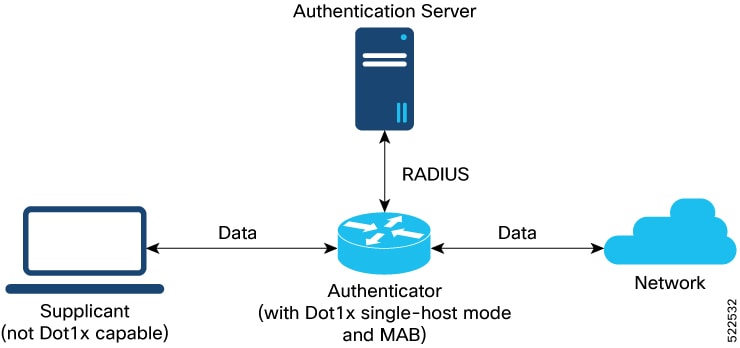
MAB provides controlled network access for a client that is connected to a router port and does not use 802.1X authentication.

Summary

The MAB process includes these components:

  • The supplicant or client sends data through the port.

  • The authenticator learns and authenticates the client MAC address.

  • The RADIUS authentication server maintains the authorized MAC-address database.

  • The network receives traffic from an authorized client.

The router uses the client MAC address as the authenticating parameter.

Workflow

Figure 2. MAB topology
A network topology that shows the three major components of MAC authentication bypass that provides end devices a controlled access to network services.

These stages describe how MAB controls client access:

  1. The router receives an incoming data packet from the connected client and learns the source MAC address.

  2. The router sends the learned MAC address to the external RADIUS server for authentication.

  3. If the RADIUS server returns an Access-Accept message, the router authenticates the MAC address, programs it on the port, and allows the client traffic to be forwarded to the network.

  4. If the RADIUS server returns an Access-Reject message, the router treats the MAC address as unauthenticated and drops further data packets from the client.

  5. In multi-auth mode, the router continues MAC learning after authenticating a client until authentication begins for the second client. Each MAC address is authenticated and managed independently.

Result

MAB provides port-controlled access based on the authentication result for each client MAC address.


MAB authentication failure behavior

Use this reference to understand the router response when MAB authentication fails.

Table 4. Authentication failure scenarios with MAB

Authentication failure scenario

Expected MAB feature behavior

RADIUS server rejects the authentication request

The router:

  • deletes the client programming on the port, provided the client was previously authenticated.

  • clears the client session upon the expiry of the quietWhile timer, which is set to 60 seconds.

  • switches the port back to MAC learning mode to relearn a new MAC address.

RADIUS server is not reachable during authentication

With server dead action auth-retry command configured:

  • The router retains the programing of the client that was already authenticated. Else, the router deletes it.

  • Router retries the authentication process with the RADIUS server at an interval of 60 seconds until the server becomes available. You can configure this interval using the authenticator timer mab-retry-time command.

  • The router does not attempt to learn any new MAC address on the port.

  • To clear the client session and its programming on the router, you must use the clear mab session command.

  • The router puts the port back in MAC learning mode to relearn a new MAC address.

Similarly, for an unauthenticated client, if the authentication does not happen after the retries, the router deletes the client context and puts the port back in MAC learning mode.

Without server dead action auth-retry command configuration:

  • The router deletes the programming of the client that was already authenticated and retries authentication.

  • If the client is still not authenticated, the router automatically clears the client session.

  • The router puts the port back in MAC learning mode to relearn a new MAC address.


MAC Authentication Bypass requirements and restrictions

Review these requirements and restrictions before you configure MAB.

Configure the following items before you configure MAB:

  • A remote RADIUS server using the radius-server command

  • An authentication method using the aaa authentication dot1x command

  • An 802.1X profile using the dot1x profile command in XR configuration mode

  • An authenticator with a reauthentication time, host mode, and server-unreachable retry action

MAB has these restrictions:

  • User authentication can use only a remote AAA server; the local AAA server on the router is not supported.

  • MAB works only as a standalone feature and not as a fallback mechanism for another authentication failure.

  • Centralized systems do not support MAB.


Configure MAC Authentication Bypass

Configure MAB to authenticate client MAC addresses through a remote RADIUS server.

Before you begin

  • Configure the remote RADIUS server and the default dot1x AAA authentication method.

  • Configure the 802.1X profile and authenticator parameters.

Procedure

  1. Enable MAB in a dot1x profile.

    Example:

    Router# configure
    Router(config)# dot1x profile sample-test-mab
    Router(dot1x-sample-test-mab)# mab
    Router(dot1x-sample-test-mab)# commit
  2. Configure the MAB authenticator retry timer.

    Example:

    Router# configure
    Router(config)# dot1x profile sample-test-mab
    Router(dot1x-sample-test-mab)# authenticator
    Router(dot1x-sample-test-mab-auth)# timer mab-retry-time 60
    Router(dot1x-sample-test-mab-auth)# commit
  3. Attach the dot1x profile to the interface.

    Example:

    Router(config)# interface GigabitEthernet0/0/0/0
    Router(config-intf)# dot1x profile sample-test-mab
    Router(config-intf)# commit
  4. Review the resulting running configuration.

    Example:

    Router# show running-configuration
    !
    radius-server host <ip-address> auth-port <auth-port-num> acct-port <acct-port-num>
    key 7 <key>
    !
    aaa authentication dot1x default group radius
    interface GigabitEthernet0/0/0/0
    dot1x profile sample-test-mab
    !
    dot1x profile sample-test-mab
    mab
    authenticator
    timer reauth-time 60
    timer mab-retry-time 60
    host-mode single-host
    server dead action auth-retry
    !
    end

MAB is enabled on the interface, and the router can authenticate the connected client MAC address through the remote RADIUS server.


Verify MAC Authentication Bypass configuration

Confirm that MAB has authorized the expected client and programmed its MAC address on the interface.

Procedure

  1. Check the MAB summary.

    Example:

    Router# show mab summary
    Fri Apr 1 16:37:32.340 IST
    NODE: node0_0_CPU0
    =====================================================================
    Interface-Name Client Status
    =====================================================================
    Gi0/0/0/0 1122.3344.5566 Authorized
    Router#
  2. Verify the detailed MAB status.

    Example:

    Router# show mab detail
    Fri Apr 1 16:37:37.140 IST
    MAB info for GigabitEthernet0/0/0/0
    ---------------------------------------------------------------
    InterfaceName : Gi0/0/0/0
    InterfaceHandle : 0x00000060
    HostMode : single-host
    PortControl : Enabled
    PuntState : Stop Success
    PuntSummary : Punt disabled
    Client:
    MAC Address : 1122.3344.5566
    Status : Authorized
    SM State : Terminate
    ReauthTimeout : 60s, Remaining 0 day(s), 00:00:46
    RetryTimeout : 60s, timer not started yet
    AuthMethod : PAP (remote)
    LastAuthTime : 2022 Apr 01 16:37:23.634
    ProgrammingStatus : Add Success
    Router#
  3. Verify the MAB interface summary and details.

    Example:

    Router# show mab interface gigabitEthernet 0/0/0/0
    Fri Apr 1 16:38:27.715 IST
    =====================================================================
    Interface-Name Client Status
    =====================================================================
    Gi0/0/0/0 1122.3344.5566 Authorized
    Router# show mab interface gigabitEthernet 0/0/0/0 detail
    Fri Apr 1 16:38:31.543 IST
    MAB info for GigabitEthernet0/0/0/0
    ---------------------------------------------------------------
    InterfaceName : Gi0/0/0/0
    InterfaceHandle : 0x00000060
    HostMode : single-host
    PortControl : Enabled
    PuntState : Stop Success
    PuntSummary : Punt disabled
    Client:
    MAC Address : 1122.3344.5566
    Status : Authorized
    SM State : Terminate
    ReauthTimeout : 60s, Remaining 0 day(s), 00:00:51
    RetryTimeout : 60s, timer not started yet
    AuthMethod : PAP (remote)
    LastAuthTime : 2022 Apr 01 16:38:23.640
    ProgrammingStatus : Add Success
    Router#
  4. Verify MAB interface statistics.

    Example:

    Router# show mab statistics interface gigabitEthernet 0/0/0/0
    Fri Apr 1 16:41:23.011 IST
    InterfaceName : GigabitEthernet0/0/0/0
    ---------------------------------------------------------------
    MAC Learning:
    RxTotal : 0
    RxNoSrcMac : 0
    RxNoIdb : 0
    Port Control:
    EnableSuccess : 1
    EnableFail : 0
    UpdateSuccess : 0
    UpdateFail : 0
    PuntStartSuccess : 0
    PuntStartFail : 0
    PuntStopSuccess : 1
    PuntStopFail : 0
    AddClientSuccess : 1
    AddClientFail : 0
    RemoveClientSuccess : 0
    RemoveClientFail : 0
    Client :
    MAC Address : 1122.3344.5566
    Authentication:
    Success : 1406
    Fail : 0
    Timeout : 0
    AAA Unreachable : 0
    Router#

The output identifies the authorized client, successful MAC programming, and MAB authentication counters.


MAC Authentication Bypass system logs

Use these messages to identify the result of MAB port control and client authentication.

Table 5. MAB port-control messages

Condition

Message

Port-control enable succeeds

%L2-DOT1X-5-PORT_CONTROL_ENABLE_SUCCESS : Hu0/0/1/0 : Port Control Enabled with Single-Host mode

Port-control enable fails

%L2-DOT1X-5-PORT_CONTROL_ENABLE_FAILURE : Hu0/0/1/0 : Failed to enable port-control

Port-control disable succeeds

%L2-DOT1X-5-PORT_CONTROL_DISABLE_SUCCESS : Hu0/0/1/0 : Port Control Disabled

Port-control disable fails

%L2-DOT1X-5-PORT_CONTROL_DISABLE_FAILURE : Hu0/0/1/0 : Failed to disable port-control

MAB authentication succeeds

%L2-DOT1X-5-MAB_AUTH_SUCCESS : Hu0/0/1/0 : Authentication successful for client <mac-address>

%L2-DOT1X-5-PORT_CONTROL_ADD_CLIENT_SUCCESS : Hu0/0/1/0 : Port Access Enabled For Client <mac-address>

MAB authentication fails

%L2-DOT1X-5-MAB_AUTH_FAIL : Hu0/0/1/0 : Authentication failed for client <mac-address>

%L2-DOT1X-5-PORT_CONTROL_REMOVE_CLIENT_SUCCESS : Hu0/0/1/0 : Port Access Disabled For Client <mac-address>

Authentication server is unreachable

%L2-DOT1X-5-MAB_AAA_UNREACHABLE : Hu0/0/1/0 : AAA server unreachable for client 027E.15F2.CAE7, Retrying Authentication