System Security Configuration Guide for Cisco 8000 Series Routers, IOS XR Releases

PDF

System Security Configuration Guide for Cisco 8000 Series Routers, IOS XR Releases

RADIUS with TLS protection

Want to summarize with AI?

Log in

Explains how Cisco IOS XR redirects RADIUS packets to a remote server over TLS so AAA traffic receives encrypted transport and peer protection.


A RADIUS TLS protection is a secure transport mechanism that

  • protects RADIUS packets by using TLS between the Cisco IOS XR RADIUS client and a remote RADIUS server

  • reduces exposure to data disclosure, replay attacks, weak authentication, and encryption weaknesses, and

  • supports TLS version 1.3.

Feature history

Table 1. Feature History Table

Feature Name

Release Information

Feature Description

RADIUS with TLS protection

Release 26.2.1

Introduced in this release on: Centralized Systems (8400 [ASIC: K100])(select variants only*)

*This feature is now supported on Cisco 8404-SYS-D routers.

RADIUS with TLS protection

Release 24.4.1

Remote Authentication Dial-In User Service (RADIUS) packets are now less vulnerable to security risks, including data exposure, replay attacks, weak authentication, and encryption weaknesses. This is because we have enabled support for RADIUS with TLS protection.

You can configure the RADIUS protocol on the router to redirect RADIUS packets to a remote server over TLS for Authentication, Authorization, and Accounting (AAA) services.

The feature introduces these changes:

CLI:

YANG Data Models:

  • New Xpath for

    Cisco-IOS-XR-um-aaa-cfg.yang

  • New Xpath for

    Cisco-IOS-XR-aaa-lib-cfg.yang

(see GitHub, YANG Data Models Navigator)


How RADIUS with TLS protection works

Traditionally, RADIUS operated over UDP or TCP, which lacked robust security. With modern security demands, transporting RADIUS over TLS offers enhanced protection and session monitoring. This feature supports TLS version 1.3.

Let's understand how you can establish RADIUS communication with TLS.

Summary

The key components involved in the process are:

  • RADIUS client: Initiates the TLS session and manages session monitoring.

  • RADIUS server: Acts as the TLS server, receiving and processing RADIUS packets over TLS.

  • TLS layer: Provides secure transport, data encryption, integrity, and connection monitoring for RADIUS packets.

RADIUS with TLS protection enhances the traditional Authentication, Authorization, and Accounting (AAA) protocol by implementing TLS version 1.3 as the transport layer. This provides improved encryption, authentication, and session control, increasing resilience against threats and ensuring a secure network environment.

Workflow

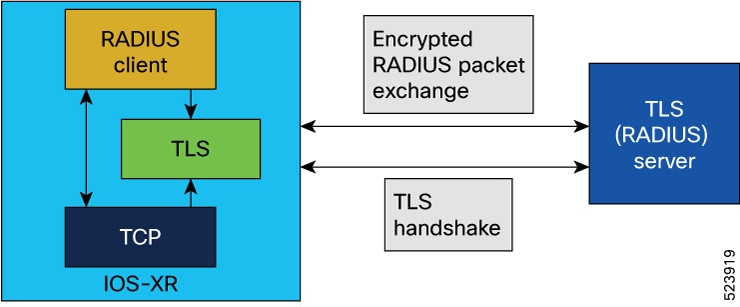
Figure 1. Topology for RADIUS with TLS protection

These stages describe how RADIUS with TLS protection works.

  1. Establish TLS session: The RADIUS client initiates the process to establish a secure TLS session with the RADIUS server, which acts as the TLS server. This session is built upon a TCP socket that the RADIUS client creates.

  2. Store TLS context: After establishing the TLS connection, the TLS context is preserved within the TLS connection context and stored in the RADIUS context for the server, ensuring a persistent secure environment.

  3. RADIUS packet handling: The client constructs standard RADIUS packets, which are handed to the TLS layer for secure encapsulation and transmission, rather than sending them directly through a TCP socket.

  4. Secure data transmission: RADIUS packets are transmitted securely over TLS, leveraging data encryption and decryption.

  5. Optimized RADIUS session control:

    • The client employs Path MTU discovery before sending traffic.

    • Different source sockets are used for RADIUS/UDP and RADIUS/TLS traffic to different servers.

    • TLS heartbeats are used for ongoing connectivity monitoring.

    • An application-layer watchdog checks server responsiveness; idle or non-responsive sessions are proactively closed.

    • Sessions are terminated if packets fail validation or contain invalid authenticators. Failovers are initiated as needed.

Result

RADIUS over TLS maintains the standard packet format while providing confidentiality, integrity, and robust session monitoring—especially in roaming environments or across untrusted networks.


Requirement: Use supported RADIUS TLS behavior

To ensure secure and compliant RADIUS over TLS deployments, you must adhere to these requirements:

  • Do not use Broadband Network Gateway (BNG) applications with RADIUS over TLS.

  • Use TCP port 2083 as the destination for RADIUS over TLS authentication and accounting; custom ports are not supported.

  • Limit the maximum number of concurrent TLS sessions to 50.

  • Use only IPv4 addresses; IPv6 is not supported for RADIUS over TLS.

  • Do not configure server groups that combine TLS, UDP, and DTLS server types under one server group for RADIUS.


Supported RADIUS TLS cipher suites

TLS cipher suites are encryption algorithms that secure RADIUS traffic between Cisco IOS XR routers and external RADIUS TLS servers.

  • TLS_AES_256_CGM_SHA384

  • TLS_CHACHA20_POLY1305_SHA256

  • TLS_AES_128_CGM_SHA256

  • TLS_ECDHE_ECDSA_WITH_AES_256_CGM_SHA384

  • TLS_ECDHE_RSA_WITH_AES_256_CGM_SHA384

  • TLS_DHE_RSA_WITH_AES_256_CGM_SHA384

  • TLS_ECDHE_ECDSA_WITH_CHACHA20_POLY1305_SHA256

  • TLS_ECDHE_RSA_WITH_CHACHA20_POLY1305_SHA256

  • TLS_DHE_RSA_WITH_CHACHA20_POLY1305_SHA256

  • TLS_ECDHE_ECDSA_WITH_AES_128_GCM_SHA256

  • TLS_ECDHE_RSA_WITH_AES_128_GCM_SHA256

  • TLS_DHE_RSA_WITH_AES_128_GCM_SHA256

  • TLS_ECDHE_ECDSA_WITH_AES_256_CBC_SHA384

  • TLS_ECDHE_RSA_WITH_AES_256_CBC_SHA384

  • TLS_DHE_RSA_WITH_AES_256_CBC_SHA256

  • TLS_ECDHE_ECDSA_WITH_AES_128_CBC_SHA256

  • TLS_ECDHE_RSA_WITH_AES_128_CBC_SHA256

  • TLS_DHE_RSA_WITH_AES_128_CBC_SHA256

  • TLS_DHE_RSA_WITH_AES_256_CBC_SHA

  • TLS_ECDHE_ECDSA_WITH_AES_128_CBC_SHA

  • TLS_ECDHE_RSA_WITH_AES_128_CBC_SHA

  • TLS_DHE_RSA_WITH_AES_128_CBC_SHA

  • TLS_RSA_WITH_AES_256_GCM_SHA384

  • TLS_RSA_WITH_AES_128_GCM_SHA256

  • TLS_RSA_WITH_AES_256_CBC_SHA256

  • TLS_RSA_WITH_AES_128_CBC_SHA256

  • TLS_RSA_WITH_AES_256_CBC_SHA

  • TLS_RSA_WITH_AES_128_CBC_SHA

  • TLS_EMPTY_RENEGOTIATION_INFO_SCSV

The cipher suite negotiated between the client and the server when both support TLS 1.3 is:

  • TLS_AES_256_GCM_SHA384

Using this reference

  • Use this reference to determine which TLS cipher suites you can select for securing RADIUS traffic between Cisco IOS XR routers and external RADIUS TLS environments.

  • When configuring the external RADIUS TLS server, select a cipher suite from this list to ensure compatibility with Cisco IOS XR.


Configure RADIUS with TLS protection

Protect RADIUS packets using TLS by configuring the server host with the radsec-server option and a trustpoint.

To secure RADIUS communication with TLS, use the radius-server host command with the radsec-server keyword.

Before you begin

  • Configure a trustpoint on the router.

  • Import the CA certificate.

  • Enroll the trustpoint and generate a client certificate from the Certification Authority (CA).

  • Import the client certificate.

Procedure

  1. Enter the hostname or IP address of the RADIUS server.

    Example:

    Router(Config)# radius-server host 209.165.201.1 auth-port 2083 acct-port 2083 radsec-server
  2. Enter the name of the trustpoint so that the router can verify certificates issued to peers.

    Example:

    Router(config-radius-host)# trustpoint test

    Your router does not need to enroll with the CA that issued the certificates to the peers.

  3. Commit the configuration changes.

    Example:

    Router(config-radius-host)# commit
  4. Use the show radius command to verify that TLS is enabled.

    Confirm that the server-type is shown as TLS.

    Example:

    Router#show radius
    Thu Jun 20 11:43:40.863 UTC
    Global dead time: 0 minute(s)
    Number of Servers: 3
    
    Server: 209.165.201.1/2083/2083  is UP
      Address family: IPv4
      Total Deadtime: 0s Last Deadtime: 0s
      Timeout: 5 sec, Retransmit limit: 3
      Quarantined: No
      Authentication:
        0 requests, 0 pending, 0 retransmits
        0 accepts, 0 rejects, 0 challenges
        0 timeouts, 0 bad responses, 0 bad authenticators
        0 unknown types, 0 dropped, 0 ms latest rtt
        Throttled: 0 transactions, 0 timeout, 0 failures
        Estimated Throttled Access Transactions: 0
        Maximum Throttled Access Transactions: 0
    
        Automated TEST Stats:
            0 requests, 0 timeouts, 0 response, 0 pending
      Server-type: TLS
      Accounting:
        0 requests, 0 pending, 0 retransmits
        0 responses, 0 timeouts, 0 bad responses
        0 bad authenticators, 0 unknown types, 0 dropped
        0 ms latest rtt
        Throttled: 0 transactions, 0 timeout, 0 failures
        Estimated Throttled Accounting Transactions: 0
        Maximum Throttled Accounting Transactions: 0
    
        Automated TEST Stats:
            0 requests, 0 timeouts, 0 response, 0 pending
  5. Verify the configuration settings by using the show running-configuration command.

    Example:

    Router# show running-configuration radius-server
    Fri Jun 21 02:59:40.238 UTC
    radius-server host 209.165.201.1 auth-port 2083 acct-port 2083
    radsec-server trustpoint test
    !

The RADIUS server host is configured to use TLS protection. The output from the operational and running-configuration commands confirms the settings.