System Security Configuration Guide for Cisco 8000 Series Routers, IOS XR Releases

PDF

System Security Configuration Guide for Cisco 8000 Series Routers, IOS XR Releases

X.509v3 certificate authentication

Want to summarize with AI?

Log in

Explains how X.509v3 identity certificates and trusted CA signatures support SSH server and user authentication on Cisco IOS XR routers.


X.509v3 certificate authentication is an SSH authentication method that

  • binds a server or user public key to a digital identity

  • verifies the binding through a chain of signatures from a trusted CA, and

  • allows or denies SSH access after certificate validation.

The feature supports server authentication and user authentication on the SSH server.

User authentication supports these public-key algorithms:

  • x509v3-ssh-dss

  • x509v3-ssh-rsa

  • x509v3-ecdsa-sha2-nistp256

  • x509v3-ecdsa-sha2-nistp384

  • x509v3-ecdsa-sha2-nistp521

Server authentication supports only x509v3-ssh-rsa algorithm.

Table 1. Feature History Table
Feature Name Release Information Feature Description
X.509v3 Certificate-based Authentication for SSH Release 25.4.1

Introduced in this release on: Fixed Systems (8010 [ASIC: A100]) (select variants only*)

*This feature is supported on:

  • 8011-32Y8L2H2FH

  • 8011-12G12X4Y-A/D

X.509v3 Certificate-based Authentication for SSH Release 25.1.1

Introduced in this release on: Fixed Systems (8700 [ASIC: K100], 8010 [ASIC: A100]) (select variants only*)

*This feature is supported on:

  • 8712-MOD-M

  • 8011-4G24Y4H-I

X.509v3 Certificate-based Authentication for SSH Release 24.4.1

Introduced in this release on: Fixed Systems (8200 [ASIC: P100], 8700 [ASIC: P100]) (select variants only*); Modular Systems (8800 [LC ASIC: P100])(select variants only*)

*This feature is supported on:

  • 8212-48FH-M

  • 8711-32FH-M

  • 88-LC1-36EH

  • 88-LC1-12TH24FH-E

  • 88-LC1-52Y8H-EM

X.509v3 Certificate-based Authentication for SSH Release 7.3.1

This feature adds new public-key algorithms that use X.509v3 digital certificates for SSH authentication. These certificates use a chain of signatures by a trusted certification authority to bind a public key to the digital identity of the user who is authenticating with the SSH server. These certificates are tough to falsify and are therefore used for identity management and access control across many applications and networks.

Commands introduced for this feature are:

ssh server certificate

ssh server trustpoint

This command is modified for this feature:

ssh server algorithms host-key


How X.509v3 certificate authentication works

The SSH Transport Layer Protocol (TLP) authenticates the server to the client. The User Authentication Protocol (UAP) authenticates the client user to the server after the transport layer is established.

Summary

A Certificate Authority (CA) issues identity and root certificates. Each SSH peer validates the certificate presented by the other peer before continuing the connection.

Workflow

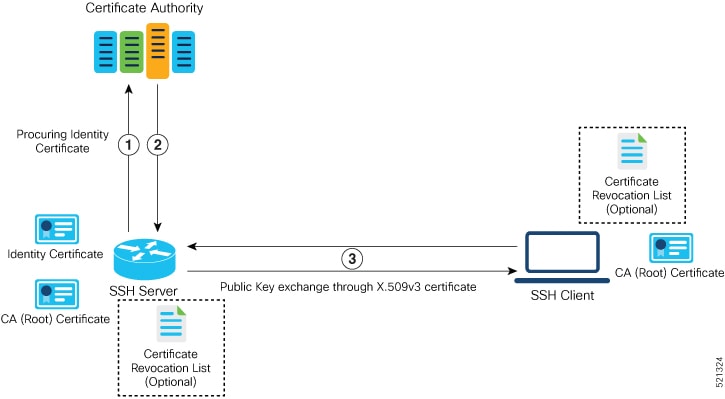
Figure 1. Server authentication using X.509v3 certificate

These stages describe server authentication using an X.509v3 certificate:

  1. The SSH server obtains a valid identity certificate from a trusted CA. The server can obtain the certificate manually or through an enrollment protocol such as SCEP.

  2. The CA provides the identity certificate and associated root certificates. The SSH server stores these certificates locally.

  3. During transport-layer authentication, the SSH server presents its identity certificate to the SSH client.

  4. The SSH client validates the server certificate. When validation succeeds, the client continues to the next phase of SSH connection establishment.

    Figure 2. User authentication using X.509v3 certificate

    These stages describe user authentication using an X.509v3 certificate:

  5. After the SSH transport layer is established, the SSH client obtains a valid user identity certificate from a trusted CA.

  6. The CA provides the user identity certificate and associated root certificates. The SSH client stores these certificates locally.

  7. The SSH client sends a user-authentication request and presents the user certificate to the SSH server.

  8. The SSH server validates the user certificate and checks its revocation status against a CRL.

  9. The SSH server extracts the username from the certificate subject common name or subject alternative name and presents it to the AAA server for authorization.

  10. The SSH server compares the extracted username with the username in the SSH connection request. When the usernames match and authorization succeeds, the server continues the SSH connection.

Result

The SSH connection advances only when certificate validation and username matching succeed.


X.509v3 certificate authentication restrictions

Review these restrictions before enabling X.509v3 authentication.

X.509v3 SSH authentication has these restrictions:

  • Cisco IOS XR supports the feature only when the router acts as the SSH server, not as the SSH client.

  • Public-key authentication requires locally configured users because RADIUS and TACACS+ do not authenticate public keys. Include the local method in the AAA authentication list. Remote TACACS+ authorization and accounting can still apply.

  • Online Certificate Status Protocol (OCSP) certificate verification is not supported. The router checks revocation status with a certificate revocation list (CRL).

  • A user certificate chain cannot exceed nine certificates.

  • The router supports up to ten user trustpoints. User trustpoints apply to all users and all VRFs.

  • The host trustpoint applies to SSH in all VRFs.

Failure conditions

  • Without a configured host trustpoint and its router certificate, the server omits x509v3-ssh-rsa from the supported host-key methods.

  • User authentication fails when the certificate format is incorrect, the certificate chain exceeds nine certificates, or certificate verification fails.

Diagnostic messages

  • SECURITY-PKI-6-LOG_INFO reports successful peer-certificate verification.

  • SECURITY-PKI-3-ERR_GENERAL reports that the user certificate issuer was not found in the configured trustpoints.

  • SECURITY-SSHD-4-WARNING_X509 reports that the server could not retrieve the host certificate chain and will not use X.509 host authentication.


Configure X.509v3 certificate authentication

Enable X.509v3 certificate-based server and user authentication for SSH.

Before you begin

  • Create the PKI trustpoints and install the required CA, router, and user certificates.

  • Configure locally defined user accounts and include the local method in the AAA authentication list.

Procedure

  1. Configure the X.509v3 RSA host-key algorithm and host trustpoint.

    Example:

    Router# configure
    Router(config)# ssh server algorithms host-key x509v3-ssh-rsa
    Router(config)# ssh server certificate trustpoint host sample-host-tp
    Router(config)# commit

    The server offers host-key algorithms according to the available keys and certificates. Without an explicit host-key configuration, it offers all available algorithms. In addition to x509v3-ssh-rsa , you can configure ecdsa-sha2-nistp521 , ecdsa-sha2-nistp384 , ecdsa-sha2-nistp256 , ssh-rsa , and ssh-dsa . Without the host trustpoint, the server does not offer x509v3-ssh-rsa for server verification. The host trustpoint applies to SSH in all VRFs.

  2. Configure one or more trustpoints for user authentication.

    Example:

    Router# configure
    Router(config)# ssh server trustpoint user sample-user-tp1
    Router(config)# ssh server trustpoint user sample-user-tp2
    Router(config)# commit

    You can configure up to ten user trustpoints. The configured trustpoints apply to all users and to SSH in all VRFs. Without a user trustpoint, the SSH server does not use certificates to authenticate users.

  3. Select the certificate field that supplies the SSH username.

    Example:

    Router# configure
    Router(config)# ssh server certificate username common-name
    Router(config)# commit

    The router can use the common name from the certificate subject name, the user principal name from the subject alternative name otherName field, or both values. This example uses the subject common name.

  4. Optionally set the total SSH authentication-attempt limit.

    Example:

    Router# configure
    Router(config)# ssh server max-auth-limit 5
    Router(config)# commit

    The supported range is 4 through 20, and the default is 20. The separate password-method limit remains three attempts.

  5. Configure local authentication and the required remote authorization method.

    Example:

    Router# configure
    Router(config)# aaa authentication login default group tacacs+ local
    Router(config)# aaa authorization exec default group radius group tacacs+
    Router(config)# commit

    The AAA authentication configuration for public-key authentication is the same as the configuration for regular or keyboard-interactive authentication, except that the authentication method list must include the local method. The example uses local certificate authentication with remote TACACS+ or RADIUS authorization.

  6. Verify the server and active-session certificate settings.

    Example:

    Router# show ssh server
    Certificate Based := Yes
    Host Trustpoint := sample-host-tp
    User Trustpoints := sample-user-tp1 sample-user-tp2
    Router# show ssh session details
    Router# show ssh

    The server output identifies certificate authentication, the host and user trustpoints, and the negotiated session algorithms. Session output identifies the X.509 public-key authentication method.

The SSH server can present its X.509v3 host certificate and authenticate users whose certificates chain to a configured user trustpoint.

What to do next

Use the show ssh session details command to verify the algorithm selected for the SSH session, and use the show ssh command to verify that the authentication method is x509-rsa-pubkey.

To disable server authentication, remove x509v3-ssh-rsa from the allowed host-key algorithms. To disable user authentication, remove the user trustpoint configuration.


X.509v3 certificate extension validation over mTLS

X.509v3 certificate extension validation over mutual TLS (mTLS) is a capability that

  • acknowledges the RFC 5280 extensions in a client certificate

  • processes extensions with different criticality settings, and

  • allows certificate authentication to continue when the presented extensions are valid.

Before Cisco IOS XR Software Release 7.9.1, the router could fail to process a critical certificate extension, causing authentication to fail. From Release 7.9.1, a client certificate can contain any number of RFC 5280 extensions with different criticality settings.

Table 2. Feature History Table
Feature Name Release Information Feature Description
Validating X.509v3 Certificate Extensions over Mutual Transport Layer Security (mTLS) Release 25.4.1

Introduced in this release on: Fixed Systems (8010 [ASIC: A100])(select variants only*)

*This feature is supported on:

  • 8011-32Y8L2H2FH

  • 8011-12G12X4Y-A/D

Validating X.509v3 Certificate Extensions over Mutual Transport Layer Security (mTLS) Release 25.1.1

Introduced in this release on: Fixed Systems (8700 [ASIC: K100], 8010 [ASIC: A100])(select variants only*)

*This feature is supported on:

  • 8712-MOD-M

  • 8011-4G24Y4H-I

Validating X.509v3 Certificate Extensions over Mutual Transport Layer Security (mTLS) Release 24.4.1

Introduced in this release on: Fixed Systems (8200 [ASIC: P100], 8700 [ASIC: P100])(select variants only*); Modular Systems (8800 [LC ASIC: P100])(select variants only*)

*This feature is supported on:

  • 8212-48FH-M

  • 8711-32FH-M

  • 88-LC1-36EH

  • 88-LC1-12TH24FH-E

  • 88-LC1-52Y8H-EM

Validating X.509v3 Certificate Extensions over Mutual Transport Layer Security (mTLS) Release 7.9.1 With this feature, the router can handle the X.509v3 Certificates Extensions defined in RFC 5280 while validating the client certificate over mTLS. Here, the router acknowledges all extensions in X.509v3 Certificates of the user while validating it. Previously, the router failed to process certification extensions when the severity was critical and resulting in authentication failure. This feature permits users to configure any certificate extensions with different severity in their X.509v3 Certificates.

Related commands

  • ssh server algorithms host-key

  • ssh server certificate username

  • ssh server max-auth-limit

  • ssh server trustpoint host

  • ssh server trustpoint user

  • show ssh server

  • show ssh session details