System Security Configuration Guide for Cisco 8000 Series Routers, IOS XR Releases

PDF

System Security Configuration Guide for Cisco 8000 Series Routers, IOS XR Releases

Steady-state trust

Want to summarize with AI?

Log in

Describes steady-state trust concepts, encompassing SELinux implementation and policy, secure installation mechanisms such as RPM signature validation, SSD encryption with DM-Crypt and data zeroization, runtime defenses, boot integrity and trust visibility, secure gRPC session practices, and the Integrity Measurement Architecture.


Steady-state trust is a runtime trustworthy systems state that

  • maintains protection after boot

  • uses operating system and storage controls, and

  • provides visibility into software integrity.

The third component in implementing a trustworthy system is to maintain trust in the steady or runtime state.

Attackers are seeking long-term compromise of systems and using effective techniques to compromise and persist within critical infrastructure devices. Hence, it is critical to establish and maintain trust within the network infrastructure devices at all points during the system runtime.

Additional reference information

In Cisco IOS XR7, trust is established and maintained in a steady state through:

  • SELinux

    • SELinux Policy

    • SELinux Mode

  • Secure Install

    • RPM Signing and Validation

    • Third-Party RPMs

  • SSD Encryption


SELinux

SELinux is a Linux kernel security module that

  • supports mandatory access control policies

  • confines targeted processes to limited domains, and

  • reduces the impact of compromised applications.

Security-Enhanced Linux (SELinux) is a Linux kernel security module that provides a mechanism for supporting access control security policies, including mandatory access controls (MAC).

A kernel integrating SELinux enforces MAC policies that confine user programs and system servers to the minimum amount of privileges they require to do their jobs. This reduces or eliminates the ability of these programs and daemons to cause harm when compromised, for example through buffer overflows or misconfigurations. This confinement mechanism operates independently of the traditional Linux access control mechanisms. SELinux does not use a "root" super-user and avoids the well-known weaknesses of traditional Linux security models, such as reliance on setuid/setgid binaries.

On Cisco IOS XR7 software, only Targeted SELinux policies are used, so that only third-party applications are affected; all Cisco IOS XR programs can run with full root permission.

With Targeted SELinux, processes that are targeted run in a confined domain. For example, the httpd process runs in the httpd_t domain. If a confined process is compromised by an attacker, SELinux policy configuration limits the attacker's access to resources and reduces the potential damage.

Additional reference information

Processes running in unconfined domains fall back to using discretionary access control (DAC) rules.

DAC is a type of access control defined as a means of restricting access to objects based on the identity of the subjects or groups to which they belong.


SELinux policy

An SELinux policy is an access-control policy that

  • maps Linux users to SELinux users

  • defines domain transitions for applications, and

  • applies restrictions to confined users and processes.

Each Linux user is mapped to an SELinux user through an SELinux policy. This allows Linux users to inherit the restrictions placed on SELinux users.

If an unconfined Linux user executes an application, which an SELinux policy defines as an application that can transition from the unconfined_t domain to its own confined domain, the unconfined Linux user is subject to the restrictions of that confined domain. The security benefit is that, even though a Linux user is running in unconfined mode, the application remains confined. Therefore, the exploitation of a flaw in the application is limited by the policy.

A confined Linux user is restricted by a confined user domain against the unconfined_t domain. The SELinux policy can also define a transition from a confined user domain to its own target confined domain. In such a case, confined Linux users are subject to the restrictions of that target confined domain.


SELinux operating modes

The SELinux security system operates in one of three modes, each controlling how SELinux policies are applied:

  • Enforcing: SELinux actively applies the security policy and denies access to resources based on defined SELinux policy rules.

  • Permissive: SELinux does not enforce policies but logs any access denials. This mode is used primarily for debugging and policy development. Permissive is the default mode.

  • Disabled: SELinux policy is not loaded, and no enforcement or logging occurs. You can change the mode through the boot loader, SELinux configuration file, or at runtime using the setenforce command.


How SELinux policy works during boot

At system startup, SELinux must ensure every process is assigned the proper domain label so that access controls are enforced from the earliest moment. This prevents unauthorized actions and maintains system integrity.

Summary

The key components involved in the process are:

  • SELinux policy: Governs how processes and files are labeled and what actions are permitted.

  • init process: Responsible for orchestrating system startup and enforcing SELinux domain labeling.

  • System processes: Require correct domain labels to operate within policy restrictions.

SELinux policy ensures proper security labeling and enforcement during system startup, providing a secure environment for all system processes from the moment the system boots.

Workflow

These stages describe how SELinux policy works during boot.

  1. Initialization: The system boots, and the init process begins execution as the first userspace process.
  2. Policy loading: The SELinux policy is loaded, defining the rules for labeling and permitted actions.
  3. Domain assignment: The init process labels itself and other startup processes with their respective domains according to the SELinux policy.
  4. Policy enforcement: SELinux continuously monitors and enforces domain labeling as new processes launch, ensuring all processes adhere to security restrictions.

Result

System startup proceeds with all processes labeled in their proper domains, allowing SELinux to enforce security policies and maintain system integrity from boot.


Secure install mechanisms

A secure install mechanism is a software package integrity solution that

  • uses digitally signed Cisco RPMs

  • validates package signatures during install actions, and

  • controls the package types that can be installed.

The Cisco IOS XR software is shipped as RPMs. Each RPM consists of one or more processes, libraries, and other files. An RPM represents a collection of software that performs a similar functionality, such as network protocol packages (e.g., BGP, OSPF) and Cisco IOS XR infrastructure libraries and processes.

RPMs can also be installed into the base Linux system outside the Cisco IOS XR domain; however, those RPMs must also be appropriately signed. All RPMs shipped from Cisco are secured using digitally signed Cisco private keys.

There are three types of packages that can be installed:

  • Packages shipped by Cisco (open source or proprietary)

  • Customer packages that replace Cisco provided packages

  • Customer packages that do not replace Cisco provided packages


RPM signature validation

A RPM signature validation is a package-integrity mechanism that

  • uses Cisco keys during the build process

  • verifies package signatures during install actions, and

  • rejects packages when signature validation fails.

  • RPMs are signed using Cisco keys during the build process.

  • The install component of Cisco IOS XR automatically performs actions such as verification, activation, deactivation, and removal on RPMs. Many of these actions invoke the underlying DNF installer, which verifies RPM signatures to ensure only legitimate packages are processed.

  • Cisco RPMs are signed with GPG keys. The RPM format includes a signature area for the header and payload, which DNF package managers validate during install operations.

Feature history

The feature history table lists release support for this feature.

Table 1. Feature History Table

Feature Name

Release Information

Feature Description

RPM Signing and Validation

Release 25.4.1

Introduced in this release on: Fixed Systems (8010 [ASIC: A100])(select variants only*)

*This feature is supported on:

  • 8011-12G12X4Y-A

  • 8011-12G12X4Y-D


Validate third-party RPM signatures

You must ensure that all third-party RPM packages have valid signatures when installing them using XR Install. XR Install uses the ‘gpgcheck’ option of DNF to enforce signature validation. Any third-party RPM installation through XR Install fails if the package does not pass signature validation.


SSD encryption

SSD encryption is a disk-level data protection capability that

  • encrypts sensitive data on persistent storage media

  • binds encrypted data to a system-specific key, and

  • uses DM-Crypt, AES-NI support, and Cryptsetup.

Customers are concerned about the security of sensitive data present on persistent storage media. User passwords are limited in their capability to protect data against attackers who bypass software systems and directly access the storage media.

In this case, only encryption can guarantee data confidentiality.

Cisco IOS XR Software introduces SSD encryption that encrypts data at the disk level. SSD encryption also ensures that the encrypted data is specific to a system and is accessible only with a specific key to decrypt it.

Data that can be encrypted includes sensitive information such as topology data, configuration data, and similar items.

Encryption is an automatic process and can be achieved through the following:

  • DM-Crypt

  • CPU with AES-NI support

  • CryptSetup

Feature history

The feature history table lists release support for this feature.

Table 2. Feature History Table

Feature Name

Release Information

Feature Description

SSD Encryption for Addiitonal PIDs

Release 25.4.1

Introduced in this release on: Fixed Systems (8010 [ASIC: A100])(select variants only*)

*This feature is supported on:

  • 8011-32Y8L2H2FH

    8011-12G12X4Y-A/D

SSD Encryption for Addiitonal PIDs

Release 25.1.1

Introduced in this release on: Fixed Systems (8700 [ASIC: K100], 8010 [ASIC: A100])(select variants only*)

*This feature is supported on:

  • 8712-MOD-M

  • 8011-4G24Y4H-I

SSD Encryption for Addiitonal PIDs

Release 24.4.1

Introduced in this release on: Fixed Systems (8200 [ASIC: P100], 8700 [ASIC: P100])(select variants only*); Modular Systems (8800 [LC ASIC: P100])(select variants only*)

*This feature is supported on:

  • 8212-48FH-M

  • 8711-32FH-M

  • 88-LC1-36EH

  • 88-LC1-12TH24FH-E

  • 88-LC1-52Y8H-EM

SSD Encryption for Addiitonal PIDs

Release 7.5.1

This feature enables trust and security in the system’s steady state by encrypting data at the disk level. The encrypted data can be accessed only with a specific key stored in the TAm.

Solid State Drive (SSD) Encryption

Release 7.3.1

This feature enables trust and security in the system’s steady state by encrypting data at the disk level. The encrypted data can be accessed only with a specific key stored in the TAm.


DM-Crypt

DM-Crypt is a Linux kernel module that

  • uses device-mapper infrastructure

  • encrypts data written to a block device, and

  • decrypts data read from a block device.

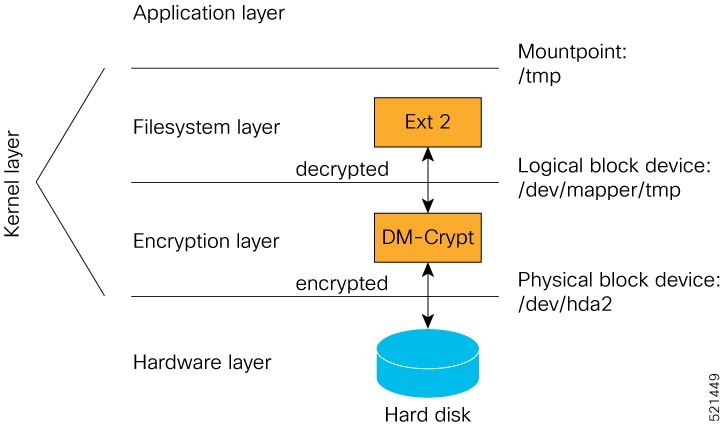
DM-Crypt is a Linux kernel module that provides disk encryption. The module takes advantage of the Linux kernel’s device-mapper (DM) infrastructure, which offers a way to create virtual layers of block devices. DM-Crypt is a device-mapper target that provides transparent encryption for block devices using the kernel crypto API. When data is written to the block device, it is encrypted; when data is read from the block device, it is decrypted.

Figure 1. DM-Crypt encryption

How AES-NI support works

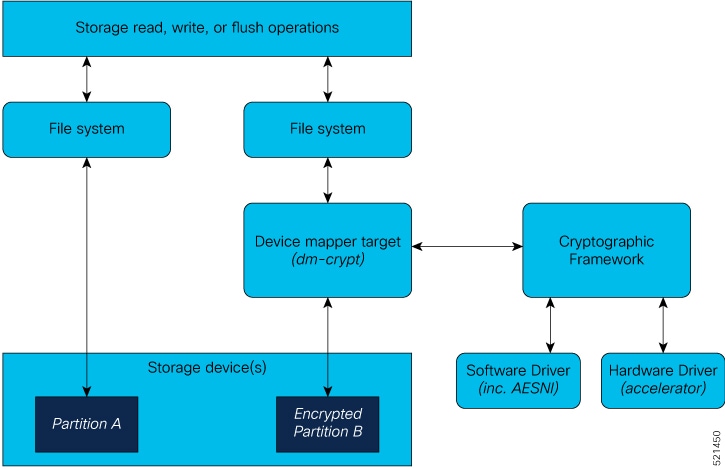
Advanced Encryption Standard New Instructions (AES-NI) is utilized in systems requiring encrypted block devices. By offloading cryptographic operations to hardware, AES-NI enables faster and more efficient encryption processes, freeing up the CPU for other tasks.

Summary

The key components involved in the process are:

  • AES-NI hardware engine: Provides hardware-based encryption and decryption for faster data processing.

  • DM-Crypt: Passes read-write requests to the crypto framework for encryption and decryption.

  • Cryptographic Framework: Utilizes off-chip hardware accelerators for cryptography and provides software implementations as needed.

AES-NI is a hardware-assisted engine from Intel that accelerates encryption and decryption for DM-Crypt operations, allowing high-speed data processing and optimized CPU usage.

Workflow

The process describes how AES-NI support works.

  1. Input-output operations initiate read-write requests to the encrypted block device.
  2. DM-Crypt receives these requests and passes multiple cryptographic requests to the Cryptographic Framework.
  3. The Cryptographic Framework leverages hardware accelerators (when available) to perform encryption and decryption, or falls back on software implementations if accelerators are not available.
  4. After processing, the crypto framework returns the encrypted or decrypted data to DM-Crypt.

Result

Encrypted or decrypted data is efficiently returned to DM-Crypt following hardware-accelerated processing, improving overall system performance and freeing CPU resources for additional tasks.


Cryptsetup

A cryptsetup tool is a command-line interface utility that

  • interacts with DM-Crypt to manage encrypted volumes

  • enables users to create, access, and manage encrypted devices, and

  • provides a user-space mechanism for setting up cryptographic disks.

DM-Crypt is a kernel-level encryption subsystem that relies on user-space tools such as cryptsetup to configure and manage cryptographic volumes.


Encrypted logical volumes

An encrypted logical volume is a storage volume that

  • can be created during software installation

  • can be activated or deactivated on demand, and

  • stores sensitive files on encrypted disk partitions.

  • An encrypted logical volume (LV) is created during software installation.

  • You can activate or deactivate the encrypted disk partition as needed. When activated, all sensitive files are migrated from the unencrypted disk partition to the encrypted disk partition; they can be migrated back during deactivation.

  • The capacity of the encrypted logical volume is 150 MB of disk space and is accessible as /var/xr/enc for applications.

Additional reference information

Applications may use this space for storage. However, if the software image is downgraded to a version that does not support encryption, this data is not included in migration.


Activate data encryption for an encrypted logical volume

Enable data encryption and verify successful completion of the backup and encryption activation process for a specific logical volume.

Use the disk-encryption activate location command to activate encryption on a logical volume. This ensures the data is protected by encrypting the specified disk. Reviewing the sample output confirms that the process has completed successfully.

Before you begin

Confirm that the router is running a supported Cisco IOS XR release and platform variant.

Procedure

Activate data encryption.

Example:

Router# disk-encryption activate location 0/RP0/CPU0
Tue Apr 16 14:35:00.939 UTC

Preparing system for backup. This may take a few minutes especially for large configurations.
	Status report: node0_RP0_CPU0: START TO BACKUP
Router#	Status report: node0_RP0_CPU0: BACKUP HAS COMPLETED SUCCESSFULLY
[Done]

The router completes the backup and activates data encryption on the specified logical volume. You can confirm successful activation by reviewing the output for the completion message.


SSD binding

A SSD binding is an encryption behavior that

  • stores an encryption key in the Trust Anchor module (TAm)

  • unlocks an encrypted logical volume only with the system-specific key, and

  • prevents an encrypted SSD from being unlocked on another line card.

When encryption is activated on a system, each card generates a random encryption key and stores it in its own secure storage—the Trust Anchor module (TAm). During successive reboots, the encryption key is read from the TAm and applied to unlock the encrypted device. Since each card stores its encryption key locally on the TAm, an SSD that is removed from one card and inserted into another cannot be unlocked by the key stored on that card, thereby making the SSD unusable.

If encryption is activated, the encrypted LV can only be unlocked by using the key stored in the TAm. So, if an encrypted SSD is removed and moved to another line card, the SSD cannot be unlocked. In other words, when you activate encryption, the SSD is bound to the card it is inserted in.


Data zeroization

Data zeroization is a cryptographic-module operation that

  • deletes sensitive data

  • can be performed from the XR prompt, and

  • uses the factory reset location command.

Zeroization refers to the process of deleting sensitive data from a cryptographic module.

You can perform zeroization by using the factory reset location command from the XR prompt.


Caution: data zeroization on encrypted systems

  • In case of a Return Material Authorization (RMA), you must perform a factory reset to zeroize the data.

  • Running the zeroization command while encryption is activated deletes the master encryption key from the TAm and renders the motherboard unusable after the subsequent reload.


Runtime defenses

A runtime defense is a runtime security tool that

  • mitigates common vulnerabilities

  • protects memory and object access patterns, and

  • monitors runtime defense functionality on the router.

Run Time Defenses (RTD) are a collection of tools used at runtime to mitigate common security vulnerabilities. RTD is classified into three groups:


Address space layout randomization

Address space layout randomization (ASLR) is a runtime defense technique that

  • randomizes memory addresses

  • makes vulnerable function locations harder to predict, and

  • reduces exploit reliability.

ASLR is a technique that stops an attacker from accessing a vulnerable program function by preventing them from discovering its memory address within a running process. To achieve this, ASLR randomly distributes fundamental parts of the process (such as the executable base, stack pointers, libraries, and other components) within the memory address space assigned by the operating system. As a result, attackers cannot reliably determine the memory address of a target function, making exploitation nearly impossible. If an attacker attempts to brute-force the address, the process typically crashes, thwarting the attack.


Kernel address space layout randomization

A kernel address space layout randomization (KASLR) is a runtime defense technique that

  • applies address randomization to the Linux kernel

  • protects fundamental kernel process parts, and

  • reduces kernel exploit predictability.

Kernel Address Space Layout Randomization (KASLR) is a technique similar to Address Space Layout Randomization (ASLR) but applies specifically at the Linux kernel level. KASLR protects the Linux kernel by randomizing the fundamental structure and locations of kernel processes within kernel memory during system boot. This prevents attackers from easily predicting or obtaining pointers to kernel memory distribution tables, hindering exploitation attempts.


Built-in object size checker

A built-in object size checker (BOSC) is a compiler-provided protection mechanism that

  • checks object size constraints

  • helps avoid buffer-overflow vulnerabilities, and

  • protects common SafeC functions.

BOSC is a limited buffer overflow protection mechanism provided by the compiler. BOSC helps in avoiding buffer-overflow related security vulnerabilities on common SafeC library functions such as, strcpy_s and memcpy_s.


Executable space protection

Executable space protection is a runtime defense technique that

  • protects data and code portions of program memory

  • blocks illegal execution attempts in data memory, and

  • blocks write attempts in code memory.

XSpace mitigates malicious code injection attacks by protecting the data and code portions of the program memory. The basic approach of such attacks is to overflow a buffer in the program stack and cause the transfer of control to injected code. Once in the injected code, the application behaves in an unexpected manner.

X-space ensures that the area of the memory where the authentic code exists is write-protected and the area of memory where the data is present is execution-protected. Illegal execution-attempts in the data-portion or write-attempts in the code-portion results in the application crashing.


Requirement: keep executable space protection enabled

You must keep the XSpace functionality enabled at all times. Do not disable executable space protection under any circumstances.


RTD monitors for runtime defense functionality

The RTD monitor tracks various aspects of runtime defense on the router, including:

  • Real-time monitoring of all RTD features enabled on the device.

  • Reporting the operational status of RTD defense mechanisms.

  • Maintaining logs for security-related runtime events.

Features

  • Provides consolidated security status for all runtime defense features.

  • Enables administrators to quickly identify which defense mechanisms are active or inactive.

  • Supports log retrieval for further analysis of runtime events.

Benefits

  • Simplifies security management by centralizing defense monitoring.

  • Enhances visibility into router protection mechanisms.

  • Assists in troubleshooting by providing detailed runtime security information.


Boot integrity and trust visibility

Boot integrity and trust visibility is an observability capability that

  • exposes platform identity information

  • records boot integrity measurements, and

  • supports verification of Cisco IOS XR software integrity.

Boot integrity and trust visibility allows Cisco's platform identity and software integrity information to be visible and actionable. Platform identity provides the platform’s manufacturing installed identity. Software integrity exposes boot integrity measurements that can be used to assess whether the platform has booted trusted code.

During the boot process, each stage of the firmware and software calculates and records the runtime checksum of the next stage boot entity in the Trusted Attestation Module (TAm). This record can be retrieved and compared with a Cisco-certified reference to verify if the software image is genuine. If checksum values differ, the software image may not be Cisco-certified or could have been altered by an unauthorized party.

Boot integrity and trust visibility provide customers with attestation capabilities to help ensure that Cisco IOS XR software has not been tampered with.


Verify boot integrity and trust visibility on the router

Ensure the router’s boot integrity and trust status are validated by reviewing PCR measurements, integrity logs, and TAm device details.

Boot integrity verification uses cryptographic measurements stored in Platform Configuration Registers (PCRs) and device trust anchor modules (TAm) to provide assurance that hardware and software components have not been altered. You can use IOS XR CLI or NETCONF protocol to obtain these values.

Before you begin

  • Confirm that the router is running a supported Cisco IOS XR release and platform variant.

  • Ensure that you have access to the router CLI or NETCONF protocol.

Procedure

  1. Collect PCR and trust measurements.

    Example:

    Router# show platform security attest pcr 15 trustpoint CiscoAIK nonce 4567

    This command displays integrity log values and confirms measurement authenticity.

    • Parameters measured include:

      • Micro loader hash

      • Boot loader hash

      • Image signing and management key hashes

      • Operating system image hash

    • Platform Configuration Register (PCR) 0-9 are used for secure boot.

      • Signature version designates the format of the signed data. The signature digest is SHA256, and the signing key is TCG-compliant.

      • (Optional) Use the Cisco-IOS-XR-remote-attestation-act.yang model to fetch boot integrity via NETCONF protocol.

  2. Review hardware digest and compare PCR values.

    • These commands display "known-good" and "observed" digest values and PCRs for hardware integrity.

    • Ensure that observed digests match known-good digests. PCRs should match platform expectations.

    Example:

    Router# show platform security attest PCR 15 trustpoint CiscoAIK nonce 4567 location 0/RP0/CPU0
    
    Sun Jun 21 03:07:18.394 UTC
    Nonce: 4567
    
    +--------------------------------------+
       Node location: node0_RP0_CPU0
    +--------------------------------------+
    Uptime: 495270
    pcr-quote: /1RDR4AYACCBG/wltf4TEwfdUjtjun7S3rXC90eAb0G0ytrYRv3ExwACRWcAAAAAAD8hUwAAAEf/////
    AQAAACQAAAALAAAAAQALAwCAAAAgae1J8QIYe06nS2RUx0JYeoG8tM3bqeVdpW7CObwBt+g=
    pcr-quote-signature:
    EZbzSUge89jSjH8ZqTgKJrZJBopEbd818C+h1Ec780qi7Li1WfCZQPIP6KCDV6HsRCVzLoFijgmlMLoZE2rakQq+/
    1TgZOWSLjMY7RbjSFr8z/zbpVI+YLnOG+wytVYWuY33uKHBn/
    YWokHwo+qVf7u9aLGhnrXKvRUaFknBiZtQGiyAdis6GbPTToqn0WSN1y6DPh4UHZj1vLVwJsI48mbQUrAyCZrz/
    XBHLM38tVJjqSrC0jw/6LF2DDoT5ks0VUFT7sqbysw4F56y+z/IlDBrrRW3GFOY46MOxDxLwSl1/
    n6zdoVjiKKeqKOnmhpBh72bJQAdeu/GVOYTrOSy4Q==
    pcr-index       pcr-value
      15    oYk8yqrzudIpGB4H++SaV0wMv6ugDSUIuUfeSqbJvbY=
    
    Router# show platform security integrity hardware digest-algorithm SHA1 trustpoint CiscoAIK nonce 4567 location 0/RP0/CPU0
    
    Sun Jun 21 03:09:14.594 UTC
    Nonce: 4567
    
    +--------------------------------------+
       Node location: node0_RP0_CPU0
    +--------------------------------------+
    TPM Name: node0_RP0_CPU0_aikido
    Uptime: 495385
    Known-good-digests:
    Index   value
      0     3TDUS9iUDCFX3VkICcOnySOQTPA=
    observed-digests:
    Index   value
      0     3TDUS9iUDCFX3VkICcOnySOQTPA=
    PCRs:
    Index   value
      15    1Y3uKqNv1UJQUNZQxmZkiuG4blk=
    
    Router# show platform security integrity hardware digest-algorithm SHA256 trustpoint CiscoAIK nonce 4567 location 0/RP0/CPU0
    
    Sun Jun 21 03:09:31.110 UTC
    Nonce: 4567
    
    +--------------------------------------+
       Node location: node0_RP0_CPU0
    +--------------------------------------+
    TPM Name: node0_RP0_CPU0_aikido
    Uptime: 495401
    Known-good-digests:
    Index   value
      0     3TDUS9iUDCFX3VkICcOnySOQTPA=
    observed-digests:
    Index   value
      0     3TDUS9iUDCFX3VkICcOnySOQTPA=
    PCRs:
    Index   value
      15    1Y3uKqNv1UJQUNZQxmZkiuG4blk=
    
    Router# show platform security integrity hardware digest-algorithm SHA256 trustpoint CiscoAIK nonce 4567 location 0/RP0/CPU0
    
    Sun Jun 21 03:09:43.782 UTC
    Nonce: 4567
    
    +--------------------------------------+
       Node location: node0_RP0_CPU0
    +--------------------------------------+
    TPM Name: node0_RP0_CPU0_aikido
    Uptime: 495414
    Known-good-digests:
    Index   value
      0     y3n/SsvyNb8g3o7FFRGCZwfbs8EGxvMZg/PeN0NA71k=
    observed-digests:
    Index   value
      0     y3n/SsvyNb8g3o7FFRGCZwfbs8EGxvMZg/PeN0NA71k=
    PCRs:
    Index   value
      15    oYk8yqrzudIpGB4H++SaV0wMv6ugDSUIuUfeSqbJvbY=
    Cisco AIK Certificate used for signing PCR
    pcr-quote: /1RDR4AYACCBG/wltf4TEwfdUjtjun7S3rXC90eAb0G0ytrYRv3ExwACRWcAAAAAAD8hywAAAEf////
    /AQAAACQAAAALAAAAAQALAwCAAAAgae1J8QIYe06nS2RUx0JYeoG8tM3bqeVdpW7CObwBt+g=
    pcr-quote-signature: qyKbK7ndJbrgxeVnOodLWQzT7++NzrxJ9ERRvJzvTe4+8r6p0HGSepHUhZHzYkXw4DbniHAK0Cs3dwg/
    hGKGe4M8Lz+/k682yIjaFYYip0DHMaV2ny/lT7RSqM/6u3j/JZrZv39MaeHa3MyjjonzRf9oe7EBSFAKsa/D54eTR0eFtaxFy/
    XdtM0VVQe2JRdoBVxnIBLGiVmGRlVVlmHvwwgX1lAN6e3/soC1Vk3I5gjLldPHUYuJ/
    7PTGyAwZsbdeigx8d4ViUUUjSMzK7JISwXa8k4GiPQVLBHtqqR+RA9scmMZTbKLsG3luIWKQeyCtXMYE1VOeW8WQlAvioMICw==
    RP/0/RP0/CPU0:ios#show platform security integrity hardware digest-algorith$
    Sun Jun 21 03:09:56.794 UTC
    Nonce: 4567
    
    +--------------------------------------+
       Node location: node0_RP0_CPU0
    +--------------------------------------+
    TPM Name: node0_RP0_CPU0_aikido
    Uptime: 495427
    Known-good-digests:
    Index   value
      0     3TDUS9iUDCFX3VkICcOnySOQTPA=
    observed-digests:
    Index   value
      0     3TDUS9iUDCFX3VkICcOnySOQTPA=
    PCRs:
    Index   value
      15    1Y3uKqNv1UJQUNZQxmZkiuG4blk=
    
  3. Inspect TAm device details and certificates.

    • Review the output for device and firmware information, serial numbers, and certificate details.

    • Check SUDI Root, SUDI Sub CA, and SUDI certificates for validity, issuer, and expiration dates.

    Example:

    Router# show platform security tam all location all
    Mon Apr 15 14:42:34.649 UTC
    ---------------------------------------------
    Node - node0_RP0_CPU0
    ---------------------------------------------
    Device Type            -     AIKIDO Extended
    Device PID             -     N540X-12Z16G-SYS-A
    Device Serial Number   -     FOC2333NJ0J
    Device Firmware Version-     0x24.000b
    Server Version         -     3
    Server Package Version -     9.4.1
    Client Package Version -     9.4.1
    
    Sudi Root Cert:
    ---------------------------------------------
    Certificate:
        Data:
            Version: 3 (0x2)
            Serial Number:
                01:9a:33:58:78:ce:16:c1:c1
            Signature Algorithm: sha256WithRSAEncryption
            Issuer: O=Cisco, CN=Cisco Root CA 2099
            Validity
                Not Before: Aug  9 20:58:28 2016 GMT
                Not After : Aug  9 20:58:28 2099 GMT
            Subject: O=Cisco, CN=Cisco Root CA 2099
            Subject Public Key Info:
                Public Key Algorithm: rsaEncryption
                    RSA Public-Key: (2048 bit)
                    Modulus:
                        00:d3:b6:e3:35:7e:0d:3e:f4:67:e5:8a:4e:1a:c6:
            Exponent: 65537 (0x10001)
            X509v3 extensions:
                X509v3 Key Usage: critical
                    Certificate Sign, CRL Sign
                X509v3 Basic Constraints: critical
                    CA:TRUE
                X509v3 Subject Key Identifier:
                    38:95:57:0F:34:23:4E:F3:A1:26:20:BA:14:91:C7:41:88:1D:A3:5B
        Signature Algorithm: sha256WithRSAEncryption
             8d:e2:99:a3:ee:31:77:4e:53:16:da:bd:f6:72:a7:58:0d:09:
    
    Sudi Sub CA Cert:
    ---------------------------------------------
    Certificate:
        Data:
            Version: 3 (0x2)
            Serial Number:
                0a:64:75:52:4c:d8:61:7c:62
            Signature Algorithm: sha256WithRSAEncryption
            Issuer: O=Cisco, CN=Cisco Root CA 2099
            Validity
                Not Before: Aug 11 20:28:08 2016 GMT
                Not After : Aug  9 20:58:27 2099 GMT
            Subject: CN=High Assurance SUDI CA, O=Cisco
            Subject Public Key Info:
                Public Key Algorithm: rsaEncryption
                    RSA Public-Key: (2048 bit)
                    Modulus:
                        00:bd:dc:de:49:67:43:23:a9:51:64:36:11:bc:0e:
    
                    Exponent: 65537 (0x10001)
            X509v3 extensions:
                X509v3 Key Usage: critical
                    Certificate Sign, CRL Sign
                X509v3 Basic Constraints: critical
                    CA:TRUE, pathlen:0
                Authority Information Access:
                    CA Issuers - URI:https://www.cisco.com/security/pki/certs/crca2099.cer
                    OCSP - URI:http://pkicvs.cisco.com/pki/ocsp
    
                X509v3 Authority Key Identifier:
                    keyid:38:95:57:0F:34:23:4E:F3:A1:26:20:BA:14:91:C7:41:88:1D:A3:5B
    
                X509v3 Certificate Policies:
                    Policy: 1.3.6.1.4.1.9.21.1.30.0
                      CPS: http://www.cisco.com/security/pki/policies/
    
                X509v3 CRL Distribution Points:
    
                    Full Name:
                      URI:http://www.cisco.com/security/pki/crl/crca2099.crl
    
                X509v3 Subject Key Identifier:
                    EA:6B:A3:B9:C1:13:97:7E:1B:FB:3A:8D:68:60:07:39:5F:87:48:FA
        Signature Algorithm: sha256WithRSAEncryption
             5c:a9:81:0e:80:01:e1:19:62:a7:77:03:3d:d3:55:d7:d8:49:
    
    Sudi Cert:
    ---------------------------------------------
    Certificate:
        Data:
            Version: 3 (0x2)
            Serial Number: 29200071 (0x1bd8ec7)
            Signature Algorithm: sha256WithRSAEncryption
            Issuer: CN=High Assurance SUDI CA, O=Cisco
            Validity
                Not Before: Sep  5 03:39:36 2019 GMT
                Not After : Aug  9 20:58:26 2099 GMT
            Subject: serialNumber=PID:N540X-12Z16G-SYS-A SN:FOC2333NJ0J, O=Cisco, OU=ACT-2 Lite SUDI, CN=Cisco NCS 540 System with 12x10G+4x1G Cu+12x1G AC Chassis
            Subject Public Key Info:
                Public Key Algorithm: rsaEncryption
                    RSA Public-Key: (2048 bit)
                    Modulus:
                        00:ca:2a:8a:b4:87:8b:43:68:17:d3:b2:43:44:ca:
    
                    Exponent: 65537 (0x10001)
            X509v3 extensions:
                X509v3 Key Usage: critical
                    Digital Signature, Non Repudiation, Key Encipherment
                X509v3 Basic Constraints: critical
                    CA:FALSE
                X509v3 Subject Alternative Name:
                    0...N.
    +..........@917C927B4B340B908703945A7A0A6D14D0207ADB2FB622DFA8C83538FD7E63B5.
    B..+.........5.3ChipID=QvZQd9q9psveoAz6QJQeNAAAAAAAAAAAAAAAAAAAAAA=
        Signature Algorithm: sha256WithRSAEncryption
             5b:67:da:2e:e5:d4:07:f2:ff:9c:17:c9:54:78:8b:da:16:df:
  4. Analyze event logs and PCR contents.

    Review the event logs for ordered, TCG-defined events extended to PCRs. Confirm that event hashes and PCR register contents align with expected values.

    Example:

    
    platform-pid string Platform ID
    Event log [key: event_number]: Ordered list of TCG described event log
                                   that extended the PCRs in the order they
                                   were logged
        +-- event_number   uint32 Unique event number of this even
        +-- event_type     uint32 log event type
        +-- PCR_index      uint16 PCR index that this event extended
        +-- digest         hex-string The hash of the event data
        +-- event_size     uint32 Size of the event data
        +-- event_data     uint8[] event data, size determined by event_size
    PCR [index] - List of relevant PCR contents
        +-- index    uint16 PCR register number
        +-- value   uint8[] 32 bytes - PCR register content
    PCR Quote binary TPM 2.0 PCR Quote
    PCR Quote Signature binary Signature of the PCR quote using TAM-held ECC  or RSA restricted key with the optional nonce if supplied

The router displays boot integrity measurements, PCR values, and TAm device details. If digest values and certificates are verified and match expectations, your router’s integrity and trust status are validated.


How boot integrity verification works

The boot integrity verification is automatic and the BIOS reports the values to the PCR.

Summary

The key components involved in the process are:

  • BIOS: Reports system versions and communicates with Platform Configuration Register (PCR).

  • Platform Configuration Register (PCR): Receives and stores integrity measurements during boot.

  • Integrity database: Provides expected integrity values for comparison during verification.

Boot integrity verification is an automated process that checks the system’s startup components to ensure the platform's integrity and detect any compromise.

Workflow

These stages describe how boot integrity verification works.

  1. Report Boot 0 version and look up the expected integrity value for this platform and version.
  2. Report bootloader version and look up the expected integrity value for this platform and version.
  3. Report OS version and look up the expected integrity value for this platform and version.
  4. Compute the expected PCR 0 and PCR 8 values using integrity values obtained from steps 1–3.
  5. Compare the expected PCR values against the actual PCR values.
  6. Verify the nonced signature to ensure the liveliness of the response data (this step is performed only after platform identity verification using SUDI).
  7. (Optional) Verify that the software image (IOS XR) version matches what is expected to be installed on the platform.

Result

A failure in any step indicates either a compromised system or an incomplete integrity value database.


Secure gRPC sessions

A secure gRPC session is a remote procedure call communication capability that

  • uses TLS by default

  • provides a secure connection between client and server, and

  • prevents eavesdropping, tampering, and message forgery.

  • gRPC remote procedure calls: An open source remote procedure call (RPC) system that provides features such as authentication, bidirectional streaming and flow control, blocking or non-blocking bindings, cancellation, and timeouts.

    For more information, see https://opensource.google.com/projects/grpc.

  • Transport Layer Security (TLS): A cryptographic protocol that provides end-to-end communications security over networks. TLS prevents eavesdropping, tampering, and message forgery.

  • Default TLS behavior in Cisco IOS XR7: In Cisco IOS XR7, TLS is enabled by default in gRPC to provide a secure connection between the client and server.


Recommendation: disable TLS 1.0 for gRPC

We recommend disabling TLS version 1.0 for gRPC. Although TLS provides secure communication between servers and clients, TLS version 1.0 may pose a security threat. You can disable TLS version 1.0 using the grpc tlsv1-disable command.


Integrity Measurement Architecture

Integrity Measurement Architecture is a Linux kernel integrity subsystem that

  • detects accidental or malicious file alteration

  • measures and appraises file integrity values, and

  • audits integrity information.

The goals of the Linux kernel integrity subsystem are to:

  • detect whether files are accidentally or maliciously altered, both remotely and locally

  • measure the file by calculating the hash of the file content

  • appraise a file's measurement against a known good value stored as an extended attribute

  • enforce local file integrity

There are three components in the Linux kernel integrity subsystem:

  • IMA measurement: Maintains a runtime measurement list and an aggregate integrity value anchored in the hardware Trusted Anchor module (TAm). This design prevents software attacks from compromising the measurement list without detection and supports attesting to runtime integrity in trusted boot systems.

  • IMA appraisal: Appraises file measurements against known good values to assess integrity.

  • IMA audit: Audits integrity information for analysis and historical tracking.

Note

These goals are complementary to the Mandatory Access Control (MAC) protections provided by SELinux.

For more information about Integrity Measurement Architecture, see An Overview of The Linux Integrity Subsystem.


IMA signatures

The IMA appraisal provides local integrity, validation, and enforcement of the measurement against a known good value stored as an extended attribute—security.ima. The method for validating file data integrity is based on a digital signature, which in addition to providing file data integrity also provides authenticity. Each file (RPM) shipped in the image is signed by Cisco during the build and packaging process and validated at runtime using the IMA public certificate stored in the TAm.

All RPMs contain Cisco IMA signatures of the files packaged in the RPM, which are embedded in the RPM header. The IMA signature of the individual file is stored in its extended attribute during RPM installation. This protects against modification of the Cisco RPMs.

The IMA signature format used for IMA can have multiple lines and every line has comma-separated fields. Each line entry will have the filename, hash, and signature as illustrated below.

  • File – Filename with the full path of the file hashed and signed

  • Hash – SHA256 hash of the file

  • Signature – RSA2048 key-based signature