System Security Configuration Guide for Cisco 8000 Series Routers, IOS XR Releases

PDF

System Security Configuration Guide for Cisco 8000 Series Routers, IOS XR Releases

Automatic PKI certificate renewal

Want to summarize with AI?

Log in

Explains automatic PKI certificate renewal and auto-enroll behavior for Cisco IOS XR trustpoint certificates.


Automatic PKI certificate renewal is a Cisco IOS XR capability that

  • enables a router to request a new PKI certificate before the current certificate expires

  • eliminates the need for manual replacement of certificates, and

  • helps avoid interruptions to encrypted communications such as MACsec session flaps due to certificate expiry.

  • Public key infrastructure (PKI) controls the digital certificates used to authenticate a router and protect sensitive information flowing through a network.

  • PKI certificates can have a short validity period and otherwise require manual replacement before expiration.

Feature history

Table 1. Feature History Table

Feature Name

Release Information

Feature Description

Automatic renewal of Public Key Infrastructure (PKI) certificate

Release 25.4.1

Introduced in this release on: Fixed Systems (8010 [ASIC: A100])(select variants only*)

*This feature is supported on:

  • 8011-32Y8L2H2FH

  • 8011-12G12X4Y-A/D

Automatic renewal of Public Key Infrastructure (PKI) certificate

Release 25.1.1

Introduced in this release on: Fixed Systems (8700 [ASIC: K100], 8010 [ASIC: A100])(select variants only*)

*This feature is supported on:

  • 8712-MOD-M

  • 8011-4G24Y4H-I

Automatic renewal of Public Key Infrastructure (PKI) certificate

Release 24.4.1

Introduced in this release on: Fixed Systems (8200 [ASIC: P100], 8700 [ASIC: P100])(select variants only*); Modular Systems (8800 [LC ASIC: P100])(select variants only*)

*This feature is supported on:

  • 8212-48FH-M

  • 8711-32FH-M

  • 88-LC1-36EH

  • 88-LC1-12TH24FH-E

  • 88-LC1-52Y8H-EM

Automatic renewal of Public Key Infrastructure (PKI) certificate

Release 7.5.3

You can now enable the router to renew the PKI certificate from the Certificate Authority (CA) by configuring the percentage of the certificate validity, after which the router requests a new certificate from the CA, and the CA authorizes it before certification expiration. This feature eliminates the previously needed manual efforts of certification renewal and avoids interruptions such as MACsec session flaps due to certificate expiry and so on.

This feature introduces the following commands:

Additional reference information

  • The auto-enroll setting defines the certificate-validity percentage after which the router requests a new certificate from the certification authority (CA).

  • PKI encrypts and decrypts data using a public key and a private key pair that it generates. A PKI digital certificate authenticates the identity of a router.

  • You can configure a timeline for PKI certificate renewal by specifying the percentage of certificate validity after which the router requests a new certificate from the CA server. This timeline for automatic PKI certificate renewal is called auto-enroll.
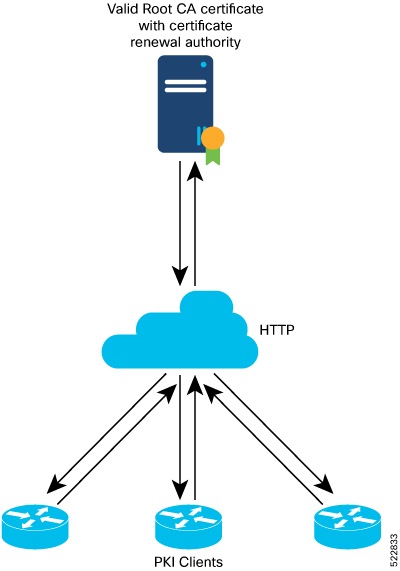

How automatic PKI certificate renewal works

Automatic PKI certificate renewal starts when a router has auto-enroll configured for a trustpoint and the configured percentage of certificate validity has elapsed.

Summary

The key components involved in the process are:

  • Router: Monitors the auto-enroll timeline and generates certificate signing requests when renewal is needed.

  • Certification authority server: Receives renewal requests, verifies authorization, and creates the newly signed certificate.

  • Auto-enroll configuration: Specifies the percentage of certificate validity after which renewal begins.

Automatic PKI certificate renewal ensures that a Cisco IOS XR router with auto-enroll configured can obtain and install a new PKI certificate before the existing certificate expires, maintaining uninterrupted secure network operations.

Workflow

Figure 1. Automatic renewal of Public Key Infrastructure (PKI) certificate

These stages describe how automatic PKI certificate renewal works.

  1. The router reaches the configured auto-enroll point as the PKI certificate approaches its expiry date.

  2. The router generates a certificate signing request.

  3. The router sends the certificate signing request to the certification authority (CA) server using Simple Certificate Management Protocol (SCMP).

  4. The CA server creates and signs the new certificate, authorizing it before the current certificate expires.

  5. The router installs the new certificate, replacing the old one.

  6. Automatic renewal ensures there is no disruption to data flows in the network.

Result

The router successfully installs a newly signed PKI certificate before the previous certificate expires, maintaining secure communication and avoiding service interruption.


Requirement: Meet automatic PKI certificate renewal prerequisites

To ensure automatic PKI certificate renewal is supported, meet the following requirements:

  • Ensure that the certificate authority (CA) has a valid certificate.

  • Confirm that the CA supports certificate renewal.

  • Configure a trustpoint in the router using the crypto ca trustpoint command.

  • A trustpoint must be authenticated before enrollment. It is authenticated when it has a CA certificate and enrolled when it has a router certificate.

  • Ensure communications between the PKI client and the CA server use the HTTP protocol; the enrollment URL must be an HTTP URL.


Requirement: Automatic PKI certificate renewal guidelines

To maintain a supported PKI certificate authority deployment, follow these requirements:

  • PKI certificates must be signed using the RSA algorithm only.

  • If you configure the auto-enroll option under the trustpoint after the renewal timer for a PKI certificate has started, this configuration takes effect for the next renewal cycle—not the current one. The same condition applies to configuring the no auto-enroll option.

  • The auto-enroll percentage can range between 1 and 99.

  • The certificate renewal process requires the serial number and IP address values in the trustpoint. If these values are available in the trustpoint, the renewal process obtains them from there; otherwise, the router CLI prompts you to configure them during trustpoint enrollment.

  • By default, PKI uses PKCS requests for automatic certificate renewal. You can also configure the router to use a Renewal request by executing the renewal-message-type renewalreq command.

  • If the CA server cannot address certificate renewal requests, it instructs the router to poll the renewal request. In this case, the router retries for 10 minutes with a gap of 1 minute between each request if a certificate renewal attempt fails. You can configure these values with the enrollment retry count and enrollment retry period commands.


Configure automatic PKI certificate renewal

Enable automatic renewal of PKI certificates so your device maintains valid credentials for secure communication.

Use automatic PKI certificate renewal to avoid manual certificate management and ensure the device consistently has valid certificates from the certificate authority (CA).

Before you begin

  • Review CA requirements and prerequisites for certificate renewal.

  • Confirm you have an existing trustpoint configured.

  • Have access to the device CLI.

Procedure

  1. Configure the trustpoint for certificate enrollment.

    Example:

    Router# configure
    Router(config)# crypto ca trustpoint test
    Router(config-trustp)# enrollment url http://frog.phoobin.com
    Router(config-trustp)# subject-name OU=Spiral Dept., O=tiedye.com
    Router(config-trustp)# auto-enroll 30
    Router(config-trustp)# commit
  2. (Optional) To disable automatic renewal.

    Example:

    Router# configure
    Router(config)# no auto-enroll
    Router(config-trustp)# commit
  3. Review the running configuration.

    Example:

    Router# show running-config crypto ca trustpoint test
    crypto ca trustpoint test
     enrollment url http://frog.phoobin.com
     auto-enroll 30
    !

PKI certificate renewal is automated. The device will renew certificates at the specified interval without manual intervention.