EVPN Configuration Guide for Cisco 8000 Series Routers, Cisco IOS XR Releases

PDF

EVPN Configuration Guide for Cisco 8000 Series Routers, Cisco IOS XR Releases

Seamless migration of VPWS network to EVPN network

Want to summarize with AI?

Log in

Explains the transition from legacy VPWS networks to EVPN-based networks, highlighting the process, compatibility, migration flexibility, and key enhancements.


A migration from VPWS to EVPN is a process that

  • enables gradual and incremental migration of PE nodes from legacy VPWS to EVPN-VPWS without service disruption

  • allows migration of Attachment Circuits (ACs) connected to legacy VPWS pseudowires (PWs) using targeted-LDP or BGP-AD signaling to EVPN-VPWS services, and

  • groups VPN instances by EVPN Instance VPN ID (EVI), identified by an Ethernet tag or AC-ID, and associates them with route-targets and route-distinguishers.

Table 1. Feature History Table

Feature Name

Release Information

Feature Description

EVPN Seamless Integration with Legacy VPWS

Release 26.2.1

Introduced in this release on: Modular Systems (8800 [LC ASIC: K100])(select variants only*);

*This feature is supported on Cisco 88-LC1-48Y8H-EM line cards.

EVPN Seamless Integration with Legacy VPWS

Release 25.4.1

Introduced in this release on: Fixed Systems (8010 [ASIC: A100])(select variants only*)

*This feature is now supported on:

  • 8011-32Y8L2H2FH

  • 8011-12G12X4Y-A

  • 8011-12G12X4Y-D

EVPN Seamless Integration with Legacy VPWS

Release 25.3.1

Introduced in this release on: Fixed Systems (8200 [ASIC: Q200, P100], 8700 [ASIC: P100, K100]); Centralized Systems (8600 [ASIC:Q200]); Modular Systems (8800 [LC ASIC: Q100, Q200, P100])

You can configure local static MPLS labels for EVPN VPWS under the L2VPN cross-connect P2P EVPN EVI configuration, which ensures remote PEs use a consistent, common label for the same EVPN service, improving forwarding consistency and operational control.

The feature introduces these changes:

CLI:

EVPN Seamless Integration with Legacy VPWS

Release 25.1.1

Introduced in this release on: Fixed Systems (8010 [ASIC: A100]) (select variants only*)

*This feature is now supported on the Cisco 8011-4G24Y4H-I routers.

EVPN Seamless Integration with Legacy VPWS

Release 24.4.1

Introduced in this release on: Fixed Systems (8700) (select variants only*)

*The seamless migration of VPWS to EVPN-VPWS services functionality is now extended to the Cisco 8712-MOD-M routers.

EVPN Seamless Integration with Legacy VPWS

Release 24.3.1

Introduced in this release on: Modular Systems (8800 [LC ASIC: P100]) (select variants only*)

*The seamless migration of VPWS to EVPN-VPWS services functionality is now extended to these fixed systems and line cards:

  • 8212-48FH-M

  • 8711-32FH-M

  • 88-LC1-52Y8H-EM

  • 88-LC1-12TH24FH-E

EVPN Seamless Integration with Legacy VPWS

Release 24.2.11

Introduced in this release on: Modular Systems (8800 [LC ASIC: Q200, P100]) (select variants only*)

*The seamless migration of VPWS to EVPN-VPWS services functionality is now extended to routers with the Q200 and 88-LC1-36EH line cards.

EVPN Seamless Integration with Legacy VPWS

Release 7.8.1

When expanding an existing L2VPN network, users may want to deploy EVPN-VPWS to provide additional Layer 2 point-to-point Ethernet services, and at the same time some of their customer traffic may still need to be terminated on the existing L2VPN PEs on their network.

Users can migrate the PE nodes from L2VPN VPWS to EVPN-VPWS, without disruption in traffic. The seamless migration offers users the option to use either VPWS or EVPN-VPWS services on PE nodes. This allows the coexistence of legacy VPWS and EVPN-VPWS dual-stack in the core for a given L2 Attachment Circuit (AC) over the same MPLS network.

This feature introduces the vpws-seamless-integration  command.

Transitioning from VPWS to EVPN

Although VPWS is a widely deployed Layer 2 VPN technology, customers are increasingly transitioning their VPWS networks to EVPN to take advantage of enhanced scalability, operational flexibility, and simplified deployment. To protect existing investments in VPWS infrastructure, service providers are focusing on strategies to ensure smooth integration between their legacy VPWS networks and modern EVPN-based networks.

Key highlights

These are the key highlights of migrating VPWS to EVPN:

  • Migration flexibility: Users can migrate PE nodes from VPWS to EVPN incrementally.

  • Attachment Circuit (AC) migration: Supports the migration of ACs connected to legacy VPWS pseudowires (PWs) using either targeted-LDP signaling or BGP Auto-Discovery (BGP-AD) signaling to EVPN-VPWS.

  • VPN instance grouping: In EVPN-VPWS, VPN instances are grouped by EVPN Instance VPN ID (EVI) and identified using an Ethernet tag or Attachment Circuit ID (AC-ID). The EVI is associated with route targets and route distinguishers.

  • Cross-connect functionality: During migration, the EVPN-VPWS PE router can perform either VPWS or EVPN-VPWS Layer 2 cross-connect for a given AC.

  • Route advertisement: When both EVPN-VPWS and BGP-AD PWs are configured for the same AC, the EVPN-VPWS PE advertises both the BGP VPWS Auto-Discovery (AD) route and the BGP EVPN Auto-Discovery (EVI/EAD) route, prioritizing EVPN-VPWS pseudowires over BGP-AD VPWS pseudowires.

MPLS static label support for EVPN VPWS

From Release 25.3.1, you can assign a static MPLS label to an EVPN service. This static assignment overrides the default dynamic label allocation by Cisco IOS XR software.

When you configure a static MPLS label on Provider Edge (PE) routers, this ensures that remote PEs receive traffic for the same service with a consistent, common label.

The MPLS static label support for EVPN VPWS provides the same static label functionality as legacy P2P services.

You can configure local static MPLS labels for EVPN VPWS under the L2VPN cross-connect P2P EVPN EVI configuration mode. The range for these static MPLS labels is from 16 to 1,048,575.

Configure static MPLS labels within the range of 16 to 15,000 to avoid conflicts with existing dynamic labels and the default Segment Routing Local Block (SRLB) range of 15,000 to 15,999. For more information, see About the Segment Routing Local Block in the Segment Routing Configuration Guide for Cisco 8000 Series Routers.

Migrating VPWS network to EVPN network

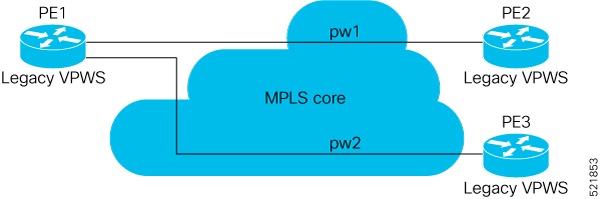
In the current topology, PE1, PE2, and PE3 are provider edge devices connected through legacy pseudowires. The user plans to replace PE1 with new hardware and enable EVPN on it. This phased migration ensures minimal disruption to the network.

Summary

This process outlines the steps to migrate a legacy VPWS network to EVPN in a phased manner. The migration is designed to be seamless and can span multiple years.

The key components involved in the process are:

  • Provider edge devices (PE1, PE2, PE3): These are the MPLS network devices where the legacy VPWS cross-connects are operational.

  • Legacy pseudowires (PW1, PW2): These are the existing connections between the provider edge devices.

  • New hardware for PE1: This replaces the legacy VPWS on PE1 and enables EVPN functionality.

Workflow

Figure 1. VPWS nodes

These are the stages of migration process:

  1. Preparation:

    • Identify the legacy VPWS nodes to be migrated.

    • Plan the migration timeline, considering that it may span multiple years.

  2. Replacement of PE1:

    • Replace the existing PE1 hardware with new equipment.

    • Ensure that the new hardware is compatible with EVPN-VPWS.

  3. Enabling EVPN-VPWS on PE1:

    • Configure the new PE1 to support EVPN-VPWS.

    • Verify the configuration to ensure seamless integration with the existing network.

  4. Testing and validation:

    • Test the connectivity between PE1 and other provider edge devices (PE2 and PE3).

    • Validate the functionality of EVPN-VPWS on the new PE1.

  5. Phased migration of other nodes:

    • Gradually replace other legacy VPWS nodes (PE2, PE3) with EVPN-VPWS-enabled hardware.

    • Repeat the configuration, testing, and validation steps for each node.

    The migration process enables the network to transition from a legacy VPWS setup to an EVPN-VPWS architecture, ensuring improved scalability, flexibility, and operational efficiency.


How EVPN-VPWS migration works

Summary

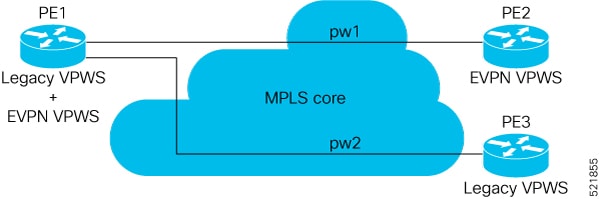
The process of migrating to EVPN-VPWS involves enabling EVPN-VPWS on PE1, followed by the gradual upgrade of other PE nodes.

The key components involved in this process are:

  • PE1: Initiates EVPN-VPWS and advertises routes.

  • PE2 and PE3: Operate in legacy VPWS mode until upgraded.

  • BGP VPWS Auto-Discovery route: Facilitates route advertisement.

Workflow

Figure 2. PE1 enabled with EVPN-VPWS

The process involves these stages:

  1. Enabling EVPN-VPWS on PE1:

    • PE1 starts advertising EVPN EVI or Ethernet-AD routes to other PE nodes.

    • PE1 advertises the BGP VPWS Auto-Discovery route and the BGP EVPN Ethernet-AD per EVI route for a given pseudowire (PW).

  2. Interoperability with legacy VPWS:

    • Since PE2 and PE3 are not yet migrated, PE1 does not receive any EVI/EAD routes from these nodes.

    • Legacy VPWS continues to operate between PE1, PE2, and PE3.

    • PE1 forwards traffic using the legacy VPWS mechanism.

  3. Upgrading PE2 to EVPN-VPWS:

    • After one year, PE2 is upgraded to EVPN-VPWS.

    • PE2 begins advertising EVPN EVI or Ethernet-AD routes, enabling EVPN-VPWS communication with PE1.

    The migration ensures a seamless transition from legacy VPWS to EVPN-VPWS, maintaining traffic forwarding during the process and enabling advanced EVPN-VPWS features post-upgrade.


How EVPN-VPWS integration works

Summary

The process of integrating EVPN-VPWS with legacy VPWS involves multiple stages, ensuring seamless migration while maintaining network stability.

The key components involved in the process are:

  • PE1 and PE2: These devices facilitate the transition from legacy VPWS to EVPN-VPWS.

  • PE3: A device that remains on legacy VPWS during the initial migration stages.

  • EVPN-VPWS service: A high-priority service that replaces legacy VPWS.

Workflow

Figure 3. PE2 enabled with EVPN-VPWS

The process involves these stages:

  1. Upgrade completion: After the upgrade is completed, PE2 begins advertising EVI/EAD routes to other PE nodes.

  2. Discovery and integration:

    • PE1 and PE2 discover each other through EVPN routes.

    • EVPN-VPWS service replaces the legacy VPWS service between PE1 and PE2, achieving seamless integration.

  3. Service prioritization: EVPN-VPWS service takes precedence over the legacy VPWS network.

  4. Legacy VPWS shutdown: PE1 and PE2 shut down the legacy VPWS between them to prevent duplicate packets from remote CE devices.

  5. Coexistence with PE3: PE3 remains on legacy VPWS, and PE1 continues running legacy VPWS service with PE3.

  6. Dual-Stack coexistence: The migration continues for remaining PE nodes, with legacy VPWS and EVPN-VPWS coexisting in the core for a given L2 AC.

  7. Future upgrades:

    • After a year, PE3 is upgraded to enable EVPN-VPWS service.

    • All PE devices are eventually replaced with EVPN-VPWS services.

  8. Configuration retention: The user retains both legacy and EVPN-VPWS-related configurations on PE1 and PE2 nodes.

  9. Rollback capability: If network issues arise, the migration can be rolled back. This reverts PE2, and subsequently PE1 and PE2, to the legacy VPWS configuration.

    The migration ensures a seamless transition to EVPN-VPWS while maintaining network stability and providing rollback options for troubleshooting.


Configure EVPN on existing VPWS

Enable seamless migration and integration from legacy VPWS to EVPN to ensure smooth migration and coexistence.

This task involves configuring EVPN-VPWS alongside legacy VPWS and migrating PE devices incrementally.

Before you begin

  • Ensure that the network devices support EVPN-VPWS.

  • Verify that the required BGP configurations are in place.

Procedure

1.

Migrate VPWS to EVPN-VPWS on PE1.

Example:

In this example, both legacy VPWS and EVPN-VPWS coexist on PE1.


/* VPWS configuration on PE1 */
Router# configure
Router(config)# l2vpn xconnect group legacy-vpws
Router(config-l2vpn-xc)# mp2mp vpws1
Router(config-l2vpn-xc-mp2mp)# autodiscovery bgp
Router(config-l2vpn-xc-mp2mp-ad)# signaling-protocol bgp
Router(config-l2vpn-xc-mp2mp-ad-sig)# ce-id 1
Router(config-l2vpn-xc-mp2mp-ad-sig-ce)# interface Bundle-Ether1.1 remote-ce-id 2
Router(config-l2vpn-xc-mp2mp-ad-sig-ce)# commit
Router(config-l2vpn-xc-mp2mp-ad-sig-ce)# exit
Router(config-l2vpn-xc-mp2mp-ad-sig)# ce-id 3
Router(config-l2vpn-xc-mp2mp-ad-sig-ce)# interface Bundle-Ether1.2 remote-ce-id 4
Router(config-l2vpn-xc-mp2mp-ad-sig-ce)# commit

/* Migrate VPWS to EVPN-VPWS on PE1 */
Router# configure
Router(config)# l2vpn xconnect group legacy-vpws
Router(config-l2vpn-xc)# mp2mp vpws1
Router(config-l2vpn-xc-mp2mp)# autodiscovery bgp
Router(config-l2vpn-xc-mp2mp-ad)# signaling-protocol bgp
Router(config-l2vpn-xc-mp2mp-ad-sig)# ce-id 1
Router(config-l2vpn-xc-mp2mp-ad-sig-ce)# vpws-seamless-integration 
Router(config-l2vpn-xc-mp2mp-ad-sig-ce)# interface Bundle-Ether1.1 remote-ce-id 2
Router(config-l2vpn-xc-mp2mp-ad-sig-ce)# commit
Router(config-l2vpn-xc-mp2mp-ad-sig-ce)# root
Router(config)# l2vpn xconnect group evpn-vpws
Router(config-l2vpn-xc)# p2p evpn1
Router(config-l2vpn-xc-p2p)# interface Bundle-Ether 1.1
Router(config-l2vpn-xc-p2p)# neighbor evpn evi 4 service 5
Router(config-l2vpn-xc-p2p-pw)# commit

/* VPWS configuration on PE2 */
Router# configure
Router(config)# l2vpn xconnect group legacy-vpws
Router(config-l2vpn-xc)# mp2mp vpws1
Router(config-l2vpn-xc-mp2mp)# autodiscovery bgp
Router(config-l2vpn-xc-mp2mp-ad)# signaling-protocol bgp
Router(config-l2vpn-xc-mp2mp-ad-sig)# ce-id 2
Router(config-l2vpn-xc-mp2mp-ad-sig-ce)# interface Bundle-Ether1.1 remote-ce-id 1
Router(config-l2vpn-xc-mp2mp-ad-sig-ce)# commit

/* VPWS configuration on PE3 */
Router# configure
Router(config)# l2vpn xconnect group legacy-vpws
Router(config-l2vpn-xc)# mp2mp vpws1
Router(config-l2vpn-xc-mp2mp)# autodiscovery bgp
Router(config-l2vpn-xc-mp2mp-ad)# signaling-protocol bgp
Router(config-l2vpn-xc-mp2mp-ad-sig)# ce-id 4
Router(config-l2vpn-xc-mp2mp-ad-sig-ce)# interface Bundle-Ether1.2 remote-ce-id 3
Router(config-l2vpn-xc-mp2mp-ad-sig-ce)# commit
2.

Use the show l2vpn xconnect command to check the VPWS status.

As PE2 and PE3 are not migrated to EVPN-VPWS, legacy VPWS continues to run between the PE devices.

Example:

This show output indicates that only legacy VPWS is up and EVPN-VPWS is down on BE1.1.


Router# show l2vpn xconnect

Legend: ST = State, UP = Up, DN = Down, AD = Admin Down, UR = Unresolved,
        SB = Standby, SR = Standby Ready, (PP) = Partially Programmed,
        LU = Local Up, RU = Remote Up, CO = Connected, (SI) = Seamless Inactive
 
XConnect                   Segment 1                       Segment 2
Group        Name       ST   Description            ST       Description            ST
---------------------------  -----------------------------   -----------------------------
evpn-vpws    evpn1      DN   BE1.1                  UP       EVPN 4,5,24004          DN
----------------------------------------------------------------------------------------
legacy-vpws  vpws1      UP   BE1.1                  UP       192.168.0.4     534296  UP
----------------------------------------------------------------------------------------
legacy-vpws  vpws1      UP   BE1.2                  UP       192.168.12.110  685694  UP
----------------------------------------------------------------------------------------
3.

Migrate VPWS to EVPN-VPWS on PE1 and PE2.

Example:

In this example, both legacy VPWS and EVPN-VPWS coexist on PE1. PE2 is migrated to EVPN-VPWS.


/* VPWS configuration on PE1 */
Router# configure
Router(config)# l2vpn xconnect group legacy-vpws
Router(config-l2vpn-xc)# mp2mp vpws1
Router(config-l2vpn-xc-mp2mp)# autodiscovery bgp
Router(config-l2vpn-xc-mp2mp-ad)# signaling-protocol bgp
Router(config-l2vpn-xc-mp2mp-ad-sig)# ce-id 1
Router(config-l2vpn-xc-mp2mp-ad-sig-ce)# interface Bundle-Ether1.1 remote-ce-id 2
Router(config-l2vpn-xc-mp2mp-ad-sig-ce)# commit
Router(config-l2vpn-xc-mp2mp-ad-sig-ce)# exit
Router(config-l2vpn-xc-mp2mp-ad-sig)# ce-id 3
Router(config-l2vpn-xc-mp2mp-ad-sig-ce)# interface Bundle-Ether1.2 remote-ce-id 4
Router(config-l2vpn-xc-mp2mp-ad-sig-ce)# commit

/* Migrate VPWS to EVPN-VPWS on PE1 */
Router# configure
Router(config)# l2vpn xconnect group legacy-vpws
Router(config-l2vpn-xc)# mp2mp vpws1
Router(config-l2vpn-xc-mp2mp)# autodiscovery bgp
Router(config-l2vpn-xc-mp2mp-ad)# signaling-protocol bgp
Router(config-l2vpn-xc-mp2mp-ad-sig)# ce-id 1
Router(config-l2vpn-xc-mp2mp-ad-sig-ce)# vpws-seamless-integration 
Router(config-l2vpn-xc-mp2mp-ad-sig-ce)# interface Bundle-Ether1.1 remote-ce-id 2
Router(config-l2vpn-xc-mp2mp-ad-sig-ce)# commit
Router(config-l2vpn-xc-mp2mp-ad-sig-ce)# root

Router(config)# l2vpn xconnect group evpn-vpws
Router(config-l2vpn-xc)# p2p evpn1
Router(config-l2vpn-xc-p2p)# interface Bundle-Ether 1.1
Router(config-l2vpn-xc-p2p)# neighbor evpn evi 4 service 5
Router(config-l2vpn-xc-p2p-pw)# commit


/* Migrate VPWS to EVPN-VPWS on PE2 */
Router# configure
Router(config)# l2vpn xconnect group legacy-vpws
Router(config-l2vpn-xc)# mp2mp vpws1
Router(config-l2vpn-xc-mp2mp)# autodiscovery bgp
Router(config-l2vpn-xc-mp2mp-ad)# signaling-protocol bgp
Router(config-l2vpn-xc-mp2mp-ad-sig)# ce-id 2
Router(config-l2vpn-xc-mp2mp-ad-sig-ce)# vpws-seamless-integration 
Router(config-l2vpn-xc-mp2mp-ad-sig-ce)# interface Bundle-Ether1.1 remote-ce-id 1
Router(config-l2vpn-xc-mp2mp-ad-sig-ce)# commit
Router(config-l2vpn-xc-mp2mp-ad-sig-ce)# root

Router(config)# l2vpn xconnect group evpn-vpws
Router(config-l2vpn-xc)# p2p evpn1
Router(config-l2vpn-xc-p2p)# interface Bundle-Ether 1.1
Router(config-l2vpn-xc-p2p)# neighbor evpn evi 4 service 5
Router(config-l2vpn-xc-p2p-pw)# commit

4.

Use the show l2vpn xconnect to check the VPWS status.

After the migration, legacy VPWS and EVPN-VPWS coexist on PE1. PE2 is migrated to EVPN-VPWS and PE3 runs with legacy VPWS. EVPN-VPWS service runs between PE1 and PE2. Legacy VPWS service runs between PE1 and PE3.

Example:

This example shows that EVPN-VPWS is up on BE1.1. The legacy VPWS is also advertised on BE1.1 with the status Standby ( SB(SI)).


Router# show l2vpn xconnect

Legend: ST = State, UP = Up, DN = Down, AD = Admin Down, UR = Unresolved,
        SB = Standby, SR = Standby Ready, (PP) = Partially Programmed,
        LU = Local Up, RU = Remote Up, CO = Connected, (SI) = Seamless Inactive
 
XConnect                   Segment 1                       Segment 2
Group        Name       ST   Description            ST       Description            ST
---------------------------  -----------------------------   -----------------------------
evpn-vpws    evpn1      UP   BE1.1                  UP       EVPN 4,5,24004          UP
----------------------------------------------------------------------------------------
legacy-vpws  vpws1      DN   BE1.1                  SB(SI)   192.168.0.4     534296  UP
----------------------------------------------------------------------------------------
legacy-vpws  vpws1      UP   BE1.2                  UP       192.168.12.110  685694  UP
----------------------------------------------------------------------------------------

Use the show l2vpn forwarding interface interface-type interface-path-id detail location node-id command to identify whether EVPN-VPWS or VPWS is used for forwarding the traffic.

In this example, evi: 1 indicates that EVPN-VPWS is used for forwarding the traffic.


Router# show l2vpn forwarding interface Bundle-Ether1.1 detail location 0/2/CPU0
Wed Apr 28 09:08:37.512 EDT
Local interface: Bundle-Ether1.1, Xconnect id: 0x800001, Status: up
  Segment 1
    AC, Bundle-Ether1.1, status: Bound
    Statistics:
      packets: received 0, sent 0
      bytes: received 0, sent 0
  Segment 2
    MPLS, Destination address: 192.168.0.4, evi: 4, ac-id: 5, status: Bound    
Pseudowire label: 24001
    Control word enabled
    Statistics:
      packets: received 0, sent 0
      bytes: received 0, sent 0


In this example, pw-id: 1 indicates that VPWS is used for forwarding the traffic.


Router# show l2vpn forwarding interface Bundle-Ether1.1  detail location 0/2/CPU0
Wed Apr 28 09:09:45.204 EDT
Local interface: Bundle-Ether1.1, Xconnect id: 0x800001, Status: up
  Segment 1
    AC, Bundle-Ether1.1, status: Bound
    Statistics:
      packets: received 0, sent 0
      bytes: received 0, sent 0
  Segment 2
    MPLS, Destination address: 192.168.0.4, pw-id: 1, status: Bound    
Pseudowire label: 24000
    Control word disabled
    Statistics:
      packets: received 0, sent 0
      bytes: received 0, sent 0

Use the l2vpn logging pseudowire command to track the migration of AC from one PW to another.

Router(config)# l2vpn logging pseudowire
RP/0/0/CPU0:Jan 18 15:35:15.607 EST: 
l2vpn_mgr[1234]: %L2-EVPN-5-VPWS_SEAMLESS_INTEGRATION_STATE_CHANGE : 
GigabitEthernet0/2/0/8.1 - Active XC is now service-1:evpn-vpws-1, standby XC is service-1:legacy-vpws-1 
5.

Migrate VPWS to EVPN-VPWS on PE1, PE2, and PE3.

Example:

In this example, both legacy VPWS and EVPN-VPWS coexist on PE1. PE2 and PE3 are migrated to EVPN-VPWS.

/* VPWS configuration on PE1 */
Router# configure
Router(config)# l2vpn xconnect group legacy-vpws
Router(config-l2vpn-xc)# mp2mp vpws1
Router(config-l2vpn-xc-mp2mp)# autodiscovery bgp
Router(config-l2vpn-xc-mp2mp-ad)# signaling-protocol bgp
Router(config-l2vpn-xc-mp2mp-ad-sig)# ce-id 1
Router(config-l2vpn-xc-mp2mp-ad-sig-ce)# interface Bundle-Ether1.1 remote-ce-id 2
Router(config-l2vpn-xc-mp2mp-ad-sig-ce)# commit
Router(config-l2vpn-xc-mp2mp-ad-sig-ce)# exit
Router(config-l2vpn-xc-mp2mp-ad-sig)# ce-id 3
Router(config-l2vpn-xc-mp2mp-ad-sig-ce)# interface Bundle-Ether1.2 remote-ce-id 4
Router(config-l2vpn-xc-mp2mp-ad-sig-ce)# commit

/* Migrate VPWS to EVPN-VPWS on PE1 */
Router# configure
Router(config)# l2vpn xconnect group legacy-vpws
Router(config-l2vpn-xc)# mp2mp vpws1
Router(config-l2vpn-xc-mp2mp)# autodiscovery bgp
Router(config-l2vpn-xc-mp2mp-ad)# signaling-protocol bgp
Router(config-l2vpn-xc-mp2mp-ad-sig)# ce-id 1
Router(config-l2vpn-xc-mp2mp-ad-sig-ce)# vpws-seamless-integration 
Router(config-l2vpn-xc-mp2mp-ad-sig-ce)# interface Bundle-Ether1.1 remote-ce-id 2
Router(config-l2vpn-xc-mp2mp-ad-sig-ce)# commit
Router(config-l2vpn-xc-mp2mp-ad-sig-ce)# exit
Router(config-l2vpn-xc-mp2mp-ad-sig)# ce-id 3
Router(config-l2vpn-xc-mp2mp-ad-sig-ce)# vpws-seamless-integration 
Router(config-l2vpn-xc-mp2mp-ad-sig-ce)# interface Bundle-Ether1.2 remote-ce-id 4
Router(config-l2vpn-xc-mp2mp-ad-sig-ce)# commit
Router(config-l2vpn-xc-mp2mp-ad-sig-ce)# root

Router(config)# l2vpn xconnect group evpn-vpws
Router(config-l2vpn-xc)# p2p evpn1
Router(config-l2vpn-xc-p2p)# interface Bundle-Ether 1.1
Router(config-l2vpn-xc-p2p)# neighbor evpn evi 4 service 5
Router(config-l2vpn-xc-p2p-pw)# commit
Router(config-l2vpn-xc-p2p-pw)# root
Router(config)# l2vpn xconnect group evpn-vpws
Router(config-l2vpn-xc)# p2p evpn2
Router(config-l2vpn-xc-p2p-pw)# exit
Router(config-l2vpn-xc-p2p)# interface Bundle-Ether 1.2
Router(config-l2vpn-xc-p2p)# neighbor evpn evi 4 service 7
Router(config-l2vpn-xc-p2p-pw)# commit

/* Migrate VPWS to EVPN-VPWS on PE3 */
Router# configure
Router(config)# l2vpn xconnect group legacy-vpws
Router(config-l2vpn-xc)# mp2mp vpws1
Router(config-l2vpn-xc-mp2mp)# autodiscovery bgp
Router(config-l2vpn-xc-mp2mp-ad)# signaling-protocol bgp
Router(config-l2vpn-xc-mp2mp-ad-sig)# ce-id 4
Router(config-l2vpn-xc-mp2mp-ad-sig-ce)# vpws-seamless-integration 
Router(config-l2vpn-xc-mp2mp-ad-sig-ce)# interface Bundle-Ether1.2 remote-ce-id 3
Router(config-l2vpn-xc-mp2mp-ad-sig-ce)# commit
Router(config-l2vpn-xc-mp2mp-ad-sig-ce)# root
Router(config)# l2vpn xconnect group evpn-vpws
Router(config-l2vpn-xc)# p2p evpn2
Router(config-l2vpn-xc-p2p)# interface Bundle-Ether 1.2
Router(config-l2vpn-xc-p2p)# neighbor evpn evi 4 service 7
Router(config-l2vpn-xc-p2p-pw)# commit
6.

Use the l2vpn logging pseudowire command to verify that all the PE devices forward traffic between them using EVPN-VPWS.

This example shows that EVPN-VPWS is up and legacy VPWS is down.

Example:


Router# show l2vpn xconnect

Legend: ST = State, UP = Up, DN = Down, AD = Admin Down, UR = Unresolved,
        SB = Standby, SR = Standby Ready, (PP) = Partially Programmed,
        LU = Local Up, RU = Remote Up, CO = Connected, (SI) = Seamless Inactive
 
XConnect                   Segment 1                       Segment 2
Group        Name       ST   Description            ST       Description            ST
---------------------------  -----------------------------   -----------------------------
evpn-vpws    evpn1      UP   BE1.1                  UP       EVPN 4,5,24004          UP
----------------------------------------------------------------------------------------
legacy-vpws  vpws1      DN   BE1.1                  UP       192.168.0.4     534296  DN
----------------------------------------------------------------------------------------
evpn-vpws    evpn2      UP   BE1.2                  UP       EVPN 4,7,24008          UP
----------------------------------------------------------------------------------------
legacy-vpws  vpws1      DN   BE1.2                  UP       192.168.12.110  685694  DN
----------------------------------------------------------------------------------------
7.

TLDP PW to EVPN-VPWS migration

Similar to migrating VPWS to EVPN, you can also migrate Targeted Label Distribution Protocol (TLDP) PW to EVPN-VPWS on all the PE routers incrementally.

You can perform this task on all the PE routers incrementaly. This configuration example shows the TLDP PW to EVPN-VPWS migration on PE1:

Example:


Router# configure
Router(config)# l2vpn xconnect group 1
Router(config-l2vpn-xc)# p2p p1
Router(config-l2vpn-xc-p2p)# interface BE1.1
Router(config-l2vpn-xc-p2p)# neighbor 10.0.0.1 pw-id 1
Router(config-l2vpn-xc-p2p-pw)# exit
Router(config-l2vpn-xc-p2p)# vpws-seamless-integration