EVPN Configuration Guide for Cisco 8000 Series Routers, Cisco IOS XR Releases

PDF

EVPN Configuration Guide for Cisco 8000 Series Routers, Cisco IOS XR Releases

Layer 2 fast reroute

Want to summarize with AI?

Log in

Describes Layer 2 fast reroute mechanisms for E-LAN and E-Line services, including supported services, traffic loss mitigation, benefits, operational workflows, deployment restrictions, and configuration procedures for enhancing Layer 2 network resilience.


A layer 2 fast reroute (FRR) is a network capability that

  • redirects traffic during link or node failures in a layer 2 network

  • establishes backup paths to enable rapid switchover and minimize disruption, and

  • prevents traffic loss when a PE-CE link fails before the remote PE receives the mass withdrawal message.


Supported Layer 2 fast reroute services

Layer 2 fast reroute is supported on these services:

  • E-LAN service—is a multipoint-to-multipoint Layer 2 connection, requiring FRR to handle traffic rerouting across multiple endpoints and maintain seamless connectivity within the LAN segment.

  • E-Line service—is a point-to-point Layer 2 connection, so FRR focuses on rerouting traffic between two endpoints.


Layer 2 fast reroute for E-LAN services

A Layer 2 fast reroute (FRR) for E-LAN services is a network capability that

  • provides rapid traffic rerouting in the event of a link or node failure within a multipoint Layer 2 network

  • improves network reliability by maintaining connectivity among multiple endpoints, and

  • ensures service continuity with minimal disruption by pre-establishing backup paths that accommodate the multipoint topology.

Table 1. Feature History Table

Feature Name

Release Information

Feature Description

Layer 2 fast reroute for E-LAN services

Release 26.1.1

Introduced in this release on: Centralized Systems (8400 [ASIC: K100]) (select variants only*)

*This feature is supported on Cisco 8404-SYS-D router.

Layer 2 fast reroute for E-LAN services

Release 25.4.1

Introduced in this release on: Fixed Systems (8700 [ASIC: K100], 8010 [ASIC: A100])(select variants only*)

*This feature is supported on:

  • 8011-32Y8L2H2FH

  • 8011-12G12X4Y-A

  • 8011-12G12X4Y-D

  • 8711-48Z-M

Layer 2 fast reroute for E-LAN services

Release 25.1.1

Introduced in this release on: Fixed Systems (8010 [ASIC: A100]) (select variants only*)

*This feature is now supported on the Cisco 8011-4G24Y4H-I routers.

Layer 2 fast reroute for E-LAN services

Release 24.4.1

Introduced in this release on: Fixed Systems(8200, 8700);Modular Systems (8800 [ASIC: P100]) (select variants only*)

*This feature is now supported on:

  • 8212-32FH-M

  • 8711-32FH-M

  • 88-LC1-12TH24FH-E

Layer 2 fast reroute for E-LAN services

Release 24.3.1

Introduced in this release on: Fixed Systems (8200, 8700); Centralized Systems (8600); Modular Systems (8800 [LC ASIC: Q100, Q200, P100])

Fast reroute minimizes traffic loss by quickly redirecting traffic to a backup path in the event of a link failure, ensuring fast convergence and maintaining the service continuity.

This feature introduces the convergence reroute  command.


MAC address handling during AC failure in Layer 2 fast reroute for E-LAN service

In an E-LAN service, local hosts are associated with a specific bridge port based on their MAC addresses, independent of the AC status. When Layer 2 FRR is enabled and an AC fails, the MAC addresses remain linked to the L2 FRR-enabled AC and are not flushed. This mechanism ensures continuous MAC address association despite changes in the AC state, maintaining network stability and connectivity.


Layer 2 fast reroute in all-active multihoming mode

In all-active redundancy mode or single-active mode, configure the AC-backup function to enable fast traffic redirection by using the service label of the all-active peer. This configuration ensures that hosts or MAC addresses remain permanently associated with the AC, maintaining stable and continuous network connectivity during failover events.


Benefits of Layer 2 fast reroute for E-LAN service

L2 FRR for E-LAN service provides several key benefits that enhance network performance and reliability:

  • delivers fast and predictable convergence, ensuring minimal disruption during failover events.

  • enables rapid failure notification even in large ring topologies with many nodes.

  • supports manual configuration to achieve predictable failover behavior tailored to network requirements.

  • requires no changes to the existing network topology, simplifying deployment and maintenance.


How Layer 2 fast reroute for EVPN multihomed E-LAN services work

Summary

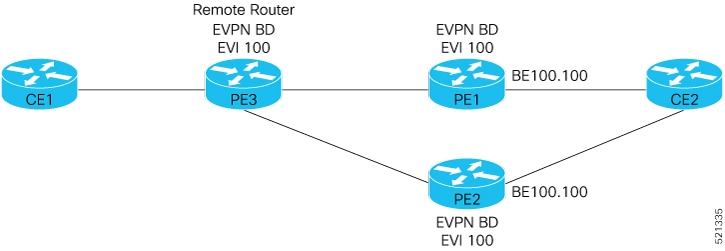
The key components involved in the L2 FRR process for EVPN multihomed E-LAN services are:

  • CE2: Customer edge device multihomed to PE1 and PE2.

  • PE1 and PE2: Provider edge routers operating in EVPN active-active or single-active mode, enabled with L2 FRR, and connected to PE3 over the MPLS core.

  • PE3: Remote Provider edge router connected to CE1.

  • FRR label: A backup path label allocated per Ethernet VPN Instance (EVI) for traffic protection.

The L2 FRR process for EVPN multihomed E-LAN services enables fast traffic redirection by pre-programming backup paths and using FRR labels to ensure seamless failover when a link to a customer edge device fails, minimizing service disruption. This process involves multihomed provider edge routers distributing and forwarding traffic with rapid failover triggered upon link failure.

Workflow

These stages describe how the L2 FRR for EVPN multihomed E-LAN services work.

  1. CE1 sends traffic to PE3.
  2. PE3 distributes the traffic across PE1 and PE2.
  3. PE1 and PE2 forward the traffic to CE2.
  4. If the PE1-CE2 link fails, PE1 triggers L2 FRR and redirects traffic to PE2 until network convergence completes.
  5. When L2 FRR is enabled on PE1, the backup path to PE2 is pre-programmed in hardware. Upon detecting the failure on the CE2 link, PE1 uses this pre-programmed backup path.
  6. PE2 allocates and advertises an FRR label for the protected traffic.
  7. All incoming traffic to PE1 is encapsulated with PE2’s FRR label and forwarded to PE2.
  8. PE2 receives the traffic with the FRR label and forwards it to CE2.

Result

This process ensures fast reroute of traffic in EVPN multihoming modes, minimizing traffic disruption during link failures by pre-establishing backup paths and labels for seamless failover.


Restrictions for Layer 2 fast reroute for E-LAN service

  • This feature is supported on EVPN all-active or single-active mode.

  • This feature applies only to unicast traffic.

  • This feature is not supported for BUM traffic.


Configure Layer 2 fast reroute for E-LAN service

Enable L2 FRR on a PE router to provide fast convergence in an E-LAN EVPN multihoming network.

Use this task to configure L2 FRR on both PE routers in an E-LAN EVPN multihoming setup to ensure rapid failover and maintain service continuity.

Procedure

1.

Associate the Ethernet segment with the bundle interface.

Example:

Router# configure
Router(config)# l2vpn
Router(config-l2vpn)# bridge group bg1
Router(config-l2vpn-bg)# bridge-domain bd1
Router(config-l2vpn-bg-bd)# interface Bundle-Ether4.1
Router(config-l2vpn-bg-bd-ac)#exit
Router(config-l2vpn-bg-bd)# evi 1
Router(config-l2vpn-bg-bd-evi)# exit
Router(config-l2vpn-bg-bd)# exit
Router(config-l2vpn-bg)# bridge-domain bd2
Router(config-l2vpn-bg-bd)# interface Bundle-Ether4.2
Router(config-l2vpn-bg-bd-ac)# exit
Router(config-l2vpn-bg-bd)# exit
Router(config-l2vpn-bg)# exit
Router(config-l2vpn)#
2.

Enable L2 FRR.

Example:

Router# configure
Router(config)# evpn
Router(config-evpn)# evi 1
Router(config-evpn-instance)# advertise-mac
Router(config-evpn-instance-mac)# exit
Router(config-evpn-instance)# exit
Router(config-evpn)# evi 2
Router(config-evpn-instance)# advertise-mac
Router(config-evpn-instance-mac)# exit
Router(config-evpn-instance)# exit
Router(config-evpn)# interface Bundle-Ether4
Router(config-evpn-ac)# ethernet-segment
Router(config-evpn-ac-es)# identifier type 0 40.00.00.00.00.00.00.00.01
Router(config-evpn-ac-es)# load-balancing-mode single-active
Router(config-evpn-ac-es)# convergence
Router(config-evpn-ac-es-conv)# reroute
Router(config-evpn-ac-es)# exit
Router(config-evpn-ac# exit
Router(config-evpn)# exit
Router(config)# exit
3.

Use show evpn ethernet-segment carving detail and show l2vpn forwarding interface BE4.1 private location 0/RP0/CPU0 commands to verify L2 FRR configuration.

Example:

Router# show evpn ethernet-segment carving detail
...Ethernet Segment Id      Interface                          Nexthops            
------------------------ ---------------------------------- --------------------
0040.0000.0000.0000.0001 BE4                                4.5.6.7
                                                            5.6.7.8
  ES to BGP Gates   : Ready
  ES to L2FIB Gates : Ready
  Main port         :
     Interface name : Bundle-Ether4
     Interface MAC  : 00c9.c654.9a04
     IfHandle       : 0x7800008c
     State          : Up
     Redundancy     : Not Defined
  ESI ID            : 1
  ESI type          : 0
     Value          : 0040.0000.0000.0000.0001
  ES Import RT      : 4000.0000.0000 (from ESI)
  Topology          :
     Operational    : MH, Single-active
     Configured     : Single-active (AApS)
  Service Carving   : Auto-selection
     Multicast      : Disabled
  Convergence    : Reroute 
  Peering Details   : 2 Nexthops
     4.5.6.7 [MOD:P:00:T]
     5.6.7.8 [MOD:P:00:T]
  Service Carving Synchronization:
     Mode           : NTP_SCT
     Peer Updates   :
                 4.5.6.7 [SCT: 2025-01-22 17:01:01.1737583]
                 5.6.7.8 [SCT: 2025-01-22 17:00:36.1737583]
  Service Carving Results:
     Forwarders     : 2
     Elected        : 1
            EVI E   :        2
     Not Elected    : 1
            EVI NE  :        1
  EVPN-VPWS Service Carving Results:
     Primary        : 0
     Backup         : 0
     Non-DF         : 0
  MAC Flush msg     : STP-TCN
  Peering timer     : 3 sec [not running]
  Recovery timer    : 30 sec [not running]
  Carving timer     : 0 sec [not running]
  Revert timer      : 0 sec [not running]
  HRW Reset timer   : 5 sec [not running]
  Local SHG label   : 24008
     IPv6_Filtering_ID : 1:16
  Remote SHG labels : 1
              24007 : nexthop 5.6.7.8
  Access signal mode: Bundle OOS
  ...
Router# show l2vpn forwarding interface BE4.1 private location 0/RP0/CPU0  
Wed Jan 22 17:02:01.387 EST

Xconnect ID 0xc0000002

  Xconnect info:
    xcon_status=Up, xcon_bound=TRUE, switching_type=0, data_type=12
    xcon_name=

    Object: XCON
    Base info: version=0xaabbcc13, flags=0x3110, type=2, object_id=UNSPECIFIED, reserved=0
    

  AC info:
    xcon_id=0xc0000002, ifh=0x7800008c, subifh=0x78000096, ac_id=0, ac_type=21, status=Bound
    ac_mtu=1500, iw_mode=1, adj=150.0.0.120+Bundle-Ether4,
    r_aps_channel=FALSE, prot_exclusion=FALSE
    rg_id=0, ro_id=0x0000000000000000
    evpn internal label = None
    E-Tree = Root
    FXC local-switch AC xcid = 0x0 (Invalid)
    FXC local-switch PW xcid = 0xffffffff (Invalid)
    EVPN MP route flags = 0x0
    Statistics:
      packets: received 0 (multicast 0, broadcast 0, unknown unicast 0, unicast 0), sent 0
      bytes: received 0 (multicast 0, broadcast 0, unknown unicast 0, unicast 0), sent 0
      MAC move: 0
      packets dropped: PLU 0, tail 0
      bytes dropped: PLU 0, tail 0

    Object: AC
    Base info: version=0xaabbcc11, flags=0x0, type=3, object_id=0x10001000000002d8|v9, reserved=0

    AC Backup info:
      VC label: 24004
      Local VC label: 0
      Backup Pseudowire XC ID: 0x0
      Statistics:
        packets: received 0, sent 0
        bytes: received 0, sent 0
        packets dropped: PLU 0, tail 0, out of order 0
        bytes dropped: PLU 0, tail 0, out of order 0

      Object: AC_BACKUP
      Base info: version=0xaabbcc39, flags=0x0, type=43, object_id=0x1000100000000300|v1, reserved=0
        Time (~200ms)     Event                     Flags
        =============     =====                     =====
        Jan 22 17:00:58.4 Create                      0x0  -  -
        -------------------------------------------------

      Nexthop info:
        nh_addr=5.6.7.8,
        ecd_plat_data_valid=TRUE, ecd_plat_data_len=104, plat_data_size=232
        child_count=0, child_evpn_ole_count=2, child_mac_count=0, child_pwhe_mp_count=0, child_ac_backup_count=2,
        child_vni_count=0, child_ifl_count=0, child_sg_count=0

        Object: NHOP
        Base info: version=0xaabbcc14, flags=0x4010, type=7, object_id=0x10001000000002f4|v5, reserved=0
        
    bp_seg1_type=0x3, mtu=1500
    is_flooding_disabled=FALSE, is_mac_learning_disabled=FALSE, is_mac_port_down_flush_disabled=FALSE,
   EVPN ESI ID: 0
   EVPN SHG Local Label: None
   EVPN SHG Remote Labels: 0
    MAC learning: enabled
    Software MAC learning: enabled
    MAC port down flush: enabled
    Flooding:
      Broadcast & Multicast: enabled
      Unknown unicast: enabled
    MAC aging time: 300 s, Type: inactivity
    MAC limit: none
    MAC Secure: disabled, Logging: disabled, Accept-Shutdown: enabled
    DHCPv4 snooping: profile not known on this node, disabled
    Dynamic ARP Inspection: disabled, Logging: disabled
    IP Source Guard: disabled, Logging: disabled
    IGMP snooping profile: profile not known on this node
    MLD snooping profile: profile not known on this node
    Router guard disabled
    vES:disabled
    Etree Leaf:disabled
    STP participating: disabled
    Storm control: disabled
    Main port: Bundle-Ether4, MSTI: 2

    Object: BRIDGE_PORT
    Base info: version=0xaabbcc1a, flags=0x0, type=12, object_id=0x10001000000002d9|v6, reserved=0

L2 FRR is enabled on the PE routers, providing fast failover in the E-LAN EVPN multihoming network. The Ethernet segment is associated with the bundle interface, and convergence reroute is active, ensuring rapid recovery from failures.


Layer 2 fast reroute for E-Line service

A Layer 2 fast reroute (FRR) for E-Line services is a network capability that

  • provides rapid traffic rerouting in the event of a link or node failure

  • improves network reliability, and

  • ensures service continuity with minimal disruption by pre-establishing backup paths.

Table 2. Feature History Table

Feature Name

Release Information

Feature Description

Layer 2 fast reroute for E-Line services

Release 26.1.1

Introduced in this release on: Centralized Systems (8400 [ASIC: K100]) (select variants only*)

*This feature is supported on Cisco 8404-SYS-D router.

Layer 2 fast reroute for E-Line services

Release 25.4.1

Introduced in this release on: Fixed Systems (8700 [ASIC: K100], 8010 [ASIC: A100]) (select variants only*)

*This feature is supported on:

  • 8011-32Y8L2H2FH

  • 8011-12G12X4Y-A

  • 8011-12G12X4Y-D

  • 8711-48Z-M

Layer 2 fast reroute for E-Line services

Release 25.1.1

Introduced in this release on: Fixed Systems 8010 [ASIC: A100]) (select variants only*)

You can now ensure faster convergence and uninterrupted service by redirecting the traffic using the EVPN pseudowire (PW) in an E-Line configuration when a dual-homing link fails.

*This feature is now supported on:

  • 8011-4G24Y4H-I


Minimize traffic loss with Layer 2 fast reroute for E-Line service

Layer 2 fast reroute protects the provider edge–customer edge (PE-CE) connection by quickly redirecting traffic through a backup path when a primary link fails. This feature minimizes traffic loss and ensures rapid network convergence. If a local link failure occurs, traffic is rerouted to a peer PE, which then forwards it to the CE. In an E-Line service, an EVPN pseudowire establishes a point-to-point Layer 2 connection over an IP/MPLS network using EVPN. All traffic is redirected to the CE without involving MAC address learning or forwarding.


Benefits of Layer 2 fast reroute for E-Line service

  • Achieves fast convergence with a 50 ms target failover time.

  • Protects PE-CE links by rerouting traffic to a peer PE in case of local link failure.

  • Maintains the same topology, requiring no additional network changes.

  • Ensures minimal traffic disruption and rapid recovery in E-Line services.


How Layer 2 fast reroute for EVPN multihomed E-Line services work

Summary

The key components involved in the Layer 2 fast reroute process for EVPN multihomed E-Line services are:

  • CE2: A customer edge device connected to both PE1 and PE2 as a multihomed device.

  • PE1 and PE2: Provider edge routers operating in EVPN active-active or single-active mode, enabled with L2 FRR and assigned FRR labels per EVI for backup paths.

  • PE3: A remote provider edge router connected to CE1 and the MPLS core network.

The Layer 2 FRR process for EVPN multihomed E-Line services rapidly switches traffic from a failed PE to a backup PE using pre-assigned FRR labels.

Workflow

These stages describe how Layer 2 FRR for EVPN multihomed E-Line services work.

  1. Normal traffic flow: CE1 sends traffic to PE3. PE3 distributes the traffic to PE1 and PE2, with PE1 acting as the Designated Forwarder (DF). PE1 and PE2 forward the traffic to CE2.
  2. Failover scenario: When the link between PE1 and CE2 fails, PE1 detects the failure on the access side.
  3. Traffic redirection: PE1 redirects incoming traffic by encapsulating it with PE2’s FRR label and forwards it to PE2 over the pre-programmed backup path.
  4. Traffic forwarding by PE2: Upon receiving the FRR-labeled traffic, PE2 forwards it to CE2 through the attachment circuit (AC), even if the AC is in a blocking state.
  5. Route update: Meanwhile, PE3 updates its routes to send traffic directly to PE2 until the primary link is restored.

Result

This process ensures rapid failover and minimal traffic disruption in EVPN multihomed E-Line services by pre-establishing backup paths and enabling seamless traffic redirection upon link failure.


Restrictions for Layer 2 fast reroute for E-Line service

  • This feature is supported on EVPN all-active or single-active mode.

  • This feature applies only to unicast traffic.

  • This feature is not supported for BUM traffic.


Configure layer 2 fast reroute for E-Line service

Enable L2 FRR on a PE router to enhance network resilience in an E-LINE EVPN multihoming environment.

This task applies to configuring L2 FRR in an EVPN E-Line service where multihoming is deployed with single-active load balancing mode.

Procedure

1.

Configure L2 FRR on a PE router in the E-LINE EVPN multihoming network.

Example:

Router(config)# evpn
Router(config-evpn)# evi 1
Router(config-evpn-instance)# exit
Router(config-evpn)# evi 2
Router(config-evpn-instance)# exit
Router(config-evpn)# interface Bundle-Ether4
Router(config-evpn-ac)# ethernet-segment
Router(config-evpn-ac-es)# identifier type 0 40.00.00.00.00.00.00.00.01
Router(config-evpn-ac-es)# load-balancing-mode single-active
Router(config-evpn-ac-es)# convergence
Router(config-evpn-ac-es-conv)# reroute
Router(config-evpn-ac-es-conv)# exit
Router(config-evpn-ac-es)# exit
Router(config-evpn-ac)# exit
Router(config-evpn)# exit
Router(config)#
2.

Use show evpn ethernet-segment carving detail and show l2vpn forwarding interface BE4.1 private location 0/RP0/CPU0 commands to verify the L2 FRR EVPN E-LINE configuration and status.

Example:

Router# show evpn ethernet-segment carving detail 
Wed Jan 22 17:15:05.606 EST
...

Ethernet Segment Id      Interface                          Nexthops            
------------------------ ---------------------------------- --------------------
0040.0000.0000.0000.0001 BE4                                4.5.6.7
                                                            5.6.7.8
  ES to BGP Gates   : Ready
  ES to L2FIB Gates : Ready
  Main port         :
     Interface name : Bundle-Ether4
     Interface MAC  : 00c9.c654.9a04
     IfHandle       : 0x7800008c
     State          : Up
     Redundancy     : Not Defined
  ESI ID            : 1
  ESI type          : 0
     Value          : 0040.0000.0000.0000.0001
  ES Import RT      : 4000.0000.0000 (from ESI)
  Topology          :
     Operational    : MH, Single-active
     Configured     : Single-active (AApS)
  Service Carving   : Auto-selection
     Multicast      : Disabled
  Convergence    : Reroute
  Peering Details   : 2 Nexthops
     4.5.6.7 [MOD:P:00:T]
     5.6.7.8 [MOD:P:00:T]
  Service Carving Synchronization:
     Mode           : NTP_SCT
     Peer Updates   :
                 4.5.6.7 [SCT: 2025-01-22 17:13:55.1737584]
                 5.6.7.8 [SCT: 2025-01-22 17:06:30.1737583]
  Service Carving Results:
     Forwarders     : 2
     Elected        : 0
     Not Elected    : 0
  EVPN-VPWS Service Carving Results:
     Primary        : 2
       EVI:ETag P   :      1:2,     2:4
     Backup         : 0
     Non-DF         : 0
  MAC Flush msg     : STP-TCN
  Peering timer     : 3 sec [not running]
  Recovery timer    : 30 sec [not running]
  Carving timer     : 0 sec [not running]
  Revert timer      : 0 sec [not running]
  HRW Reset timer   : 5 sec [not running]
  Local SHG label   : 24008
     IPv6_Filtering_ID : 1:16
  Remote SHG labels : 1
              24007 : nexthop 5.6.7.8
  Access signal mode: Bundle OOS
Router# show l2vpn forwarding interface BE4.1 private location 0/RP0/CPU0 
Wed Jan 22 17:15:29.510 EST

Xconnect ID 0xc0000002

  Xconnect info:
    xcon_status=Up, xcon_bound=TRUE, switching_type=0, data_type=4
    xcon_name=xg1:xc1

    Object: XCON
    Base info: version=0xaabbcc13, flags=0x110, type=2, object_id=UNSPECIFIED, reserved=0
    

  AC info:
    xcon_id=0xc0000002, ifh=0x7800008c, subifh=0x78000096, ac_id=0, ac_type=21, status=Bound
    ac_mtu=1500, iw_mode=0, adj=150.0.0.120+Bundle-Ether4,
    r_aps_channel=FALSE, prot_exclusion=FALSE
    rg_id=0, ro_id=0x0000000000000000
    evpn internal label = None
    E-Tree = Root
    FXC local-switch AC xcid = 0x0 (Invalid)
    FXC local-switch PW xcid = 0x0 (Invalid)
    EVPN MP route flags = 0x4
    Main port: Bundle-Ether4, MSTI: 3
    Statistics:
      packets: received 0, sent 0
      bytes: received 0, sent 0
      packets dropped: MTU exceeded 0, other 0

    Object: AC
    Base info: version=0xaabbcc11, flags=0x0, type=3, object_id=0x100010000000032a|v5, reserved=0

    AC Backup info:
      VC label: 24012
      Local VC label: 24012
      Backup Pseudowire XC ID: 0x20000005
      Statistics:
        packets: received 0, sent 0
        bytes: received 0, sent 0
        packets dropped: PLU 0, tail 0, out of order 0
        bytes dropped: PLU 0, tail 0, out of order 0

      Object: AC_BACKUP
      Base info: version=0xaabbcc39, flags=0x0, type=43, object_id=0x100010000000032b|v1, reserved=0
      

      Nexthop info:
        nh_addr=5.6.7.8,
        ecd_plat_data_valid=TRUE, ecd_plat_data_len=104, plat_data_size=232
        child_count=0, child_evpn_ole_count=0, child_mac_count=0, child_pwhe_mp_count=0, child_ac_backup_count=2,
        child_vni_count=0, child_ifl_count=0, child_sg_count=0

        Object: NHOP
        Base info: version=0xaabbcc14, flags=0x4010, type=7, object_id=0x100010000000032c|v3, reserved=0
        

  PW info:
    pw_id=1, 1, nh_valid=TRUE, sig_cap_flags=0x1, context=0x0,
    MPLS, Destination address: 1.2.3.4, evi: 1, ac-id: 1, status: Bound
    Local Pseudowire label: 24013
    Remote Pseudowire label: 24007
    Control word enabled
    EVPN Virtual ES PW: 0
    VFI PW: 0
    Statistics:
      packets: received 0, sent 0
      bytes: received 0, sent 0
      packets dropped: PLU 0, tail 0, out of order 0
      bytes dropped: PLU 0, tail 0, out of order 0

    Object: ATOM
    Base info: version=0xaabbcc12, flags=0x0, type=4, object_id=0x100010000000032d|v3, reserved=0

    Nexthop info:
      nh_addr=1.2.3.4,
      ecd_plat_data_valid=TRUE, ecd_plat_data_len=104, plat_data_size=232
      child_count=2, child_evpn_ole_count=0, child_mac_count=0, child_pwhe_mp_count=0, child_ac_backup_count=0,
      child_vni_count=0, child_ifl_count=0, child_sg_count=0

      Object: NHOP
      Base info: version=0xaabbcc14, flags=0x4010, type=7, object_id=0x100010000000032e|v3, reserved=0
      
    Statistics:
      packets: received 0, sent 0
      bytes: received 0, sent 0
      packets dropped: MTU 0, tail 0, out of order 0
      bytes dropped: MTU 0, tail 0, out of order 0

    PD System Data: Learn key: 0
The PE router is configured for Layer 2 FRR in an EVPN E-Line multihoming setup, enabling rapid failover and improved service availability.