EVPN Configuration Guide for Cisco 8000 Series Routers, Cisco IOS XR Releases

PDF

EVPN Configuration Guide for Cisco 8000 Series Routers, Cisco IOS XR Releases

EVPN cost-out

Want to summarize with AI?

Log in

Explains the EVPN cost-out capability, how it manages Ethernet segment interfaces with LACP, and supports node operations for reload or software upgrades on various Cisco routers.


An EVPN cost-out is a network capability that

  • controls the operational state of bundle interfaces within an Ethernet segment configured with Link Aggregation Control Protocol (LACP)

  • enables placing a node out of service (OOS) without manually shutting down all bundle interfaces on the PE device, and

  • facilitates preparation of the node for reload or software upgrade.

Table 1. Feature History Table

Feature Name

Release Information

Feature Description

EVPN Cost-Out

Release 26.2.1

Introduced in this release on: Modular Systems (8800 [LC ASIC: K100])(select variants only*);

*This feature is supported on Cisco 88-LC1-48Y8H-EM line cards.

EVPN Cost-Out

Release 25.4.1

Introduced in this release on: Fixed Systems (8010 [ASIC: A100])(select variants only*)

*This feature is now supported on:

  • 8011-32Y8L2H2FH

  • 8011-12G12X4Y-A

  • 8011-12G12X4Y-D

EVPN Cost-Out

Release 25.1.1

Introduced in this release on: Fixed Systems (8010 [ASIC: A100]) (select variants only*)

*This feature is now supported on the Cisco 8011-4G24Y4H-I routers.

EVPN Cost-Out

Release 24.4.1

Introduced in this release on: Fixed Systems (8700) (select variants only*)

*The EVPN Cost-Out functionality is now extended to the Cisco 8712-MOD-M routers.

EVPN Cost-Out

Release 24.3.1

Introduced in this release on: Fixed Systems (8200 [ASIC: P100], 8700 [ASIC: P100])(select variants only*); Modular Systems (8800 [LC ASIC: P100])(select variants only*)

*The EVPN Cost-Out functionality is now extended to:

  • 8212-48FH-M

  • 8711-32FH-M

  • 88-LC1-52Y8H-EM

  • 88-LC1-12TH24FH-E

EVPN Cost-Out

Release 24.2.11

Introduced in this release on: Modular Systems (8800 [LC ASIC: P100]) (select variants only*)

The cost-out node brings down the bundle interfaces on the PE to prepare the node for reload or software upgrade. By costing out a node, the traffic is steered away from the PE without any traffic disruption. This allows you to manage the network traffic effectively while reloading or upgrading a node.

*This feature is supported only on routers with the 88-LC1-36EH line cards.


Traffic redirection using EVPN cost-out for Ethernet segments

The EVPN cost-out process enables seamless traffic redirection in multihomed EVPN environments by gracefully withdrawing a node’s bundle interfaces from service.

  • The router withdraws Ethernet A-D Ethernet Segment (ES-EAD) routes before shutting down the associated bundle interfaces.

  • The PE device notifies the connected CE device to bring down the corresponding bundle member interface.

  • Traffic is automatically steered away from the affected PE node, ensuring no disruption to ongoing services.

  • In a multihoming scenario, any traffic from the CE destined for the Ethernet segment is redirected to a peer PE device.

EVPN cost-out is supported only on Ethernet segments that have manually configured Ethernet Segment Identifiers (ESIs).


How EVPN cost-out works

Summary

The key components involved in the EVPN cost-out process are:

  • CE device: Connects to multiple PE devices and forwards traffic accordingly.

  • PE device: Hosts bundle interfaces on Ethernet segments and controls their operational state.

  • Cost-out command: Controls the operational state of bundle interfaces on PE and CE devices.

  • Startup-cost-in command: Manages timed transition of the node from cost-out to cost-in state after reload.

Workflow

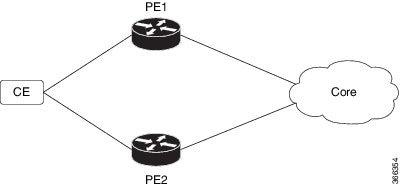
Figure 1. EVPN cost-out

These are the stages of EVPN cost-out.

  1. When the cost-out command is configured on PE1, all bundle interfaces on the Ethernet segment are brought down on PE1. Correspondingly, the related bundle member on the CE is also brought down. This causes the CE to send all traffic for that Ethernet segment to PE2.
  2. To bring the node back into service, the no cost-out command is used. This command brings up all bundle interfaces on the EVPN Ethernet segment on the PE and the corresponding bundle members on the CE.
  3. While the node is in the cost-out state:
    • Adding a new bundle Ethernet segment causes that bundle to be brought down.
    • Removing a bundle Ethernet segment causes that bundle to be brought up.
  4. The startup-cost-in command allows the node to come into service automatically after a specified time following a reload. Initially, the node enters the cost-out state when EVPN initializes and remains so until the timer expires.
  5. If the no startup-cost-in command is executed while the timer is running, the timer stops and the node transitions to the cost-in state.
  6. The cost-out configuration always takes precedence over the startup-cost-in timer. Therefore:
    • If both configurations are present during a reload, the cost-out state is controlled solely by the cost-out command, and the timer is ignored.
    • If the startup timer is running and the cost-out command is configured, the timer stops, and the out-of-service state is controlled exclusively by the cost-out configuration.
  7. If a process restart occurs while the startup-cost-in timer is running, the node remains in the cost-out state and the timer restarts.

Result

This process ensures controlled failover and recovery of traffic between PE devices in an EVPN environment by managing the operational state of bundle interfaces on both PE and CE devices.


Configure EVPN cost-out and startup cost-in timer

Configure EVPN cost-out to bring down a node on a PE device and set the startup cost-in timer to control the node’s startup delay after reload.

Use this task when you need to administratively bring down an EVPN node or delay its startup after a reload to manage network stability and convergence.

Procedure

1.

Configure cost-out to bring down the EVPN node on the PE.

Example:

Router# configure
Router(config)# evpn
Router(config-evpn)# cost-out
Router(config-evpn)commit
2.

Bring the EVPN node back into service.

Example:

Router# configure
Router(config)# evpn
Router(config-evpn)# no cost-out
Router(config-evpn)commit
3.

Configure the startup cost-in timer to delay node startup after reload.

Example:

Router# configure
Router(config)# evpn
Router(config-evpn)# startup-cost-in 6000
Router(config-evpn)commit
4.

Running configuration of EVPN cost-out and startup cost-in timer.

Example:


configure
evpn
 cost-out
!

configure
evpn
 startup-cost-in 6000 
!
5.

Use the show evpn summary command to verify the cost-out and startup cost-in timer configurations.

Example:

Verify the node cost-out configuration.

Router# show evpn summary
Fri Apr  7 07:45:22.311 IST
Global Information
-----------------------------
Number of EVIs                : 2
Number of Local EAD Entries   : 0
Number of Remote EAD Entries  : 0
Number of Local MAC Routes    : 0
Number of Local MAC Routes    : 5
          MAC                 : 5
          MAC-IPv4            : 0
          MAC-IPv6            : 0
Number of Local ES:Global MAC : 12
Number of Remote MAC Routes   : 7
          MAC                 : 7
          MAC-IPv4            : 0
          MAC-IPv6            : 0
Number of Local IMCAST Routes : 56
Number of Remote IMCAST Routes: 56
Number of Internal Labels     : 5
Number of ES Entries          : 9
Number of Neighbor Entries    : 1
EVPN Router ID                : 192.168.0.1
BGP Router ID                 : ::
BGP ASN                       : 100
PBB BSA MAC address           : 0207.1fee.be00
Global peering timer          :      3 seconds
Global recovery timer         :     30 seconds
EVPN cost-out                 : TRUE
      startup-cost-in timer   : Not configured


Verify the no cost-out configuration.


Router# show evpn summary
Fri Apr  7 07:45:22.311 IST
Global Information
-----------------------------
Number of EVIs                : 2
Number of Local EAD Entries   : 0
Number of Remote EAD Entries  : 0
Number of Local MAC Routes    : 0
Number of Local MAC Routes    : 5
          MAC                 : 5
          MAC-IPv4            : 0
          MAC-IPv6            : 0
Number of Local ES:Global MAC : 12
Number of Remote MAC Routes   : 7
          MAC                 : 7
          MAC-IPv4            : 0
          MAC-IPv6            : 0
Number of Local IMCAST Routes : 56
Number of Remote IMCAST Routes: 56
Number of Internal Labels     : 5
Number of ES Entries          : 9
Number of Neighbor Entries    : 1
EVPN Router ID                : 192.168.0.1
BGP Router ID                 : ::
BGP ASN                       : 100
PBB BSA MAC address           : 0207.1fee.be00
Global peering timer          :      3 seconds
Global recovery timer         :     30 seconds
EVPN cost-out                 : FALSE
      startup-cost-in timer   : Not configured


Verify the startup-cost-in timer configuration.


Router# show evpn summary
Fri Apr  7 07:45:22.311 IST
Global Information
-----------------------------
Number of EVIs                : 2
Number of Local EAD Entries   : 0
Number of Remote EAD Entries  : 0
Number of Local MAC Routes    : 0
Number of Local MAC Routes    : 5
          MAC                 : 5
          MAC-IPv4            : 0
          MAC-IPv6            : 0
Number of Local ES:Global MAC : 12
Number of Remote MAC Routes   : 7
          MAC                 : 7
          MAC-IPv4            : 0
          MAC-IPv6            : 0
Number of Local IMCAST Routes : 56
Number of Remote IMCAST Routes: 56
Number of Internal Labels     : 5
Number of ES Entries          : 9
Number of Neighbor Entries    : 1
EVPN Router ID                : 192.168.0.1
BGP Router ID                 : ::
BGP ASN                       : 100
PBB BSA MAC address           : 0207.1fee.be00
Global peering timer          :      3 seconds
Global recovery timer         :     30 seconds
EVPN node cost-out            : TRUE
        startup-cost-in timer : 6000

The EVPN node is administratively brought down or brought up as needed, and the startup cost-in timer controls the delay before the node becomes active after a reload.