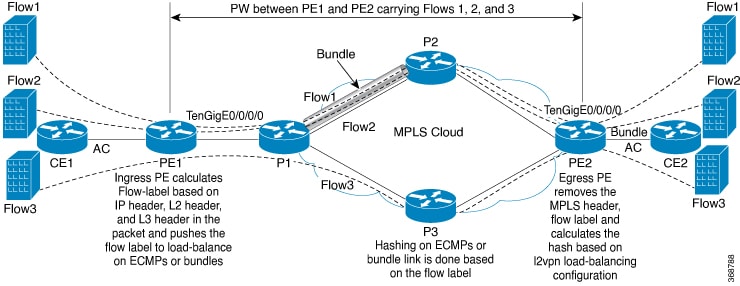
Explains how flow label support for EVPN enables provider routers to optimize traffic distribution using flow-based load balancing in an MPLS environment.
A flow label support for EVPN is a feature that
-
enables provider (P) routers to use flow-based load balancing to forward traffic between PE devices
-
utilizes Flow-Aware Transport (FAT) of pseudowires (PW) over an MPLS packet-switched network for load balancing traffic across BGP-based signaled pseudowires for EVPN and
-
improves traffic distribution across equal cost multipaths (ECMP) or link-bundled paths in the core.
| Feature Name |
Release Information |
Feature Description |
|---|---|---|
| Flow label support for EVPN |
Release 26.2.1 | Introduced in this release on: Modular Systems (8800 [LC ASIC: K100])(select variants only*); *This feature is supported on Cisco 88-LC1-48Y8H-EM line cards. |
| Flow label support for EVPN |
Release 25.4.1 | Introduced in this release on: Fixed Systems (8010 [ASIC: A100])(select variants only*) *This feature is now supported on:
|
| Flow label support for EVPN |
Release 25.1.1 |
Introduced in this release on: Fixed Systems (8010 [ASIC: A100]) (select variants only*) *This feature is now supported on the Cisco 8011-4G24Y4H-I routers. |
| Flow label support for EVPN |
Release 24.4.1 |
Introduced in this release on: Fixed Systems (8200 [ASIC: P100], 8700 [ASIC: P100, K100])(select variants only*); Modular Systems (8800 [LC ASIC: Q100, P100])(select variants only*) The Flow Label Support for EVPN functionality is now extended to:
|
| Flow label support for EVPN |
Release 7.3.2 |
The Flow Label support improves traffic distribution by enabling flow-based load balancing between provider edge devices. It uses Flow-Aware Transport (FAT) pseudowires over an MPLS network to efficiently manage traffic across BGP-signaled pseudowires in an Ethernet VPN. Flow labels, based on packet flows, help optimize traffic across equal cost multipaths or link-bundled paths. |
Optimize traffic distribution using flow label
A service provider deploying EVPN can use this feature to optimize traffic distribution across multiple paths in their MPLS core network. A network with high traffic volumes can benefit from reduced congestion and improved performance by leveraging flow-based load balancing.
Flow-based load balancing with FAT pseudowires
FAT pseudowires (PWs) in EVPN provides the capability to identify individual flows within a PW, allowing routers to load-balance traffic effectively. When ECMP is used, FAT PWs ensure better traffic distribution by creating a flow label based on indivisible packet flows entering an imposition PE. This flow label is inserted as the lowermost label in the packet. P routers then use the flow label for load balancing.
A flow is identified by either:
-
The source and destination IP address of the traffic, or
-
The source and destination MAC address of the traffic.
Supported EVPN services
Flow label support for EVPN is supported on EVPN E-Line and EVPN E-LAN services in both single-homing and multihoming deployments. You enable the flow-label command at the EVPN instance (EVI) level. After it is enabled for an EVI, the flow-label configuration applies to all services attached to that EVI.