EVPN Configuration Guide for Cisco 8000 Series Routers, Cisco IOS XR Releases

PDF

EVPN Configuration Guide for Cisco 8000 Series Routers, Cisco IOS XR Releases

EVPN designated forwarder election

Want to summarize with AI?

Log in

Explains EVPN designated forwarder election processes, including DF election methods, backup path handling, restrictions, highest random weight and non-revertive modes, and step-by-step configuration for improved traffic management and resiliency in multihomed environments


A designated forwarder election is a network control method that

  • defines the backup path well before a link failure occurs

  • enables the access network to manage EVPN provider edge (PE) devices proactively, and

  • ensures that, during a link failure, the PE node knows the next PE to assume the active role, reducing traffic loss.

Table 1. Feature History Table

Feature Name

Release Information

Feature Description

EVPN Designated Forwarder Election

Release 26.2.1

Introduced in this release on: Modular Systems (8800 [LC ASIC: K100])(select variants only*);

*This feature is supported on Cisco 88-LC1-48Y8H-EM line cards.

EVPN Designated Forwarder Election

Release 25.4.1

Introduced in this release on: Fixed Systems (8010 [ASIC: A100])(select variants only*)

*This feature is now supported on:

  • 8011-32Y8L2H2FH

  • 8011-12G12X4Y-A

  • 8011-12G12X4Y-D

EVPN Designated Forwarder Election

Release 25.1.1

Introduced in this release on: Fixed Systems (8010 [ASIC: A100]) (select variants only*)

*This feature is now supported on the Cisco 8011-4G24Y4H-I routers.

EVPN Designated Forwarder Election

Release 24.4.1

Introduced in this release on: Fixed Systems (8700) (select variants only*)

* The EVPN designated forwarder election functionality is now extended to the Cisco 8712-MOD-M routers.

EVPN Designated Forwarder Election

Release 24.3.1

Introduced in this release on: Fixed Systems (8200 [ASIC: P100], 8700 [ASIC: P100])(select variants only*); Modular Systems (8800 [LC ASIC: P100])(select variants only*)

* The EVPN designated forwarder election functionality is now extended to:

  • 8212-48FH-M

  • 8711-32FH-M

  • 88-LC1-52Y8H-EM

  • 88-LC1-12TH24FH-E

EVPN Designated Forwarder Election

Release 24.2.11

Introduced in this release on: Modular Systems (8800 [LC ASIC: P100]) (select variants only*)

Designated Forwarder (DF) election enables the access network to control EVPN PE devices by defining the backup path much before the event of a link failure. During the link failure, the PE node is aware of the next PE that will take over the active role and this reduces the traffic loss.

EVPN designated forwarder election supports preference-based and access-driven mechanism.

* This feature is supported only on routers with the 88-LC1-36EH line cards.


DF election methods

You can configure the designated forwarder (DF) election using two methods: preference-based or access-driven.

  • Preference-based DF election uses weight to determine which PE device acts as the DF at any time. This method suits topologies where interface failures are revertive.

  • Access-driven DF election is recommended for topologies where an access PE connects directly to the core PE. When access PEs operate in non-revertive mode, this mechanism allows the access PE to select the DF.


EVPN designated forwarder election and backup path

In an access network, an interface connects PE nodes to the EVPN PE in the core network. When this interface fails, traffic loss can last longer because the backup PE is not preselected before the failure.

The EVPN DF election feature enables the EVPN PE to pre-program a backup PE before any interface failure occurs. This preselection allows the PE node to immediately know which PE will take over if the interface fails, significantly reducing convergence time.

To configure the backup path, use the preference DF weight option for the ESI. By assigning a weight to a PE, you control the DF election process and define the backup path accordingly.

This mechanism improves network resilience by minimizing traffic disruption during interface failures.


Restrictions for EVPN DF election

  • This feature is supported only on EVPN PEs operating in port-active mode.

  • The bundle attached to the Ethernet segment must be configured with the lacp mode active command.

  • The lacp mode on command is not supported and must not be used.


How backup path precomputation works in EVPN

Summary

The key components involved in the backup path precomputation process in an EVPN network are:

  • PE devices (PE1, PE2, PE3): Core PE routers configured with different weights to determine primary and backup paths.

  • Access PEs (aPE1, aPE2, aPE3): Access PE routers configured in a multichassis link aggregation group (MCLAG) redundancy group operating in non-revertive mode.

  • Ethernet segment: A bundle shared by all PE devices with a common Ethernet Segment Identifier (ESI).

  • Traffic sources (for example, PE4): Hosts or devices sending traffic through the EVPN network.

The backup path precomputation process in an EVPN network involves core PE devices assigned different weights to determine primary and backup paths, access PE devices grouped in a multichassis link aggregation group operating in non-revertive mode, and a shared Ethernet segment identified by a common ESI. These components collaborate to provide redundancy and efficient path selection for traffic sources within the network.

Workflow

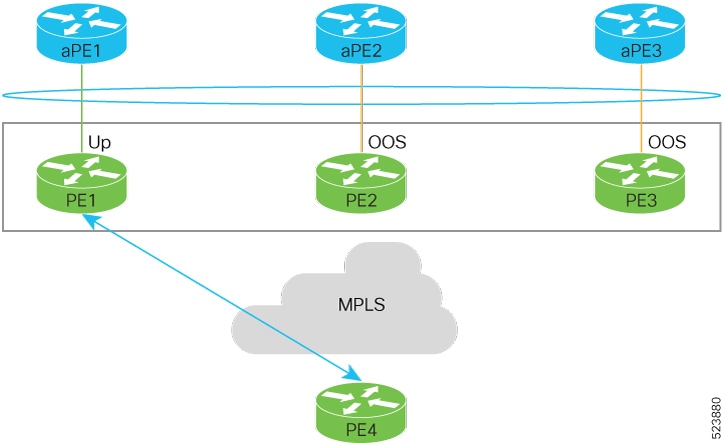
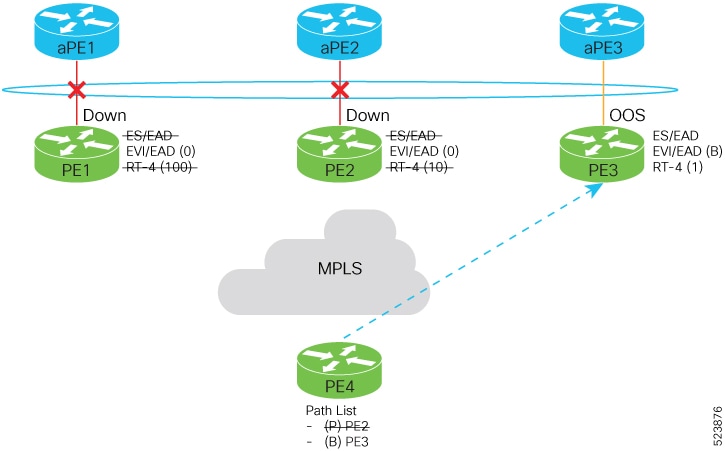
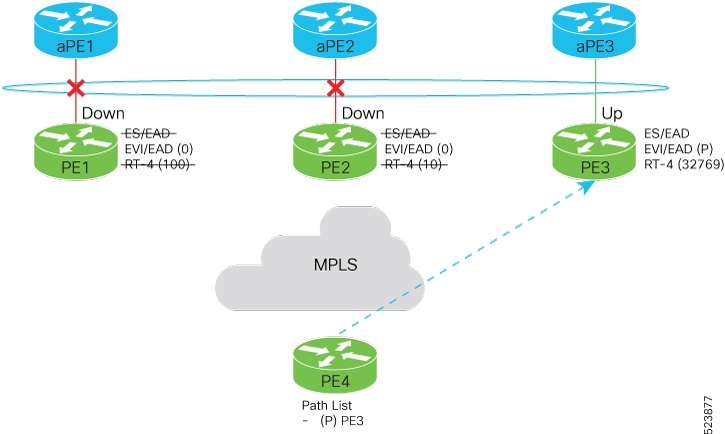
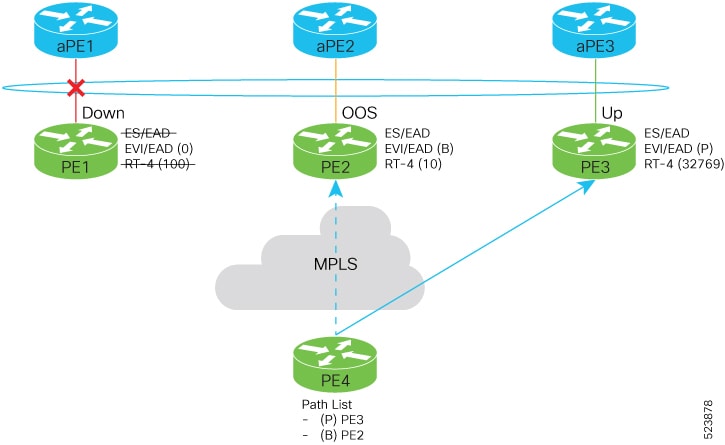
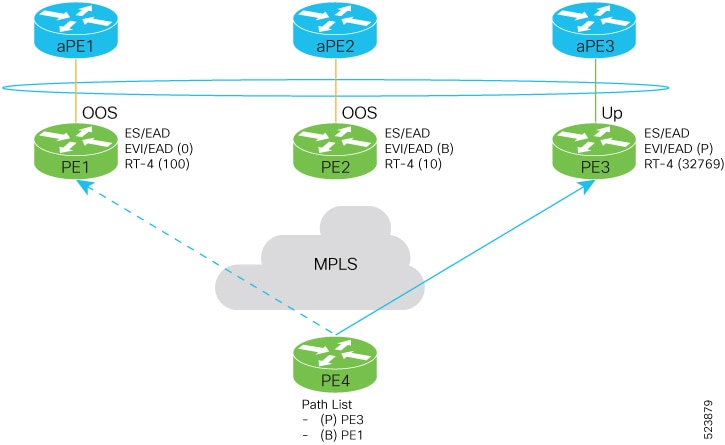
Figure 1. EVPN DF election

These are the stages of EVPN DF election.

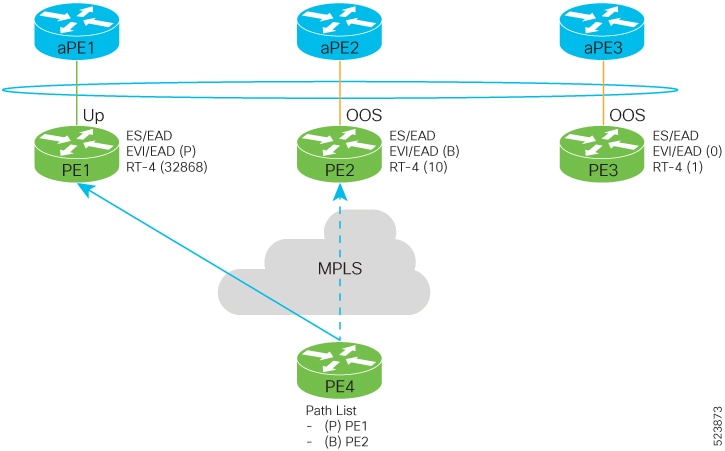
  1. Initial traffic flow.
    Figure 2. Traffic flow
    • The aPE1-PE1 interface is active (up), while aPE2-PE2 and aPE3-PE3 interfaces remain out of service (OOS).
    • Traffic from PE4 is forwarded to aPE1 through PE1 because PE1 has the highest configured weight of 100.
    • The highest weight is adjusted by adding 32,768 to the configured value (e.g., PE1’s weight 100 becomes 32,868).
    • The highest weight is advertised with the P-bit (primary), the next highest with the B-bit (backup), and the lowest weight as non-designated forwarder (NDF).
    • When EVPN PE devices have the same weight, traffic forwarding preference is determined by the lowest IP address.
    • Only one PE signals that the Ethernet Segment bundle state is up; all other PEs mark the Ethernet Segment as standby and their bundles as OOS.
    • All PE devices maintain awareness of their peers’ next hops and weights.
  2. Failure and recovery scenarios.
    • The weights configured on EVPN PE devices follow the same order as the protection mechanism on the access side PEs: aPE1, aPE2, then aPE3.
    • The weight hierarchy is PE1 > PE2 > PE3.
    • If this ordering is not maintained, the network will eventually converge, but efficiency will be reduced.
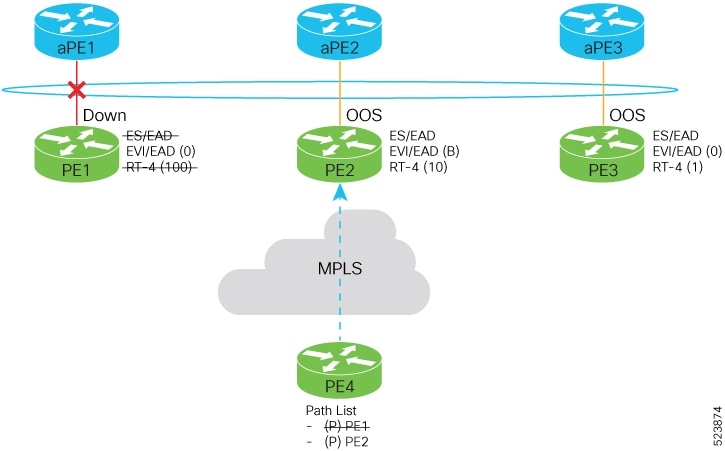
  3. Scenario 1 – aPE1-PE1 interface down
    • PE1 withdraws the EAD/ES route.
    • Traffic is sent through the backup path through PE2.
    • aPE2-PE2 becomes primary with a weight of 32,778 and advertises the P-bit.
    • aPE3-PE3 becomes backup and advertises the B-bit.
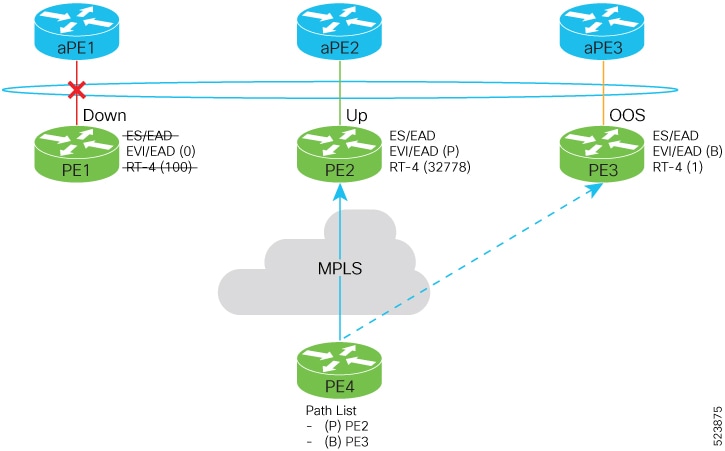
  4. Scenario 2 – aPE2-PE2 interface also down
    • Traffic is sent through aPE3-PE3 link.
    • aPE3-PE3 becomes the primary path with a weight of 32,769.
  5. Scenario 3 – aPE2-PE2 interface recovers
    • aPE3-PE3 remains the primary path.
    • aPE2-PE2 becomes the backup path with a weight of 10.
  6. Scenario 4 – aPE1-PE1 interface recovers
    • aPE3-PE3 remains the primary path with a weight of 32,769.
    • aPE1-PE1 becomes the backup path with a weight of 100.
    • aPE2-PE2 becomes non-designated forwarder (NDF) with a weight of 10.

Result

This process ensures efficient traffic forwarding and redundancy in the EVPN network by precomputing backup paths based on configured weights and interface states, enabling fast failover and recovery while maintaining optimal traffic flow.


Configure EVPN DF election

Configure EVPN DF election using preference-based and access-driven service carving modes, and enable LACP with non-revertive mode on associated aPE devices.

Use this task to set up stable and efficient DF election across multiple PE devices with differentiated weights and access-driven behavior, while supporting link aggregation on aPE devices.

Before you begin

  • Ensure all PE devices are reachable and have consistent Ethernet Segment Identifiers (ESI).

  • Confirm LACP support on bundle interfaces.

Perform these tasks to configure access-driven and preference-based EVPN DF election:

  • Configure EVPN DF election on PE1, PE2, and PE3, with the service carving mode as preference-based and access-driven.

  • Configure LACP on aPE1, aPE2, and aPE3

Procedure

1.

Configure EVPN DF election on PE1, PE2, and PE3

Example:

on PE1
Router#configure
Router(config)#evpn
Router(config-evpn)#interface Bundle-Ether1
Router(config-evpn-ac)#ethernet-segment
Router(config-evpn-ac-es)#identifier type 0 01.11.00.00.00.00.00.00.01
Router(config-evpn-ac-es)#load-balancing-mode port-active
Router(config-evpn-ac-es)#service-carving preference-based
Router(config-evpn-ac-es-sc-pref)#weight 100 
Router(config-evpn-ac-es-sc-pref)#access-driven
Router(config-evpn-ac-es-sc-pref)#commit

Example:

on PE2

Example:

Router#configure
Router(config)#evpn
Router(config-evpn)#interface Bundle-Ether1
Router(config-evpn-ac)#ethernet-segment
Router(config-evpn-ac-es)#identifier type 0 01.11.00.00.00.00.00.00.01
Router(config-evpn-ac-es)#load-balancing-mode port-active
Router(config-evpn-ac-es)#service-carving preference-based
Router(config-evpn-ac-es-sc-pref)#weight 10 
Router(config-evpn-ac-es-sc-pref)#access-driven
Router(config-evpn-ac-es-sc-pref)#commit

Example:

on PE3

Example:

Router#configure
Router(config)#evpn
Router(config-evpn)#interface Bundle-Ether1
Router(config-evpn-ac)#ethernet-segment
Router(config-evpn-ac-es)#identifier type 0 01.11.00.00.00.00.00.00.01
Router(config-evpn-ac-es)#load-balancing-mode port-active
Router(config-evpn-ac-es)#service-carving preference-based
Router(config-evpn-ac-es-sc-pref)#weight 1 
Router(config-evpn-ac-es-sc-pref)#access-driven
Router(config-evpn-ac-es-sc-pref)#commit
2.

Configure LACP on aPE1, aPE2, and aPE3.

Example:

on aPE1

Example:

Router#configure
Router(config)#interface Bundle-Ether 1
Router(config-if)#lacp non-revertive
Router(config-if)#bundle maximum-active links 1 hot-standby
Router(config-if)#exit
Router(config-if)#interface GigabitEthernet0/0/0/40
Router(config-if)bundle id 10 mode active
Router(config-if)bundle port-priority 10000
Router(config-if)description Connection to PE1
Router(config-if)commit

Example:

on aPE2
Router#configure
Router(config)#interface Bundle-Ether 1
Router(config-if)#lacp non-revertive
Router(config-if)#bundle maximum-active links 1 hot-standby
Router(config-if)#exit
Router(config-if)#interface GigabitEthernet0/0/0/39
Router(config-if)bundle id 10 mode active
Router(config-if)bundle port-priority 20000
Router(config-if)description Connection to PE2
Router(config-if)commit

Example:

on aPE2
Router#configure
Router(config)#interface Bundle-Ether 1
Router(config-if)#lacp non-revertive
Router(config-if)#bundle maximum-active links 1 hot-standby
Router(config-if)#exit
Router(config-if)#interface GigabitEthernet0/0/0/38
Router(config-if)bundle id 10 mode active
Router(config-if)bundle port-priority 30000
Router(config-if)description Connection to PE3
Router(config-if)commit
3.

Running configuration of EVPN DF election.

Example:


/* PE1 Configuration */
evpn
 interface Bundle-Ether 1
  ethernet-segment
   identifier type 0 01.11.00.00.00.00.00.00.01
    load-balancing-mode port-active
    service-carving preference-based
    weight 100
    access-driven
   !
 !  

/* PE2 Configuration */
evpn
 interface Bundle-Ether 1
  ethernet-segment
   identifier type 0 01.11.00.00.00.00.00.00.01
    load-balancing-mode port-active
    service-carving preference-based
    weight 10
    access-driven
   !
 !  

/* PE3 Configuration */
evpn
 interface Bundle-Ether 1
  ethernet-segment
   identifier type 0 01.11.00.00.00.00.00.00.01
    load-balancing-mode port-active
    service-carving preference-based
    weight 1
    access-driven
   !
 !  

/* aPE1 Configuration */

interface Bundle-Ether 1
 lacp non-revertive
  bundle maximum-active links 1 hot-standby
interface GigabitEthernet0/0/0/40
 bundle id 10 mode active
 bundle port-priority 10000
 description Connection to PE1
!

/* aPE2 Configuration */

interface Bundle-Ether 1
 lacp non-revertive
  bundle maximum-active links 1 hot-standby
interface GigabitEthernet0/0/0/39
 bundle id 10 mode active
 bundle port-priority 20000
 description Connection to PE2
!

/* aPE3 Configuration */

interface Bundle-Ether 1
 lacp non-revertive
  bundle maximum-active links 1 hot-standby
interface GigabitEthernet0/0/0/40
 bundle id 10 mode active
 bundle port-priority 30000
 description Connection to PE3
!

4.

Use the show evpn ethernet-segment detail to verify that you have successfully configured EVPN DF election.

Example:


Router#show evpn ethernet-segment detail
Ethernet Segment Id      Interface                          Nexthops            
------------------------ ---------------------------------- --------------------
0001.0001.0001.1b01.001b BE1                                192.168.0.1
                                                            192.168.0.3
  ES to BGP Gates   : Ready
  ES to L2FIB Gates : Ready
  Main port         :
     Interface name : Bundle-Ether1
     Interface MAC  : 02ef.af8d.8008
     IfHandle       : 0x00004190
     State          : Up
     Redundancy     : Active
  ESI type          : 0
     Value          : 01.0001.0001.1b01.001b
  ES Import RT      : 0100.0100.011b (from ESI)
  Source MAC        : 0000.0000.0000 (N/A)
  Topology          :
     Operational    : MH
     Configured     : Port-Active 
  Service Carving   : Preferential
     Multicast      : Disabled
  Convergence       : 
  Peering Details   : 2 Nexthops
     192.168.0.1 [PREF:P:d6ce:T] >> Weight in hexadecimal
     192.168.0.3 [PREF:P:457]
  Service Carving Synchronization:
     Mode           : NONE
     Peer Updates   :
  Service Carving Results:
     Forwarders     : 3
     Elected        : 3
     Not Elected    : 0
  EVPN-VPWS Service Carving Results:
     Primary        : 1
     Backup         : 0
     Non-DF         : 0
  MAC Flushing mode : STP-TCN
  Peering timer     : 3 sec [not running]
  Recovery timer    : 30 sec [not running]
  Carving timer     : 0 sec [not running]
  Local SHG label   : 28384
  Remote SHG labels : 0
  Access signal mode: Bundle OOS (Default)

Highest random weight mode for EVPN DF election

A Highest Random Weight (HRW) mode for EVPN DF election is a capability that

  • provides optimal load distribution for DF election

  • ensures redundancy, enables fast access, and

  • guarantees nondisruptive service for an Ethernet Segment (ES) regardless of the state of a peer DF.


DF election weight calculation

The DF election is determined by calculating weights for each router on the Ethernet segment. The router with the highest weight is selected as the DF, while the router with the next highest weight becomes the backup designated forwarder (BDF).

The weight is computed using the following formula:

Wrand(v, Si) = (1103515245 × ((1103515245 × Si + 12345) XOR D(v)) + 12345) mod 2³¹

where:

  • Si: IP address of router i

  • v: Ethernet Virtual Instance (EVI)

  • D(v): 31-bit digest, specifically the CRC-32 checksum of v

This calculation ensures a unique and deterministic weight assignment based on the router’s IP address and the EVI, facilitating the election of the DF and BDF roles.


Designated forwarder election algorithm

The DF election algorithm determines which PE device forwards traffic for a multihomed Ethernet segment. It uses a mathematical function called “service carving,” which combines the ESI and EVI, as described in RFC 7432.

Key points about the algorithm:

  • The election is based on an ordinal value derived from a modulus calculation involving the number of peers and the EVI.

  • This modulus calculation mode can perform poorly when Ethernet tags are all even or all odd.

  • In scenarios where an Ethernet Segment (ES) is multihomed to two PEs, all VLANs may select the same PE as the DF.

  • Consequently, one PE may never be elected as the DF, resulting in a non-optimal distribution of forwarding responsibilities.


Benefits of highest random weight mode over modulus mode in DF election

The HRW mode of DF election offers several advantages compared to the modulus mode:

  • Equal distribution of DF election across PEs: The DF election for each VLAN is evenly distributed among the PEs, ensuring balanced load sharing.

  • Stability during PE failures: If a PE that is neither a DF nor a BDF hosting VLANs on a given ES goes down or loses connection to the ES, it does not trigger a reassignment of DF and BDF roles to other PEs. This behavior reduces unnecessary computation during connection flaps.

  • Minimized service disruption: HRW mode avoids the service interruptions that are common with the modulus-based DF election algorithm.

  • Redundant connectivity through BDF: The BDF provides backup connectivity, ensuring no traffic disruption occurs when a DF fails. In such cases, the BDF automatically assumes the DF role.


Configure highest random weight mode for EVPN DF election

Enable the HRW mode for DF election in EVPN to optimize forwarding decisions based on a hashing algorithm, improving load distribution and redundancy.

Procedure

1.

Configure HRW mode for EVPN DF election.

Example:


Router# configure
Router(config)#evpn
Router(config-evpn)#interface Bundle-Ether 23
Router(config-evpn-ac)#ethernet-segment
Router(config-evpn-ac-es)#service-carving hrw
Router(config-evpn-ac-es)#commit
2.

Running configuration of HRW mode for DF election.

Example:


configure
 evpn
  interface Bundle-Ether 23
   ethernet-segment
    service-carving hrw
   !
  !
 !
3.

Use the show evpn ethernet-segment interface bundleEther 23 carving detail command to verify that you have configured HRW mode of DF election.

Example:


Router#show evpn ethernet-segment interface bundleEther 23 carving detail
Ethernet Segment Id      Interface                          Nexthops            
------------------------ ---------------------------------- --------------------
0011.1111.1111.1111.1111 Gi0/2/0/0                          192.168.0.2
                                                            192.168.0.3
  ES to BGP Gates   : Ready
  ES to L2FIB Gates : Ready
  Main port         :
     Interface name : GigabitEthernet0/2/0/0
     Interface MAC  : 02db.c740.ca4e
     IfHandle       : 0x01000060
     State          : Up
     Redundancy     : Not Defined
  ESI type          : 0
     Value          : 11.1111.1111.1111.1111
  ES Import RT      : 0011.0011.0011 (Local)
  Source MAC        : 0000.0000.0000 (N/A)
  Topology          :
     Operational    : MH, Single-active
     Configured     : Single-active (AApS) (default)
  Service Carving   : HRW    -> Operation mode of carving
  Peering Details   : 192.168.0.2[HRW:P:00] 192.168.0.3[HRW:P:00] -> Carving capability as advertised by peers
  Service Carving Results:
     Forwarders     : 1
     Permanent      : 0
     Elected        : 0
     Not Elected    : 1
  MAC Flushing mode : STP-TCN
  Peering timer     : 3 sec [not running]
  Recovery timer    : 30 sec [not running]
  Carving timer     : 0 sec [not running]
  Local SHG label   : 28109
  Remote SHG labels : 1
              24016 : nexthop 192.168.0.3

EVPN non-revertive DF election

A non-revertive mode of DF election is a network configuration mode that

  • adjusts the weight of PE devices so that the PE that became the designated forwarder during a link failure remains the designated forwarder after the link recovers

  • prevents traffic disruption during DF re-election and service re-carving, and

  • avoids triggering service re-carving after recovery.

Table 2. Feature History Table

Feature Name

Release Information

Feature Description

EVPN Non-Revertive Designated Forwarder (DF) Election

Release 26.2.1

Introduced in this release on: Modular Systems (8800 [LC ASIC: K100])(select variants only*);

*This feature is supported on Cisco 88-LC1-48Y8H-EM line cards.

EVPN Non-Revertive Designated Forwarder (DF) Election

Release 25.4.1

Introduced in this release on: Fixed Systems (8010 [ASIC: A100])(select variants only*)

*This feature is now supported on:

  • 8011-32Y8L2H2FH

  • 8011-12G12X4Y-A

  • 8011-12G12X4Y-D

EVPN Non-Revertive Designated Forwarder (DF) Election

Release 25.1.1

Introduced in this release on: Fixed Systems (8010 [ASIC: A100]) (select variants only*)

*This feature is now supported on the Cisco 8011-4G24Y4H-I routers.

EVPN Non-Revertive Designated Forwarder (DF) Election

Release 24.4.1

Introduced in this release on: Fixed Systems (8700) (select variants only*)

*The EVPN Non-Revertive Designated Forwarder Election functionality is now extended to the Cisco 8712-MOD-M routers.

EVPN Non-Revertive Designated Forwarder (DF) Election

Release 24.3.1

Introduced in this release on: Fixed Systems (8200, 8700); Modular Systems (8800 [LC ASIC: P100]) (select variants only*)

*The EVPN Non-Revertive Designated Forwarder Election functionality is now extended to:

  • 8212-48FH-M

  • 8711-32FH-M

  • 88-LC1-52Y8H-EM

  • 88-LC1-12TH24FH-E

EVPN Non-Revertive Designated Forwarder (DF) Election

Release 24.2.11

Introduced in this release on: Modular Systems (8800 [LC ASIC: P100]) (select variants only*)

In a preference-based Designated Forwarder (DF) election, non-revertive mode prevents the traffic disruption that occurs during the recovery of a node in a port-active multihoming network.

While recovering from a link failure, an EVPN ethernet-segment (ES) performs DF re-election and re-carves the services among the multihomed nodes, which causes traffic interruption and interface flapping, leading to traffic loss. In the non-revertive mode, the EVPN ES does not re-carve the services after the recovery, thus avoiding the traffic disruption.

The feature introduces these changes:

CLI:

YANG Data Model:

  • Cisco-IOS-XR-evpn-oper.yang

  • Cisco-IOS-XR-l2vpn-cfg.yang

(see GitHub, YANG Data Models Navigator)

*This feature is supported only on routers with the 88-LC1-36EH line cards.


Non-revertive mode to minimize traffic interruption during DF re-election

During link recovery, the re-election of the DF and the re-carving of services cause traffic interruptions and loss. This problem worsens when an Ethernet Segment hosts multiple services because the time required for service re-carving and transferring the DF role to the Provider Edge (PE) with the highest weight prolongs traffic disruption.

The non-revertive mode addresses this issue by preventing the DF role from reverting to the original PE with the highest weight after failure recovery. Instead, it maintains the current DF, which reduces service interruptions and traffic loss during recovery. This approach enhances network stability and ensures better service continuity.

Key points:

  • DF election is preference-based, selecting the PE with the highest weight as DF.

  • Link failure triggers DF as DF.

  • Link failure triggers DF re-election, causing traffic interruption.

  • Recovery triggers another re-election and service re-carving, increasing the risk of traffic loss.

  • Non-revertive mode avoids reverting the DF role to the original PE after recovery.

  • This mode reduces traffic interruption and improves service continuity during failover and recovery.

To return to revertive mode, the network resumes the DF election and service carving processes. This transition allows the DF role to revert to the PE with the highest preference, restoring the default behavior.

  • Using the revert timer: Configure a timer with the revert command that starts during node recovery. When this timer expires, revertive mode activates, triggering the DF election. This delay helps prevent immediate traffic disruption by postponing the election, allowing the PE with the highest preference to become the DF smoothly.

  • Disabling non-revertive mode: Use the l2vpn evpn ethernet-segment interface revert command to disable non-revertive mode. This action immediately triggers DF election and service carving. If a revert timer was previously set, it is canceled upon disabling non-revertive mode.


Restrictions for EVPN non-revertive DF election

Use non-reverting mode of EVPN DF election only in these scenarios:

  • When performing preference-based DF election.

  • On physical and bundle interfaces.

  • In EVPN port-active multihoming mode.

Do not use non-reverting mode of EVPN DF election in these scenarios:

  • When using access-driven DF election.

  • On virtual interfaces such as virtual Ethernet segment (vES), network virtualization endpoint (NVE), and pseudowire headend (PWHE).

  • When employing segment routing over IPv6 (SRv6).


Configure EVPN non-revertive DF election

Enable non-revertive DF election to prevent traffic disruption during link recovery in EVPN.

In EVPN networks, the DF election determines which PE device forwards traffic for a multihomed Ethernet segment. By default, DF election reverts to the highest-weight PE after link recovery, which can cause traffic disruption. Configuring non-revertive mode maintains the current DF to avoid this disruption.

Before you begin

It is recommended to configure the non-revertive mode of DF election on all the nodes in the network.

  1. Configure Ethernet segment in port-active load-balancing mode on peering PEs for a specific interface, using the load-balancing-mode port-active command.

  2. Configure the service carving mode as preference-based using the service-carving preference-based command. The DF election happens based on the highest preference, that is the weight of the PE.

  3. Configure the non-revertive mode of DF election using the non-revertive command, to enable the non-revertive mode on the PEs.

  4. Configure the PE devices with different weights, using the weight command.

Procedure

1.

Configure non-revertive mode.

In this example, PE1 and PE2 are configured with a weight of 100 and 10 respectively.

  • After the DF election, PE1 is selected as the DF.

  • When there is a link failure, PE1 goes down, and the next PE with the highest weight, PE2, becomes the DF.

  • By default, the DF election happens during the recovery, and PEl becomes the DF again. Transferring the DF role from PE2 to PE1 leads to traffic disruption.

  • When the non-revertive mode is enabled, the weight of the PE1 is adjusted so that PE2 remains the DF. This prevents the traffic disruption incurred due to the DF election.

  1. Configure non-revertive mode on PE1.

    Example:

    Router# configure
    Router(config)# evpn
    Router(config-evpn)# interface Bundle-Ether1
    Router(config-evpn-ac)# ethernet-segment
    Router(config-evpn-ac-es)# identifier type 0 01.11.00.00.00.00.00.00.01
    Router(config-evpn-ac-es)# load-balancing-mode port-active
    Router(config-evpn-ac-es)# service-carving preference-based
    Router(config-evpn-ac-es-sc-pref)# non-revertive
    Router(config-evpn-ac-es-sc-pref)# weight 100 
    Router(config-evpn-ac-es-sc-pref)# commit
  2. Configure non-revertive mode on PE2.

    Example:

    Router# configure
    Router(config)# evpn
    Router(config-evpn)# interface Bundle-Ether1
    Router(config-evpn-ac)# ethernet-segment
    Router(config-evpn-ac-es)# identifier type 0 01.11.00.00.00.00.00.00.01
    Router(config-evpn-ac-es)# load-balancing-mode port-active
    Router(config-evpn-ac-es)# service-carving preference-based
    Router(config-evpn-ac-es-sc-pref)# non-revertive
    Router(config-evpn-ac-es-sc-pref)# weight 10 
    Router(config-evpn-ac-es-sc-pref)# commit
2.

Running configuration of EVPN non-revertive mode DF election.

Example:

evpn
 interface Bundle-Ether1
  ethernet-segment
   identifier type 0 01.11.00.00.00.00.00.00.01
   load-balancing-mode port-active
   service-carving preference-based
    non-revertive    
    weight 100
   !
evpn
 interface Bundle-Ether1
  ethernet-segment
   identifier type 0 01.11.00.00.00.00.00.00.01
   load-balancing-mode port-active
   service-carving preference-based
    non-revertive    
    weight 10
3.

Use the show evpn ethernet-segment interface Bundle-Ether 1 private command to verify that non-revertive mode is enabled.

Example:

Router# show evpn ethernet-segment interface Bundle-Ether 1 private

…
  Topology          :
     Operational    : SH
     Configured     : Port-Active
  Service Carving   : Preferential
     Config Weight  : 100
     Oper Weight    : 100
     Non-Revertive  : Enabled, Active
     Access Driven  : Disabled
     Multicast      : Disabled
  Convergence       : 
  Peering Details   : 2 Nexthops
     192.168.0.1 [PREF:DP:7fff:T][1]
     192.168.0.3 [PREF:DP:7fff:T][2]

Configure to return to revertive mode

Restore the default revertive mode behavior in EVPN after a link failure recovery.

In non-revertive mode, the DF election does not occur during recovery from a link failure. To revert to the default behavior where DF election happens, configure the revert timer.

Procedure

1.

Configure non-revertive mode on an interface and configure revert timer on the interface.

When you configure a revert timer on the PEs enabled with non-revertive mode, the timer starts after the nodes have recovered from link failure. After the timer expires, the PEs return to the revertive mode and DF election happens in the network. The timer is configured in seconds.

Example:

outer# configure
Router(config)# evpn
Router(config-evpn)# interface Bundle-Ether1
Router(config-evpn-ac)# ethernet-segment
Router(config-evpn-ac-es)# identifier type 0 01.11.00.00.00.00.00.00.01
Router(config-evpn-ac-es)# load-balancing-mode port-active
Router(config-evpn-ac-es)# service-carving preference-based
Router(config-evpn-ac-es-sc-pref)# non-revertive
Router(config-evpn-ac-es-sc-pref)# weight 100 
Router(config-evpn-ac-es-sc-pref)# exit
Router(config-evpn-ac-es)# exit
Router(config-evpn-ac)# timers
Router(config-evpn-ac-timers)# revert 300
Router(config-evpn-ac-es)# commit

You can also configure the revert timer globally.

Router(config)# evpn
Router(config-evpn)# timers
Router(config-evpn-timers)# revert 300
Router(config-evpn-timers)# commit
2.

Running configuration of return to revertive mode.

Example:

Revert timer configuration on an interface.


evpn 
 interface Bundle-Ether1 
  ethernet-segment
   identifier type 0 01.11.00.00.00.00.00.00.01 
   load-balancing-mode port-active 
   service-carving preference-based 
    non-revertive 
  ! 
   timers 
    revert 300

Global configuration of revert timer.


evpn 
  timers 
   revert 300
3.

Use the show evpn ethernet-segment interface Bundle-Ether 1 private command to verify that non-revertive mode is enabled along with the configured revert timer.

Example:

Router# show evpn ethernet-segment interface Bundle-Ether 1 private

 …
  Topology          :
     Operational    : SH
     Configured     : Port-Active
  Service Carving   : Preferential
     Config Weight  : 100
     Oper Weight    : 100
     Non-Revertive  : Enabled, Active
     Access Driven  : Disabled
     SRG Driven     : Disabled
     Multicast      : Disabled
  Convergence       : 
  Peering Details   : 0 Nexthops
  Service Carving Synchronization:
     Mode           : NONE
     Peer Updates   :
  Service Carving Results:
     Forwarders     : 0
     Elected        : 0
     Not Elected    : 0
  EVPN-VPWS Service Carving Results:
     Primary        : 0
     Backup         : 0
     Non-DF         : 0
  MAC Flush msg     : STP-TCN
  Peering timer     : 3 sec [not running]
  Recovery timer    : 30 sec [not running]
  Carving timer     : 0 sec [not running]
  Revert timer      : 300 sec [not running]
  HRW Reset timer   : 5 sec [not running]
  AC Debounce timer : 3000 msec [not running]

In this example, the revert timer has expired and the non-revertive mode is inactive.

Router# show evpn ethernet-segment interface Bundle-Ether 1 private

 …
  Topology          :
     Operational    : SH
     Configured     : Port-Active
  Service Carving   : Preferential
     Config Weight  : 100
     Oper Weight    : 100
     Non-Revertive  : Enabled, Inactive
     Access Driven  : Disabled
     SRG Driven     : Disabled
     Multicast      : Disabled
  Convergence       : 
  Peering Details   : 0 Nexthops
  Service Carving Synchronization:
     Mode           : NONE
     Peer Updates   :
  Service Carving Results:
     Forwarders     : 0
     Elected        : 0
     Not Elected    : 0
  EVPN-VPWS Service Carving Results:
     Primary        : 0
     Backup         : 0
     Non-DF         : 0
  MAC Flush msg     : STP-TCN
  Peering timer     : 3 sec [not running]
  Recovery timer    : 30 sec [not running]
  Carving timer     : 0 sec [not running]
  Revert timer      : 0 sec [not running]
  HRW Reset timer   : 5 sec [not running]
  AC Debounce timer : 3000 msec [not running]

The PE devices return to revertive mode after the revert timer expires, restoring the default DF election behavior during link recovery.


Disable non-revertive mode

Disable the non-revertive behavior on an Ethernet segment interface to cancel the revert timer and trigger a new DF election in the network.

Use this task when you need to stop the non-revertive mode on an Ethernet segment interface, causing the network to perform a fresh DF election.

Procedure

Disable non-revertive mode on the specified Ethernet segment interface.

Example:

Router# l2vpn evpn ethernet-segment interface Bundle-Ether1 revert

This command cancels the revert timer if it is configured and initiates a new DF election in the network.

The non-revertive mode is disabled, the revert timer is cancelled, and the network performs a new DF election.