EVPN Configuration Guide for Cisco 8000 Series Routers, Cisco IOS XR Releases

PDF

EVPN Configuration Guide for Cisco 8000 Series Routers, Cisco IOS XR Releases

EVPN E-Line with FXC service in VLAN unaware mode

Want to summarize with AI?

Log in

Introduces EVPN E-Line with FXC service in VLAN unaware mode, outlining its ability to aggregate multiple ACs per ES, reduce BGP state complexity, avoid VLAN failure signaling over BGP, and support both single-homing and multihoming for scalable, flexible connectivity.


An EVPN E-Line with flexible cross-connect (FXC) service in VLAN unaware mode is a network service that

  • aggregates mulitple normalized attachment circuits (ACs) on a single Ethernet segment (ES) destined to a single endpoint or interface into a single EVPN E-Line tunnel represented by one E-Line service ID

  • reduces the number of BGP states by advertising one EVI-EAD route per VLAN-unaware FXC instead of per AC, and

  • does not signal VLAN failure over BGP, which means that in a multihoming scenario, ES-EAD routes are present, and the EVI can be shared with other VLAN-unaware FXCs or EVPN E-Line.

Table 1. Feature History Table
Feature Name

Release Information

Feature Description

EVPN E-Line with FXC service in VLAN unaware mode

Release 25.4.1

Introduced in this release on: Fixed Systems (8200 [ASIC: P100], 8700 [ASIC: P100, K100], 8010 [ASIC: A100]); Modular Systems (8800 [LC ASIC: P100])

You can reduce BGP state complexity and improve scalability with EVPN E-Line in FXC VLAN unaware mode. This mode combines multiple normalized ACs on a single ES into one EVPN E-Line tunnel using a single service ID, advertising one EVI-EAD route per FXC instead of per AC. Additionally, VLAN failures are not signaled over BGP, reducing unnecessary state changes.

This feature supports both single-homing and multihoming scenarios, providing flexible and efficient connectivity options.


Scalability challenges of pseudowire services

As service provider networks expand, supporting a growing customer base imposes specific scalability challenges for pseudowire services:

  • The number of pseudowires increases proportionally with the customer base, requiring higher capacity from aggregation routers.

  • Aggregation routers may become bottlenecks, leading to increased hardware investment to support additional pseudowires.

  • Operational costs rise as managing a larger pseudowire infrastructure entails more equipment and ongoing maintenance.


FXC service for pseudowire aggregation

The FXC service mitigates pseudowire scalability challenges by enabling users to select L2 subinterfaces from multiple physical or bundled ports and group them into a single cross-connection group, where all AC members connect to a common pseudowire (PW). This approach reduces the total number of individual PWs required, thereby lowering the capacity demands on aggregation routers and simplifying network management.


Benefits of FXC service

  • Allows selecting specific L2 subinterfaces from different physical or bundled ports.

  • Consolidates multiple customer traffic streams into a single PW.

  • Supports L3 services on individual PWHE subinterfaces.

  • Optimizes resource utilization on access and service PE routers.


Limitations of EVPN E-Line with FXC service VLAN unaware mode

  • Multihoming is supported on VLAN unaware FXC only if all ACs belong to the same main interface.

  • When multiple ESIs exist, whether zero-ESI or non-zero ESI, only ESI 0 is signaled. Therefore, only single-home mode is supported in this scenario.


How traffic flows in FXC service-enabled networks

Service providers use the FXC service to manage complex customer traffic flows, ensuring each customer’s data is properly tagged, routed, and delivered regardless of the underlying network architecture.

Summary

The key components involved in the process are:

  • Access Provider Edge (A-PE): Runs FXC service, assigns and rewrites VLAN tags, and interfaces with customer devices.

  • Service Provider Edge (S-PE): Receives and forwards MPLS labeled PW traffic between the core and A-PE.

  • L2 subinterfaces: Serve as the entry and exit points for customer traffic, supporting VLAN tagging operations.

  • Normalized VLAN IDs: Unique VLAN identifiers assigned to each customer’s L2 sub-interface for consistent traffic mapping.

  • PW tunnels: Carry normalized VLAN-tagged traffic across the core MPLS network.

Only a single normalized VLAN tag is supported.

The FXC service manages VLAN tag normalization and mapping to ensure seamless traffic flow between customer-facing sub-interfaces and core MPLS networks, enabling accurate customer traffic identification and delivery.

Workflow

These stages describe how traffic flows in FXC service-enabled networks.

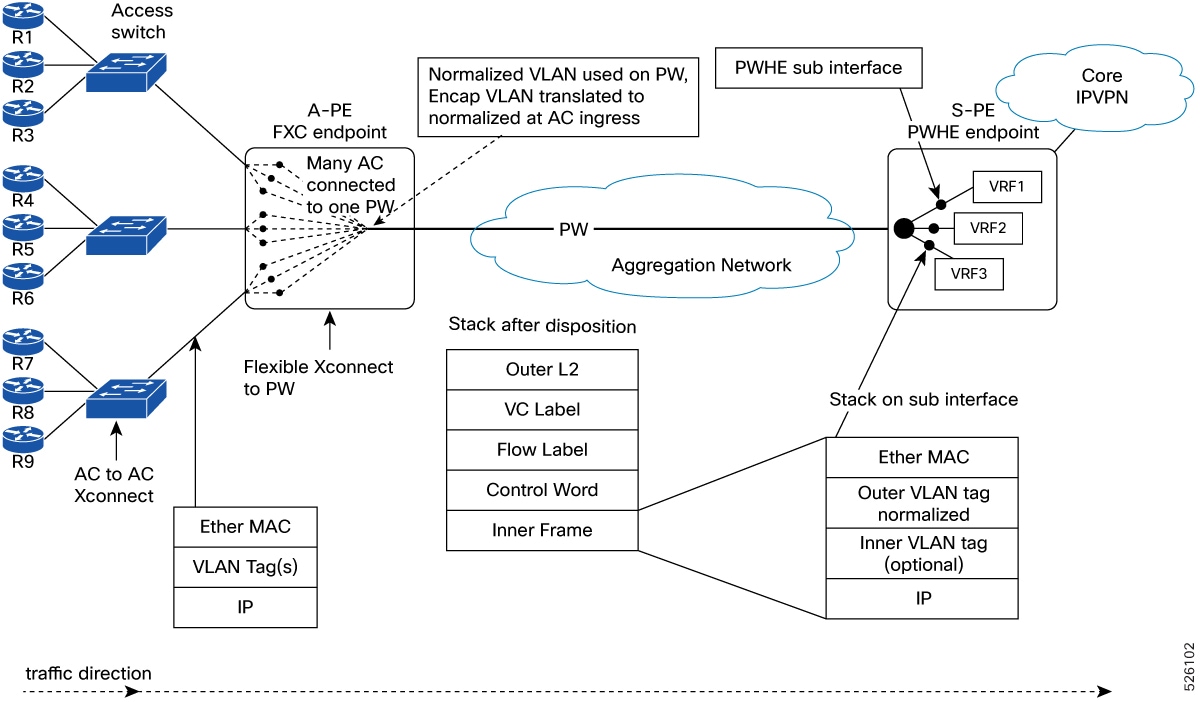
Figure 1. Traffic flow from A-PE to S-PE (access to core)
  1. Customer traffic arrives at the access router (A-PE) on a dedicated L2 subinterface, tagged with a customer-specific VLAN.
  2. The FXC service at the A-PE rewrites the incoming customer VLAN tag to a unique normalized VLAN ID at the sub-interface level.
  3. The normalized VLAN-tagged traffic is forwarded into a PW tunnel towards the PW handling entity (PWHE) on the S-PE.
  4. The S-PE receives the traffic and processes it according to the core MPLS network policies.
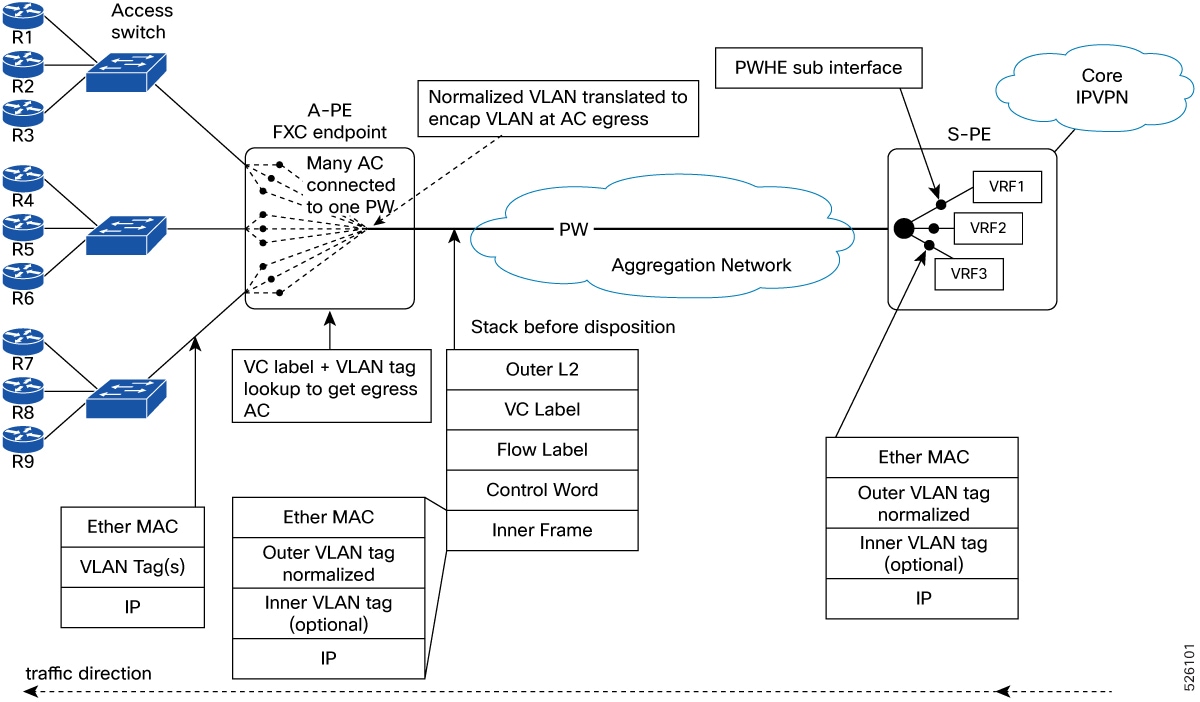
    Figure 2. Traffic flow from S-PE to A-PE (core to access)
  5. The S-PE sends MPLS-labeled PW traffic towards the A-PE, with each customer’s traffic tagged using the corresponding normalized VLAN ID.
  6. At the A-PE, the FXC service maps the normalized VLAN-tagged traffic back to the appropriate customer-facing L2 sub-interface during PW disposition.
  7. On the egress L2 subinterface, the normalized VLAN tag is swapped back to the original customer VLAN tag.
  8. The traffic is then delivered to the customer device with the correct VLAN tagging restored.

Configure flexible cross-connect service using VLAN-unaware mode

You can configure flexible cross-connect service in VLAN-unaware mode for both single-homed and multihomed EVPN scenarios:

  • Configure single-homed flexible cross-connect service using VLAN-unaware mode

  • Configure multihomed flexible cross-connect service using VLAN-unaware mode


Configure single-homed flexible cross-connect service using VLAN-unaware mode

Enable L2 connectivity between a single PE router and customer equipment using a single-homed FXC service in VLAN-unaware mode.

This task applies when you need to configure an FXC service that supports single-homing with EVPN control and VLAN-unaware operation on bundle interfaces and subinterfaces (See Figure 1 and Figure 2 for topology reference).

No ESI or ethernet-segment configuration is required for single-homed operation.

Procedure

1.

Configure the FXC service in VLAN-unaware mode on the A-PE.

Example:

Router# configure
Router(config)# l2vpn
Router(config-l2vpn)# flexible-xconnect-service vlan-unaware fxs1
Router(config-l2vpn-fxs)# interface FourHundredGigE0/0/0/0.1
Router(config-l2vpn-fxs)# interface FourHundredGigE0/0/0/0.2
Router(config-l2vpn-fxs)# interface FourHundredGigE0/0/0/1.1
Router(config-l2vpn-fxs)# neighbor evpn evi 1001 target 1
Router(config-l2vpn-fxs)# commit
2.

Configure the L2 transport and VLAN translation for each subinterface.

Example:

Router# configure
Router(config)# interface FourHundredGigE0/0/0/0.1 l2transport
Router(config-l2vpn-subif)# encapsulation dot1q 11
Router(config-l2vpn-subif)# rewrite ingress tag translate 1-to-1 dot1q 101 symmetric
Router(config-l2vpn-subif)# commit
Router(config-l2vpn-subif)# exit
Router(config)# interface FourHundredGigE0/0/0/0.2 l2transport
Router(config-l2vpn-subif)# encapsulation dot1q 21
Router(config-l2vpn-subif)# rewrite ingress tag translate 1-to-1 dot1q 102 symmetric
Router(config-l2vpn-subif)# commit
Router(config-l2vpn-subif)# exit
Router(config)# interface FourHundredGigE0/0/0/1.1 l2transport
Router(config-l2vpn-subif)# encapsulation dot1q 11
Router(config-l2vpn-subif)# rewrite ingress tag translate 1-to-1 dot1q 103 symmetric
Router(config-l2vpn-subif)# commit
3.

Configure the S-PE for pseudowire handling and service mapping.

Example:

Router# configure
Router(config)# generic-interface-list GI-LIST
Router(config-generic-if-list)# interface FourHundredGigE0/0/0/10
Router(config-generic-if-list)# exit
Router(config)# interface PW-Ether1
Router(config-if)# attach generic-interface-list GI-LIST
Router(config-if)# exit
Router(config)# l2vpn
Router(config-l2vpn)# xconnect group PWHE
Router(config-l2vpn-xc)# p2p PWHE-1
Router(config-l2vpn-xc-p2p)# interface PW-Ether1
Router(config-l2vpn-xc-p2p)# neighbor evpn evi 1001 target 1
Router(config-l2vpn-xc-p2p)# commit
4.

Configure the S-PE subinterfaces for L3 or L2 handoff.

Example:

Router# configure
Router(config)# interface PW-Ether1.101
Router(config-subif)# vrf PRIV10
Router(config-subif)# ipv4 address 66.0.0.1 255.255.255.0
Router(config-subif)# encapsulation dot1q 101
Router(config-subif)# commit
Router(config-subif)# exit
Router(config)# interface PW-Ether1.102
Router(config-subif)# vrf PRIV20
Router(config-subif)# ipv4 address 192.1.1.1 255.255.255.0
Router(config-subif)# encapsulation dot1q 102
Router(config-subif)# commit
Router(config-subif)# exit
Router(config)# interface PW-Ether1.103
Router(config-subif)# vrf PRIV10
Router(config-subif)# ipv4 address 66.1.110.1 255.255.255.0
Router(config-subif)# encapsulation dot1q 103
Router(config-subif)# commit
5.

Running configuration of single-homed flexible cross-connect service using VLAN-unaware mode.

Example:

/* A-PE configuration */
interface FourHundredGigE0/0/0/0.1 l2transport
 encapsulation dot1q 11
 rewrite ingress tag translate 1-to-1 dot1q 101 symetric 


interface FourHundredGigE0/0/0/0.2 l2transport
  encapsulation dot1q 21
  rewrite ingress tag translate 1-to-1 dot1q 102 symetric

interface FourHundredGigE0/0/0/1.1 l2transport
  encapsulation dot1q 11
  rewrite ingress tag translate 1-to-1 dot1q 103 symetric

l2vpn 
  flexible-xconnect-service vlan-unaware fxs1
   interface FourHundredGigE0/0/0/0.1
   interface FourHundredGigE0/0/0/0.2
   interface FourHundredGigE0/0/0/1.1
   neighbor evpn evi 1001 target 1
!  


/* S-PE configuration */
generic-interface-list GI-LIST
 FourHundredGigE0/0/0/10
!
interface PW-Ether1
 attach generic-interface-list GI-LIST

l2vpn 
 xconnect group PWHE
  p2p PWHE-1
   interface PW-Ether1
   neighbor evpn evi 1001 target 1
  !

interface PW-Ether1.101
 vrf PRIV10
 ipv4 address 66.0.0.1 255.255.255.0
 encapsulation dot1q 101

interface PW-Ether1.102
 vrf PRIV20
 ipv4 address 192.1.1.1 255.255.255.0
 encapsulation dot1q 102

interface PW-Ether1.103
 vrf PRIV10
 ipv4 address 66.1.110.1 255.255.255.0
 encapsulation dot1q 103

Configure multihomed flexible cross-connect service using VLAN-unaware mode

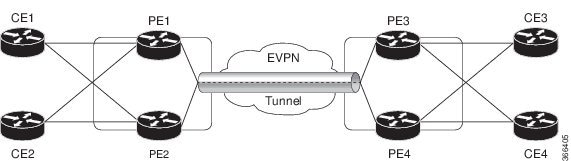
Enable L2 connectivity across multiple PE routers using a multihomed FXC service in VLAN-unaware mode.

This task applies when you need to configure a FXC service that supports multihoming with EVPN control and VLAN unaware operation on bundle interfaces and subinterfaces.

Before you begin

  • Ensure bundle interfaces and subinterfaces are operational.

  • Confirm EVPN and L2VPN features are enabled on all PE routers.

  • Obtain ESI for each PE router.

Procedure

1.

Configure the FXC service in VLAN unaware mode on all PE devices.

Set up each bundle subinterface for L2 transport and configure the EVPN Ethernet segment on the bundle interface.

  1. Configure the FXC service in VLAN unaware mode on PE1.

    Example:

    Router# configure 
    Router(config)# l2vpn 
    Router(config-l2vpn)# flexible-xconnect-service vlan-unaware fxc1_16
    Router(config-l2vpn-fxs)# interface Bundle-Ether10.11
    Router(config-l2vpn-fxs)# interface Bundle-Ether10.12
    Router(config-l2vpn-fxs)# neighbor evpn evi 1 target 16
    Router(config-l2vpn-fxs)# commit
    Router(config-l2vpn-fxs)# exit
    Router(config-l2vpn)# exit
    Router(config)# interface Bundle-Ether10.11 l2transport 
    Router(config-l2vpn-subif)# encapsulation dot1q 1
    Router(config-l2vpn-subif)# rewrite ingress tag translate 1-to-1 dot1q 11 symmetric
    Router(config-l2vpn-subif)# commit
    Router(config-l2vpn-subif)# exit
    Router(config)# interface Bundle-Ether10.12 l2transport 
    Router(config-l2vpn-subif)# encapsulation dot1q 2
    Router(config-l2vpn-subif)# rewrite ingress tag translate 1-to-1 dot1q 12 symmetric
    Router(config-subif)# commit
    Router(config-subif)# exit
    Router(config)# evpn
    Router (config-evpn)# interface Bundle-Ether10
    Router (config-evpn-ac)# ethernet-segment
    Router (config-evpn-ac-es)# identifier type  0 00.01.00.ac.ce.55.00.0a.00
    Router (config-evpn-ac-es)# commit
  2. Configure the FXC service in VLAN unaware mode on PE2.

    Example:

    Router# configure 
    Router(config)# l2vpn 
    Router(config-l2vpn)# flexible-xconnect-service vlan-unaware fxc1_16
    Router(config-l2vpn-fxs-vu)# interface Bundle-Ether10.11
    Router(config-l2vpn-fxs)# interface Bundle-Ether10.12
    Router(config-l2vpn-fxs)# neighbor evpn evi 1 target 16
    Router(config-l2vpn-fxs)# commit
    Router(config-l2vpn-fxs)# exit
    Router(config-l2vpn)# exit
    Router(config)# interface Bundle-Ether10.11 l2transport 
    Router(config-l2vpn-subif)# encapsulation dot1q 1
    Router(config-l2vpn-subif)# rewrite ingress tag translate 1-to-1 dot1q 11 symmetric
    Router(config-l2vpn-subif)# commit
    Router(config-l2vpn-subif)# exit
    Router(config)# interface Bundle-Ether10.12 l2transport 
    Router(config-l2vpn-subif)# encapsulation dot1q 2
    Router(config-l2vpn-subif)# rewrite ingress tag translate 1-to-1 dot1q 12 symmetric
    Router(config-subif)# commit
    Router(config-subif)# exit
    Router(config)# evpn
    Router (config-evpn)# interface Bundle-Ether10
    Router (config-evpn-ac)# ethernet-segment
    Router (config-evpn-ac-es)# identifier type  0 00.01.00.ac.ce.55.00.0a.00
    Router (config-evpn-ac-es)# commit
  3. Configure the FXC service in VLAN unaware mode on PE3.

    Example:

    Router# configure 
    Router(config)# l2vpn 
    Router(config-l2vpn)# flexible-xconnect-service vlan-unaware fxc1_16
    Router(config-l2vpn-fxs-vu)# interface Bundle-Ether20.11
    Router(config-l2vpn-fxs)# interface Bundle-Ether20.12
    Router(config-l2vpn-fxs)# neighbor evpn evi 1 target 16
    Router(config-l2vpn-fxs)# commit
    Router(config-l2vpn-fxs)# exit
    Router(config-l2vpn)# exit
    Router(config)# interface Bundle-Ether20.11 l2transport 
    Router(config-l2vpn-subif)# encapsulation dot1q 1
    Router(config-l2vpn-subif)# rewrite ingress tag translate 1-to-1 dot1q 11 symmetric
    Router(config-l2vpn-subif)# commit
    Router(config-subif)# exit
    Router(config)# interface Bundle-Ether20.12 l2transport 
    Router(config-l2vpn-subif)# encapsulation dot1q 2
    Router(config-l2vpn-subif)# rewrite ingress tag translate 1-to-1 dot1q 12 symmetric
    Router(config-l2vpn-subif)# commit
    Router(config-subif)# exit
    Router(config)# evpn
    Router (config-evpn)# interface Bundle-Ether20
    Router (config-evpn-ac)# ethernet-segment
    Router (config-evpn-ac-es)# identifier type  0 00.01.00.ac.ce.55.00.14.00
    Router (config-evpn-ac-es)# commit
  4. Configure the FXC service in VLAN unaware mode on PE4.

    Example:

    Router# configure 
    Router(config)# l2vpn 
    Router(config-l2vpn)# flexible-xconnect-service vlan-unaware fxc1_16
    Router(config-l2vpn-fxs-vu)# interface Bundle-Ether20.11
    Router(config-l2vpn-fxs)# interface Bundle-Ether20.12
    Router(config-l2vpn-fxs)# neighbor evpn evi 1 target 16
    Router(config-l2vpn-fxs)# commit
    Router(config-l2vpn-fxs)# exit
    Router(config-l2vpn)# exit
    Router(config)# interface Bundle-Ether20.11 l2transport 
    Router(config-l2vpn-subif)# encapsulation dot1q 1
    Router(config-l2vpn-subif)# rewrite ingress tag translate 1-to-1 dot1q 11 symmetric
    Router(config-l2vpn-subif)# commit
    Router(config-subif)# exit
    Router(config)# interface Bundle-Ether20.12 l2transport 
    Router(config-l2vpn-subif)# encapsulation dot1q 2
    Router(config-l2vpn-subif)# rewrite ingress tag translate 1-to-1 dot1q 12 symmetric
    Router(config-l2vpn-subif)# commit
    Router(config-subif)# exit
    Router(config)# evpn
    Router (config-evpn)# interface Bundle-Ether20
    Router (config-evpn-ac)# ethernet-segment
    Router (config-evpn-ac-es)# identifier type  0 00.01.00.ac.ce.55.00.14.00
    Router (config-evpn-ac-es)# commit
2.

Running configuration of multihomed flexible cross-connect service using VLAN-unaware mode.

Example:

/* On PE1 */

configure
l2vpn
 flexible-xconnect-service vlan-unaware fxc1_16
  interface Bundle-Ether10.11
	 interface Bundle-Ether10.12
		neighbor evpn evi 1 target 16
  
!

configure
interface Bundle-Ether10.11 l2transport
  encapsulation dot1q 1
  rewrite ingress tag translate 1-to-1 dot1q 11 symmetric 

!


configure
interface Bundle-Ether10.12 l2transport
  encapsulation dot1q 2
  rewrite ingress tag translate 1-to-1 dot1q 12 symmetric 

!

evpn 
  interface Bundle-Ether10
   ethernet-segment identifier type 0 00.01.00.ac.ce.55.00.0a.00
  
!

/* On PE2 */

configure
l2vpn
 flexible-xconnect-service vlan-unaware fxc1_16
  interface Bundle-Ether10.11
	 interface Bundle-Ether10.12
		neighbor evpn evi 1 target 16
  
!

configure
interface Bundle-Ether10.11 l2transport
  encapsulation dot1q 1
  rewrite ingress tag translate 1-to-1 dot1q 11 symmetric 

!


configure
interface Bundle-Ether10.12 l2transport
  encapsulation dot1q 2
  rewrite ingress tag translate 1-to-1 dot1q 12 symmetric 

!

evpn 
  interface Bundle-Ether10
   ethernet-segment identifier type 0 00.01.00.ac.ce.55.00.0a.00
  
!

/* On PE3 */

configure
l2vpn
 flexible-xconnect-service vlan-unaware fxc1_16
  interface Bundle-Ether20.11
  interface Bundle-Ether20.12
		neighbor evpn evi 1 target 16
  
!

configure
interface Bundle-Ether20.11 l2transport
  encapsulation dot1q 1
  rewrite ingress tag translate 1-to-1 dot1q 11 symmetric 

!

configure
interface Bundle-Ether20.12 l2transport
  encapsulation dot1q 2
  rewrite ingress tag translate 1-to-1 dot1q 12 symmetric 

!

evpn 
  interface Bundle-Ether20
   ethernet-segment identifier type 0 00.01.00.ac.ce.55.00.14.00
  
!

/* On PE4 */

configure
l2vpn
 flexible-xconnect-service vlan-unaware fxc1_16
  interface Bundle-Ether20.11
  interface Bundle-Ether20.12
		neighbor evpn evi 1 target 16
  
!

configure
interface Bundle-Ether20.11 l2transport
  encapsulation dot1q 1
  rewrite ingress tag translate 1-to-1 dot1q 11 symmetric 

!

configure
interface Bundle-Ether20.12 l2transport
  encapsulation dot1q 2
  rewrite ingress tag translate 1-to-1 dot1q 12 symmetric 

!

evpn 
  interface Bundle-Ether20
   ethernet-segment identifier type 0 00.01.00.ac.ce.55.00.14.00
  
!