|
1. |
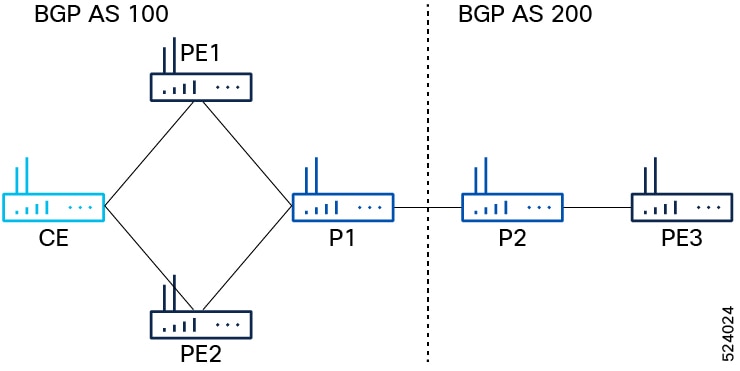
Configure IGP, MPLS, and BGP on PE1, PE2, and PE3.
-
Configure IGP on PE1 and PE2
Example:
Router(config)#router ospf pyats_test
Router(config-ospf)#router-id 54.54.54.54
Router(config-ospf)#redistribute bgp 100
Router(config-ospf)#mpls ldp sync
Router(config-ospf)#mpls ldp auto-config
Router(config-ospf)#area 0
Router(config-ospf-ar)#interface loopback0
Router(config-ospf-ar-if)#exit
Router(config-ospf-ar)#interface FourHundredGigE0/0/0/2
Router(config-ospf-ar-if)#commit
-
Configure MPLS on PE1 and PE2.
Example:
Router(config)# mpls ldp
Router(config-ldp)# router-id 54.54.54.54
Router(config-ldp)# address-family ipv4
Router(config-ldp-af)# label
Router(config-ldp-af-lbl)# local
Router(config-ldp-af-lbl)# allocate for host-routes
Router(config-ldp-af-lbl-lcl)# root
Router(config)# mpls ldp
Router(config-ldp)# interface FourHundredGigE0/0/0/2
-
Configure BGP on PE1 and PE2.
Example:
Router(config)#router bgp 100
Router(config-bgp)#bgp router-id 54.54.54.54
Router(config-bgp)#address-family ipv4 unicast
Router(config-bgp-af)#exit
Router(config-bgp)#address-family l2vpn evpn
Router(config-bgp-af)#retain route-target all
Router(config-bgp-af)#exit
Router(config-bgp)#neighbor-group IBGP-PEERS
Router(config-bgp-nbrgrp)#remote-as 100
Router(config-bgp-nbrgrp)#update-source loopback0
Router(config-bgp-nbrgrp)#address-family ipv4 unicast
Router(config-bgp-nbrgrp-af)#exit
Router(config-bgp-nbrgrp)#address-family l2vpn evpn
-
Configure IGP, MPLS, and BGP on PE3.
Example:
Router# configure
Router(config)#router ospf pyats_test
Router(config-ospf)#router-id 51.51.51.51
Router(config-ospf)#redistribute bgp 200
Router(config-ospf)#mpls ldp sync
Router(config-ospf)#mpls ldp auto-config
Router(config-ospf)#area 0
Router(config-ospf-ar)#interface loopback0
Router(config-ospf-ar-if)#exit
Router(config-ospf-ar)#interface FourHundredGigE0/0/0/10
Router(config-ospf-ar-if)#commit
Router(config)# mpls ldp
Router(config-ldp)# router-id 51.51.51.51
Router(config-ldp)# address-family ipv4
Router(config-ldp-af)# label
Router(config-ldp-af-lbl)# local
Router(config-ldp-af-lbl-lcl)# allocate for host-routes
Router(config-ldp-af-lbl-lcl)# root
Router(config)# mpls ldp
Router(config-ldp)# interface FourHundredGigE0/0/0/10
Router(config-ldp-if)# root
Router(config)#router bgp 100
Router(config-bgp)#bgp router-id 54.54.54.54
Router(config-bgp)#address-family ipv4 unicast
Router(config-bgp-af)#exit
Router(config-bgp)#address-family l2vpn evpn
Router(config-bgp-af)#retain route-target all
Router(config-bgp-af)#exit
Router(config-bgp)# neighbor 56.56.56.56
Router(config-bgp-nbr)#remote-as 200
Router(config-bgp-nbr)#update-source loopback0
Router(config-bgp-nbr)#address-family ipv4 unicast
Router(config-bgp-nbr-af)#exit
Router(config-bgp-nbr)#address-family l2vpn evpn
|
|
2. |
Configure iBGP peer on P1 and PE2.
-
Configure iBGP peer on P1.
Example:
Router(config-bgp)# neighbor 52.52.52.52
Router(config-bgp-nbr)# use neighbor-group IBGP-PEERS
-
Configure iBGP peer on PE2.
Example:
Router(config-bgp)# neighbor 55.55.55.55
Router(config-bgp-nbr)# remote-as 100
Router(config-bgp-nbr)# use neighbor-group IBGP-PEERS
Router(config-bgp-nbr)# update-source Loopback0
Router(config-bgp-nbr)# address-family l2vpn evpn
|
|
3. |
Configure P2 as route reflector.
Example:
Router(config)# prefix-set LOOPBACKS
Router(config-pfx)# 53.53.53.53,
Router(config-pfx)# 54.54.54.54,
Router(config-pfx)# 55.55.55.55,
Router(config-pfx)# 52.52.52.52,
Router(config-pfx)# 56.56.56.56,
Router(config-pfx)# 51.51.51.51
Router(config-pfx)# end-set
Router(config)# route-policy passall
Router(config-rpl)# pass
Router(config-rpl)# end-policy
Router(config)# route-policy MATCH_LOOPBACKS
Router(config-rpl)#if destination in LOOPBACKS then
Router(config-rpl-if)#pass
Router(config-rpl-if)#else
Router(config-rpl-else)#drop
Router(config-rpl-else)#endif
Router(config-rpl)#end-policy
|
|
4. |
Configure route policy, IGP, MPLS, and BGP on P1 and P2.
-
Configure route policy, IGP, MPLS, and BGP on P1.
Example:
Router(config)#router ospf pyats_test
Router(config-ospf)#router-id 52.52.52.52
Router(config-ospf)#redistribute bgp 100
Router(config-ospf)#mpls ldp sync
Router(config-ospf)#mpls ldp auto-config
Router(config-ospf)#area 0
Router(config-ospf-ar)#interface loopback0
Router(config-ospf-ar-if)#exit
Router(config-ospf-ar)#interface FourHundredGigE0/0/0/11
Router(config-ospf-ar-if)#exit
Router(config-ospf-ar)#interface FourHundredGigE0/0/0/12
Router(config-ospf-ar-if)#root
Router(config)# router static
Router(config-static)# address-family ipv4 unicast
Router(config-static-afi)# 100.0.0.2/32 FourHundredGigE0/0/0/13
Router(config-static-afi-if)# root
Router(config)# mpls ldp
Router(config-ldp)# router-id 52.52.52
Router(config-ldp)# address-family ipv4
Router(config-ldp-af)# label
Router(config-ldp-af-lbl)# local
Router(config-ldp-af-lbl-lcl)# allocate for host-routes
Router(config-ldp-af-lbl-lcl)# root
Router(config)# mpls ldp
Router(config-ldp)# interface FourHundredGigE0/0/0/11
Router(config-ldp-if)# exit
Router(config-ldp)# interface FourHundredGigE0/0/0/12
-
Configure route policy, IGP, MPLS, and BGP on P2.
Example:
Router(config)#router ospf pyats_test
Router(config-ospf)#router-id 56.56.56.56
Router(config-ospf)#redistribute bgp 200
Router(config-ospf)#mpls ldp sync
Router(config-ospf)#mpls ldp auto-config
Router(config-ospf)#area 0
Router(config-ospf-ar)#interface loopback0
Router(config-ospf-ar-if)#passive enable
Router(config-ospf-ar-if)#exit
Router(config-ospf-ar)#interface FourHundredGigE0/0/0/2
Router(config-ospf-ar)#root
Router(config)# router static
Router(config-static)# address-family ipv4 unicast
Router(config-static-afi)# 100.0.0.1/32 FourHundredGigE0/0/0/5
Router(config-static-afi)# root
Router(config)# mpls ldp
Router(config-ldp)# router-id 56.56.56.56
Router(config-ldp)# address-family ipv4
Router(config-ldp-af)# label
Router(config-ldp-af-lbl)# local
Router(config-ldp-af-lbl-lcl)# allocate for host-routes
Router(config-ldp-af-lbl-lcl)# root
Router(config)# mpls ldp
Router(config-ldp)# interface FourHundredGigE0/0/0/4
-
Configure router reflector client on P2, which is essential for copying the EVPN routes between the AS.
Example:
Router(config)#router bgp 200
Router(config-bgp)#bgp router-id 56.56.56.56
Router(config-bgp)#address-family ipv4 unicast
Router(config-bgp-af)#network 51.51.51.51/32
Router(config-bgp-af)#network 52.52.52.52/32
Router(config-bgp-af)#network 53.53.53.53/32
Router(config-bgp-af)#network 54.54.54.54/32
Router(config-bgp-af)#network 55.55.55.55/32
Router(config-bgp-af)#network 56.56.56.56/32
Router(config-bgp-af)#redistribute connected
Router(config-bgp-af)#redistribute ospf 0
Router(config-bgp-af)#allocate-label all
Router(config-bgp-af)#exit
Router(config-bgp)#address-family l2vpn evpn
Router(config-bgp-af)#retain route-target all
Router(config-bgp-af)#exit
Router(config-bgp)#neighbor-group IBGP-PEERS
Router(config-bgp-nbrgrp)#remote-as 200
Router(config-bgp-nbr)#update-source loopback0
Router(config-bgp-nbr)#address-family ipv4 unicast
Router(config-bgp-nbr-af)#exit
Router(config-bgp-nbr)#address-family l2vpn evpn
Router(config-bgp-nbr-af)#route-reflector-client
|
|
5. |
Configure P1 and P2 as eBGP neighbor.
-
Configure P1 as eBGP neighbor.
Example:
Router(config-bgp)# neighbor 100.0.0.1
Router(config-bgp-nbr)#remote-as 100
Router(config-bgp-nbr)#ebgp-multihop 255
Router(config-bgp-nbr)#address-family ipv4 labeled-unicast
Router(config-bgp-nbr-af)#next-hop-self
Router(config-bgp-nbr-af)#route-policy passall in
Router(config-bgp-nbr-af)#route-policy MATCH_LOOPBACKS out
Router(config-bgp-nbr-af)#send-extended-community-ebgp
Router(config-bgp-nbr-af)#exit
Router(config-bgp-nbr)#address-family l2vpn evpn
Router(config-bgp-nbr-af)#route-policy passall in
Router(config-bgp-nbr-af)#route-policy passall out
Router(config-bgp-nbr-af)#next-hop-unchanged
-
Configure P2 as eBGP neighbor.
Example:
Router(config-bgp)# neighbor 100.0.0.2
Router(config-bgp-nbr)#remote-as 200
Router(config-bgp-nbr)#ebgp-multihop 255
Router(config-bgp-nbr)#address-family ipv4 labeled-unicast
Router(config-bgp-nbr-af)#next-hop-self
Router(config-bgp-nbr-af)#route-policy passall in
Router(config-bgp-nbr-af)#route-policy MATCH_LOOPBACKS out
Router(config-bgp-nbr-af)#send-extended-community-ebgp
Router(config-bgp-nbr-af)#exit
Router(config-bgp-nbr)#address-family l2vpn evpn
Router(config-bgp-nbr-af)#route-policy passall in
Router(config-bgp-nbr-af)#route-policy passall out
Router(config-bgp-nbr-af)#next-hop-unchanged
|
|
6. |
Configure PE1, PE2, and PE3 as iBGP neighbor.
-
Configure PE3 as iBGP neighbor.
Example:
Router(config-bgp)#neighbor 51.51.51.51
Router(config-bgp-nbr)#use neighbor-group IBGP-PEERS
-
Configure PE1 and PE2 as iBGP neighbor.
Example:
Router(config-bgp)#neighbor 54.54.54.54
Router(config-bgp-nbr)#use neighbor-group IBGP-PEERS
Router(config-bgp-nbr)#exit
Router(config-bgp)#neighbor 55.55.55.55
Router(config-bgp-nbr)#use neighbor-group IBGP-PEERS
|
|
7. |
For P1, the iBGP peers are PE1 and PE2, and the eBGP peer is P2.
-
For P1, the iBGP peers are PE1 and PE2, and the eBGP peer is P2.
Example:
Router(config)# prefix-set LOOPBACKS
Router(config-pfx)# 53.53.53.53,
Router(config-pfx)# 54.54.54.54,
Router(config-pfx)# 55.55.55.55,
Router(config-pfx)# 52.52.52.52,
Router(config-pfx)# 56.56.56.56,
Router(config-pfx)# 51.51.51.51
Router(config-pfx)# end-set
Router(config)# route-policy passall
Router(config-rpl)# pass
Router(config-rpl)# end-policy
Router(config)# route-policy MATCH_LOOPBACKS
Router(config-rpl)#if destination in LOOPBACKS then
Router(config-rpl-if)#pass
Router(config-rpl-if)#else
Router(config-rpl-else)#drop
Router(config-rpl-else)#endif
Router(config-rpl)#end-policy
-
Configure router reflector client.
Example:
Router(config)#router bgp 100
Router(config-bgp)#bgp router-id 52.52.52.52
Router(config-bgp)#address-family ipv4 unicast
Router(config-bgp-af)#network 51.51.51.51/32
Router(config-bgp-af)#network 52.52.52.52/32
Router(config-bgp-af)#network 53.53.53.53/32
Router(config-bgp-af)#network 54.54.54.54/32
Router(config-bgp-af)#network 55.55.55.55/32
Router(config-bgp-af)#network 56.56.56.56/32
Router(config-bgp-af)#redistribute connected
Router(config-bgp-af)#redistribute ospf 0
Router(config-bgp-af)#allocate-label all
Router(config-bgp-af)#exit
Router(config-bgp)#address-family l2vpn evpn
Router(config-bgp-af)#retain route-target all
Router(config-bgp-af)#exit
Router(config-bgp)#neighbor-group IBGP-PEERS
Router(config-bgp-nbrgrp)#remote-as 100
Router(config-bgp-nbr)#update-source loopback0
Router(config-bgp-nbr)#address-family ipv4 unicast
Router(config-bgp-nbr-af)#exit
Router(config-bgp-nbr)#address-family l2vpn evpn
Router(config-bgp-nbr-af)#route-reflector-client
|
|
8. |
Configure L2VPN and EVPN on PE1, PE2, and PE3.
Example:
Router(config)# l2vpn
Router(config-l2vpn)# bridge group bg1
Router(config-l2vpn-bg)# bridge-domain bd1
Router(config-l2vpn-bg-bd)# interface Bundle-Ether3.1
Router(config-l2vpn-bg-bd-ac)# evi 1
Router(config-l2vpn-bg-bd-ac)# root
Router(config)# l2vpn
Router(config-l2vpn)# bridge group bg2
Router(config-l2vpn-bg)# bridge-domain bd2
Router(config-l2vpn-bg-bd)# interface Bundle-Ether3.2
Router(config-l2vpn-bg-bd-ac)# evi 2
Router(config-l2vpn-bg-bd-ac-evi)# root
Router(config)# evpn
Router(config-evpn)# evi 1
Router(config-evpn-evi)# advertise-mac
Router(config-evpn-evi)# exit
Router(config-evpn)# evi 2
Router(config-evpn-evi)# advertise-mac
|
|
9. |
Use these show commands to verify that you have successfully configured EVPN bridging and E-Line services over BGP-LU underlay with LDP.
-
show evpn internal-label vpn-id 1 detail
-
show bgp l2vpn evpn route-type inclusive-mcast
-
show l2vpn forwarding bridge-domain mac location 0/RP0/CPU0
-
show bgp l2vpn evpn route-type mac-advertisement
Example:
Router# show evpn internal-label vpn-id 1 detail

VPN-ID     Encap  Ethernet Segment Id         EtherTag     Label
---------- ------ --------------------------- ----------   --------
1          MPLS   0040.0000.0000.0000.0001    0            24010
   Multi-paths resolved: TRUE (Remote all-active)
   Multi-paths Internal label: 24010
    EAD/ES  (ID:0x0000000000000652)
                54.54.54.54                                0
                55.55.55.55                                0
    EAD/EVI (ID:0x0000000000000649)
                54.54.54.54                                24000
                55.55.55.55                                24000
   Summary pathlist (ID 0x000000000000064d):
 0x02000001 (P) 54.54.54.54                                24000
 0x02000002 (P) 55.55.55.55                                24000
Router# show bgp l2vpn evpn route-type inclusive-mcast

BGP router identifier 51.51.51.51, local AS number 200
BGP generic scan interval 60 secs
Non-stop routing is enabled
BGP table state: Active
Table ID: 0x0
BGP table nexthop route policy:
BGP main routing table version 100
BGP NSR Initial initsync version 1 (Reached)
BGP NSR/ISSU Sync-Group versions 0/0
BGP scan interval 60 secs

Status codes: s suppressed, d damped, h history, * valid, > best
              i - internal, r RIB-failure, S stale, N Nexthop-discard
Origin codes: i - IGP, e - EGP, ? - incomplete
   Network            Next Hop            Metric LocPrf Weight Path
Route Distinguisher: 51.51.51.51:1 (default for vrf bd1)
Route Distinguisher Version: 94
*> [3][0][32][51.51.51.51]/80
                      0.0.0.0                                0 i N
*>i[3][0][32][54.54.54.54]/80
                      54.54.54.54                   100      0 100 i N
*>i[3][0][32][55.55.55.55]/80
                      55.55.55.55                   100      0 100 i N
Route Distinguisher: 51.51.51.51:2 (default for vrf bd2)
Route Distinguisher Version: 100
*> [3][0][32][51.51.51.51]/80
                      0.0.0.0                                0 i N
*>i[3][0][32][54.54.54.54]/80
                      54.54.54.54                   100      0 100 i N
*>i[3][0][32][55.55.55.55]/80
                      55.55.55.55                   100      0 100 i N
Route Distinguisher: 54.54.54.54:1
Route Distinguisher Version: 92
*>i[3][0][32][54.54.54.54]/80
                      54.54.54.54                   100      0 100 i N
Route Distinguisher: 54.54.54.54:2
Route Distinguisher Version: 99
*>i[3][0][32][54.54.54.54]/80
                      54.54.54.54                   100      0 100 i N
Route Distinguisher: 55.55.55.55:1
Route Distinguisher Version: 67
*>i[3][0][32][55.55.55.55]/80
                      55.55.55.55                   100      0 100 i N
Route Distinguisher: 55.55.55.55:2
Route Distinguisher Version: 96
*>i[3][0][32][55.55.55.55]/80
                      55.55.55.55                   100      0 100 i N

Processed 10 prefixes, 10 paths
Router# show l2vpn forwarding bridge-domain mac location 0/RP0/CPU0

 To Resynchronize MAC table from the Network Processors, use the command...
    l2vpn resynchronize forwarding mac-address-table location <r/s/i>

Mac Address    Type    Learned from/Filtered on    LC learned Resync Age/Last Change Mapped to
-------------- ------- --------------------------- ---------- ---------------------- --------------
0000.cccc.dddd dynamic FH0/0/0/0.2                 N/A        12 Mar 13:17:36        N/A   --> MAC 0000.cccc.dddd was locally learned from interface FH0/0/0/0.2
0000.aaaa.bbbb EVPN    BD id: 1                    N/A        N/A                    N/A   --> MAC 0000.aaaa.bbbb was advertised from PE1/PE2
Router# show bgp l2vpn evpn route-type mac-advertisement

BGP router identifier 51.51.51.51, local AS number 200
BGP generic scan interval 60 secs
Non-stop routing is enabled
BGP table state: Active
Table ID: 0x0
BGP table nexthop route policy:
BGP main routing table version 100
BGP NSR Initial initsync version 1 (Reached)
BGP NSR/ISSU Sync-Group versions 0/0
BGP scan interval 60 secs

Status codes: s suppressed, d damped, h history, * valid, > best
              i - internal, r RIB-failure, S stale, N Nexthop-discard
Origin codes: i - IGP, e - EGP, ? - incomplete
   Network            Next Hop            Metric LocPrf Weight Path
Route Distinguisher: 51.51.51.51:2 (default for vrf bd2)
Route Distinguisher Version: 100
*>i[2][0][48][0000.aaaa.bbbb][0]/104 -->
                      54.54.54.54                   100      0 100 i N
* i                   55.55.55.55                   100      0 100 i N
*> [2][0][48][0000.cccc.dddd][0]/104 -->
                      0.0.0.0                                0 i N
Route Distinguisher: 54.54.54.54:2
Route Distinguisher Version: 99
*>i[2][0][48][0000.aaaa.bbbb][0]/104
                      54.54.54.54                   100      0 100 i N
Route Distinguisher: 55.55.55.55:2
Route Distinguisher Version: 96
*>i[2][0][48][0000.aaaa.bbbb][0]/104
                      55.55.55.55                   100      0 100 i N
Processed 4 prefixes, 5 paths
|