EVPN Configuration Guide for Cisco 8000 Series Routers, Cisco IOS XR Releases

PDF

EVPN Configuration Guide for Cisco 8000 Series Routers, Cisco IOS XR Releases

EVPN E-LAN single-active multihoming mode

Want to summarize with AI?

Log in

Explains how EVPN E-LAN single-active multihoming modes provide network redundancy by ensuring traffic forwarding is managed efficiently among connected PE nodes.


EVPN E-LAN single-active multihoming mode is a network redundancy method that

  • enables PE nodes locally connected to an Ethernet segment to load balance traffic to and from the segment based on an EVI

  • ensures that within an EVI, only one PE forwards traffic to and from the Ethernet segment, and

  • supports efficient use of network resources by managing active forwarding paths.

Table 1. Feature History Table

Feature Name

Release Information

Feature Description

EVPN E-LAN single-active multihoming mode

Release 26.2.1

Introduced in this release on: Modular Systems (8800 [LC ASIC: K100])(select variants only*);

*This feature is supported on Cisco 88-LC1-48Y8H-EM line cards.

EVPN E-LAN single-active multihoming mode

Release 25.4.1

Introduced in this release on: Fixed Systems (8010 [ASIC: A100])(select variants only*)

*This feature is supported on:

  • 8011-32Y8L2H2FH

  • 8011-12G12X4Y-A

  • 8011-12G12X4Y-D

EVPN E-LAN single-active multihoming mode

Release 25.1.1

Introduced in this release on: Fixed Systems (8010 [ASIC: A100]) (select variants only*)

*This feature is now supported on the Cisco 8011-4G24Y4H-I routers.

EVPN E-LAN single-active multihoming mode

Release 24.4.1

Introduced in this release on: Fixed Systems (8700) (select variants only*)

*The EVPN E-LAN single-active multihoming functionality is now extended to the Cisco 8712-MOD-M routers.

EVPN E-LAN single-active multihoming mode

Release 24.3.1

Introduced in this release on: Fixed Systems (8200 [ASIC: P100], 8700 [ASIC: P100])(select variants only*); Modular Systems (8800 [LC ASIC: P100])(select variants only*)

*The EVPN E-LAN single-active multihoming functionality is now extended to:

  • 8212-48FH-M

  • 8711-32FH-M

  • 88-LC1-52Y8H-EM

  • 88-LC1-12TH24FH-E

EVPN E-LAN single-active multihoming mode

Release 24.2.11

Introduced in this release on: Modular Systems (8800 [LC ASIC: P100]) (select variants only*)

The single-active multihoming mode offers redundant connectivity on a single link at a time with failover to the second link in case the active link fails. In this mode, only a single PE among a group of PEs attached to an Ethernet segment forwards traffic to and from that Ethernet Segment.

*This feature is supported only on routers with the 88-LC1-36EH line cards.


EVPN E-LAN single-active multihoming mode for redundant connectivity

EVPN E-LAN single-active multihoming mode provides network redundancy in EVPN environments, especially in ring topologies:

  • Only one PE device, the active PE, handles traffic forwarding and reception for an Ethernet segment at a time, preventing network loops.

  • When the active PE's link fails, traffic switches to a standby PE. During switchover, the standby PE learns the MAC addresses, which can cause a brief interruption.

  • The standby PE quickly learns MAC addresses from the failed path, supporting rapid convergence and minimizing traffic loss.

  • A CE device can connect to multiple PEs for redundancy. The first PE to advertise a host’s MAC address in a VLAN becomes the active forwarder for that MAC.

  • This mode also enables load balancing for traffic to and from the Ethernet segment, based on the EVI.


Benefits of single-active multihoming mode

Single-active multihoming mode offers several key advantages for network management and service provision:

  • Redundant connectivity: Provides a backup link that automatically takes over if the active link fails, ensuring continuous service availability.

  • Simplified traffic management: Directs traffic to a single uplink, simplifying the monitoring and management of data flows.

  • Enhanced network control: Allows for precise control over bandwidth restrictions and data usage accounting, which is beneficial for implementing policing and metering.

  • Billing flexibility: Facilitates accurate billing for business customers by integrating with internal billing systems, ensuring proper account management.

  • High availability: Maintains a reliable connection by utilizing redundant paths, enhancing overall network resilience.


How EVPN E-LAN single-active multihoming mode works

Summary

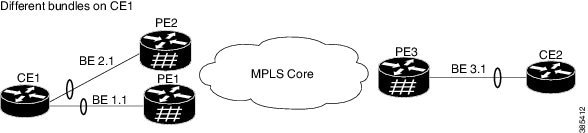
The EVPN E-LAN single-active multihoming process involves a network topology where a CE1 device is multihomed to two provider edge devices,PE1 and PE2, connected through an MPLS core to PE3. This process ensures efficient traffic flow and redundancy.

The key components involved in the process are:

  • CE1: A customer edge device multihomed to PE1 and PE2.

  • PE1 and PE2: Provider edge devices connected to CE1 and PE3, responsible for advertising routes and managing traffic flow.

  • PE3: A provider edge device connected to CE2 through an Ethernet interface bundle.

  • CE2: A customer edge device connected to PE3.

Workflow

The process involves the following stages:

  1. Route advertisement:

    • PE1 and PE2 advertise Type 4 routes to elect the designated forwarder (DF). PE1 is elected as the DF, while PE2 becomes the non-DF.

  2. Traffic management:

    • CE1 sends an ARP broadcast request to both PE1 and PE2.

    • PE1, as the DF, forwards the ARP request from CE1.

    • PE2, being the non-DF, drops the traffic from CE1.

  3. Traffic flow:

    • All traffic is sent through PE1, with PE2 acting as a standby device.

    • PE1 advertises MAC routes to PE3.

    • PE3 sends and receives traffic through PE1 and forwards it to CE2 over the Ethernet interface bundle.

  4. Redundancy management:

    • In case of a link failure where PE1 goes down, PE2 becomes active to maintain the traffic flow.

The EVPN E-LAN single-active multihoming process ensures efficient and reliable traffic flow while providing redundancy. When the active link (PE1) fails, the router automatically switches to the standby link (PE2) to maintain network connectivity.


Configure EVPN single-active multihoming mode

Set up EVPN single-active multihoming on PE routers for efficient network redundancy and load balancing.

This task involves configuring BGP sessions and MPLS LDP, setting up EVPN EVI parameters, and enabling single-active mode on PE routers.

Perform the following configuration on PE1, PE2, and PE3.

  1. Configure BGP session and MPLS Label Distribution Protocol (LDP) to enable EVPN.

  2. Configure bridge domain, EVI, and advertisement of MAC routes.

  3. Enter the bundle interface mode and configure the Ethernet segment identifier (ESI) for the interface.

  4. Ensure that you configure the same ESI on all the PEs.

  5. Enable single-active mode by using the load-balancing-mode single-active command.

Procedure

1.

Configure BGP session and MPLS LDP to enable EVPN on PE routers.

Example:

PE1 configuration.

Router(config)# router bgp 100
Router(config-bgp)# bgp router-id 54.54.54.54
Router(config-bgp)# address-family l2vpn evpn
Router(config-bgp)# neighbor 51.51.51.51
Router(config-bgp-nbr)# remote-as 100
Router(config-bgp-nbr)# update-source Loopback 0
Router(config-bgp-nbr)# address-family l2vpn evpn
Router(config-bgp)# neighbor 55.55.55.55
Router(config-bgp-nbr)# remote-as 100
Router(config-bgp-nbr)# update-source Loopback 0
Router(config-bgp-nbr)# address-family l2vpn evpn

Configure MPLS LDP.

Router(config)# mpls ldp
Router(config-ldp)# router-id 55.55.55.55
Router(config-ldp)# interface FourHundredGigE0/0/0/2

PE2 configuration.

Router(config)# router bgp 100
Router(config-bgp)# bgp router-id 55.55.55.55
Router(config-bgp)# address-family l2vpn evpn
Router(config-bgp)# neighbor 51.51.51.51
Router(config-bgp-nbr)# remote-as 100
Router(config-bgp-nbr)# update-source Loopback 0
Router(config-bgp-nbr)# address-family l2vpn evpn
Router(config-bgp)# neighbor 54.54.54.54
Router(config-bgp-nbr)# remote-as 100
Router(config-bgp-nbr)# update-source Loopback 0
Router(config-bgp-nbr)# address-family l2vpn evpn

Configure MPLS LDP.

Router(config)# mpls ldp
Router(config-ldp)# router-id 55.55.55.55
Router(config-ldp)# interface FourHundredGigE0/0/0/2

PE3 configuration.

Router(config)# router bgp 100
Router(config-bgp)# bgp router-id 51.51.51.51
Router(config-bgp)# address-family l2vpn evpn
Router(config-bgp)# neighbor 54.54.54.54
Router(config-bgp-nbr)# remote-as 100
Router(config-bgp-nbr)# update-source Loopback 0
Router(config-bgp-nbr)# address-family l2vpn evpn
Router(config-bgp)# neighbor 55.55.55.55
Router(config-bgp-nbr)# remote-as 100
Router(config-bgp-nbr)# update-source Loopback 0
Router(config-bgp-nbr)# address-family l2vpn evpn

Configure MPLS LDP.

Router(config)# mpls ldp
Router(config-ldp)# router-id 51.51.51.51
Router(config-ldp)# interface FourHundredGigE0/0/0/2
2.

Configure bridge domain, EVI, and advertise MAC routes.

Example:

Router(config)# l2vpn 
Router(config-l2vpn)# bridge group bg1
Router(config-l2vpn-bg)# bridge-domain bd1
Router(config-l2vpn-bg-bd)# interface Bundle-Ether1.1
Router(config-l2vpn-bg-bd-ac)# evi 1
Router(config-l2vpn-bg-bd-ac)# root
Router(config)# l2vpn 
Router(config-l2vpn)# bridge group bg2
Router(config-l2vpn-bg)# bridge-domain bd2
Router(config-l2vpn-bg-bd)# interface Bundle-Ether1.2
Router(config-l2vpn-bg-bd-ac)# evi 2

Configure EVPN EVI parameters and advertise MAC routes.

Router(config)# evpn
Router(config-evpn)# evi 1
Router(config-evpn-evi)# advertise-mac
Router(config-evpn-evi)# exit
Router(config-evpn)# evi 2
Router(config-evpn-evi)# advertise-mac
3.

Enter the bundle interface mode and configure the same ESI on all the PE routers.

Example:

Router(config)# evpn
Router(config-evpn)# interface Bundle-Ether1
Router(config-evpn-ac)# ethernet-segment
Router(config-evpn-ac-es)# identifier type 0 40.00.00.00.00.00.00.00.01
4.

Enable single-active mode.

Example:

Router(config-evpn-ac-es)# load-balancing-mode single-active
Router(config-evpn-ac-es)# commit
5.

Running configuration of EVPN single-active multihoming mode.

Example:


/* PE1 Configuration */
router bgp 100
 bgp router-id 54.54.54.54
 address-family l2vpn evpn
 !
 neighbor 51.51.51.51
  remote-as 100
  update-source Loopback0
  address-family l2vpn evpn
  !
 !
 neighbor 55.55.55.55
  remote-as 100
  update-source Loopback0
  address-family l2vpn evpn
  !
 !
!
mpls ldp
 router-id 54.54.54.54
 interface FourHundredGigE0/0/0/2
 !
!

/* PE2 Configuration */
router bgp 100
 bgp router-id 55.55.55.55
 address-family l2vpn evpn
 !
 neighbor 51.51.51.51
  remote-as 100
  update-source Loopback0
  address-family l2vpn evpn
  !
 !
 neighbor 54.54.54.54
  remote-as 100
  update-source Loopback0
  address-family l2vpn evpn
  !
 !
!
mpls ldp
 router-id 55.55.55.55
 interface FourHundredGigE0/0/0/2
 !
!

/* PE3 Configuration */
router bgp 100
 bgp router-id 51.51.51.51
 address-family l2vpn evpn
 !
 neighbor 54.54.54.54
  remote-as 100
  update-source Loopback0
  address-family l2vpn evpn
  !
 !
 neighbor 55.55.55.55
  remote-as 100
  update-source Loopback0
  address-family l2vpn evpn
  !
 !
!
mpls ldp
 router-id 51.51.51.51
 interface FourHundredGigE0/0/0/3
 !
!

Configuration of bridge domain, EVI, and advertise MAC routes on all the PEs.


l2vpn
 bridge group bg1
  bridge-domain bd1
   interface Bundle-Ether1.1
   !
   evi 1
   !
  !
 !
 bridge group bg2
  bridge-domain bd2
   interface Bundle-Ether1.2
   !
   evi 2
   !
  !
 !
!
evpn
 evi 1
  advertise-mac
  !
 !
 evi 2
  advertise-mac
  !
 !
 interface Bundle-Ether1
  ethernet-segment
   identifier type 0 40.00.00.00.00.00.00.00.01
   load-balancing-mode single-active
  !
 !
!
6.

Use the show evpn ethernet-segment interface BE1 carving detail to verify that single-active mode is configured on PE1.

Example:

Router# show evpn ethernet-segment interface BE1 carving detail

Ethernet Segment Id      Interface                          Nexthops            
------------------------ ---------------------------------- --------------------
0040.0000.0000.0000.0001 BE1                                54.54.54.54
                                                            55.55.55.55
  ES to BGP Gates   : Ready
  ES to L2FIB Gates : Ready
  Main port         :
     Interface name : Bundle-Ether1
     Interface MAC  : 008d.9c38.7205
     IfHandle       : 0x0f00003c
     State          : Up
     Redundancy     : Not Defined
  ESI ID            : 1
  ESI type          : 0
     Value          : 0040.0000.0000.0000.0001
  ES Import RT      : 4000.0000.0000 (from ESI)
  Topology          :
     Operational    : MH, Single-active
     Configured     : Single-active (AApS)
  Service Carving   : Auto-selection
     Multicast      : Disabled
  Convergence       : 
  Peering Details   : 2 Nexthops
     54.54.54.54 [MOD:P:00:T]
     55.55.55.55 [MOD:P:00:T]
  Service Carving Synchronization:
     Mode           : NONE
     Peer Updates   :
             54.54.54.54 [SCT: N/A]
             55.55.55.55 [SCT: 2024-03-12 10:42:30.1710254]
  Service Carving Results:
     Forwarders     : 2
     Elected        : 1
            EVI E   :        2
     Not Elected    : 1
            EVI NE  :        1
  EVPN-VPWS Service Carving Results:
     Primary        : 0
     Backup         : 0
     Non-DF         : 0
  MAC Flush msg     : STP-TCN
  Peering timer     : 3 sec [not running]
  Recovery timer    : 30 sec [not running]
  Carving timer     : 0 sec [not running]
  Revert timer      : 0 sec [not running]
  HRW Reset timer   : 5 sec [not running]
  Local SHG label   : 24004
  Remote SHG labels : 1
              24004 : nexthop 55.55.55.55
  Access signal mode: Bundle OOS


The EVPN single-active multihoming configuration is applied across PE routers, ensuring optimized redundancy and load balancing.

Disabling MAC flush messages is particularly relevant in the context of EVPN single-active multihoming mode, as it helps prevent network disruptions at the CE by mitigating issues like BPDU guard triggers when configuring multihoming scenarios.


MAC flush message disablement

Disabling MAC flush messages is an EVPN E-LAN feature that

  • prevents MAC flush messages from being sent for an Ethernet segment

  • addresses undesired behavior such as triggering BPDU guard at the CE, and

  • is implemented using the mac-flush-message disable command during the configuration of EVPN single-active multihoming on PE routers.


Disable MAC flush messages for EVPN single-active multihoming mode

Set up EVPN and L2VPN configurations to manage Ethernet segments effectively with MAC flush messages disabled.

This task is performed to configure EVPN and L2VPN settings on a router to handle Ethernet segments with specific identifiers and load balancing mode. It includes setting up bridge groups and domains, configuring interfaces, and ensuring MAC flush messages are disabled for the specified segments

Procedure

1.

Configure L2VPN.

Example:

Router(config)#l2vpn
Router(config-l2vpn)#bridge group 100
Router(config-l2vpn-bg)#bridge-domain 100
Router(config-l2vpn-bg-bd)#interface Bundle-Ether2.10
Router(config-l2vpn-bg-bd)#evi 100
Router(config-l2vpn-bg-bd-evi)#commit
2.

Configure EVPN single-active multihoming mode and disable MAC flush message.

Example:

Router(config)#evpn
Router(config-evpn)#evi 100 
Router(config-evpn-instance)#advertise-mac
Router(config-evpn-instance-mac)#exit
Router(config-evpn-instance)#exit
Router(config-evpn)#interface Bundle-Ether1
Router(config-evpn-ac)#ethernet-segment
Router(config-evpn-ac-es)#identifier type 0 36.37.00.00.00.00.00.11.00
Router(config-evpn-ac-es)#load-balancing-mode single-active
Router(config-evpn-ac-es)#exit
Router(config-evpn-ac)# mac-flush-message disable
Router(config-evpn-ac)# commit
3.

Running configuration.

Example:


l2vpn     
 bridge group 100
  bridge-domain 100
   interface Bundle-Ether1.10
   !      
   evi 100
   !      
  !       
 !        
!  
evpn
 evi 100  
  advertise-mac
  !   
 !        
 interface Bundle-Ether1
  ethernet-segment
   identifier type 0 36.37.00.00.00.00.00.11.00
   load-balancing-mode single-active
  !
  mac-flush-message disable 
  !       
 !        
!         
4.

Use the show evpn ethernet-segment detail command to verify the MAC flush message status.

Example:


Router#show evpn ethernet-segment detail

Legend:
  B   - No Forwarders EVPN-enabled,
  C   - Backbone Source MAC missing (PBB-EVPN),
  RT  - ES-Import Route Target missing,
  E   - ESI missing,
  H   - Interface handle missing,
  I   - Name (Interface or Virtual Access) missing,
  M   - Interface in Down state,
  O   - BGP End of Download missing,
  P   - Interface already Access Protected,
  Pf  - Interface forced single-homed,
  R   - BGP RID not received,
  S   - Interface in redundancy standby state,
  X   - ESI-extracted MAC Conflict
  SHG - No local split-horizon-group label allocated

Ethernet Segment Id      Interface                          Nexthops            
------------------------ ---------------------------------- --------------------
0036.3700.0000.0000.1100 BE1                                10.1.1.1
                                                            10.2.2.2
  ES to BGP Gates   : Ready
  ES to L2FIB Gates : Ready
  Main port         :
     Interface name : Bundle-Ether1
     Interface MAC  : 0008.3302.3208
     IfHandle       : 0x02000160
     State          : Up
     Redundancy     : Not Defined
  ESI type          : 0
     Value          : 36.3700.0000.0000.1100
  ES Import RT      : 3637.0000.0000 (from ESI)
  Source MAC        : 0000.0000.0000 (N/A)
  Topology          :
    Operational    : MH, Single-active
     Configured     : Single-active (AApS)
  Service Carving   : Auto-selection
     Multicast      : Disabled
  Convergence       : 
     Mobility-Flush : Count 0, Skip 0, Last n/a
  Peering Details   : 2 Nexthops
     10.1.1.1 [MOD:P:00]
     10.2.2.2 [MOD:P:00]
 Service Carving Results:
     Forwarders     : 1
     Elected        : 1
     Not Elected    : 0
  EVPN-VPWS Service Carving Results:
     Primary        : 0
     Backup         : 0
     Non-DF         : 0
  MAC Flush msg     : Disabled
  Peering timer     : 3 sec [not running]
  Recovery timer    : 30 sec [not running]
  Carving timer     : 0 sec [not running]
  Local SHG label   : 24007
  Remote SHG labels : 1
              24007 : nexthop 10.2.2.2
  Access signal mode: Bundle OOS (Default)

Check that the MAC flush message is disabled in the output.