EVPN Configuration Guide for Cisco 8000 Series Routers, Cisco IOS XR Releases

PDF

EVPN Configuration Guide for Cisco 8000 Series Routers, Cisco IOS XR Releases

Seamless migration of VPLS network to an EVPN network

Want to summarize with AI?

Log in

Explains how service providers can migrate their VPLS networks to EVPN without service disruption, highlighting key attributes, benefits, and technical aspects.


A migration from VPLS to EVPN is a process that

  • enables service providers to gradually upgrade their VPLS networks to EVPN without disrupting services

  • facilitates the coexistence of legacy VPLS and EVPN-VPLS dual-stack configurations, and

  • leverages MP-BGP for efficient MAC learning and propagation.

Table 1. Feature History Table

Feature Name

Release Information

Feature Description

Seamless Migration of VPLS Network to EVPN Network

Release 26.2.1

Introduced in this release on: Modular Systems (8800 [LC ASIC: K100])(select variants only*)

*This feature is supported on Cisco 88-LC1-48Y8H-EM line cards.

Seamless Migration of VPLS Network to EVPN Network

Release 25.4.1

Introduced in this release on: Fixed Systems (8010 [ASIC: A100])(select variants only*)

*This feature is now supported on:

  • 8011-32Y8L2H2FH

  • 8011-12G12X4Y-A

  • 8011-12G12X4Y-D

Seamless Migration of VPLS Network to EVPN Network

Release 25.3.1

Introduced in this release on: Fixed Systems (8200 [ASIC: Q200, P100], 8700 [ASIC: P100, K100]); Centralized Systems (8600 [ASIC:Q200]); Modular Systems (8800 [LC ASIC: Q100, Q200, P100])

You can configure local static MPLS labels for unicast IP traffic under the EVPN EVI configuration, which ensures remote PEs use a consistent, common label for the same EVPN service, improving forwarding consistency and operational control.

The feature introduces these changes:

CLI:

Seamless Migration of VPLS Network to EVPN Network

Release 25.1.1

Introduced in this release on: Fixed Systems (8010 [ASIC: A100]) (select variants only*)

*This feature is now supported on the Cisco 8011-4G24Y4H-I routers.

Seamless Migration of VPLS Network to EVPN Network

Release 24.4.1

Introduced in this release on: Fixed Systems (8700) (select variants only*)

*The seamless VPLS-to-EVPN migration is now extended to the Cisco 8712-MOD-M routers.

Seamless Migration of VPLS Network to EVPN Network

Release 24.3.1

Introduced in this release on: Fixed Systems (8200, 8700); Modular Systems (8800 [LC ASIC: P100]) (select variants only*)

*The seamless VPLS-to-EVPN migration is now extended to:

  • 8212-48FH-M

  • 8711-32FH-M

  • 88-LC1-52Y8H-EM

  • 88-LC1-12TH24FH-E

Seamless Migration of VPLS Network to EVPN Network

Release 24.2.11

Introduced in this release on: Modular Systems (8800 [LC ASIC: P100]) (select variants only*)

*The seamless VPLS-to-EVPN migration is now extended to routers with the 88-LC1-36EH line cards.

Seamless Migration of VPLS Network to EVPN Network

Release 7.11.1

You can now provision an EVPN service on existing VPLS-enabled PEs individually, thus ensuring a seamless VPLS-to-EVPN migration without traffic disruption.

This feature is supported only on Q200-based line cards.

Transitioning from VPLS to EVPN

Although VPLS is a widely deployed Layer 2 VPN technology, customers are increasingly migrating their VPLS networks to EVPN to benefit from improved scalability and simplified deployment. Recognizing the importance of preserving existing investments in VPLS, service providers are exploring ways to seamlessly integrate their legacy VPLS networks with new EVPN-based networks.

Key benefits of migration

The migration of VPLS to an EVPN network offers these benefits:

  • Incremental migration: Service providers can migrate PE nodes from VPLS to EVPN gradually, ensuring no service disruption.

  • Dual-Stack coexistence: Legacy VPLS and EVPN-VPLS can coexist in the same MPLS network, enabling a smooth transition.

  • Control plane efficiency: EVPN uses MP-BGP for MAC learning and propagation, unlike VPLS, which relies on the data plane.

Technical highlights

These points highlight the key aspects of VPLS to an EVPN migration:

  • EVPN instance grouping: VPN instances in EVPN are grouped by EVPN Instance ID (EVI-ID) and associated with route targets and route distinguishers.

  • MAC learning: EVPN employs a control plane for MAC learning, while VPLS uses a flood-and-learn technique in the data plane.

  • Route Types:

    • Type-2: Advertises customer MAC addresses.

    • Type-3: Handles broadcast, unknown unicast, and multicast (BUM) traffic using ingress replication multicast routes.

Migration process

These stages describe the migration process for transitioning from VPLS to EVPN.

  • Gradual PE node upgrade: Upgrade one PE node at a time without requiring a network-wide software update.

  • Route exchange: EVPN-enabled PEs advertise both BGP VPLS autodiscovery (AD) routes and EVPN multicast routes (Type-3) for seamless integration.

  • BUM traffic handling: Type-3 routes ensure that PEs with matching route targets receive BUM traffic.

Table 2. Comparison of VPLS and EVPN

Feature

VPLS

EVPN

MAC learning

Data plane

Control plane

Protocol

Flood and learn

MP-BGP

Route Types

Not applicable

Type-2 (MAC), Type-3 (BUM)

MPLS static label support for EVPN ELAN

From Release 25.3.1, you can assign a static MPLS label to an EVPN service. This static assignment overrides the default dynamic label allocation by Cisco IOS XR software.

When you configure a static MPLS label on Provider Edge (PE) routers, this ensures that remote PEs receive traffic for the same service with a consistent, common label.

You can configure static MPLS labels for unicast IP traffic in EVPN ELAN by assigning local static labels under the EVPN EVI configuration mode. The range for these static MPLS labels is from 16 to 1,048,575.

Configure static MPLS labels within the range of 16 to 15,000 to avoid conflicts with existing dynamic labels and the default Segment Routing Local Block (SRLB) range of 15,000 to 15,999. For more information, see About the Segment Routing Local Block in the Segment Routing Configuration Guide for Cisco 8000 Series Routers.
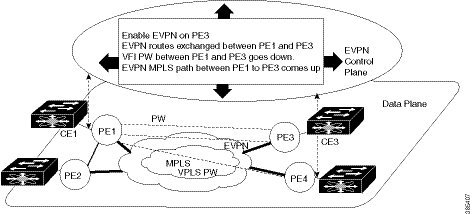

Migrating VPLS network to an EVPN network

Summary

The migration process involves transitioning a VPLS network to an EVPN network. This process ensures seamless integration and avoids traffic disruption.

The key components involved in the process are:

  • PE nodes: Devices such as PE1, PE2, PE3, and PE4 that form the network.

  • VPLS Pseudowires (PW): Connections between PE nodes in the VPLS network.

  • EVPN service: A service that replaces VPLS for enhanced network functionality.

Workflow

Figure 1. Seamless migration of VPLS network to EVPN network

These are the stages of the migration process:

  1. Initial setup: Ensure that PE1, PE2, PE3, and PE4 are interconnected in a full-meshed topology using VPLS pseudowires.

  2. Enable EVPN on PE1:

    • Activate EVPN in a VPN instance of the VPLS service on PE1.

    • PE1 starts advertising the EVPN inclusive multicast route to other PE nodes.

    • Since no inclusive multicast routes are received from other PE nodes, VPLS pseudowires between PE1 and other PE nodes remain active.

    • PE1 forwards traffic using VPLS pseudowires and advertises all MAC addresses learned from CE1 using EVPN Route Type-2.

  3. Enable EVPN on PE3:

    • Activate EVPN on PE3.

    • PE3 starts advertising an inclusive multicast route to other PE nodes.

    • PE1 and PE3 discover each other through EVPN routes and shut down pseudowires between them.

    • EVPN service replaces VPLS service between PE1 and PE3.

  4. Seamless integration: PE1 continues running VPLS service with PE2 and PE4 while starting EVPN service with PE3 in the same VPN instance.

  5. Migrate the remaining nodes: Repeat the process for PE2 and PE4 until all PE nodes are enabled with the EVPN service.

  6. Complete the migration: After all nodes are migrated, the VPLS service is completely replaced with the EVPN service, and all VPLS pseudowires are shut down.

    The migration process ensures a seamless transition from VPLS to EVPN, enhancing network efficiency and functionality without disrupting traffic.


Configure EVPN on the existing VPLS network

Enable EVPN on an existing VPLS network to enhance Layer 2 VPN capabilities.

This task involves configuring EVPN on an existing VPLS network by setting up the L2VPN EVPN address-family, EVI, and corresponding BGP route-targets, and verifying the configuration.

Before you begin

  • Ensure that the PE routers are operational and configured for VPLS.

  • Verify that the required BGP configurations are in place.

Procedure

1.

Configure L2VPN EVPN address-family.

Example:


Router# configure
Router(config)#router bgp 65530
Router(config-bgp)#nsr
Router(config-bgp)#bgp graceful-restart
Router(config-bgp)#bgp router-id 200.0.1.1
Router(config-bgp)#address-family l2vpn evpn
Router(config-bgp-af)#exit
Router(config-bgp)#neighbor 200.0.4.1
Router(config-bgp-nbr)#remote-as 65530
Router(config-bgp-nbr)#update-source Loopback0
Router(config-bgp-nbr)#address-family l2vpn evpn
Router(config-bgp-nbr-af)#commit
2.

Running configuration of L2VPN EVPN address-family.

Example:


configure
 router bgp 65530
  nsr
  bgp graceful-restart
  bgp router-id 200.0.1.1
  address-family l2vpn evpn
  !
  neighbor 200.0.4.1
   remote-as 65530
   update-source Loopback0
   address-family l2vpn evpn
   !
 !
3.

Use the show bgp l2vpn evpn summary command to verify that the BGP neighbor is functional.

Example:

Router# show bgp l2vpn evpn summary
BGP router identifier 200.0.1.1, local AS number 65530
BGP generic scan interval 60 secs
Non-stop routing is enabled
BGP table state: Active
Table ID: 0x0   RD version: 0
BGP main routing table version 1
BGP NSR Initial initsync version 4294967295 (Not Reached)
BGP NSR/ISSU Sync-Group versions 0/0
BGP scan interval 60 secs

BGP is operating in STANDALONE mode.

Process       RcvTblVer   bRIB/RIB   LabelVer  ImportVer  SendTblVer  StandbyVer
Speaker               1          1          1          0           1           0

Neighbor        Spk    AS MsgRcvd MsgSent   TblVer  InQ OutQ  Up/Down  St/PfxRcd
200.0.4.1        0      65530       2       2        0    0    0 00:00:09          0
4.

Configure EVI under EVPN configuration mode.

Example:

To enable EVPN on PE1, configure EVI. Also, configure advertise-mac, else the MAC routes (Type-2) are not advertised.


Router# configure
Router(config)#evpn
Router(config-evpn)#evi 1
Router(config-evpn-evi)#advertise-mac
Router(config-evpn-evi)#commit
5.

EVI running configuration.

Example:


configure
 evpn
  evi
   advertise-mac
   !
  !
 !
6.

Use the show evpn summary command to verify the number of configured EVIs and the advertised local and remote MAC routes.

Example:


Router#show evpn summary
-----------------------------
Global Information
-----------------------------
Number of EVIs                     : 6
Number of Local EAD Entries        : 0
Number of Remote EAD Entries       : 0
Number of Local MAC Routes         : 4
          MAC                      : 4
          MAC-IPv4                 : 0
          MAC-IPv6                 : 0
Number of Local ES:Global MAC      : 1
Number of Remote MAC Routes        : 0
          MAC                      : 0
          MAC-IPv4                 : 0
          MAC-IPv6                 : 0
Number of Remote SOO MAC Routes    :0
Number of Local IMCAST Routes      : 4
Number of Remote IMCAST Routes     : 4
Number of Internal Labels          : 0
Number of ES Entries               : 1
Number of Neighbor Entries         : 4
EVPN Router ID                     : 200.0.1.1
BGP ASN                            : 65530
PBB BSA MAC address                : 0026.982b.c1e5
Global peering timer               :      3 seconds
Global recovery timer              :     30 seconds

Router#show evpn evi vpn-id 1 mac
Mon Feb 20 21:36:23.574 EST

EVI        MAC address    IP address                   Nexthop                            Label   
---------- -------------- ---------------------------------------- ---------------------------------
1      0033.0000.0001      ::                       200.0.1.1                          45106
7.

Configure EVI under the corresponding L2VPN bridge domain.

Example:


Router# configure
Router(config)#l2vpn
Router(config-l2vpn)#bridge group bg1
Router(config-l2vpn-bg)#bridge-domain bd1
Router(config-l2vpn-bg-bd)#interface HundredGigE0/0/0/0
Router(config-l2vpn-bg-bd-ac)#exit
Router(config-l2vpn-bg-bd)#evi 1
Router(config-l2vpn-bg-bd-evi)#exit
Router(config-l2vpn-bg-bd)#vfi v1
Router(config-l2vpn-bg-bd-vfi)#neighbor 172.16.0.1 pw-id 12
Router(config-l2vpn-bg-bd-vfi-pw)#neighbor 192.168.0.1 pw-id 13
Router(config-l2vpn-bg-bd-vfi-pw)#mpls static label local 20001 remote 10001
Router(config-l2vpn-bg-bd-vfi-pw)#commit
8.

EVI running configuration under the corresponding L2VPN bridge domain.

Example:


configure
 l2vpn
  bridge group bg1
   bridge-domain bd1
    interface HundredGigE0/0/0/0 
    !
    evi 1
    !
   vfi v1
    neighbor 172.16.0.1 pw-id 12
    neighbor 192.168.0.1 pw-id 13
     mpls static label local 20001 remote 10001
     !
    !
9.

Use the show l2vpn bridge-domain command to verify EVPN and VPLS status.

Example:

Router# show l2vpn bridge-domain
Legend: pp = Partially Programmed.
Bridge group: vplstoevpn, bridge-domain: vplstoevpn, id: 0, state: up, ShgId: 0, MSTi: 0
  Aging: 300 s, MAC limit: 4000, Action: none, Notification: syslog
  Filter MAC addresses: 0
  ACs: 1 (1 up), VFIs: 1, PWs: 2 (1 up), PBBs: 0 (0 up), VNIs: 0 (0 up)
  List of EVPNs:
    EVPN, state: up
  List of ACs:
    Hu0/0/0/0, state: up, Static MAC addresses: 0, MSTi: 5
  List of Access PWs:
  List of VFIs:
    VFI vpls (up)
      Neighbor 172.16.0.1 pw-id 12, state: down, Static MAC addresses: 0
      Neighbor 192.168.0.1 pw-id 13, state: up, Static MAC addresses: 0

The output indicates that the VPLS PW "neighbor 172.16.0.1 pw-id 12" is replaced by EVPN service, as the EVPN control plane discovered that both local PE and remote PE (172.16.0.1) have enabled EVPN service on the L2VPN instance.