EVPN Configuration Guide for Cisco 8000 Series Routers, Cisco IOS XR Releases

PDF

EVPN Configuration Guide for Cisco 8000 Series Routers, Cisco IOS XR Releases

EVPN E-LAN port-active multihoming mode

Want to summarize with AI?

Log in

Explains how EVPN E-LAN port-active multihoming modes provide single-active redundancy and protocol simplification for network interfaces.


An EVPN E-LAN port-active multihoming is a network model that

  • supports single-active redundancy load balancing at the port-level or interface-level

  • provides faster convergence during a link failure, and

  • enables protocol simplification by having only one physical port active at a given time.

Table 1. Feature History Table

Feature Name

Release Information

Feature Description

EVPN E-LAN port-active multihoming mode

Release 26.2.1

Introduced in this release on: Modular Systems (8800 [LC ASIC: K100])(select variants only*);

*This feature is supported on Cisco 88-LC1-48Y8H-EM line cards.

EVPN E-LAN port-active multihoming mode

Release 26.1.1

Introduced in this release on: Centralized Systems (8400 [ASIC: K100])(select variants only*)

*This feature is now supported on Cisco 8404-SYS-D routers.

EVPN E-LAN port-active multihoming mode

Release 25.4.1

Introduced in this release on: Fixed Systems (8010 [ASIC: A100])(select variants only*)

*This feature is now supported on:

  • 8011-32Y8L2H2FH

  • 8011-12G12X4Y-A

  • 8011-12G12X4Y-D

EVPN E-LAN port-active multihoming mode

Release 25.1.1

Introduced in this release on: Fixed Systems (8010 [ASIC: A100]) (select variants only*)

*This feature is now supported on the Cisco 8011-4G24Y4H-I routers.

EVPN E-LAN port-active multihoming mode

Release 24.4.1

Introduced in this release on: Fixed Systems (8200, 8700); Centralized Systems (8600); Modular Systems (8800 [LC ASIC: Q200])(select variants only*)

*The EVPN E-LAN port-active multihoming mode is now extended to:

  • 8712-MOD-M

  • 8201-32FH

  • 8201-24H8FH

  • 8202-32FH-M

  • 8608

  • 88-LC0-34H14FH

  • 88-LC0-36FH

  • 88-LC0-36FH-M

EVPN E-LAN port-active multihoming mode

Release 24.3.1

Introduced in this release on: Fixed Systems (8200 [ASIC: P100], 8700 [ASIC: P100])(select variants only*); Modular Systems (8800 [LC ASIC: P100])(select variants only*)

*The EVPN E-LAN port-active multihoming is now extended to:

  • 8212-48FH-M

  • 8711-32FH-M

  • 88-LC1-52Y8H-EM

  • 88-LC1-12TH24FH-E

EVPN E-LAN port-active multihoming mode

Release 24.2.11

Introduced in this release on: Modular Systems (8800 [LC ASIC: P100]) (select variants only*)

The port-active multihoming mode enables single-active redundancy load balancing at the port-level or the interface-level. In this mode, one of the PEs remains active at the port-level.

*This feature is supported only on routers with the 88-LC1-36EH line cards.


Port-active mode for network traffic management

Port-active mode streamlines operations by providing a simpler alternative to ICCP-based MC-LAG solutions. This mode allows you to:

  • enable precise control over QoS features by ensuring only one PE device actively forwards traffic at a time

  • reduce complexity and operational overhead compared to multichassis approaches that rely on ICCP and LDP, and

  • improve overall traffic management efficiency by using selective port activation and a clear standb-active model.


Active and standby mode operation at port level

The EVPN E-LAN port-active mode enables one PE to be active and another to be standby on a per-port basis. Only the active PE sends and receives traffic, while the standby PE remains passive. The designated forwarder (DF) election mechanism ensures proper role assignment, supporting either modulo or HRW algorithms for per-port elections. By default, the modulo algorithm is used for per port DF election.


Benefits of EVPN E-LAN port-active multihoming

The benefits of this mode include protocol simplification, efficient traffic handling, improved QoS support, robust role assignment, and enhanced network stability, as demonstrated by:

  • Protocol simplification: Eliminates the need for ICCP, reducing protocol complexity and operational overhead.

  • Efficient traffic handling: Only the active PE port handles traffic, preventing duplication and ensuring clear traffic paths.

  • Improved QoS support: Facilitates QoS features that require a single active forwarding point per port.

  • Robust role assignment:Uses a Designated Forwarder (DF) election mechanism with either modulo or Highest Random Weight (HRW) algorithms to dynamically assign active and standby roles per port.

  • Enhanced network stability: By having a standby PE port ready to take over, it improves network resilience and failover capabilities.

This approach streamlines network design and operation while maintaining high availability and performance at the port level.


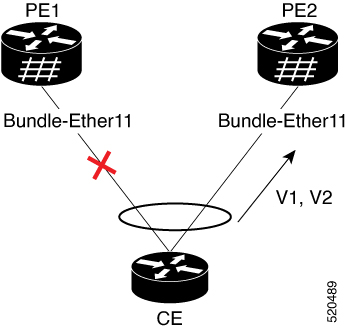
How EVPN E-LAN port-active multihoming mode works

Summary

The process of aggregating links in a multihomed topology involves managing traffic flow between customer edge and provider edge devices. The key components involved in the process are:

  • CE: Utilizes single link aggregation and connects to multiple provider edge devices.

  • PE1: Initially in standby mode; its interface is not forwarding traffic.

  • PE2: Initially in active mode; its interface forwards traffic from the CE.

Workflow

The process involves these stages:

  1. Initial configuration:

    • The CE connects to PE1 and PE2 using link aggregation.

    • Only one CE interface forwards traffic, with the other in standby.

  2. Traffic management:

    • PE2 operates in active mode, carrying traffic from the CE.

    • PE1 remains in standby mode, not carrying traffic.

  3. Configuration changes:

    • Removing port-active configuration from both PE1 and PE2.

    • Re-adding port-active configuration to both PEs.

  4. Interface selection:

    • After reconfiguration, PE2 is chosen as the active interface again.

Result

The process ensures efficient traffic management in multihomed topologies, with PE2 consistently selected as the active PE device, maintaining optimal service operations and connectivity.


Configure EVPN port-active multihoming mode

Set up EVPN port-active multihoming on PE routers to enable efficient load balancing and redundancy.

This configuration is essential for deploying EVPN in a network environment where multihoming is required, enabling single-active mode for efficient resource use.

Before you begin

  • Ensure you have access to PE1 and PE2 with administrative privileges.

Procedure

1.

Configure BGP session and MPLS LDP on PE1.

Example:

Configure BGP session.

Router(config)# router bgp 100
Router(config-bgp)# bgp router-id 55.55.55.55
Router(config-bgp)# address-family l2vpn evpn
Router(config-bgp)# neighbor 51.51.51.51
Router(config-bgp-nbr)# remote-as 100
Router(config-bgp-nbr)# update-source Loopback 0
Router(config-bgp-nbr)# address-family l2vpn evpn
Router(config-bgp)# neighbor 54.54.54.54
Router(config-bgp-nbr)# remote-as 100
Router(config-bgp-nbr)# update-source Loopback 0
Router(config-bgp-nbr)# address-family l2vpn evpn

Configure MPLS LDP .

Router(config)# mpls ldp
Router(config-ldp)# router-id 55.55.55.55
Router(config-ldp)# interface FourHundredGigE0/0/0/2
2.

Configure BGP session and MPLS LDP on PE2.

Example:

Configure BGP session.

Router(config)# router bgp 100
Router(config-bgp)# bgp router-id 54.54.54.54
Router(config-bgp)# address-family l2vpn evpn
Router(config-bgp)# neighbor 51.51.51.51
Router(config-bgp-nbr)# remote-as 100
Router(config-bgp-nbr)# update-source Loopback 0
Router(config-bgp-nbr)# address-family l2vpn evpn
Router(config-bgp)# neighbor 55.55.55.55
Router(config-bgp-nbr)# remote-as 100
Router(config-bgp-nbr)# update-source Loopback 0
Router(config-bgp-nbr)# address-family l2vpn evpn

Configure MPLS LDP .

Router(config)# mpls ldp
Router(config-ldp)# router-id 54.54.54.54
Router(config-ldp)# interface FourHundredGigE0/0/0/2
3.

Configure bridge domain and EVI on PE1 and PE2.

Example:

Router(config)# l2vpn 
Router(config-l2vpn)# bridge group bg1
Router(config-l2vpn-bg)# bridge-domain bd1
Router(config-l2vpn-bg-bd)# interface Bundle-Ether11.1
Router(config-l2vpn-bg-bd-ac)# evi 1
Router(config-l2vpn-bg-bd-ac)# root
Router(config)# l2vpn 
Router(config-l2vpn)# bridge group bg2
Router(config-l2vpn-bg)# bridge-domain bd2
Router(config-l2vpn-bg-bd)# interface Bundle-Ether11.2
Router(config-l2vpn-bg-bd-ac)# evi 2
4.

Configure EVPN EVI and advertise the MAC routes on PE1 and PE2.

Example:

Router(config)# evpn
Router(config-evpn)# evi 1
Router(config-evpn-evi)# advertise-mac
Router(config-evpn-evi)# exit
Router(config-evpn)# evi 2
Router(config-evpn-evi)# advertise-mac
5.

Configure the same ESI on all the PE routers.

Example:

Router(config)# evpn
Router(config-evpn)# interface Bundle-Ether11
Router(config-evpn-ac)# ethernet-segment
Router(config-evpn-ac-es)# identifier type 0 40.00.00.00.00.00.00.00.01
Router(config-evpn-ac-es)# load-balancing-mode port-active
Router(config-evpn-ac-es)# commit
6.

EVPN port-active multihoming mode running configuration.

Example:


/* PE1 Configuration */
router bgp 100
 bgp router-id 55.55.55.55
 address-family l2vpn evpn
 !
 neighbor 51.51.51.51
  remote-as 100
  update-source Loopback0
  address-family l2vpn evpn
  !
 !
 neighbor 54.54.54.54
  remote-as 100
  update-source Loopback0
  address-family l2vpn evpn
  !
 !
!
mpls ldp
 router-id 55.55.55.55
 interface FourHundredGigE0/0/0/2
 !
!
/* PE2 Configuration */
router bgp 100
 bgp router-id 54.54.54.54
 address-family l2vpn evpn
 !
 neighbor 51.51.51.51
  remote-as 100
  update-source Loopback0
  address-family l2vpn evpn
  !
 !
 neighbor 55.55.55.55
  remote-as 100
  update-source Loopback0
  address-family l2vpn evpn
  !
 !
!
mpls ldp
 router-id 54.54.54.54
 interface FourHundredGigE0/0/0/2
 !
!
/* Configuration on all the PEs */
l2vpn
 bridge group bg1
  bridge-domain bd1
   interface Bundle-Ether11.1
   !
   evi 1
   !
  !
 !
 bridge group bg2
  bridge-domain bd2
   interface Bundle-Ether11.2
   !
   evi 2
   !
  !
 !
!
evpn
 evi 1
  advertise-mac
  !
 !
 evi 2
  advertise-mac
  !
 !
 interface Bundle-Ether11
  ethernet-segment
   identifier type 0 40.00.00.00.00.00.00.00.01
   load-balancing-mode port-active
  !
 !
!
7.

Use the show bundle BE11 command to verify that port-active mode is configured.

Example:

Verify that PE2 is active and the status shows as Up.

Router# show bundle BE11
Bundle-Ether11
  Status:                                    Up
  Local links <active/standby/configured>:   1 / 0 / 1
  Local bandwidth <effective/available>:     400000000 (400000000) kbps
  MAC address (source):                      008d.9c38.7205 (Chassis pool)
  Inter-chassis link:                        No
  Minimum active links / bandwidth:          1 / 1 kbps
  Maximum active links:                      64
  Wait while timer:                          2000 ms
  Load balancing:                            
    Link order signaling:                    Not configured
    Hash type:                               Default
    Locality threshold:                      None
  LACP:                                      Operational
    Flap suppression timer:                  Off
    Cisco extensions:                        Disabled
    Non-revertive:                           Disabled
  mLACP:                                     Not configured
  IPv4 BFD:                                  Not configured
  IPv6 BFD:                                  Not configured

  Port                  Device           State        Port ID         B/W, kbps
  --------------------  ---------------  -----------  --------------  ----------
  FH0/0/0/3             Local            Active       0x8000, 0x0001   400000000
      Link is Active
  

Verify that PE1 is in standby mode.

Router#show bundle BE11
Bundle-Ether11
  Status:                                    EVPN Hot-Standby
  Local links <active/standby/configured>:   0 / 1 / 1
  Local bandwidth <effective/available>:     0 (0) kbps
  MAC address (source):                      003f.ee3b.5a05 (Chassis pool)
  Inter-chassis link:                        No
  Minimum active links / bandwidth:          1 / 1 kbps
  Maximum active links:                      64
  Wait while timer:                          2000 ms
  Load balancing:                            
    Link order signaling:                    Not configured
    Hash type:                               Default
    Locality threshold:                      None
  LACP:                                      Operational
    Flap suppression timer:                  Off
    Cisco extensions:                        Disabled
    Non-revertive:                           Disabled
  mLACP:                                     Not configured
  IPv4 BFD:                                  Not configured
  IPv6 BFD:                                  Not configured

  Port                  Device           State        Port ID         B/W, kbps
  --------------------  ---------------  -----------  --------------  ----------
  FH0/0/0/6             Local            Standby      0x8000, 0x0001   400000000
      Link is in standby due to bundle out of service state


This output shows the port-active mode configuration.

Router#show evpn ethernet-segment int Bundle-Ether 11 carving detail

Ethernet Segment Id      Interface                          Nexthops            
------------------------ ---------------------------------- --------------------
0040.0000.0000.0000.0001 BE11                               54.54.54.54
                                                            55.55.55.55
  ES to BGP Gates   : Ready
  ES to L2FIB Gates : Ready
  Main port         :
     Interface name : Bundle-Ether11
     Interface MAC  : 008d.9c38.7205
     IfHandle       : 0x0f00005c
     State          : Up
     Redundancy     : Not Defined
  ESI ID            : 1
  ESI type          : 0
     Value          : 0040.0000.0000.0000.0001
  ES Import RT      : 4000.0000.0000 (from ESI)
  Topology          :
     Operational    : MH
     Configured     : Port-Active
  Service Carving   : Auto-selection
     Multicast      : Disabled
  Convergence       : 
  Peering Details   : 2 Nexthops
     54.54.54.54 [MOD:P:00:T]
     55.55.55.55 [MOD:P:00:T]
  Service Carving Synchronization:
     Mode           : NTP_SCT
     Peer Updates   :
             54.54.54.54 [SCT: 2024-03-12 10:58:28.1710255]
             55.55.55.55 [SCT: 2024-03-12 10:58:47.1710255]
  Service Carving Results:
     Forwarders     : 2
     Elected        : 2
            EVI E   :        1,       2
     Not Elected    : 0
  EVPN-VPWS Service Carving Results:
     Primary        : 0
     Backup         : 0
     Non-DF         : 0
  MAC Flush msg     : STP-TCN
  Peering timer     : 3 sec [not running]
  Recovery timer    : 30 sec [not running]
  Carving timer     : 0 sec [not running]
  Revert timer      : 0 sec [not running]
  HRW Reset timer   : 5 sec [not running]
  Local SHG label   : 24004
  Remote SHG labels : 1
              24004 : nexthop 55.55.55.55
  Access signal mode: Bundle Hot-Standby