EVPN Configuration Guide for Cisco 8000 Series Routers, Cisco IOS XR Releases

PDF

EVPN Configuration Guide for Cisco 8000 Series Routers, Cisco IOS XR Releases

EVPN E-LAN single-flow-active multihoming mode

Want to summarize with AI?

Log in

Explains how EVPN E-LAN single-flow-active multihome mode provides redundancy and efficient traffic management for Ethernet VPN services.


An EVPN E-LAN single-flow-active multihoming mode is a networking architecture that

  • provides redundancy and load balancing for Ethernet VPNs by allowing multiple links from a customer site to connect to a service provider network

  • ensures that only one link is active for a given flow at any time, thereby preventing loops and ensuring efficient traffic management, and

  • offers seamless failover capabilities, automatically switching to another link if the active link fails.

Table 1. Feature History Table

Feature Name

Release Information

Feature Description

EVPN E-LAN Single-Flow-Active Multihoming

Release 26.2.1

Introduced in this release on: Modular Systems (8800 [LC ASIC: K100])(select variants only*);

*This feature is supported on Cisco 88-LC1-48Y8H-EM line cards.

EVPN E-LAN Single-Flow-Active Multihoming

Release 25.4.1

Introduced in this release on: Fixed Systems (8010 [ASIC: A100])(select variants only*)

*This feature is supported on:

  • 8011-32Y8L2H2FH

  • 8011-12G12X4Y-A

  • 8011-12G12X4Y-D

EVPN E-LAN Single-Flow-Active Multihoming

Release 25.1.1

Introduced in this release on: Fixed Systems (8010 [ASIC: A100]) (select variants only*)

*This feature is now supported on the Cisco 8011-4G24Y4H-I routers.

EVPN E-LAN Single-Flow-Active Multihoming

Release 24.4.1

Introduced in this release on: Fixed Systems (8700) (select variants only*)

*The EVPN E-LAN single-flow-active multihoming functionality is now extended to the Cisco 8712-MOD-M routers.

EVPN E-LAN Single-Flow-Active Multihoming

Release 24.3.1

Introduced in this release on: Fixed Systems (8200 [ASIC: P100], 8700 [ASIC: P100])(select variants only*); Modular Systems (8800 [LC ASIC: P100])(select variants only*)

*The EVPN E-LAN single-flow-active multihoming functionality is now extended to:

  • 8212-48FH-M

  • 8711-32FH-M

  • 88-LC1-52Y8H-EM

  • 88-LC1-12TH24FH-E

EVPN E-LAN Single-Flow-Active Multihoming

Release 24.2.11

Introduced in this release on: Modular Systems (8800 [LC ASIC: P100])(select variants only*)

This feature introduces EVPN E-LAN single-flow-active multihoming load balancing mode to connect PE devices in an access network that run Layer 2 access gateway protocols. In this mode, only the PE that first advertises the host MAC address in a VLAN forwards the traffic in a specific flow. When the primary link fails, the traffic quickly switches to the standby PE that learns the MAC address from the originated path, thereby providing fast convergence.

The feature introduces the load-balancing-mode command with keyword, single-flow-active .

*This feature is supported only on routers with the 88-LC1-36EH line cards.


Traffic management in EVPN E-LAN single-flow-active multihoming mode

EVPN E-LAN single-flow-active multihoming mode optimizes traffic management in ring topologies by improving failover response and reducing traffic loss in case of link failure.

Key points

In traditional ring topologies:

  • Only one PE device, the active PE, handles all traffic to prevent loops.

  • If the active PE fails, the standby PE takes over, but there is a delay because it must learn the MAC addresses from connected hosts.

  • This learning process causes temporary traffic loss until switchover completes.

With EVPN E-LAN single-flow-active multihoming mode:

  • PE devices are connected to the access network to provide seamless switchover.

  • Upon failure of the active link, traffic immediately switches to the standby PE.

  • Immediate switchover minimizes traffic loss.


MAC address learning in EVPN E-LAN single-flow-active multihoming mode

Both active and standby PEs learn the MAC addresses of the connected hosts. The PE that learns the MAC address of the host directly is called the primary (active) PE. The primary PE advertises the learned MAC addresses to the peer PE, referred to as the standby PE. As the standby PE learns the MAC address of the host through the active PE, this learned path is referred to as the reoriginated path.

Fast convergence in EVPN E-LAN single-flow-active multihoming mode

When the primary link fails, convergence happens quickly, and traffic is sent through the standby PE through the reoriginated path.


Limitations of EVPN E-LAN single-flow-active multihoming mode

These limitations apply to the EVPN E-LAN single-flow-active multihoming mode:

  • The EVPN E-LAN single-flow active multihoming mode is not supported for EVPN VPWS.

  • The EVPN E-LAN single-flow-active multihoming mode is not supported on the Q100 and Q200 based systems.

  • Starting from Release 24.1.1, only the G.8032 is supported for EVPN E-LAN single-flow-active multihoming mode.


How EVPN E-LAN single flow-active mode works

Summary

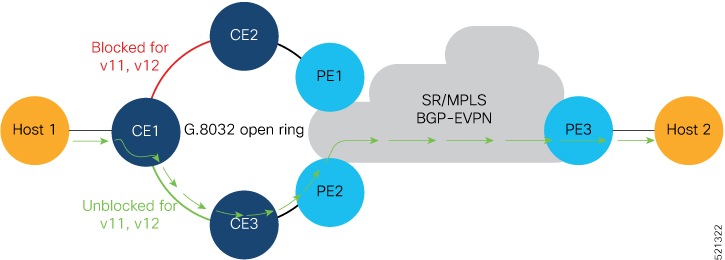
EVPN E-LAN single flow-active mode enables fast convergence in a ring topology, ensuring efficient network traffic management by utilizing multihoming and dynamic local preference settings. The key components involved in this process are:

  • Host 1: Connected to CE1, sending traffic across the network.

  • CE1: Multihomed and connected to both PE1 and PE2.

  • PE1 and PE2: Multihoming devices configured with the same Ethernet Segment ID and EVPN instance.

Workflow

Figure 1. How EVPN E-LAN single flow-active mode works

The process involves these stages:

  1. Traffic flow initiation:

    • Host 1 sends traffic to CE1.

    • CE1 sends traffic to PE2 through CE3, as the CE1-CE3 link is in the forwarding state.

  2. MAC address learning:

    • PE2 learns Host 1's MAC address and advertises it to PE1.

    • PE2, acting as the active PE, sets the BGP local preference value to 100.

  3. Traffic routing:

    • PE1, acting as the stand-by PE, sets its BGP local preference to 80.

    • PE1 sends traffic to PE3, which forwards it to Host 2.

  4. Failure scenario:

    • If the CE1-CE3 or CE3-PE2 link fails, traffic reroutes through PE1.

    • CE1-CE2 link changes to the forwarding state.

    • PE1 learns Host 1’s MAC address directly, sets its BGP local preference to 100, and routes traffic to Host 2 through PE3.

    Figure 2. Failure Scenario

Result

The EVPN E-LAN single flow-active mode ensures fast convergence by dynamically adjusting local preferences and multihoming configurations, allowing efficient traffic management and minimizing network disruption during link failures.


Configure EVPN E-LAN single-flow-active multihoming

Set up EVPN E-LAN with single-flow-active multihoming across PE1 and PE2 routers.

This task involves configuring EVPN instances on both routers to enable single-flow-active mode for enhanced load balancing and redundancy.

Procedure

1.

Configure advertisement of MAC routes.

Example:

Router# configure
Router(config)# evpn
Router(config-evpn)# evi 100
Router(config-evpn-instance)# advertise-mac
Router(config-evpn-instance-mac)# commit

Configure both PE1 and PE2 with the same EVI of 100.

2.

Configure single-flow-active load-balancing mode.

Example:

Router(config)# evpn        
Router(config-evpn)# interface bundle-ether 1
Router(config-evpn-ac)# ethernet-segment
Router(config-evpn-ac-es)# identifier type 0 36.37.00.00.00.00.00.11.01
Router(config-evpn-ac-es)# load-balancing-mode single-flow-active
Router(config-evpn-ac-es)# commit

Configure both PE1 and PE2 with the same ESI 0 36.37.00.00.00.00.00.11.01.

3.

Configure bridge domain and associate the evi to the bridge domain.

Example:

Router(config)# l2vpn
Router(config-l2vpn)# bridge group 100
Router(config-l2vpn-bg)# bridge-domain 100
Router(config-l2vpn-bg-bd)# interface Bundle-Ether1.2
Router(config-l2vpn-bg-bd-ac)#exit
Router(config-l2vpn-bg-bd)# evi 100
Router(config-l2vpn-bg-bd-evi)# root
Router(config)# interface Bundle-Ether1.2 l2transport
Router(config-l2vpn-subif)#encapsulation dot1q 2
Router(config-l2vpn-subif)#commit
4.

Running configuration of EVPN E-LAN single-flow-active multihoming.

Example:


evpn      
 evi 100  
  advertise-mac
  !       
 !        
 interface Bundle-Ether1
  ethernet-segment
   identifier type 0 36.37.00.00.00.00.00.11.01
   load-balancing-mode single-flow-active
  convergence 
      mac-mobility
   !
  !       
 !        
!         
l2vpn     
  bridge group 100
   bridge-domain 100
    interface Bundle-Ether1
   !      
   evi 100
   !      
  !       
 !
 interface Bundle-Ether1.2 l2transport
  encapsulation dot1q 2
!        
!                
5.

Use the show evpn ethernet-segment interface be 1 detail to verify that EVPN E-LAN single-flow-active multihoming mode is configured.

Example:

Router#show  evpn  ethernet-segment  interface  be 1 detail
Legend:
B   - No Forwarders EVPN-enabled,
C   - MAC missing (Backbone S-MAC PBB-EVPN / Grouping ES-MAC vES),
RT  - ES-Import Route Target missing,
E   - ESI missing,
H   - Interface handle missing,
I   - Name (Interface or Virtual Access) missing,
M   - Interface in Down state,
O   - BGP End of Download missing,
P   - Interface already Access Protected,
Pf  - Interface forced single-homed,
R   - BGP RID not received,
S   - Interface in redundancy standby state,
X   - ESI-extracted MAC Conflict
SHG - No local split-horizon-group label allocated
Hp  - Interface blocked on peering complete during HA event
Rc  - Recovery timer running during peering sequence

Ethernet Segment Id            Interface                          Nexthops
0 36.37.00.00.00.00.00.11.01  BE1                                 172.16.0.4
                                                                  172.16.0.5
ES to BGP Gates   : Ready
ES to L2FIB Gates : P
Main port         :
Interface name    : Bundle-Ether1
Interface MAC     : b0a6.51e5.00dd
IfHandle          : 0x2000802c
State             : Up
Redundancy        : Not Defined
ESI type          : 0
Value             : 07.0807.0807.0807.0800
ES Import RT      : 0708.0708.0708 (from ESI)
Source MAC        : 0000.0000.0000 (N/A)
Topology          :
Operational    : MH, Single-flow-active
Configured     : Single-flow-active
Service Carving   : Auto-selection
Multicast         : Disabled
Convergence       : MAC-Mobility
Mobility-Flush    : Debounce 1 sec, Count 0, Skip 0
                  : Last n/a
Peering Details   : 2 Nexthops
172.16.0.4 [MOD:P:00:T]
172.16.0.5 [MOD:P:00:T]
Service Carving Synchronization:
Mode              : NONE
Peer Updates      :
172.16.0.4 [SCT: N/A]
172.16.0.5 [SCT: N/A]
Service Carving Results:
Forwarders    : 1
Elected          : 0
Not Elected   : 0
EVPN-VPWS Service Carving Results:
Primary          : 0
Backup           : 0
Non-DF           : 0
MAC Flushing mode: STP-TCN
Peering timer    : 3 sec [not running]
Recovery timer   : 30 sec [not running]
Carving timer    : 0 sec [not running]
HRW Reset timer  : 5 sec [not running]
Local SHG label  : 24007
Remote SHG labels: 1
24010            : nexthop 172.16.0.5
Access signal mode: Bundle OOS (Default)