Introduces Cisco Workgroup Bridges, describing key operational concepts, listing restrictions, and providing instructions for configuring Workgroup Bridge on WLAN as well as monitoring status for effective network integration.
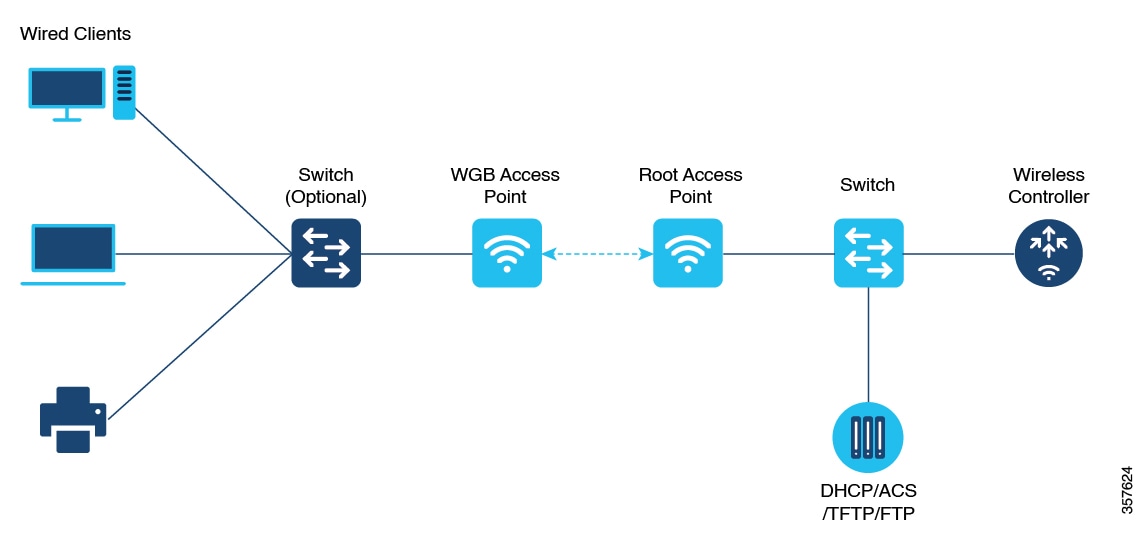
A workgroup bridge (WGB) is an access point mode that
-
provides wireless connectivity to wired clients connected on its Ethernet port
-
connects a wired network to an existing wireless infrastructure through a single wireless segment, and
-
learns the MAC addresses of its wired clients and reports them to the wireless LAN controller (WLC) using IAPP messaging.
The WGB establishes a single wireless connection to the root access point (AP). The root AP treats the WGB as a wireless client, allowing the wired devices behind the WGB to access the wireless network seamlessly. Suppose you have a group of wired devices in a conference room with no Ethernet drop available. You can connect these devices to a WGB, which allows them to communicate over the enterprise wireless network as if they were wireless clients.
Starting from Cisco IOS XE Cupertino 17.8.1, WGB is supported on the following Cisco Catalyst 9100 Series Access Points.
-
Cisco Catalyst 9105
-
Cisco Catalyst 9115
-
Cisco Catalyst 9120
Starting from Cisco IOS XE Dublin 17.10.1, WGB is supported on the following Cisco Catalyst 9100 Series Access Points.
-
Cisco Catalyst 9124
-
Cisco Catalyst 9130
From Cisco IOS XE Cupertino 17.9.1 onwards, WGB supports one radio for uplink (backhaul) connectivity and another radio for serving wireless clients. This feature is supported on the Cisco 11AX APs such as Cisco Catalyst 9105 APs, Cisco Catalyst 9115 APs, Cisco Catalyst 9120 APs.
OPEN and PSK security (WPA2 Personal) based wireless clients can be associated to WGB independent of its uplink connectivity, but they will not be able to pass traffic unless WGB has uplink connectivity. Radius server must be configured and the WGB should have uplink connectivity for authentication of wireless clients to 802.1x security (WPA2 Enterprise) WLAN. Both IPv4 and IPv6 traffic forwarding is supported for wireless clients. Static IP and Passive Client support is enabled by default on these WLANs.
These features are supported for use with WGB:
|
Feature |
Cisco Wave 2 APs |
Cisco 11AX APs |
|---|---|---|
|
802.11r |
Supported |
Supported |
|
QOS |
Supported |
Supported |
|
UWGB mode |
Supported |
Not supported |
|
IGMP Snooping or Multicast |
Supported |
Supported |
|
802.11w |
Supported |
Supported |
|
PI support (without SNMP) |
Not supported |
Not supported |
|
IPv6 |
Supported |
Supported |
|
VLAN |
Supported |
Supported |
|
802.11i (WPAv2) |
Supported |
Supported |
|
Broadcast tagging/replicate |
Supported |
Supported |
|
Unified VLAN client |
Supported |
Supported |
|
WGB client |
Supported |
Supported |
|
802.1x – PEAP, EAP-FAST, EAP-TLS |
Supported |
Supported |
|
NTP |
Supported |
Supported |
|
Wired client support on all LAN ports |
Supported in all Wired-0, 1 and LAN ports 1, 2, and 3 |
Supported in all Wired-0, 1 and LAN ports 1, 2, and 3 |
|
Second radio wireless client support |
Not supported |
Supported |
This table shows the supported and unsupported authentication and switching modes for Cisco APs when connecting to a WGB.
Workgroup Bridge mode is supported on the WiFi6 Pluggable Module from Cisco IOS XE Bengaluru 17.6.1.
|
Access Points |
Requirements |
|---|---|
|
Cisco Aironet 2800, 3800, 4800, 1562, and Cisco Catalyst 9105, 9115, 9120, 9124, and 9130, IW6300 and ESW6300 Series |
CAPWAP image starting from Cisco AireOS 8.8 release. |