Cisco Catalyst 9800 Series Wireless Controller Software Configuration Guide, Cisco IOS XE 26.1.x

PDF

Cisco Catalyst 9800 Series Wireless Controller Software Configuration Guide, Cisco IOS XE 26.1.x

Dynamic Host Configuration Protocol

Want to summarize with AI?

Log in

Describes a network protocol that dynamically assigns IP addresses to devices on a network for IP communication.


Dynamic Host Configuration Protocol (DHCP) is a network protocol that

  • dynamically assigns IP addresses to devices on a network for IP communication

  • enables configuration of WLANs to use the same or different DHCP servers or no DHCP server, and

  • provides two types of DHCP servers: internal and external.


Internal DHCP servers

An internal DHCP server is a device-based DHCP service that

  • provides DHCP addresses to wireless clients, direct-connect APs, and DHCP requests that are relayed from APs

  • supports only lightweight APs, and

  • requires SVI configuration for the client VLAN with the IP address set as DHCP server IP address.

General guidelines

The device contains an internal DHCP server. This server is typically used in branch offices that do not have a DHCP server.

DHCP option 43 is not supported on the internal server. Therefore, the APs must use an alternative method to locate the management interface IP address of the device, such as local subnet broadcast, Domain Name System (DNS), or priming.

When clients use the internal DHCP server of the device, IP addresses are not preserved across reboots. As a result, multiple clients can be assigned to the same IP address. To resolve any IP address conflicts, clients must release their existing IP address and request a new one.

Key configuration requirements:

  • Internal DHCP server serves both wireless client and wired client (wired client includes AP).

  • To serve wireless client with internal DHCP server, an unicast DHCP server IP address must be configured for wireless client. Internal DHCP server IP address must be configured under the server facing interface, which can be loopback interface, SVI interface, or L3 physical interface.

  • To use internal DHCP server for both wireless and wired client VLAN, an IP address must be configured under client VLAN SVI interface.

  • For wireless client, in DHCP helper address configuration, the IP address of the internal DHCP server must be different from address of wireless client VLAN SVI interface.

  • For wireless client with internal DHCP server support, the internal DHCP server can be configured using global configuration command, under the client VLAN SVI interface or under the wireless policy profile.

  • An internal DHCP server pool can also serve clients of other controllers .

Note
  • VRF is supported in the internal DHCP servers.

  • DHCPv6 is not supported in the internal DHCP servers.


External DHCP servers

An external DHCP server is a separate server outside the device that

  • dynamically assigns IP addresses within a network

  • operates with industry-standard DHCP Relay support, and

  • maintains client IP addresses during roaming scenarios.

External DHCP server operation

The operating system is designed to appear as a DHCP relay to the network and as a DHCP server to clients with industry-standard external DHCP servers that support DHCP Relay, which means that each controller appears as a DHCP relay agent to the DHCP server, and as a DHCP server in the virtual IP address to wireless clients.

Because the controller captures the client IP address that is obtained from a DHCP server, it maintains the same IP address for that client during intra controller, inter controller, and inter-subnet client roaming.

Note

External DHCP servers support DHCPv6.


DHCP assignments

A DHCP assignment is a network configuration method that

  • configures DHCP servers on a per-interface or per-WLAN basis,

  • allows assignment of primary and secondary DHCP servers to individual interfaces, and

  • enables DHCP server definition on WLANs to override interface-level DHCP server addresses.

DHCP assignment configuration

You can configure DHCP on a per-interface or per-WLAN basis. We recommend that you use the primary DHCP server address that is assigned to a particular interface.

You can assign DHCP servers for individual interfaces. You can configure the management interface, AP manager interface, and dynamic interface for a primary and secondary DHCP server, and configure the service-port interface to enable or disable DHCP servers. You can also define a DHCP server on a WLAN (in this case, the server overrides the DHCP server address on the interface assigned to the WLAN).

For enhanced security, we recommend that you ask all clients to obtain their IP addresses from a DHCP server. To enforce this requirement, you can configure all the WLANs with a DHCP Address. Assignment Required setting, which disallows client static IP addresses. If DHCP Address Assignment Required is selected, clients must obtain an IP address through DHCP. Any client with a static IP address is not allowed on the network. The controller monitors DHCP traffic because it acts as a DHCP proxy for the clients.

Note
  • WLANs that support management over wireless must allow management (device-servicing) clients to obtain an IP address from a DHCP server.

  • The operating system is designed to appear as a DHCP relay to the network and as a DHCP server to clients with industry-standard external DHCP servers that support DHCP relay. This means that each controller appears as a DHCP relay to the DHCP server and as a DHCP server at the virtual IP address to wireless clients.

You can create WLANs with DHCP Address Assignment Required disabled. If you do this, clients have the option of using a static IP address or obtaining an IP address from a designated DHCP server. However, note that this might compromise security.

Note

DHCP Address Assignment Required is not supported for wired guest LANs.

You can create separate WLANs with DHCP Address Assignment Required configured as disabled. This is applicable only if DHCP proxy is enabled for the controller. You must not define the primary or secondary configuration DHCP server instead you should disable the DHCP proxy. These WLANs drop all the DHCP requests and force clients to use a static IP address. These WLANs do not support management over wireless connections.

DHCP option 82

DHCP option 82 is a DHCP relay agent feature that

  • provides additional security when DHCP is used to allocate network addresses

  • enables the controller to act as a DHCP relay agent to prevent DHCP client requests from untrusted sources, and

  • allows the controller to add option 82 information to DHCP requests from clients before forwarding the requests to the DHCP server.

DHCP option 82 operation

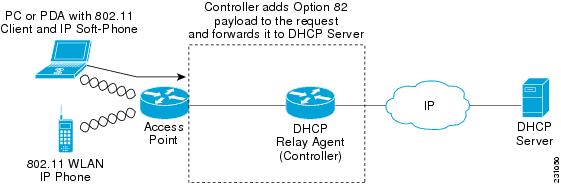
The AP forwards all the DHCP requests from a client to the controller. The controller adds the DHCP option 82 payload and forwards the request to the DHCP server. The payload can contain the MAC address or the MAC address and SSID of the AP, depending on how you configure this option.

Note

DHCP packets that already include a relay agent option are dropped at the controller.

For DHCP option 82 to operate correctly, DHCP proxy must be enabled.

Figure 1. DHCP Option 82


Restrictions for configuring DHCP for WLANs

When configuring DHCP for WLANs, ensure proper server reachability and service enablement to avoid connectivity issues.

  • If you override the DHCP server in a WLAN, you must ensure that you configure the underlying Cisco IOS configuration to make sure that the DHCP server is reachable.

  • WLAN DHCP override works only if DHCP service is enabled on the controller.

    You can configure DHCP service in either of the following ways:

    • Configuring the DHCP pool on the controller.

    • Configuring a DHCP relay agent on the SVI. Note that the VLAN of the SVI must be mapped to the WLAN where DHCP override is configured.


Guidelines for DHCP relay configuration

Relay agent source IP

Configure the relay agent source IP according to the following precedence order to ensure proper DHCP relay functionality.

  • If you configure source interface VLAN in the SVI interface, the IP address of the VLAN interface configured as source is used.

  • If the Relay Agent source IP is not mentioned, the IP address of the SVI interface created for the corresponding client's VLAN is used.

  • If the Relay Agent source IP is not mentioned, the source address specified at the global level is used.

DHCP server

Configure DHCP server addresses according to the following precedence order to ensure proper server selection.

  • If the DHCP server address is configured in the wireless policy profile, the server address configured in the policy profile takes precedence.

  • If the DHCP server address is not configured in the policy profile, the server address configured in SVI takes precedence.

    Note

    You can configure two server addresses in the SVI. In this case, the DHCP packets from the client are sent to both the servers.

    The Option 82 configured in policy profile, SVI, and globally is considered and honored together.

These guidelines apply to central DHCP and local switching configurations. The DHCP packets are sourced from the IP address of the Wireless Management Interface (WMI), if VLAN is not configured in the policy profile and AAA override. The SVI interface configuration is mandatory to achieve the DHCP relay functionality in central DHCP or local switching. Even though many interface options are available in the ip dhcp relay source-interface <> command, only VLAN interface is applicable.