Cisco Catalyst 9800 Series Wireless Controller Software Configuration Guide, Cisco IOS XE 26.1.x

PDF

Cisco Catalyst 9800 Series Wireless Controller Software Configuration Guide, Cisco IOS XE 26.1.x

New configuration model, tags, and profile

Want to summarize with AI?

Log in

Introduces the foundational elements of the tag-based configuration model and outlines the complete configuration workflow for implementing wireless network infrastructure.


The new configuration model is a wireless network configuration approach that

  • uses profiles to define feature-specific parameters

  • uses tags to bundle and apply profiles to APs, and

  • separates policy, site, RF, and WLAN definitions for modular deployment.

Profiles define attributes such as WLAN policy, RF behavior, and AP join characteristics. Tags are logical containers that map these profiles to APs, ensuring flexible and scalable configurations.

A tag is a logical container that

  • is defined by the property of policies you associate with it

  • maps multiple profiles—policy, site, and RF—to an AP or client, and determines that device's configuration and behavior, and

  • enables modular and flexible deployment across sites.

Every tag has a default that is created when the system boots up.

A profile is a logical container that

  • include feature-specific attributes and parameters applied to tags

  • represent multiple attributes related to policy, site, and RF

  • determine the configuration and behavior of applied APs and associated clients, and

  • is a reusable entities that can be used across tags.
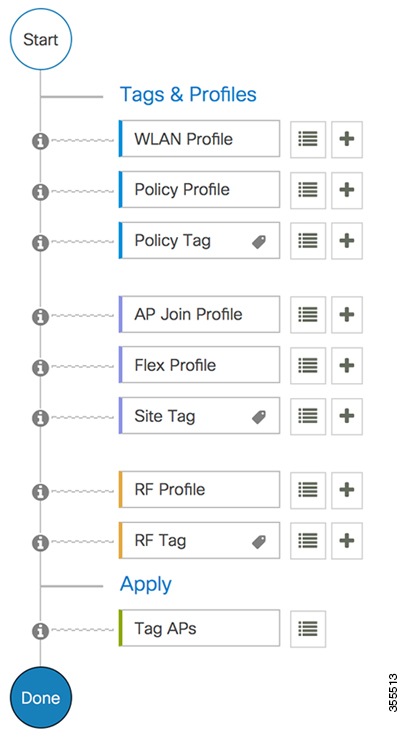

Configuration workflow

Configuring wireless networks involves establishing profiles and tags that link configurations to APs for effective wireless management.

Summary

The key components involved in the process are:

  • Profiles: Logical groupings of settings (such as WLAN, Policy, AP Join, Flex, and RF) used to configure APs.

  • Tags: Logical containers or labels (such as Policy, Site, Tag) that help link profiles with APs.

  • APs: Devices that implement the configurations provided by profiles and tags to deliver wireless connectivity.

Workflow

Figure 1. Configuration workflow

These are the stages of configuration:

  1. Profile creation creates specific profiles:
    • WLAN profile for managing wireless network settings.
    • Policy profile for enforcing network rules.
    • AP Join profile for controlling AP associations.
    • Flex profile for handling local switching.
    • RF profile for optimizing radio frequency settings.
  2. Tag creation: generates tags to complement profiles:
    • Policy tag to align with the Policy profile.
    • Site tag for specific location identification.
    • RF tag corresponding to the RF profile.
  3. Tag association: associates the created tags with an AP to apply the configured settings and policies.

Result

The configuration workflow enables APs to be set up correctly with designated profiles and tags, resulting in efficient network operation and management.