Cisco Catalyst 9800 Series Wireless Controller Software Configuration Guide, Cisco IOS XE 26.1.x

PDF

Cisco Catalyst 9800 Series Wireless Controller Software Configuration Guide, Cisco IOS XE 26.1.x

Protected management frames with 802.11w

Want to summarize with AI?

Log in

Introduces protected management frames in 802.11w, explains IGTK and BIP integrity protocols, details SA teardown protection and associated procedures, and summarizes prerequisites and restrictions for deploying 802.11w.


A protected management frame is a wireless security feature that

  • uses the 802.11w protocol to safeguard management frames

  • prevents spoofing and forgery of authentication, de-authentication, association, and disassociation frames, and

  • enhances the overall security of Wi-Fi networks by protecting key network management actions from attack.

While data frames can be encrypted, management frames were traditionally sent in the clear, making them vulnerable to interception and forgery. The 802.11w standard addresses this vulnerability by requiring cryptographic protection for certain management frames between client and access point.

An attacker attempting to disconnect a legitimate client by sending forged disassociation frames will fail on networks supporting protected management frames, as only cryptographically validated frames are accepted.

Types of management frames protected by 802.11w

The 802.11w protocol protects certain management frames by using the Protected Management Frames (PMF) service. These frames are classified as robust management frames and include:
  • Disassociation frames

  • De-authentication frames

  • Robust Action frames

Robust Action frames protected by 802.11w include:
  • Spectrum Management

  • Quality of Service (QoS)

  • Direct Link Setup (DLS)

  • Block acknowledgement

  • Radio Measurement

  • Fast Basic Service Set (BSS) Transition

  • Security Association (SA) Query

  • Protected Dual of Public Action

  • Vendor-specific Protected

Frames not included in this list are not protected by 802.11w.

Protections offered by 802.11w

When 802.11w is implemented, these protections are provided:

  • Client protection: The AP adds cryptographic protection to de-authentication and dissociation frames, preventing spoofing in DOS attacks.

  • Infrastructure protection: Security Association (SA) teardown protection is implemented using Association Comeback Time and SA-Query procedures to prevent spoofed association requests from disconnecting connected clients.
Integrity Group Temporal Key (IGTK)

An integrity group temporal key (IGTK) is a wireless security mechanism that

  • protects broadcast and multicast robust management frames.

  • uses random values assigned by the authenticator station (such as a wireless LAN controller), and

  • secures MAC management protocol data units (MMPDUs) in 802.11w networks.

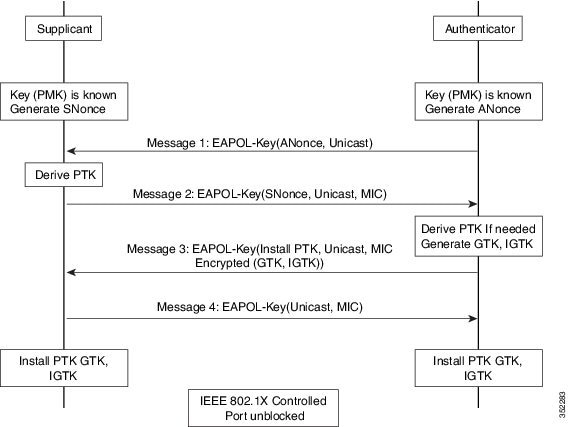
Figure 1. IGTK exchange in four-way handshake

802.11w introduced IGTKs to enhance the security of management frames in wireless networks.

How IGTK is used in 802.11w management frame protection

When you enable management frame protection, the AP encrypts the group temporal key (GTK) and IGTK values in an Extensible Authentication Protocol over LAN-Key (EAPoL-Key) frame. The AP includes this frame in the third message of the four-way handshake.

  • IGTK is exchanged during the four-way handshake process.

  • If the AP changes the GTK later, it sends the new GTK and the new IGTK to your client device using the Group Key Handshake

Imagine a wireless network as a secured meeting room, with announcements broadcast to everyone inside. The IGTK acts like a special group password that lets only authorized members hear these important messages. The authenticator (such as a wireless LAN controller) is like the meeting organizer, who gives each member a random, unique password at the door. When the password changes for added security, the organizer discreetly shares the new password with all members so that only legitimate participants can continue to hear future group announcements.

Broadcast or multicast integrity protocol (BIP)

A broadcast or multicast integrity protocol (BIP) is a wireless security mechanism that
  • ensures data integrity of broadcast and multicast robust management frames

  • provides replay protection for these frames after you establish an Integrity Group Temporal Key Security Association (IGTKSA), and

  • adds a message integrity code (MIC) calculated using the shared IGTK key.


SA teardown protection

SA teardown protection is a wireless network security mechanism that

  • prevents spoofed or replay attacks from disconnecting already associated clients

  • uses Association Comeback Time and an SA-Query procedure to verify the authenticity of association requests, and

  • ensures the AP only accepts new associations after the original security association is proven invalid.


How association comeback time and SA query procedures work

This process describes how Association Comeback Time and SA Query procedures protect wireless client sessions from replay-based association teardown attacks.”

Summary

The key components involved in the process are:

  • AP: implements security association (SA) teardown protection and manages association requests.”

  • Client device: Maintains a security association and sends and receives association and SA Query frames.

  • SA Teardown Protection Mechanism: Provides the logic for handling replay and spoofed association attempts.

In this process, the AP and client device exchange association and SA Query frames. This exchange validates security associations and prevents unauthorized session teardown.

Workflow

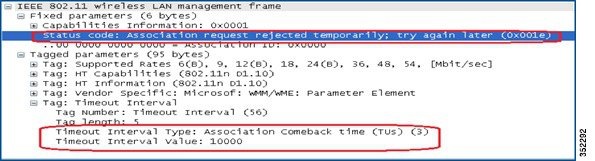
Figure 2. Association Reject with Comeback Time

These stages describe how the Association Comeback Time and SA Query procedures operate to protect client sessions:

  1. When an AP receives an Association Request from a client with an existing valid security association (SA) negotiated with 802.11w, the AP rejects the request with status code 30 (“Association request rejected temporarily; try again later”) and sends an Association Comeback Time.
  2. The AP does not modify the existing association during the comeback interval.
  3. If no ongoing SA Query session with the client exists, the AP sends SA Query requests repeatedly until it receives a valid SA Query response or the comeback time expires.
  4. Receiving a matching SA Query response or a valid protected frame indicates a valid SA. The AP may then allow a new association attempt without more SA Query cycles.

Result

This process ensures that spoofed requests cannot disconnect valid clients, protecting against replay-based association teardown attacks.


Prerequisites for 802.11w

  • To configure 802.11w feature for optional and mandatory, you must have WPA and AKM configured.

    Note
    The RNS (Robust Secure Network) IE must be enabled with an AES Cipher.

Restrictions for 802.11w

  • You cannot use 802.11w with open WLANs, Wired Equivalent Privacy (WEP)-encrypted WLANs, or Temporal Key Integrity Protocol (TKIP)-encrypted WLANs.

  • You can use 802.11w with Protected Management Frames (PMF) for non-Apple clients. For Apple iOS version 11 and earlier, request a fix from Apple to resolve association issues

  • When clients do not use 802.11w PMF, the controller ignores disassociation frames or deauthentication frames they send. If a client uses PMF, its entry is deleted immediately when the controller receives such a frame. This process helps prevent denial-of-service attacks by malicious devices, since frames without PMF are not secure.