Demonstrates practical ACL implementations through configuration examples, including commented entries, applying ACLs to policy profiles, small network scenarios, numbered, extended, and named ACLs, time-based rules, and logging configurations.
Examples: including comments in ACLs
You can use the remark keyword to include comments (remarks) about entries in any IP standard or extended ACL. The remarks make the ACL easier for you to understand and scan. Each remark line is limited to 100 characters.
The remark can go before or after a permit or deny statement. Place remarks consistently to clarify which permit or deny statement each remark describes. If remarks are placed both before and after permit or deny statements, it may be unclear which remark applies to which statement.
To include a comment for IP numbered standard or extended ACLs, use the access-list access-list number remark remark global configuration command. To remove the remark, use the no form of this command.
In this example, the workstation that belongs to Jones is allowed access, and the workstation that belongs to Smith is not allowed access:
Device(config)# access-list 1 remark Permit only Jones workstation through
Device(config)# access-list 1 permit 171.69.2.88
Device(config)# access-list 1 remark Do not allow Smith through
Device(config)# access-list 1 deny 171.69.3.13
For an entry in a named IP ACL, use the remark access-list configuration command. To remove the remark, use the no form of this command.
In this example, the Jones subnet is not allowed to use outbound Telnet:
Device(config)# ip access-list extended telnetting
Device(config-ext-nacl)# remark Do not allow Jones subnet to telnet out
Device(config-ext-nacl)# deny tcp host 171.69.2.88 any eq telnet
Examples: apply an IPv4 ACL to a policy profile in a wireless environment
This example shows how to apply an IPv4 ACL to a policy profile in a wireless environment.
All IPv4 ACLs must be associated to a policy profile.
This example uses extended ACLs to permit TCP traffic.
-
Creating an IPv4 ACL.
Device(config)# ip access-list extended <acl-name> Device(config-ext-nacl)# 10 permit ip any 10.193.48.224 0.0.0.31 Device(config-ext-nacl)# 20 permit ip any any -
Applying the IPv4 ACL to a policy profile.
Device(config)# wireless profile policy <policy-profile-name>
Device(config-wireless-policy)# shutdown
Device(config-wireless-policy)# ipv4 acl <acl-name>
Device(config-wireless-policy)# no shutdown
IPv4 ACL Configuration Examples
This section provides examples of configuring and applying IPv4 ACLs. For detailed information about compiling ACLs, see the Cisco IOS Security Configuration Guide, Release 12.4 and to the Configuring IP Services” section in the “IP Addressing and Services” chapter of the Cisco IOS IP Configuration Guide, Release 12.4.
ACLs in a small networked office
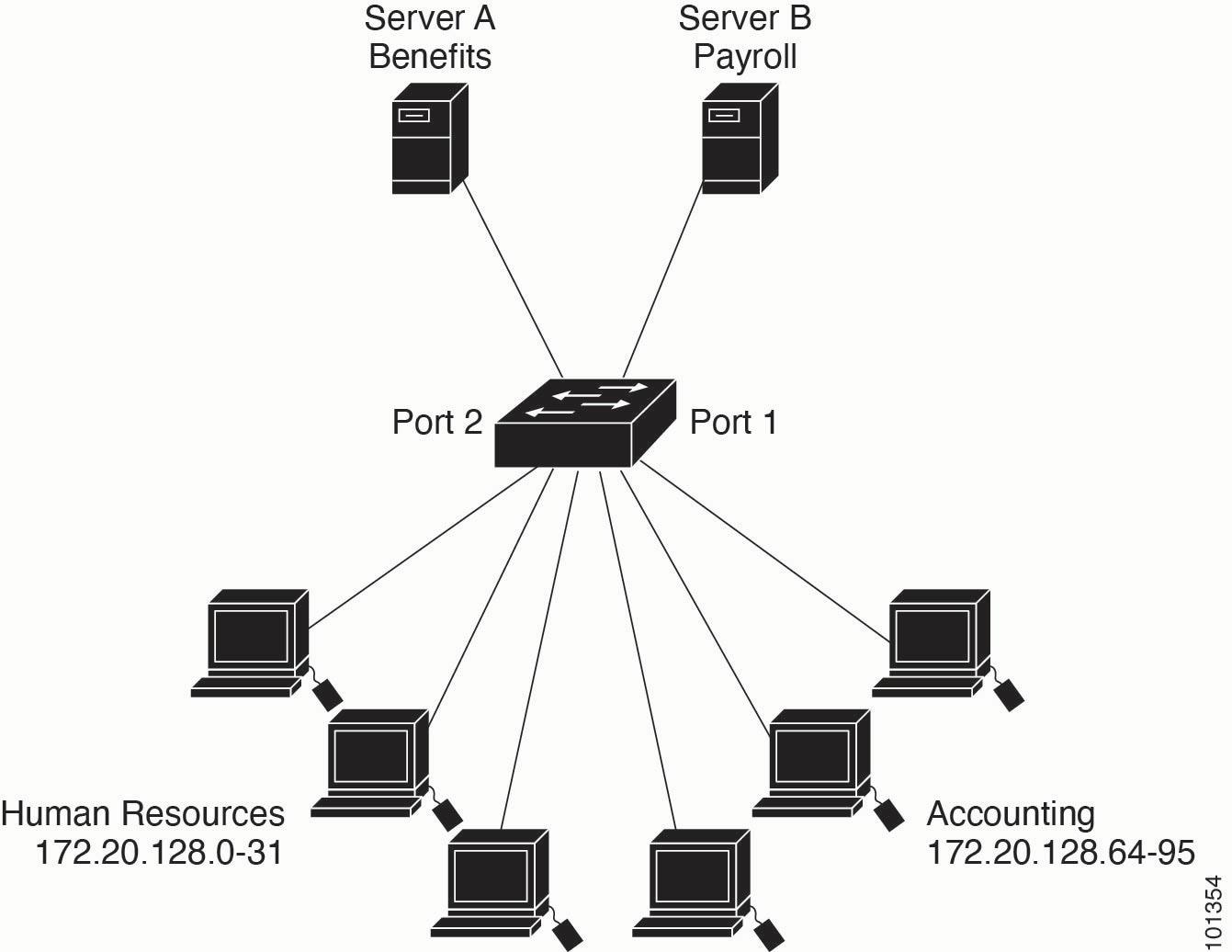
The diagram illustrates a small networked office. Routed Port 2 connects to Server A, which hosts benefits and other information accessible to all employees. Routed Port 1 connects to Server B, which contains confidential payroll data. All users can access Server A. Server B is restricted to authorized users.
Use router ACLs to do this in one of two ways:
-
Create a standard ACL to filter traffic coming to the server from Port 1.
-
Create an extended ACL to filter traffic coming from the server into Port 1.
Examples: ACLs in a small networked office
This example uses a standard ACL to filter traffic coming into Server B from a port. The ACL permits traffic only from accounting’s source addresses 172.20.128.64 to 172.20.128.95. The ACL is applied to traffic that comes out of routed Port 1 from the specified source address.
Device(config)# access-list 6 permit 172.20.128.64 0.0.0.31
Device(config)# end
Device# how access-lists

Standard IP access list 6
10 permit 172.20.128.64, wildcard bits 0.0.0.31
Device(config)# interface gigabitethernet1/0/1
Device(config-if)# ip access-group 6 out
This example uses an extended ACL to filter traffic from Server B into a port. It permits traffic from any source address (in this case Server B) only to accounting destination addresses in the range 172.20.128.64 to 172.20.128.95. The ACL is applied to traffic going into routed Port 1, permitting it to go only to the specified destination addresses. With extended ACLs, enter the protocol (IP) before specifying source and destination information.
Device(config)# access-list 106 permit ip any 172.20.128.64 0.0.0.31
Device(config)# end
Device# show access-lists

Extended IP access list 106
10 permit ip any 172.20.128.64 0.0.0.31
Device(config)# interface gigabitethernet1/0/1
Device(config-if)# ip access-group 106 in
Example: numbered ACLs
In this example, network 10.0.0.0 is a Class A network. Its second octet specifies a subnet, and its subnet mask is 255.255.0.0. The third and fourth octets in a 10.0.0.0 network address specify a particular host. Using access list 2, the switch accepts one address on subnet 48 and rejects all other addresses on that subnet. The last line of the list shows that the switch accepts addresses on all other subnets of network 10.0.0.0. The ACL is applied to packets entering a port.
Device(config)# access-list 2 permit 10.48.0.3
Device(config)# access-list 2 deny 10.48.0.0 0.0.255.255
Device(config)# access-list 2 permit 10.0.0.0 0.255.255.255
Device(config)#

Device(config-if)# ip access-group 2 in
Examples: extended ACLs
In this example, the first line permits any incoming TCP connections with destination ports greater than 1023. The second line permits incoming TCP connections to the Simple Mail Transfer Protocol (SMTP) port of host 128.88.1.2. The third line permits incoming ICMP messages for error feedback.
Device(config)# access-list 102 permit tcp any 128.88.0.0 0.0.255.255 gt 1023
Device(config)# access-list 102 permit tcp any host 128.88.1.2 eq 25
Device(config)# access-list 102 permit icmp any any
Device(config)#

Device(config-if)# ip access-group 102 in
In this example, suppose that you have a network connected to the Internet, and you want any host on the network to be able to form TCP connections to any host on the Internet. However, you do not want IP hosts to be able to form TCP connections to hosts on your network, except to the mail (SMTP) port of a dedicated mail host.
SMTP uses TCP port 25 on one end of the connection and a random port number on the other end. The same port numbers are used throughout the life of the connection. Mail packets coming in from the Internet have a destination port of 25. Because the secure system of the network always accepts mail connections on port 25, incoming are separately controlled.
Device(config)# access-list 102 permit tcp any 128.88.0.0 0.0.255.255 eq 23
Device(config)# access-list 102 permit tcp any 128.88.0.0 0.0.255.255 eq 25
Device(config)#

Device(config-if)# ip access-group 102 in
Examples: named ACLs
Creating named standard and extended ACLs
This example creates a standard ACL named internet_filter and an extended ACL named marketing_group. The internet_filter ACL allows all traffic from the source address 1.2.3.4.
Device(config)# ip access-list standard Internet_filter
Device(config-ext-nacl)# permit 1.2.3.4
Device(config-ext-nacl)# exit
The marketing_group ACL allows any TCP Telnet traffic to the destination address and wildcard 171.69.0.0 0.0.255.255 and denies any other TCP traffic. It permits ICMP traffic, denies UDP traffic from any source to the destination address range 171.69.0.0 through 179.69.255.255 with a destination port less than 1024, denies any other IP traffic, and provides a log of the result.
Device(config)# ip access-list extended marketing_group
Device(config-ext-nacl)# permit tcp any 171.69.0.0 0.0.255.255 eq telnet
Device(config-ext-nacl)# deny tcp any any
Device(config-ext-nacl)# permit icmp any any
Device(config-ext-nacl)# deny udp any 171.69.0.0 0.0.255.255 lt 1024
Device(config-ext-nacl)# deny ip any any log
Device(config-ext-nacl)# exit
The Internet_filter ACL is applied to outgoing traffic and the marketing_group ACL is applied to incoming traffic on a Layer 3 port.
Device(config)# interface gigabitethernet3/0/1

Device
Device(config-if)# ip address 2.0.5.1 255.255.255.0
Device(config-if)# ip access-group Internet_filter out
Device(config-if)# ip access-group marketing_group in
Deleting individual ACEs from named ACLs
This example shows how you can delete individual ACEs from the named access list border-list:
Device(config)# ip access-list extended border-list
Device(config-ext-nacl)# no permit ip host 10.1.1.3 any