Cisco Catalyst 9800 Series Wireless Controller Software Configuration Guide, Cisco IOS XE 26.1.x

PDF

Cisco Catalyst 9800 Series Wireless Controller Software Configuration Guide, Cisco IOS XE 26.1.x

Tags and their associated profiles

Want to summarize with AI?

Log in

Details RF tags, RF profiles, site tags, flex profiles, AP join profiles, policy tags, WLAN profiles, policy profiles, and methods for associating APs with tags.


The new configuration model has different types of tags that contain various types of profiles, depending on the functionality they represent.

Table 1. Various types of tags and the contained profiles

Tag

Contains

Function

RF Tag

Radio profile

RF tags are used to group and manage radio frequency profiles for wireless networks.

Site Tag

Flex profile and AP join profile

Site tags define the properties of a site and maps the flex profile to the the AP join profile.

Policy Tag

WLAN profile and policy profile

Policy tags map WLAN profile to the policy profile

The figure depicts the various types of tags and their contained profiles. The figure also depicts how the tag is thus applied to access points easily.
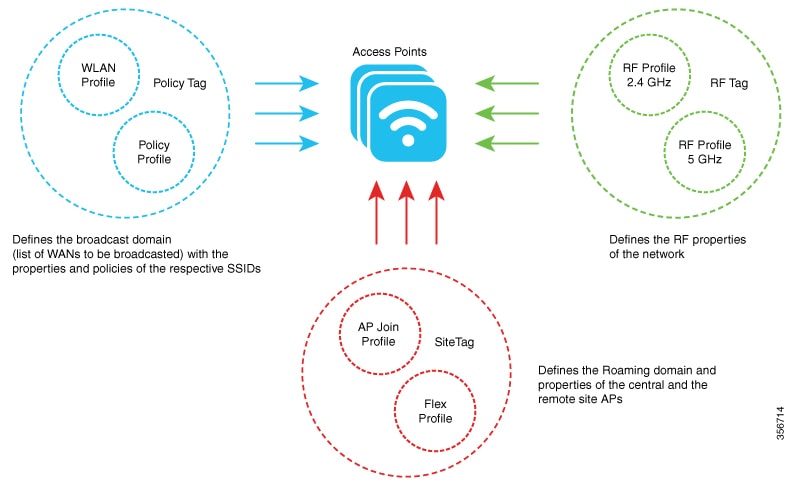

RF Tags

An RF tag is a configuration object that

  • contains profiles for different radio frequency bands

  • are used to group and manage radio frequency profiles for wireless networks

  • defines global or band-specific parameters for wireless devices, and

  • provides default settings for each RF profile to ensure consistent operation across radios.

The RF tag contains the 2.4 GHz, 5 GHz, and 6 GHz RF profiles. The default RF tag contains the global configuration for 2.4 and 5 GHz bands and default RF profile for 6 GHz band. All these profiles contain the same default values for global or RF profile parameters for the respective radios.

Example of RF tag

For a device operating in multiple frequency bands, applying an RF tag ensures that each radio (such as 2.4 GHz or 5 GHz) uses the network-approved configuration for coverage, performance, and reliability.


RF Profiles

An RF profile is a configuration set that

  • centralizes radio settings for APs

  • applies a uniform set of radio parameters to all APs within an AP group, and

  • ensures consistent wireless performance and feature deployment across the group.

Some RF profile options are specific to the 6-GHz band and include features such as Unsolicited Broadcast Probe Response, FILS Discovery, Multi-BSSID, and Preferred Scanning Channels. These features address 802.11ax requirements and help optimize management traffic or channel selection for reliable wireless performance..

Preferred Scanning Channels is a feature that helps RRM choose PSC channels to 6-GHz radios.


Site Tags

A site tag is a configuration object that

  • defines the properties of a wireless site

  • maps a flex profile to an AP join profile, and

  • specifies site-specific settings, such as a list of primary APs for upgrades.

Additional reference information

  • Attributes unique to a flex or remote site are part of the flex profile, while attributes that belong to the actual physical site—like the primary APs list—are directly included in the site tag.

  • The site tag includes settings that are not suited for shared, reusable profiles.

  • If the flex profile name or AP profile name is changed within the site tag, associated APs are required to rejoin the controller by disconnecting their Datagram Transport Layer Security (DTLS) session.

  • When a site tag is created, the AP and flex profiles default to preset values (default-ap-profile and default-flex-profile).

Example of site tag

Assigning a set of primary APs for efficient software upgrades is done through the site tag, not the flex profile, since this information applies specifically to the physical site.


Flex profiles

A Flex profile is a configuration profile that

  • contains policy attributes for network management

  • specifies remote site–specific parameters, and

  • supports custom mappings such as VLAN-to-ACL and VLAN name-to-ID assignments.

The FlexConnect configuration helps the central controller to manage sites that are geo-distributed, for example, retail, campus, and so on.

Example of flex profile

A Flex profile can include EAP profiles used when an AP acts as an authentication server for local RADIUS information, as well as mappings for VLANs and associated ACLs or VLAN names and IDs

Analogy: A Flex profile is like a master checklist for a remote office: just as a checklist ensures every necessary step, tool, and contact is available for smooth operation at the branch, a Flex profile gathers all the required policies and site-specific settings so each access point at a remote site works according to the organization’s requirements without repeated manual configuration.


AP join profiles

An AP join profile is a configuration set that

  • specifies global and AP group-specific parameters for APs

  • defines network and communication settings specific to an AP, such as CAPWAP, IPv4, IPv6, and protocol configurations, and

  • centralizes control of AP-specfic settings—including retransmit configuration, UDP Lite, high availability, Global AP failover, Hyperlocation config parameters, Telnet and SSH, and 11u parameters—to streamline access point management across a network.


Policy Tag

A policy tag is a network configuration object that

  • maps each WLAN profile to a specific policy profile

  • determines how network and switching policies are assigned to wireless clients, and

  • controls the deployment of WLAN and policy profiles to access points (APs) based on their enabled state.

Policy tag mapping

A policy tag maps the WLAN profile to the policy profile.

Network Configuration Object

Function

WLAN profile

defines the wireless characteristics of the WLAN.

Policy profile

defines the network policies and the switching policies for the client (Quality of Service [QoS] is an exception, which constitutes AP policies as well).

Policy Tag

maps the WLAN profile to the policy profile.

There are 16 such WLAN-to-policy profile pairs.

The policy tag directs how wireless services and policies are applied across the network.

Note

Quality of Service (QoS) policies are an exception, as they are managed as part of AP policies instead of policy profiles.

Example of policy tag

If a policy tag includes WLAN1 mapped to Policy1, and both profiles are enabled, their definitions are pushed to APs assigned that policy tag. If either the WLAN profile or the policy profile is disabled, that mapping is not pushed to the AP. You can also remove a WLAN profile from an AP by deleting its mapping in the policy tag configuration.


WLAN profiles

A WLAN profile is a configuration entity that

  • defines the wireless network by specifying the service set identifier (SSID)

  • associates Layer 2 security policies with WLANs, and

  • groups related settings required for controllers to manage wireless local area networks.

Create WLANs with the same SSID you to assign different Layer 2 security policies within a single wireless LAN.

Distinguish WLANs that use the same SSID by assigning a unique WLAN profile name to each. Each WLAN with a shared SSID must have a unique Layer 2 security policy so that clients can select the appropriate WLAN based on the security information advertised in beacon and probe responses.

Note

Switching and network policies are not included in the WLAN profile definition; they are configured separately.

Analogy: A WLAN profile is like a membership card for a club. The card (profile) shows which club you belong to (SSID), lists the rules you must follow to enter (Layer 2 security policies), and includes the necessary information for the club staff (controller) to manage your membership. Just as two people can have cards for the same club but with different access levels, multiple WLAN profiles can share the same SSID but have different security policies to distinguish them.


Policy profiles

A policy profile is a network configuration entity that

  • allows you to group and manage multiple policies

  • is reusable across tags and deployments, and applied to APs or controllers for client access, and

  • improves consistency and efficiency in large-scale wireless environments.

Example of policy profile

Policy profile centralizes policy parameters such as VLAN, access control list (ACL), Quality of Service (QoS), session timeout, idle timeout, AVC profile, Bonjour profile, local profiling, device classification, and BSSID QoS.

Table 2. Comparison between policy profiles and WLAN profiles

Policy profiles

WLAN profiles

Contain network and switching policies

Contain wireless-related security attributes, and features such as authentication and encryption

Reusable across tags and deployments, and applied to APs or controllers for client access

Configured per WLAN (SSID)

Table 3. Comparison between policy profiles and WLAN profiles

Policy profiles

WLAN profiles

Contain network and switching policies

Contain wireless-related security attributes, and features such as authentication and encryption

Reusable across tags and deployments, and applied to APs or controllers for client access

Configured per WLAN (SSID)

Analogy: A policy profile is like a preset rulebook for network access, grouping the common rules that apply to all players (clients), while the WLAN profile acts like a gatekeeper, focusing on who can enter and under what security conditions.

Table 4. Comparison between policy profiles and WLAN profiles

Policy profiles

WLAN profiles

Contain network and switching policies

Contain wireless-related security attributes, and features such as authentication and encryption

Reusable across tags and deployments, and applied to APs or controllers for client access

Configured per WLAN (SSID)


Methods for associating APs with tags

APs can be associated with tags in several ways, supporting flexible and scalable network configuration. The main association methods are:

  • Ethernet MAC address association: The default option where an AP’s Ethernet MAC address is directly mapped to a policy-tag, site tag, and RF tag.

  • Filter-based association: Uses regular expressions (regex) to match AP Ethernet MAC addresses. Any AP matching the pattern receives the assigned tags (policy-tag, site tag, and RF tag) configured through an AP filter.

  • AP-based association: Tag names are pre-configured at the Plug and Play (PnP) server. The AP stores these and submits the tag name during the discovery process.

  • Location-based association: Tags are mapped to specific locations. Any AP mapped to a location receives the corresponding tags.

Effect of AP tag modification

Modifying an AP tag results in DTLS connection reset, forcing the AP to rejoin the controller. If only one tag is specified in the configuration, default tags are used for other types, for example, if only policy tag is specified, the default-site-tag and default-rf-tag will be used for site tag and RF tag.

Modifying an AP tag has these effects:

  • It resets the DTLS connection, forcing the AP to rejoin the controller.

  • If only one tag is specified (for example, only a policy tag), the system assigns default tags for the other types:

    • The default-site-tag is used for the site tag.

    • The default-rf-tag is used for the RF tag.