A FlexConnect authentication mode is a WLAN operating state that
-
defines how a FlexConnect AP handles client authentication and data switching
-
changes its behavior based on connection status to the controller, and
-
enables resilient client connectivity during both connected and standalone operation.
Locally switched: The AP forwards client data directly to the local LAN or VLAN at the site instead of tunneling it through the controller.
Centrally switched: The AP forwards the client’s data traffic to the controller, depending on the WLAN configuration.
FlexConnect is a wireless solution for branch office and remote office deployments. It enables customers to configure and
control access points (AP) in a branch or remote office from the corporate office through a wide area network (WAN) link without
deploying a controller in each office. The FlexConnect access points can also switch client data traffic locally and perform
client authentication locally when their connection to the controller is lost. When they are connected to the controller,
they can also send traffic back to the controller. FlexConnect access points support multiple SSIDs. In the connected mode,
the FlexConnect access point can also perform local authentication.
An access point does not have to reboot when moving from local mode to FlexConnect mode and vice-versa.
FlexConnect Deployment
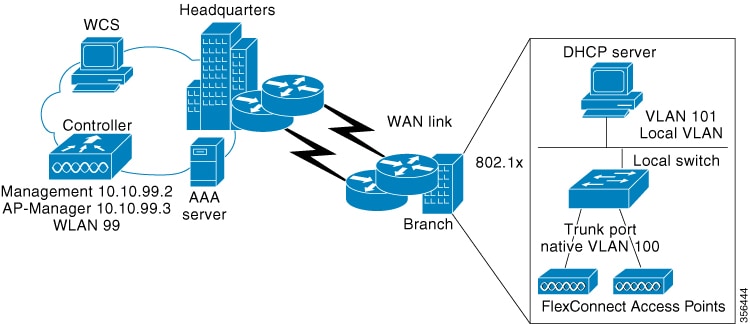
The embedded wireless controller software uses a more robust fault-tolerance methodology with FlexConnect APs. Whenever a
FlexConnect AP disassociates from controller, it moves to the standalone mode. Centrally switched clients are disassociated. However, the FlexConnect access point continues to serve locally switched clients. When a FlexConnect AP loses and rejoins its primary
or identically configured secondary controller, locally switched client sessions are maintained, providing seamless connectivity.
After the client connection is established, the controller does not restore the original attributes of the client. The client username, current rate and supported rates, and listen
interval values are reset to the default or new configured values only after the session timer expires.
The controller can send multicast packets in the form of unicast or multicast packets to an access point. In FlexConnect mode, an access
point can receive only multicast packets.
In Cisco Catalyst 9800 Series Wireless Controller, you can define a flex connect site. A FlexConnect site can have a flex
connect profile associate with it. You can have a maximum of 100 access points for each flex connect site.
FlexConnect access points support a one-to-one network address translation (NAT) configuration. They also support PAT for
all features except true multicast. Multicast is supported across NAT boundaries when configured using the Unicast option.
FlexConnect access points also support a many-to-one NAT or PAT boundary, except when you want true multicast to operate for
all centrally switched WLANs.
Workgroup Bridge and Universal Workgroup Bridge modes are supported on FlexConnect APs for locally switched clients.
FlexConnect supports IPv6 clients by bridging traffic to the local VLAN, similar to IPv4 operation.
-
An office with intermittent WAN connectivity keeps wireless clients connected using local authentication, with data switched
locally until the central controller is available again.
-
A FlexConnect AP at a remote branch uses backup RADIUS for 802.1X authentication during WAN outages.
Analogy: retail chain
Imagine a retail chain with a central headquarters (controller) and a branch store (the FlexConnect AP).
Normal day: Every time a customer wants to make a purchase, the cashier phones headquarters for approval and processing. This
is like central authentication and switching.
Local authentication (policy choice): Even on a normal day, the branch can be configured to keep a small credit-card terminal
in the store. If management decides to use it, the cashier can approve transactions locally without phoning headquarters.
The headquarters link is still up, but the store chooses to handle the verification itself. That terminal is “local authentication".
Stand-alone mode (connectivity condition): One day the phone lines to headquarters go down. The branch is forced to rely on
its credit-card terminal, whether it originally planned to or not, if it wants to keep making sales. The store switches on
its emergency lights, keeps serving customers, and records the day’s sales to upload later. That forced independence is “standalone mode”.
Key Takeaway
Standalone mode is the situation (phone lines down).
Local authentication is the tool (the in-store terminal) that lets the store keep serving customers—even when the phone lines
are fine and especially when they are not.


 Feedback