802.11r Fast Transition
802.11r Fast Transition is a roaming mechanism that
-
enables the initial handshake with a new AP even before the corresponding client roams to the target access point
-
allows a client and the access points to do the Pairwise Transient Key (PTK) calculation in advance, and
-
applies PTK keys to the client and the access points after the client responds to the reassociation request or responds to the exchange with new target AP.
802.11r Fast Transition features
The FT key hierarchy is designed to allow clients to make fast BSS transitions between APs without requiring reauthentication at every AP. WLAN configuration contains a new Authenticated Key Management (AKM) type called Fast Transition (FT).
Client roaming
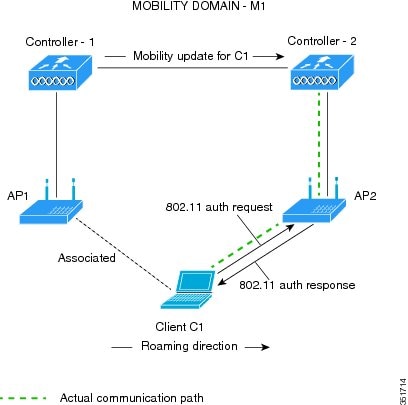
For a client to move from its current AP to a target AP using the FT protocols, message exchanges are performed using one of these methods:
-
Over-the-Air: The client communicates directly with the target AP using IEEE 802.11 authentication with the FT authentication algorithm.
-
Over-the-Distribution System (DS): The client communicates with the target AP through the current AP. The communication between the client and the target AP is carried in FT action frames between the client and the current AP and is then sent through the device.

 Note |
The 802.11r Fast Transition for SAE (FT-SAE) is not restricted to inter controller roaming. |
Restrictions for 802.11r Fast Transition
Consider these restrictions when implementing 802.11r Fast Transition:
-
EAP LEAP method is not supported.
-
Traffic Specification (TSPEC) is not supported for 802.11r fast roaming. Therefore, RIC IE handling is not supported.
-
If WAN link latency exists, fast roaming is also delayed. Voice or data maximum latency should be verified. The Cisco WLC handles 802.11r Fast Transition authentication requests during roaming for both Over-the-Air and Over-the-DS methods.
-
Legacy clients cannot associate with a WLAN that has 802.11r enabled if the driver of the supplicant that is responsible for parsing the Robust Security Network Information Exchange (RSN IE) is old and not aware of the additional AKM suites in the IE. Due to this limitation, clients cannot send association requests to WLANs. These clients, however, can still associate with non-802.11r WLANs. Clients that are 802.11r-capable can associate as 802.11i clients on WLANs that have both 802.11i and 802.11r Authentication Key Management Suites enabled.
The workaround is to enable or upgrade the driver of the legacy clients to work with the new 802.11r AKMs, after which the legacy clients can successfully associate with 802.11r-enabled WLANs.
Another workaround is to have two SSIDs with the same name, but with different security settings (FT and non-FT).
-
Fast Transition resource–request protocol is not supported because clients do not support this protocol. Also, the resource–request protocol is an optional protocol.
-
To avoid any Denial of Service (DoS) attack, each Cisco WLC allows a maximum of three Fast Transition handshakes with different APs.
-
Non-802.11r–capable devices will not be able to associate with FT-enabled WLAN.
-
We recommend 802.11r FT Over-the-Air roaming for FlexConnect deployments.
-
FT-SAE Over-the-DS roam is not supported in FlexConnect local authentication mode.
-
802.11r FT-over-DS is enabled by default, when a WLAN is created in the controller. In Cisco Wave 2 APs, local switching local authentication with 802.11r is not supported. To make the local switching local authentication work with Cisco Wave 2 APs, explicitly disable 802.11r in WLAN. A sample configuration is given below:
wlan local-dot1x 24 local-dot1x
no security ft over-the-ds
no security ft adaptive
security dot1x authentication-list spwifi_dot1x
no shutdown
Monitor 802.11r fast transition
These commands can be used to monitor 802.11r Fast Transition:
| Command | Description |
|---|---|
| show WLAN name WLAN-name |
Displays a summary of the configured parameters on the WLAN. |
| show wireless client mac-address mac-address | Displays the summary of the 802.11r authentication key management configuration on a client. |
Configure 802.11r Fast Transition in an open WLAN (CLI)
Procedure
|
Step 1 |
Enter global configuration mode. Example: |
|
Step 2 |
Enter WLAN configuration submode. Example:Example:The profile-name is the profile name of the configured WLAN. |
|
Step 3 |
Associate the client VLAN to the WLAN. Example:Example: |
|
Step 4 |
Disable WPA security. Example: |
|
Step 5 |
Disable security AKM for dot1x. Example: |
|
Step 6 |
Disable WPA2 security. Example: |
|
Step 7 |
Disable WPA2 ciphers for AES. Example: |
|
Step 8 |
Enable 802.11r Fast Transition parameters. Example: |
|
Step 9 |
Enable the WLAN. Example: |
|
Step 10 |
Return to privileged EXEC mode. Example:Alternatively, you can also press Ctrl-z to exit global configuration mode |
Configure 802.11r BSS Fast Transition on a Dot1x security enabled WLAN (CLI)
Procedure
|
Step 1 |
Enter global configuration mode. Example: |
|
Step 2 |
Enter WLAN configuration submode. Example: |
|
Step 3 |
Associate the client VLAN to this WLAN. Example:Example: |
|
Step 4 |
Enable the local auth EAP profile. Example: |
|
Step 5 |
Enable security authentication list for dot1x security. Example:The configuration is similar for all dot1x security WLANs. |
|
Step 6 |
Enable 802.11r Fast Transition on the WLAN. Example: |
|
Step 7 |
Enable 802.1x security on the WLAN. Example: |
|
Step 8 |
Enable the WLAN. Example: |
|
Step 9 |
Return to privileged EXEC mode. Example:Alternatively, you can also press Ctrl-z to exit global configuration mode |
Configure 802.11r Fast Transition on a PSK security–enabled WLAN (CLI)
Procedure
|
Step 1 |
Enter global configuration mode. Example: |
|
Step 2 |
Enter WLAN configuration mode. Example: |
|
Step 3 |
Associate the client VLAN to this WLAN. Example:Example: |
|
Step 4 |
Disable security AKM for dot1x. Example: |
|
Step 5 |
Configure Fast Transition PSK support. Example: |
|
Step 6 |
Configure PSK AKM shared key. Example:Example: |
|
Step 7 |
Configure 802.11r Fast Transition. Example: |
|
Step 8 |
Enable the WLAN. Example: |
|
Step 9 |
Return to privileged EXEC mode. Example:Alternatively, you can also press Ctrl-Z to exit global configuration mode. |
Disable 802.11r fast transition (GUI)
Disable 802.11r Fast Transition functionality on a WLAN configuration to prevent automatic roaming assistance between access points.
Use this procedure when you need to turn off Fast Transition capabilities for a specific WLAN. Note that fast transition cannot be enabled or disabled if you have configured an SSID with Open Authentication.
Procedure
|
Step 1 |
Choose . |
||
|
Step 2 |
On the WLANs page, click the WLAN name. |
||
|
Step 3 |
In the Edit WLAN window, click the tab. |
||
|
Step 4 |
From the Fast Transition drop-down list, choose Disabled.
|
||
|
Step 5 |
Click Update & Apply to Device. |
The 802.11r Fast Transition feature is disabled for the selected WLAN, and the configuration changes are applied to the device.
Disable 802.11r Fast Transition (CLI)
Disable 802.11r Fast Transition on WLANs to prevent Fast Transitions in 802.11r-enabled networks.
Use this procedure when you need to prevent Fast Transitions in 802.11r-enabled WLANs using the command line interface.
Procedure
|
Step 1 |
Enter the global configuration mode. Example: |
|
Step 2 |
Enter the WLAN configuration submode. Example: |
|
Step 3 |
Disable the FT AKMs that are enabled before disabling FT. Example:The available FT AKMs are: SAE-FT, SAE-EXT-FT and 802.1x-FT. |
|
Step 4 |
Disable 802.11r Fast Transition on the WLAN. Example: |
|
Step 5 |
Return to privileged EXEC mode. Example: |
802.11r Fast Transition is disabled on the WLAN and Fast Transitions will no longer occur for clients connecting to this network.
 Feedback