Introduces managing the access policy. Secure Access has a single unified policy, which consists of policy rules and settings. Your private access and internet policy rules and the default policy rules control the access and security of your resources and protect the traffic in your organization.
Secure Access has a single unified policy, which consists of policy rules and settings. Your private access and internet policy rules and the default policy rules control the access and security of your resources and protect the traffic in your organization. Before you start adding rules to your policy, we recommend that you read through the topics in this section in full.
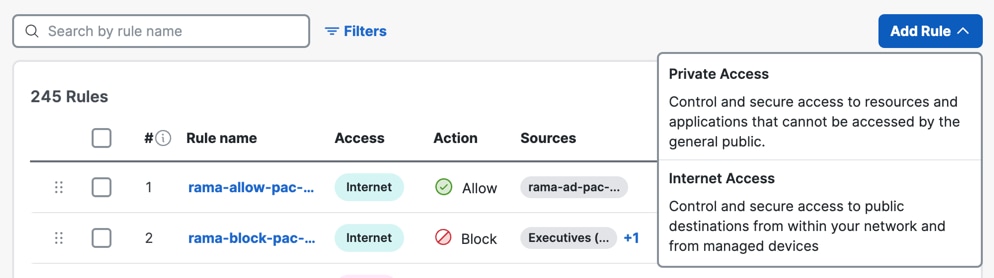
Private and Internet Access Rules in Your Policy
There are two types of access rules:
-
Private access rules—Controls access to applications hosted from your data center and private clouds.
To create and work with these rules, see Get Started with Private Access Rules.
-
Internet access rules—Controls access to resources on the internet from managed devices.
To create and work with these rules, see Get Started with Internet Access Rules.
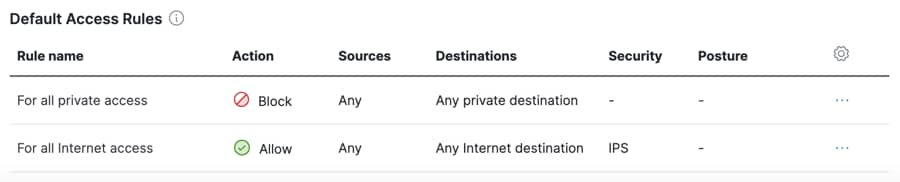
Default Access Rules in Your Policy
If your traffic does not match any of the rules in your policy, Secure Access applies the settings on the Default Access rules. For more information, see Edit the Default Access Rules.
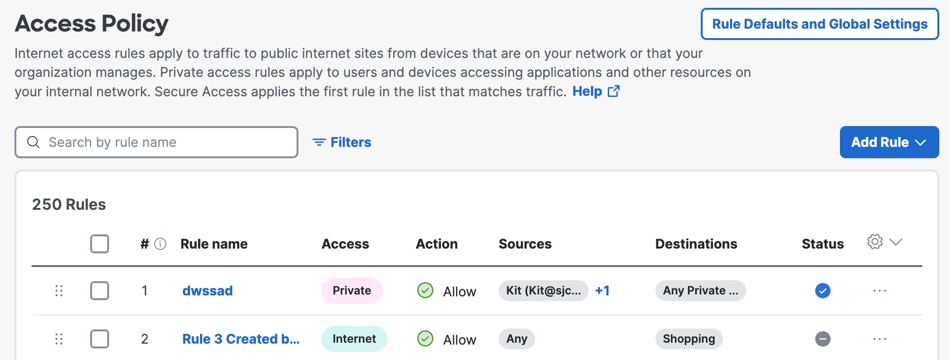
Rule Defaults and Global Settings
-
For more information, see Global Settings for Access Rules.
-
For more information, see Rule Defaults: Default Settings for Access Rules.
About the Access Policy
Describes about the access policy. The Cisco Secure Access policy is the collection of your internet and private access rules, rule defaults, and global settings. The policy displays your configured rule data and allows you to choose how to prioritize the rules in your policy.
Show Additional Data on Your Access Rules
Provides instructions for show additional data on your access rules. To customize the policy table, you can change the height of the table rows, add more columns of rule data, and remove the Security and Hits columns.
Edit the Order of the Rules in Your Access Policy
Describes editing the order of the rules in your access policy. The order of the rules listed on the Policy page is critical to traffic handling.
Rule Defaults: Default Settings for Access Rules
Describes rule defaults: default settings for access rules. When you create a new access rule, the rule is configured with the default rule settings unless you select other options in the rule.
Global Settings for Access Rules
Describes global settings for access rules. In Cisco Secure Access, the Access policy has a Global Settings configuration that affects all rules of the applicable type: internet access rules or private access rules.
Edit Rule Defaults and Global Settings
Provides instructions for editing rule defaults and global settings. Secure Access is pre-configured with default and global settings for access rules. We recommend that you change the default policy rule settings. You may need to change the global settings.
Edit the Default Access Rules
Describes editing the default access rules. There are two default access rules: Default internet access rule Default private access rule