Configure a side-by-side comparison view to examine added, modified, deleted, and message entries for device configuration changes in the change log.
View change log differences to analyze configuration changes made to devices by examining before and after states of the running configuration file.
Change log differences provide a detailed comparison between the original and modified configuration files, helping you understand what changes were made to device configurations. The side-by-side view highlights additions, modifications, and deletions in the running configuration.
Procedure
| 1. | Click Diff in the change log. A side-by-side comparison of the changes in the running configuration file of the device opens. The Original Configuration column shows the running configuration file before a change was written to the ASA device. The Modified Configuration column shows the running configuration file after the change was written. |
|
| 2. | Follow the lines across from the left to the right column to see the changes. In the comparison view, you can see additions such as the HR_network object and the access rule preventing addresses in the engineering network to reach addresses in the HR_network network. The Original Configuration column highlights rows that provide reference points for understanding the changes in the Modified Configuration column.
|
|
| 3. | Click Previous and Next to move through the changes in the file. |
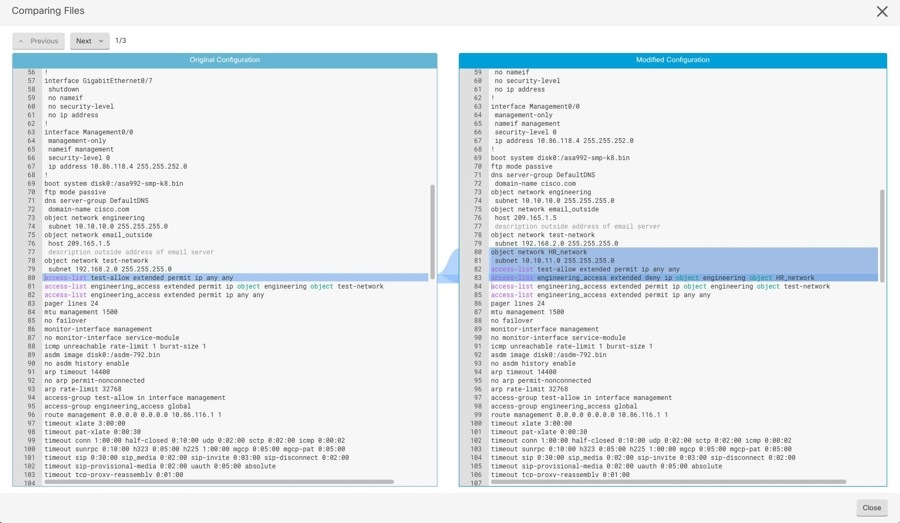
You can view and analyze the configuration differences between the original and modified device configurations, understanding exactly what changes were made during the configuration update process.