Provides information about interpreting change log entries created after deploying configuration changes to a Secure Firewall ASA, including how Security Cloud Control records completed deployments and tracks device updates.
A checkmark on the header indicates that the change log is complete. The change log displays the most recent entries first followed by the older entries below in a chronological order. You can sort these entries.
Click the Diff link in the change log entry row to view a side-by-side comparison of the changes in the context of the running configuration file.
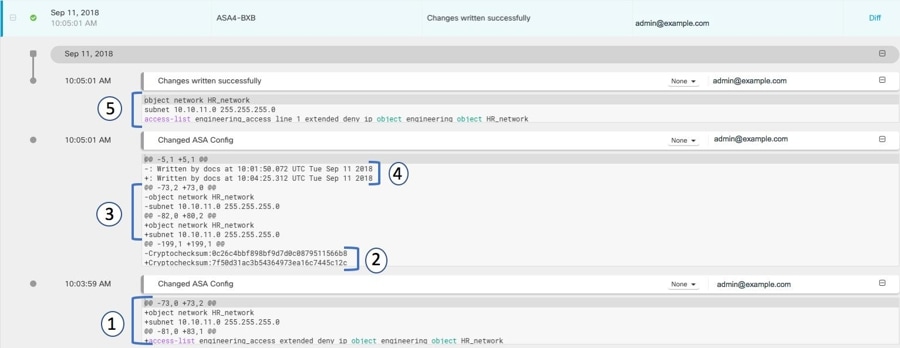
The explanations for the different changes are shown below.
| Number in illustration |
Explanation |
|---|---|
| 1 |
This is the change that admin@example.com made at 10:03:59 AM on September 11, 2018.
|
| 2 |
The checksum of the running configuration file was recalculated by the ASA and changed. The old value was removed and the new value was added. |
| 3 |
The ASA moves the object to a different location in the running configuration file than where Security Cloud Control placed it.
|
| 4 |
The record of the last time the running configuration file was updated. The old timestamp is removed and the new timestamp is added. This change was made by the ASA. |
| 5 |
These are the commands sent by Security Cloud Control to the ASA to make the configuration changes. |