Explains per-VRF label allocation for VPN routes, covering associated limitations, configuration approaches for same or different RD scenarios, and step-by-step procedures supporting route scale and MPLS VPN deployment flexibility.
A per-VRF label allocation for VPN routes is a label assignment method that
-
assigns a single label per VPN routing and forwarding (VRF) instance rather than per individual route prefix
-
conserves label resources, which is especially important on low-end platforms with limited label capacity, and
-
enables more efficient advertisement and management of imported VPN routes across different route distinguishers (RDs).
|
Feature Name |
Release Information |
Feature Description |
|---|---|---|
|
Per-VRF label allocation for VPN routes |
Release 26.1.1 |
Introduced in this release on: Centralized Systems (8400 [ASIC: K100])(select variants only*) * This feature is now supported on Cisco 8404-SYS-D routers. |
|
Per-VRF label allocation for VPN routes |
Release 25.1.1 |
Introduced in this release on: Fixed Systems (8700 [ASIC: K100]). This feature is now supported on Cisco 8712-MOD-M routers. |
|
Per-VRF label allocation for VPN routes |
Release 24.4.1 |
Introduced in this release on: Fixed Systems (8200 [ASIC:Q200, P100], 8700 [ASIC: P100, K100] ); Centralized Systems (8600 [ASIC:Q200]); Modular Systems (8800 [LC ASIC: Q100, Q200, P100]) This feature modifies the default label allocation from per-prefix to per-VRF by allowing you to enforce per-VRF label allocation for imported VPN routes using the advertise vpn-imported label-mode per-vrf command. This feature introduces these changes: CLI: YANG Data Model:
|
Default label allocation behavior
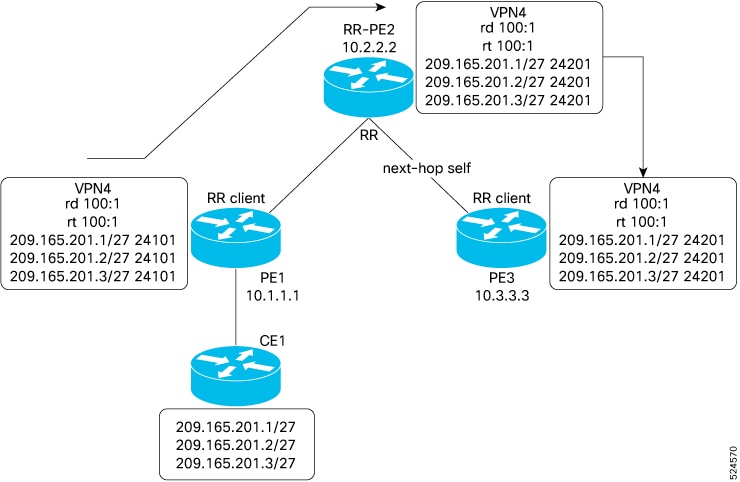
When a Route Reflector (RR) that is also a Provider Edge (PE) router is configured with the same route distinguisher (RD) and the next-hop-self option, the system uses per-prefix mode for local label allocation by default. This default applies even if Prefix Independent Convergence (PIC) is enabled. In this scenario, remote VPN routes with the same RD and matching route targets also receive per-prefix labels.
Label exhaustion in low-end platforms
On devices with limited label capacity, using per-prefix label allocation for imported VPN routes can exhaust available labels. Switching to per-VRF label allocation conserves label space and prevents label exhaustion on these platforms.
Modified label allocation behavior
This feature enables per-VRF label allocation for imported VPN routes with the same RD. By using the advertise vpn-imported label-mode per-vrf command, you can override the default per-prefix allocation in favor of per-VRF label assignment:
Support for differing RDs
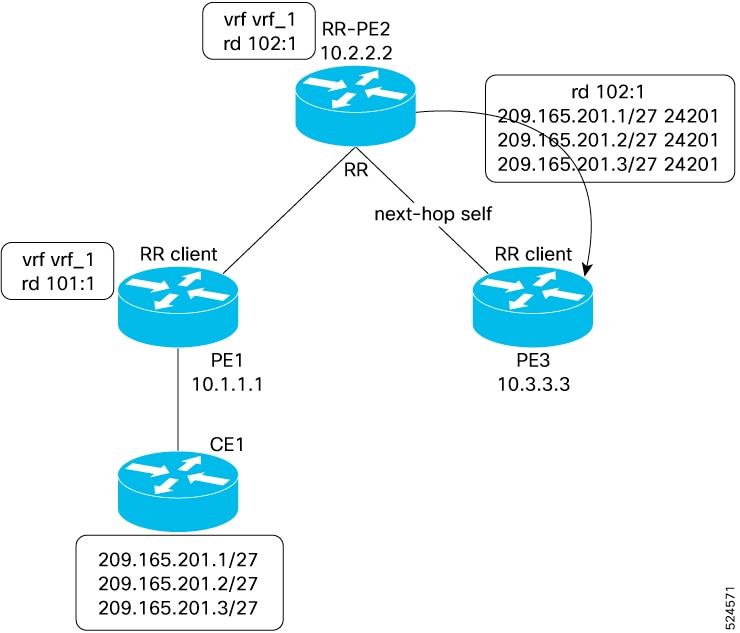
For routes with different RDs, the default behavior assigns per-prefix labels to routes with remote RDs, and these routes are advertised. Imported VPN routes are not advertised by default. When per-VRF label allocation is enabled:
-
Routes with remote RDs do not receive labels and are not advertised.
-
Imported VPN routes are assigned a single per-VRF label and are advertised.
Per-VRF label allocation example
If you enable per-VRF label allocation on a low-end platform that previously exhausted label space under per-prefix allocation, imported VPN routes will now share a single label per VRF, resolving label exhaustion and optimizing label usage.