Outlines mechanisms for influencing BGP path selection, including cost communities, local preference and weight, multi-exit discriminator, accumulated IGP attributes, and administrative distances, with detailed configuration examples and procedures.
While BGP’s default algorithm provides a robust method for selecting the best path, you must influence this decision to meet business or technical objectives. This section covers the major attributes and configuration tools available for tuning path selection, including the cost community, local preference, weight, MED, and the AIGP attribute.
BGP cost communities
A BGP cost community is a nontransitive extended community attribute that
passes to internal BGP (iBGP) and confederation peers but not to external BGP (eBGP) peers,
enables customization of local route preference by assigning cost values to specific routes, and
influences the BGP best-path selection process at defined points in the algorithm.
The cost community feature allows network operators to prefer certain paths over others by assigning lower cost values. By default, the cost community affects the best-path algorithm after the IGP metric comparison. If multiple paths have equal preference, the cost community serves as a tie-breaker.
Points of insertion
The extended community format introduces generic points of insertion (POI) within the best-path selection process, allowing granular control over route preference. This mechanism gives administrators the flexibility to adjust the decision logic at key stages for more sophisticated routing policies.
How BGP cost communities affect best path selection
Cost communities can be configured to act as tiebreakers when several paths have equal preference by traditional BGP metrics. You can compare these attributes using a deterministic and hierarchical process.
Summary
The key components involved in the process are:
BGP router: A router that analyzes multiple received paths and applies the cost community attribute during best-path computation.
Cost community attribute: A path attribute that is used for fine-tuning the selection among equal-cost paths.
Point of Insertion (POI): The decision stage where cost community is evaluated before other standard metrics.
After IGP metric evaluation, the BGP router uses cost communities to compare paths. It sorts and compares attributes by point of insertion, community ID, and cost, preferring lower values. The router selects the path that ranks highest as the best path in the routing table.
Workflow
These stages describe how BGP cost communities affect best path selection:
Path reception: The BGP router receives multiple routes to the same destination.
POI evaluation: The router applies the point of insertion (POI), where cost community attributes take effect, after IGP metric comparisons.
Cost community comparison:
When multiple paths have the cost community attribute, the BGP router compares them as follows:
Sort and prepare:
For each path, the router sorts cost community attributes by Point of Insertion (POI) and then by Community ID.
If a path does not include a cost community for the given POI and community ID, the router assigns it the default cost value (2147483647).
Pairwise comparison:
The router compares two paths at a time, examining the cost community attributes for the POI and community ID in order.
At each step:
If neither path has a relevant cost community, the router declares a tie for this comparison.
If only one path has a cost community, the router selects that path as the best path.
If both paths have cost communities with different community IDs, the path with the lower Community ID is chosen.
If both have the same Community ID but different cost values, the path with the lower cost value is selected.
If both have the same Community ID and cost value, the router continues to the next lowest Community ID and repeats the process.
The comparison ends when a best path is determined or all comparisons result in a tie.
Result
The BGP router installs the path with the most favorable cost community, so administrators can control routing decisions when standard BGP metrics do not produce a unique result.
Aggregate routes and multipaths
Aggregate routes and multipaths are extensions of the BGP cost community feature that
allow the cost community attribute to be applied to aggregate and multipath routes
ensure that unique cost community IDs from component routes are passed to the aggregate or multipath route, and
apply only the highest cost value from all component routes for each unique ID to the aggregate or multipath route.
Inheritance of cost community attributes in aggregate and multipath routes
Aggregate or multipath routes inherit the BGP cost community attribute from the individual component routes. This means that any cost community attribute present in a component route is transferred to the aggregate or multipath route as part of the aggregation process.
Selection of cost values for each community ID
For each unique cost community ID found among the component routes, the aggregate or multipath route uses only the highest cost value for that ID. This ensures that, when multiple component routes share the same ID but have different cost values, the most significant (highest) value is selected and advertised.
Handling missing or mismatched cost community attributes
If a component route does not contain the cost community attribute, or if the component routes possess different cost community IDs, the default value of 2147483647 is advertised for those IDs.
Aggregate route with the same cost community ID
Route 10.0.0.1 has POI=IGP, cost community ID=1, and cost number=100.
Route 192.168.0.1 has POI=IGP, cost community ID=1, and cost number=200.
After aggregation, the aggregate route advertises cost community ID=1 with a cost of 200, which is the highest value among the component routes.
Aggregate route with different cost community IDs
Route 10.0.0.1 has POI=IGP, cost community ID=1, and cost number=100
Route 172.16.0.1 has POI=IGP, cost community ID=2, and cost number=100
Route 192.168.0.1 has POI=IGP, cost community ID=1, and cost number=200
In this scenario, the aggregate route advertises the default cost value 2147483647 for both ID=1 and ID=2, since multiple IDs are present and cannot be consolidated under a single value.
If any component route does not include the cost community attribute, the aggregate or multipath route advertises the default cost value (2147483647) for that community ID.
Example: Adding routes to the Routing Information Base
The Routing Information Base (RIB) uses specific criteria for adding routes and selecting the best path. These criteria ensure the most optimal route is chosen based on BGP's cost community and best-path algorithms.
The RIB uses these criteria when adding routes and selecting the best path:
If a nonsourced path becomes the best path after a best-path calculation, BGP adds the route to the RIB and passes cost communities along with other IGP extended communities.
When a protocol adds a route with multiple paths to the RIB, the RIB checks both current best paths and incoming paths for the presence of cost extended communities.
If cost extended communities are present:
The RIB compares the sets of cost communities between paths.
If there is a tie in cost community comparison, the RIB continues with the remaining steps of the best-path algorithm.
If a cost community is missing from either current best paths or newly added paths, the RIB also continues with the remaining best-path evaluation steps.
Table 1. Summary:
Condition
RIB Action
Nonsourced path is best after calculation
Adds route to RIB with cost or IGP communities
Cost community found in compared paths
Compares cost communities, selects best
Tie in cost community comparison
Runs next steps of best-path algorithm
Missing cost community in any compared path
Runs next steps of best-path algorithm
Example: Influencing route preference in a multiexit IGP network
In large enterprise and service provider networks, it is common to have multiple exit points (border routers) connecting an internal network to one or more external networks or service providers. These are known as multiexit points. If interior gateway protocols (IGPs) such as OSPF or IS-IS provide equal-cost paths to these exit points, BGP treats all exit points equally.
Default behavior:
If multipath load sharing is configured in BGP, both equal-cost paths are installed in the routing table and used for balancing traffic.
If multipath load balancing is not configured, BGP selects the path that was learned first and installs only this path in the routing table. You might see suboptimal routing if, for example, the first-learned path uses a lower-speed link.
Using cost community to influence preference:
The BGP cost community attribute allows you to customize route preference within the AS, even when IGP metrics are equal. By assigning a lower cost community value to a preferred route, you can ensure that BGP selects that route over others.
Example:
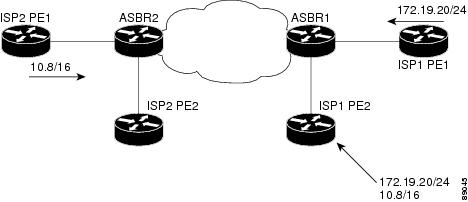
This figure shows an IGP network with two autonomous system boundary routers (ASBRs) on the edge. Each ASBR has an equal cost path to network 10.8/16
Figure 1. Multiexit point IGP network
Suppose you want BGP to prefer the path learned from ASBR2 over ASBR1. You can apply a lower cost community value to the route received via ASBR2. For example:
Router(config)# route-policy ISP2_PE1
Router(config-rpl)# set extcommunity cost (1:1)
This configuration assigns a cost community number of 1 to the 10.8.0.0 route learned from ASBR2. By default, BGP sets the cost community value of the path learned from ASBR1 to 2147483647. Because 1 is lower than 2147483647, the path via ASBR2 is selected as the best path by BGP.
Configure a BGP cost community
Configure BGP with the cost community feature to enable tiebreaking among equal paths during the best-path selection process.
Before you begin
Ensure you are in privileged EXEC mode on the router.
Gather the desired route policy name and cost community information.
Follow these steps to configure a BGP cost community:
Procedure
Enter route policy configuration mode, and set the BGP extended community attribute for cost in the route-policy.
Example:
Router# configure
Router(config)# route-policy costA
Router(config)# set extcommunity cost cost_A
Configure BGP and apply the route policy to a BGP neighbor.
Use the default-information originate command to originate default-information.
Use the aggregate-address[ address | mask-length ]route-policyroute-policy-name to configure an aggregate-address.
Example:
Router(config)# router bgp 120
Router(config-bgp)# default-information originate
Router(config-bgp)# neighbor 172.168.40.24
Router(config-bgp-nbr)# address-family ipv4 unicast
Router(config-bgp-nbr-af)# route-policy costA in
Use the showbgpip-address command to verify the configuration.
Ensure that the cost community is displayed in this format:
Example:
Cost: POI : cost-community-ID : cost-number
Local preference and weight
Local preference and weight are key BGP attributes used to influence route selection within an AS, allowing for straightforward prioritization of certain paths.
Change the BGP default local preference value
Adjust the default local preference value for BGP paths to influence route selection.
Use this task when you need to make certain BGP paths more or less preferred in your network routing policy by changing the default preference value.
Before you begin
Ensure you have administrative access to the router.
Follow this step to change the BGP default local preference value:
Procedure
Enter BGP router configuration mode for your autonomous system, and configure the default local preference value.
This value overrides the default (100) for all BGP paths learned unless set otherwise.
Configure BGP weights
Assign a weight to routes received from a BGP neighbor to influence the best-path selection process.
BGP weights allow you to prefer specific neighbors for routing most of your traffic. By assigning a higher weight to routes learned from a particular neighbor, you control which path is chosen as the best for outgoing traffic.
Before you begin
Determine the desired autonomous system (AS) number for your BGP router.
Identify the IP address and remote AS number of the BGP neighbor whose routes you want to modify.
Follow this step to configure BGP weights:
Procedure
Configure the neighbor and assign a weight to all routes learned from the neighbor.
The Multi Exit Discriminator (MED) is an attribute used in BGP to influence the path selection process when multiple exit points exist from one autonomous system (AS) to another. Understanding its comparison logic and configuration is important for controlling external routing behavior.
Conditions for BGP MED comparison
BGP compares the Multi-Exit Discriminator (MED) attribute under specific conditions controlled by default behavior and configuration options.
Table 2. MED comparison summary
Condition
MED compared?
Paths from same neighbor AS
Yes
bgp bestpath med always configured
Yes, for all paths
Paths from different neighbor AS (by default)
No
Paths with only confederation segments (default)
No
bgp bestpath med confed configured
Yes, among confederation peers
Default comparison rules
BGP compares MED values only between paths received from the same neighboring AS by default.
If two paths are from different neighboring ASes, MED is not considered unless specific configuration options are set.
When the AS path starts with an AS_SEQUENCE, the neighbor AS is the first AS number in that sequence. MED is compared only with other paths from the same neighbor AS.
If a path lacks an AS path or its AS path starts with an AS_SET, the path is considered internal, and MED is compared only with other internal paths.
When a path contains only confederation segments or starts with confederation segments followed by an AS_SET, MED is not compared by default unless the bgp bestpath med confed command is configured.
If the AS path starts with confederation segments followed by an AS_SEQUENCE, MED is compared with other paths whose neighbor AS matches the first AS in the AS_SEQUENCE.
Configuration overrides
If the bgp bestpath med always command is set, MED is compared among all paths, regardless of the neighbor AS.
If the bgp bestpath med confed command is set, MED is also compared for paths from confederation peers.
Handling missing MED values
If a route does not include a MED attribute, BGP assigns it a default value of 0.
When the bgp bestpath med missing-as-worst command is configured, a missing MED is treated as the highest possible value, making the path least preferred.
Key points
Lower MED values are preferred. BGP chooses paths with the lowest MED when other path attributes are equal.
MED comparison is only relevant if higher-priority path attributes (weight, local preference, AS path length, origin) are the same.
Configure MED for BGP routes
Set the MED value to advertise to BGP peers for routes that do not already have a MED attribute.
Before you begin
Ensure you are in global configuration mode on the router.
Procedure
Set the default metric (MED) for routes without an existing MED attribute:
Accumulated IGP attributes for BGP are optional BGP path attributes that
record and propagate the cumulative IGP metric along a BGP route
enable BGP to make routing decisions based on IGP metrics, and
support multi-AS environments by simulating IGP metric behavior across BGP domains.
Table 3. Feature History Table
Feature Name
Release Information
Feature Description
Accumulated IGP Attribute for BGP
Release 25.4.1
Introduced in this release on: Fixed Systems (8010 [ASIC: A100])(select variants only*)
*This feature is now supported on:
8011-32Y8L2H2FH
8011-12G12X4Y-A/D
Accumulated IGP Attribute for BGP
Release 25.1.1
Introduced in this release on: Fixed Systems (8010 [ASIC: A100])(select variants only*)
*This feature is now supported on Cisco 8011-4G24Y4H-I routers.
Accumulated IGP Attribute for BGP
Release 24.4.1
Introduced in this release on: Fixed Systems (8200 [ASIC: P100], 8700 [ASIC: P100, K100])(select variants only); Modular Systems (8800 [LC ASIC: P100])(select variants only*)
*This feature is now supported on:
8212-48FH-M
8711-32FH-M
8712-MOD-M
88-LC1-36EH
88-LC1-12TH24FH-E
88-LC1-52Y8H-EM
Accumulated IGP Attribute for BGP
Release 7.3.2
This feature enables you to implement multiple contiguous BGP Autonomous Systems under a single administration.
You can allow BGP to make its routing decisions based on the IGP metric just as an IGP would do.
The Accumulated IGP (AIGP) attribute is assigned an IANA type code and is included in BGP updates as a set of Type/Length/Value elements (TLVs) that specifically carry the accumulated IGP metric.
Purpose and benefits of AIGP
The AIGP attribute allows BGP to carry IGP cost equivalents between provider edge devices. It enables optimal path selection and OSPF-like behavior for redistributed routes within BGP.
Use case for AIGP in network design
AIGP is especially useful in networks where OSPF or LDP only carry metric information locally, but BGP redistributes prefixes or labels at area boundaries to remote areas. This design lets BGP make path decisions that include information about IGP costs from various network segments.
When an OSPF or static route is redistributed into BGP, the AIGP attribute carries the total IGP cost from the originating router.
Using a route-policy, the AIGP metric can be set during route redistribution to inform BGP of the correct path cost.
If the AIGP attribute is not set, BGP bases its routing decisions only on attributes like AS_PATH or LOCAL_PREF, without considering the underlying IGP costs. This can lead to suboptimal path selection in complex or multi-AS environments.
Configure accumulated IGP attributes for BGP
Enable BGP to use accumulated IGP (AIGP) metrics for route selection, simulating IGP metric-based decision-making and supporting seamless redistribution of IGP routes into BGP.
Use this task when you want BGP to compute routes based on IGP-derived metrics, especially in networks where prefixes are redistributed from IGP (such as OSPF) into BGP, and you need to preserve and propagate cost information throughout the BGP domain.
Before you begin
Ensure BGP and the relevant IGP (such as OSPF) are configured and operational.
Confirm that route-policies and address families relevant to redistribution are defined.
Follow these steps to configure accumulated IGP attributes for BGP:
Procedure
Define a route-policy to set the AIGP metric using IGP cost.
Example:
Router(config)# route-policy aip_policy
Router(config-rpl)# set aigp-metric igp-cost
Router(config-rpl)# exit
Configure redistribution of IGP routes (such as OSPF) into BGP using the defined route-policy.
(Optional) Repeat for static routes or other sources as needed, applying a route-policy that sets or modifies the AIGP metric as appropriate.
Use the show bgpprefix command to verify the configuration.
Example:
Router# show bgp 10.0.0.1
Thu Sep 30 21:21:15.279 EDT
BGP routing table entry for 10.0.0.1/32
Versions:
Process bRIB/RIB SendTblVer
Speaker 4694 4694
Last Modified: Sep 30 21:20:09.000 for 00:01:06
Paths: (2 available, best #1)
Not advertised to any peer
Path #1: Received by speaker 0
Not advertised to any peer
Local
192.168.0.1 (metric 2) from 192.168.0.1 (192.168.0.6)
Received Label 24000
Origin IGP, localpref 80, aigp metric 900, valid, internal, best, group-best, labeled-unicast
Received Path ID 1, Local Path ID 1, version 4694
Originator: 192.168.0.6, Cluster list: 192.168.0.1
Total AIGP metric 902 <-- AIGP attribute received.
Administrative distances
A administrative distance is a routing protocol metric that:
quantifies the trustworthiness of a routing information source,
determines which route is preferred when multiple protocols learn the same route, and
assigns lower values to more trusted routes.
Role of administrative distance in route selection
When a router learns about a network route from more than one routing protocol (such as eBGP, OSPF, or EIGRP), it uses administrative distance to decide which route to install in the IP routing table. The protocol with the lowest administrative distance is favored.
Administrative distance and BGP path selection
Administrative distance does not influence the BGP path selection algorithm, but it does determine whether BGP-learned routes are installed in the IP routing table.
Default administrative distances for common protocols
In most cases, routes learned through eBGP (distance 20) are preferred over routes learned from IGPs (such as OSPF, distance 110; EIGRP, distance 90; IGRP, distance 100; and RIP, distance 120).
BGP default administrative distances
Distance
Default Value
Function
External
20
Applied to routes learned from eBGP.
Internal
200
Applied to routes learned from iBGP.
Local
200
Applied to routes originated by the router.
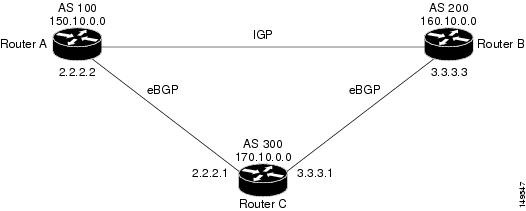
Figure 2. Back door example
Suppose Router A learns about network 160.10.0.0 from both eBGP (distance 20) and EIGRP (distance 90). The eBGP route is preferred because it has a lower administrative distance. If you want Router A to instead use the EIGRP path, you can configure a BGP back-door route:
With this configuration, Router A treats the eBGP-learned route as a local route (distance 200), making the EIGRP-learned route (distance 90) the preferred path. If the EIGRP route fails, the eBGP route becomes active.
Configure BGP back-door routes
Configure a BGP back-door route so that the router prefers an IGP-learned path over an eBGP-learned path for specific network prefixes.
When a prefix is reachable via both IGP (internal) and eBGP (external), routers usually prefer the eBGP path due to its lower administrative distance. Use the BGP back-door feature to override this preference, so the router uses the IGP route and uses the eBGP route as a backup if the IGP path fails.
Before you begin
Make sure BGP is enabled and running.
Identify the network prefix you want to configure as a back-door route.
Follow this step to configure a BGP back-door route:
Procedure
Enter BGP configuration mode, and configure the network prefix with the backdoor option.