Explains the protocol extension that distributes IGP link-state information via BGP, improves network topology visibility, and uses a dedicated AFI/SAFI to encode link-state attributes.
BGP Link-State (BGP-LS) is a protocol extension that
-
distributes IGP link-state information via BGP
-
improves network topology visibility for applications like SR-PCE, and
-
uses a dedicated AFI/SAFI (RFC7752) to encode link-state attributes.
|
Feature Name |
Release Information |
Feature Description |
|
BGP Link-State |
Release 25.4.1 |
Introduced in this release on: Fixed Systems (8010 [ASIC: A100])(select variants only*) *This feature is supported on:
|
|
BGP Link-State |
Release 25.1.1 |
Introduced in this release on: Fixed Systems (8010 [ASIC: A100])(select variants only*) *This feature is supported on Cisco 8011-4G24Y4H-I routers. |
|
BGP Link-State |
Release 24.4.1 |
Introduced in this release on: Fixed Systems (8200 [ASIC: P100], 8700 [ASIC: P100, K100])(select variants only); Modular Systems (8800 [LC ASIC: P100])(select variants only*) With BGP Link-State (BGP-LS), you can efficiently share IGP link-state information across your network, allowing applications such as Segment Routing Path Computation Element (SR-PCE) to gain greater topology awareness and optimize path computations using Segment Routing Traffic Engineering (SR-TE). This feature uses Address Family Identifier (AFI) and Sub-address Family Identifier (SAFI) to encode link-state data in the BGP-LS attribute as defined by RFC7752. *This feature is supported on:
|
BGP-LS extends BGP to carry Interior Gateway Protocol (IGP) link-state information using a specific Address Family Identifier (AFI) and Sub-address Family Identifier (SAFI). As defined in RFC7752, BGP-LS encodes each link-state object, such as a node, a link, or a prefix, in the BGP Network Layer Reachability Information (NLRI) format, while the properties of each object are conveyed using the BGP-LS path attribute. This approach enables controllers and applications to build a comprehensive topology view across multiple domains.
Example
A Segment Routing Path Computation Element (SR-PCE) can use BGP-LS data to discover node capabilities, learn mappings for SR segments, and compute optimal paths using Segment Routing Traffic Engineering (SR-TE). This enables SR-PCE to steer traffic on paths different from the underlying IGP-based distributed best-path computation.
Deployment scenarios for BGP Link-State
This figure illustrates a typical BGP-LS deployment.
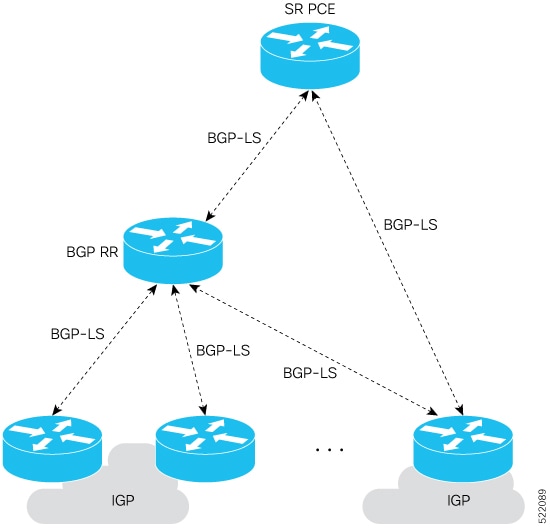
The deployment involves:
-
Configuring one or more BGP speakers (nodes) with BGP-LS in each IGP area.
-
Establishing an iBGP mesh between BGP speakers and route-reflectors.
-
Allowing route-reflectors to aggregate and share link-state information from all IGP areas and from eBGP peers in other autonomous systems (AS).