BGP Configuration Guide for Cisco 8000 Series Routers, Cisco IOS XR Releases

PDF

Resilient hashing and flow auto-recovery

Want to summarize with AI?

Log in

Overview

Describes resilient hashing and flow auto-recovery features that maintain stable traffic flows during ECMP path failures by rerouting only affected flows and restoring original distribution upon recovery.

Resilient hashing and flow auto-recovery is a network reliability feature that

  • maintains stable traffic flows during Equal-Cost Multipath (ECMP) path failures by only rerouting traffic affected by the failed path,

  • prevents unnecessary rebalancing of existing flows to new links, and

  • automatically restores original flow distribution when a failed path or server returns to service.

  • ECMP: A routing technique that balances traffic across multiple equal-cost paths to the same destination.

  • Bucket: A logical mapping of flows to paths in a hashing algorithm.

Table 1. Feature History Table

Feature Name

Release Name

Description

Resilient hashing and flow auto-recovery

Release 25.4.1

Introduced in this release on: Fixed Systems (8010 [ASIC: A100])(select variants only*)

*This feature is now supported on:

  • 8011-32Y8L2H2FH

  • 8011-12G12X4Y-A

  • 8011-12G12X4Y-D

Resilient hashing and flow auto-recovery

Release 25.1.1

Introduced in this release on: Fixed Systems (8010 [ASIC: A100])(select variants only*)

*This feature is supported on Cisco 8011-4G24Y4H-I routers.

Resilient hashing and flow auto-recovery

Release 24.4.1

Introduced in this release on: Fixed Systems (8200 [ASIC: P100], 8700 [ASIC: P100, K100])(select variants only); Modular Systems (8800 [LC ASIC: P100])(select variants only*)

You can ensure no packet loss and optimal load distribution across available paths by automatically rerouting data flows during link failures. This feature enhances network reliability by maintaining continuous service and dynamically adjusting to network topology changes without manual intervention. It seamlessly integrates with existing configurations, offering high availability and reducing downtime, thus keeping network operations uninterrupted and efficient.

*This feature is supported on:

  • 8212-48FH-M

  • 8711-32FH-M

  • 8712-MOD-M

  • 88-LC1-36EH

  • 88-LC1-12TH24FH-E

  • 88-LC1-52Y8H-EM

*Previously this feature was supported on Q200 and Q100.

Impact of ECMP path failures on traffic flows

Resilient hashing and flow auto-recovery let you selectively override the default equal cost multipath (ECMP) behavior during an ECMP path failure. This feature redirects only the flows on failed links and prevents all existing flows from being rehashed to a new link. It also allows a recovered link or server to be reused for sessions when it becomes available.

Prior to the implementation of resilient hashing and flow auto-recovery feature, ECMP load balances traffic across all available paths to a destination. If one path fails, ECMP rehashes the traffic and selects new next hops for each flow.
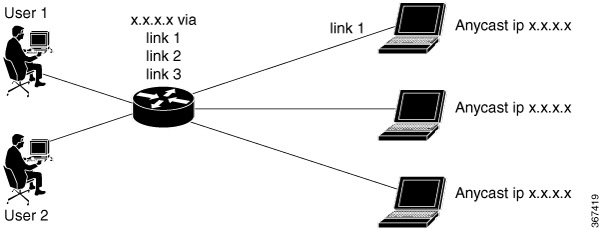
Figure 1. ECMP Path Failure

For example, if you have three links—link 1, link 2, and link 3—a traffic flow that originally uses link 1 may switch to link 3 after a failure, even if only link 2 fails.

This redistribution of traffic flows does not cause issues in traditional core networks because end-to-end connectivity is maintained and users are not affected. However, in data center environments, load balancing caused by this redistribution can create problems.

In data centers where multiple servers connect through ECMP, rehashing may cause active flows to move, which can reset TCP sessions and disrupt applications.

Benefits of resilient hashing and flow auto-recovery

  • Maintains uninterrupted network operations and high availability

  • Minimizes traffic disruption and session resets during link failures or recoveries, and

  • Supports dynamic adjustment to topology changes without manual intervention.

How resilient hashing and flow auto-recovery work

Summary

The key components involved in the process are:

  • Resilient hashing configuration: Determines how flows are distributed and reassigned when a path fails.

  • Route policy language (RPL): Used to specify the prefixes that require resilient hashing and flow auto-recovery.

  • ECMP path list: Represents the set of available equal-cost paths for a given prefix.

Resilient hashing and flow auto-recovery help maintain consistent traffic distribution and minimize disruption during ECMP path failures and recoveries. This process ensures only affected traffic flows are redirected, while existing flows remain stable.

Workflow

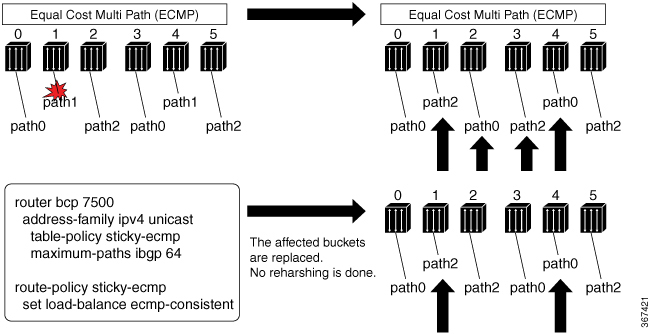
Figure 2. Resilient hashing and flow auto-recovery

These stages describe how resilient hashing and flow auto-recovery work.

  1. The router uses an RPL to define prefixes with associated ECMP path lists, such as path 0, path 1, and path 2 for prefix X.
  2. If a path fails, for example, path 1:
    • Without resilient hashing: The router performs a full rehashing, redistributing all flows across the remaining available paths, for example, path 0, path 2, and path 0.
    • With resilient hashing and flow auto-recovery enabled: Only the affected traffic buckets are reassigned, for example, the new path list becomes path 0, path 0, and path 2, and no complete rehash occurs.
  3. When the failed path becomes active again, for example, path 1:
    • Without resilient hashing and flow auto-recovery: The path is not reused until one of the following actions happens:
      • Addition of a new path to ECMP
      • Use of the clear route command
      • Removal and reapplication of a table policy followed by a commit , or
      • Configuration of the cef consistent-hashing auto-recovery command
    • With resilient hashing and flow auto-recovery enabled: Sessions previously moved to other paths during the failure are automatically rehashed back to the restored path. Only these specific sessions are disrupted, while others remain unaffected.

Result

Resilient hashing and flow auto-recovery provide stable traffic flows during ECMP path failures and recoveries, minimizing service disruption and ensuring efficient use of all available paths.


Configure resilient hashing and flow auto-recovery

To realize resilient hashing and flow auto-recovery, you can use persistent load balancing, also known as sticky ECMP. Sticky ECMP ensures that when a path failure occurs, only the flows that relied on the failed path are reassigned, while all other flows continue on their original routes.

Traditional ECMP load balances traffic across multiple available paths. When a path fails, ECMP redistributes all flows, which can disrupt established sessions. Persistent load balancing, also known as sticky ECMP, ensures that only flows using the failed path are reassigned, while all other flows remain unchanged.

Before you begin

  • Make sure BGP and ECMP are already configured in your network.

  • Identify the prefixes that require sticky ECMP.

Follow these steps to configure resilient hashing and flow auto-recovery using sticky ECMP.

Procedure

1.

Enter BGP configuration mode and set up the table policy for sticky ECMP.

Example:

Router(config)# router bgp 7500 
Router(config-bgp)# address-family ipv4 unicast 
Router(config-bgp-af)# table-policy sticky-ecmp 
Router(config-bgp-af)# bgp attribute-download 
Router(config-bgp-af)# maximum-paths ebgp 64
Router(config-bgp-af)# maximum-paths ibgp 32
Router(config-bgp-af)# exit
Router(config-bgp)# exit
2.

Define a route policy that applies sticky ECMP to the required destination prefix.

Example:

Router(config)# route-policy sticky-ecmp 
Router(config-rpl)# if destination in (192.1.1.1/24) then
Router(config-rpl-if)# set load-balance ecmp-consistent
Router(config-rpl-if)# else
Router(config-rpl-else)# pass
Router(config-rpl-else)# endif
RP/0/0/CPU0:ios(config-rpl)# end-policy
RP/0/0/CPU0:ios(config)#
3.

Enable automatic recovery to restore the original hashing state after failed paths become active.

Example:

Router(config)# cef consistent-hashing auto-recovery
4.

Clear the route to recover the original hashing state after failed paths come back up and avoid affecting new flows.

Example:

Router(config)# clear route 192.0.2.0/24
5.

Verify the running configuration.

Example:

Router#show running-config
router bgp 7500 
 address-family ipv4 unicast 
  table-policy sticky-ecmp 
  bgp attribute-download 
  maximum-paths ebgp 64
  maximum-paths ibgp 32


cef consistent-hashing auto-recovery

clear route 192.0.2.0/24 
6.

Verify that persistent load balancing is working as expected by checking the path distribution before and after a link failure.

  1. Run the show cef command to check the path distribution before a link failure.

    Example:

     
    Router# show cef 192.0.2.0/24 
     LDI Update time Sep  5 11:22:38.201
       via 10.1.0.1/32, 3 dependencies, recursive, bgp-multipath [flags 0x6080]
        path-idx 0 NHID 0x0 [0x57ac4e74 0x0]
        next hop 10.1.0.1/32 via 10.1.0.1/32
       via 10.2.0.1/32, 3 dependencies, recursive, bgp-multipath [flags 0x6080]
        path-idx 1 NHID 0x0 [0x57ac4a74 0x0]
        next hop 10.2.0.1/32 via 10.2.0.1/32
       via 10.3.0.1/32, 3 dependencies, recursive, bgp-multipath [flags 0x6080]
        path-idx 2 NHID 0x0 [0x57ac4f74 0x0]
        next hop 10.3.0.1/32 via 10.3.0.1/32
    
    
        Load distribution (consistent): 0 1 2 (refcount 1)
    
        Hash  OK  Interface                 Address
        0     Y   GigabitEthernet0/0/0/0    10.1.0.1       
        1     Y   GigabitEthernet0/0/0/1    10.2.0.1       
        2     Y   GigabitEthernet0/0/0/2    10.3.0.1    
    
    
  2. Run the show cef command to check the path distribution after a link failure.

    Example:


    Router# show cef 192.0.2.0/24 
     LDI Update time Sep  5 11:23:13.434
       via 10.1.0.1/32, 3 dependencies, recursive, bgp-multipath [flags 0x6080]
        path-idx 0 NHID 0x0 [0x57ac4e74 0x0]
        next hop 10.1.0.1/32 via 10.1.0.1/32
       via 10.3.0.1/32, 3 dependencies, recursive, bgp-multipath [flags 0x6080]
        path-idx 1 NHID 0x0 [0x57ac4f74 0x0]
        next hop 10.3.0.1/32 via 10.3.0.1/32
    
        Load distribution (consistent) : 0 1 2 (refcount 1)
        Hash  OK  Interface                 Address
        0     Y   GigabitEthernet0/0/0/0    10.1.0.1       
     1*    Y   GigabitEthernet0/0/0/0    10.1.0.1    
        2     Y   GigabitEthernet0/0/0/2    10.3.0.1     

    The reassignment of bucket 1 to GigabitEthernet 0/0/0/0, indicated by the “*” symbol, shows that this path is being used as a replacement for a failed path.

Persistent load balancing ensures that only flows on failed paths are reassigned, maintaining session stability for all other traffic.