BGP Configuration Guide for Cisco 8000 Series Routers, Cisco IOS XR Releases

PDF

BGP labeled unicast over RSVP-TE

Want to summarize with AI?

Log in

Overview

Outlines integration of BGP labeled unicast with RSVP-TE, describing path selection, tunnel protection, configuration, applicable restrictions, and verification steps to ensure deployment and operational validation in MPLS environments.

A BGP labeled unicast over RSVP-TE is a routing feature that

  • enables routers to forward BGP labeled unicast traffic to the BGP-LU next-hop router through RSVP-TE tunnels,

  • allows network administrators to select the tunnel path for traffic transport based on your requirements, and

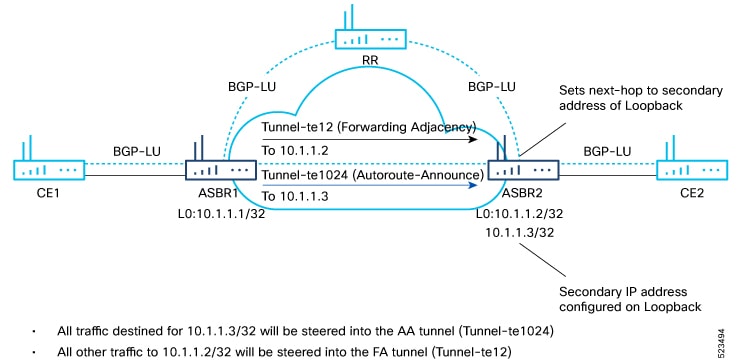
  • differentiates traffic by routing packets destined for the tunnel destination address exclusively through Autoroute Announce (AA) tunnels, while routing all other traffic through Forwarding-Adjacency (FA) tunnels.

Table 1. Feature History Table

Feature Name

Release Information

Feature Description

BGP Labeled Unicast over RSVP-TE

Release 25.4.1

Introduced in this release on: Fixed Systems (8010 [ASIC: A100])(select variants only*)

*This feature is now supported on:

  • 8011-32Y8L2H2FH

  • 8011-12G12X4Y-A

  • 8011-12G12X4Y-D

BGP Labeled Unicast over RSVP-TE

Release 25.1.1

Introduced in this release on: Fixed Systems (8010 [ASIC: A100])(select variants only*)

*This feature is supported on Cisco 8011-4G24Y4H-I routers.

BGP Labeled Unicast over RSVP-TE

Release 24.4.1

Introduced in this release on: Fixed Systems (8200 [ASIC: P100], 8700 [ASIC: P100, K100])(select variants only); Modular Systems (8800 [LC ASIC: P100])

*This feature is supported on:

  • 8212-48FH-M

  • 8711-32FH-M

  • 8712-MOD-M

  • 88-LC1-36EH

  • 88-LC1-12TH24FH-E

  • 88-LC1-52Y8H-EM

BGP Labeled Unicast over RSVP-TE

Release 7.11.1

You can now steer the MPLS traffic as per your requirement instead of relying on what the IGP directs.

This feature extends the BGP Labeled Unicast (LU) functionality over RSVP-TE protocol. BGP LU advertises label bindings while RSVP-TE establishes the traffic engineering paths that you specify. This feature allows the provider Edge (PE) routers to forward incoming traffic using the label bindings along the specific path reserved using RSVP-TE. This ability to provide explicit routing ensures optimal use of your network resources.

The feature introduces these changes:

CLI:

YANG Data Models:


How BGP labeled unicast path selection and tunnel protection work

BGP-LU with RSVP-TE enables network administrators to select explicit tunnel paths for traffic, assures traffic engineering, and protects service continuity using recovery mechanisms.

Summary

The key components involved in the process are:

  • ASBR1: Establishes RSVP-TE tunnels to ASBR2 and forwards traffic to CE2 based on the next-hop address received from ASBR2.

  • ASBR2: Receives BGP-LU prefixes and sets next-hop addresses.

  • CE1/CE2: Edge routers exchanging traffic.

  • RSVP-TE: Tunneling technique for traffic protection.

  • Fast Reroute (FRR): Provides resiliency in case of failures.

This process uses BGP-LU and RSVP-TE tunnels to ensure reliable, protected traffic forwarding between customer edge routers across ASBRs, enabling explicit path selection, traffic engineering, and service continuity.

Workflow

Figure 1. BGP labeled unicast over RSVP-TE

These stages describe the process by which BGP-LU and RSVP-TE tunnels are used to establish connectivity, select forwarding paths, and protect traffic between CE1 and CE2 through ASBR1 and ASBR2, ensuring reliable and resilient network service.

  1. Establish BGP-LU connections: ASBR1 connects to CE1 and ASBR2 connects to CE2 using BGP labeled unicast.
  2. Configure RSVP-TE tunnels: ASBR1 is configured with FA and AA tunnels to ASBR2's primary and secondary IP addresses, respectively.
  3. Set BGP-LU next-hop: ASBR2 sets BGP-LU next-hop prefixes from CE2 to the secondary IP address.
  4. Forward packets based on next-hop: ASBR1 forwards traffic for CE2 via the AA tunnel based on the next-hop prefix.
  5. Select preferred next-hop path: If two paths are learned (RSVP-TE and regular), the regular next-hop path is chosen.
  6. Provide failure protection with FRR: Fast Reroute (FRR) protects against link and node failures during forwarding.

Result

Traffic between CE1 and CE2 is forwarded reliably and efficiently, with automatic protection against failures to maintain continuous network service.


Guidelines for BGP LU over RSVP-TE

  • Do not configure BGP-LU over RSVP-TE simultaneously with BGP-LU (over NH) and Class-based forwarding (CBF). You must disable BGP-LU and CBF before enabling BGP-LU over RSVP-TE to avoid error messages.

  • BGP-LU over RSVP-TE is not supported on Q100-based line cards.

  • BGP-LU SR-TE is not supported.

  • L3VPN, 6PE, and 6VPE services are not supported with BGP-LU over RSVP-TE.

  • Use LDP or SR as the transport underlay. Do not use Traffic Engineering (TE) as the transport underlay.

  • Reaching ASBR (BGP next-hop) through both regular next-hop and RSVP-TE is not supported.


Configure BGP-LU over RSVP-TE

Use this task when you need to deploy BGP-LU over RSVP-TE, optimize path selection with Forwarding-Adjacency (FA) and Autoroute Announce (AA) tunnels, and maintain protection against link or node failures.

Enable routers to forward BGP labeled unicast (BGP-LU) traffic through RSVP-TE tunnels, allowing you to select optimal tunnel paths and ensure traffic continuity with fast reroute (FRR) protection.

Before you begin

  • Verify existing BGP-LU and Class-Based Forwarding (CBF) configurations are not active.

  • Ensure you have appropriate router access and privileges.

Follow these steps to configure BGP-LU over RSVP-TE:

Procedure

1.

Disable BGP-LU and CBF configurations:

Example:

Router(config)# no hw-module profile cef bgplu enable  
Router(config)# no hw-module profile cef cbf enable  
2.

Enable BGP-LU over RSVP-TE and optionally increase tunnel capacity:

Example:

Router(config)# hw-module profile cef bgplu-over-rsvpte enable  
Router(config)# hw-module profile cef te-tunnel highscale-no-ldp-over-te  
3.

Configure the loopback interface:

Example:

Router(config)# interface Loopback1001  
Router(config-if)# ipv4 address 10.10.10.10 255.255.255.255  
Router(config-if)# exit  
4.

Configure the tunnel interface:

Example:

Router(config)# interface tunnel-te1  
Router(config-if)# ipv4 unnumbered Loopback0  
Router(config-if)# autoroute announce  
Router(config-if)# exit  
Router(config)# destination 10.10.10.11  
Router(config)# path-option 1 dynamic 
5.

Configure the BGP router and address families:

Example:

Router(config)# router bgp 100  
Router(config-bgp)# bgp router-id 10.10.10.10  
Router(config-bgp)# address-family ipv4 unicast  
Router(config-bgp)# allocate-label all unlabeled-path  
Router(config-bgp)# exit  
Router(config-bgp)# address-family ipv6 unicast  
Router(config-bgp)# exit 
6.

Configure the BGP neighbor:

Example:

Router(config-bgp)# neighbor 10.0.0.1  
Router(config-bgp-nbr)# remote-as 200  
Router(config-bgp-nbr)# update-source Loopback0  
Router(config-bgp-nbr)# address-family ipv4 labeled-unicast  
Router(config-bgp-nbr-af)# route-policy PASS-ALL in  
Router(config-bgp-nbr-af)# route-policy PASS-ALL out  
Router(config-bgp-nbr-af)# next-hop-self  
Router(config-bgp-nbr-af)# exit  
7.

Configure MPLS LDP:

Example:

Router(config)# mpls ldp  
Router(config-ldp)# router-id 10.1.1.1  
Router(config-ldp)# interface tunnel-te1  
Router(config-ldp)# exit  
8.

Reload the router to apply the hardware module profile commands.

BGP-LU over RSVP-TE is now active, optimal tunnel paths are selected, and traffic is protected by fast reroute capabilities.

What to do next

Continue monitoring network performance and verify reroute operation during link or node failure events.


Verify BGP labeled unicast over RSVP-TE

Verify that BGP labeled unicast traffic forwards correctly through RSVP-TE tunnels. This ensures your configuration works as intended, enabling optimized traffic transport and fast reroute protection for reliable network performance.

Procedure

1.

Verify the configuration:

Example:

Router# show running configuration

Router configuration:
!
hw-module profile cef bgplu-over-rsvpte enable
!
router bgp 200
 nsr
 bgp router-id 10.1.1.1
 mpls activate
  interface Bundle-Ether10
  interface Bundle-Ether40
  interface Bundle-Ether100
  interface Bundle-Ether101
  interface HundredGigE0/0/0/22
 !
 bgp graceful-restart
 ibgp policy out enforce-modifications
 address-family ipv4 unicast
  additional-paths receive
  additional-paths send
  additional-paths selection route-policy INSTALL_BACKUP
  network 10.1.1.5/32
  allocate-label all unlabeled-path
 !
 neighbor 10.1.4.1             
  remote-as 200
  bfd fast-detect
  bfd multiplier 3
  bfd minimum-interval 100
  update-source Loopback0
  address-family ipv4 labeled-unicast
   next-hop-self
   soft-reconfiguration inbound always
   !
 neighbor 10.1.5.1       
  remote-as 200
  bfd fast-detect
  bfd multiplier 3
  bfd minimum-interval 100
  update-source Loopback0
  address-family ipv4 labeled-unicast
   next-hop-self
   soft-reconfiguration inbound always
  !
  !
 neighbor 10.1.6.1           
  remote-as 200
  bfd fast-detect
  bfd multiplier 3
  bfd minimum-interval 100
  address-family ipv4 labeled-unicast
   next-hop-self
   route-policy PASS-ALL in
   route-reflector-client
   route-policy PASS-ALL out
  !
Enabling LDP (to assign labels to the tunnel):

mpls ldp
 router-id 10.1.1.1
 address-family ipv4
  label
   local
    allocate for ldp-acl
   !
  !
router isis core
 is-type level-2-only
 net 49.1111.0000.0001.00
 nsr
 nsf cisco
 log adjacency changes
 address-family ipv4 unicast
  metric-style wide
  mpls traffic-eng level-2-only
  mpls traffic-eng router-id Loopback0
  mpls traffic-eng igp-intact
 !
 address-family ipv6 unicast
  metric-style wide
  maximum-paths 64
 !
 interface Bundle-Ether40
  circuit-type level-2-only
  point-to-point
  address-family ipv4 unicast
   metric 10
  !
  address-family ipv6 unicast
   metric 10
  !
   interface Bundle-Ether100
  circuit-type level-2-only
  point-to-point
  address-family ipv4 unicast
   metric 10
  !
  address-family ipv6 unicast
   metric 10
  !
 interface Bundle-Ether101
  circuit-type level-2-only
  point-to-point
  address-family ipv4 unicast
   metric 10
  !
  address-family ipv6 unicast
   metric 10
  !
Tunnel Configuration:

interface tunnel-te141
 description PE1-PE4
 ipv4 unnumbered Loopback0
 signalled-bandwidth 1000000
 autoroute announce
 !
 destination 10.1.4.1
 fast-reroute
 path-protection
 !
 path-option 1 explicit name R1-R4-141
!
interface tunnel-te142
 description PE1-PE4
 ipv4 unnumbered Loopback0
 shutdown
 signalled-bandwidth 1000000
 autoroute announce
 !
 destination 10.1.4.1
 fast-reroute
 path-option 1 explicit name R1-R4-142
!
interface tunnel-te13641
 ipv4 unnumbered Loopback0
 signalled-bandwidth 1000000
 autoroute announce
 !
 destination 10.1.4.1
 path-option 1 explicit name R1-R3-R6-R4-Phy protected-by 2
 path-option 2 explicit name R1-R3-R6-R4-Bundle
!
!

mpls traffic-eng
 interface Bundle-Ether10
 !
 interface Bundle-Ether100
  backup-path tunnel-te 13641
 !
 interface Bundle-Ether101
  backup-path tunnel-te 13641
2.

Verify the details of route paths:

Example:

Router# show cef 209.165.200.225/27

Tue Jun  6 13:59:39.649 UTC
201.1.1.10/32, version 838761, internal 0x5000001 0x40 (ptr 0xb6848370) [1], 0x600 (0xb67bc1d8), 0xa08 (0xbbc3c0d8)
 Updated Jun  6 13:56:34.879
 Prefix Len 32, traffic index 0, precedence n/a, priority 4
  gateway array (0xc020eac8) reference count 3, flags 0x100078, source rib (7), 0 backups
                [2 type 5 flags 0x441 (0xc1807b38) ext 0x0 (0x0)]
  LW-LDI[type=5, refc=3, ptr=0xb67bc1d8, sh-ldi=0xc1807b38]
  gateway array update type-time 1 Jun  6 13:56:34.879
 LDI Update time Jun  6 13:56:34.879
 LW-LDI-TS Jun  6 13:56:34.879
   via 10.1.4.1/32, 60047 dependencies, recursive [flags 0x6000]
    path-idx 0 NHID 0x0 [0x97518b90 0x0]
    recursion-via-/32
    next hop 10.1.4.1/32 via 24000/0/21
     local label 36112 
     next hop 10.1.4.1/32 tt141        labels imposed {ImplNull 34184}
     next hop 10.1.4.1/32 tt142        labels imposed {ImplNull 34184}
     next hop 10.1.4.1/32 tt13641      labels imposed {ImplNull 34184}
   via 10.1.5.1/32, 30045 dependencies, recursive, backup [flags 0x6100]
    path-idx 1 NHID 0x0 [0x97524fc0 0x0]
    recursion-via-/32
    next hop 10.1.5.1/32 via 24002/0/21
     local label 36112 
     next hop 10.1.5.1/32 tt13651      labels imposed {ImplNull 39146}
          
    Load distribution: 0 (refcount 2)
          
    Hash  OK  Interface                 Address
    0     Y   recursive                 24000/0    

Example:

Router# show route 10.1.4.1
Tue Jun  6 14:02:31.653 UTC

Routing entry for 10.1.4.1/32
  Known via "isis core", distance 115, metric 20, type level-2
  Installed Jun  6 13:59:07.013 for 00:03:24
  Routing Descriptor Blocks
    10.1.4.1, from 10.1.4.1, via tunnel-te141
      Route metric is 20
    10.1.4.1, from 10.1.4.1, via tunnel-te142
      Route metric is 20
    10.1.4.1, from 10.1.4.1, via tunnel-te13641
      Route metric is 20
  No advertising protos. 

Example:

Router# show route summary
Wed May 31 17:47:01.203 UTC
Route Source                     Routes     Backup     Deleted     Memory(bytes)
connected                        536        2          0           116248       
local                            539        0          0           116424       
local LSPV                       1          0          0           216          
local SMIAP                      1          0          0           216          
application fib_mgr              0          0          0           0            
static                           4          0          0           904          
bgp 200                          48152      60         0           11936632     
te-client                        0          0          0           0            
isis core                        14056       534        0           4088288      
dagr                             0          0          0           0            
vxlan                            0          0          0           0            
Total                            61364      596        0           16202240   
3.

Verify the details of LSP tunnel:

Example:

Router# show mpls forwarding prefix 209.165.200.225/27
Tue Jun  6 14:00:17.601 UTC
Local  Outgoing    Prefix             Outgoing     Next Hop        Bytes       
Label  Label       or ID              Interface                    Switched    
------ ----------- ------------------ ------------ --------------- ------------
36112  34184       209.165.200.225/27                 10.1.4.1        0           
       39146       209.165.200.225/27                 10.1.5.1        0            
4.

Verify the contents of the Fast Reroute (FRR) database:

Example:

show mpls traffic-eng fast-reroute database
Tue Jun  6 14:01:59.907 UTC
Tunnel head FRR information:
Tunnel       Out Intf : Label   FRR Intf : Label   Status 
------------ ------------------ ------------------ -------
tt141        BE100:Pop          tt13641:Pop        Ready  
tt142        BE101:Pop          tt13641:Pop        Ready  
5.

Verify the forwarding information on tunnels:

Example:

Router# show mpls traffic-eng forwarding tunnel-id 141
Mon Jun  5 23:46:04.961 UTC
P2P tunnels:

Tunnel ID                  Ingress IF     Egress IF      In lbl  Out lbl        Backup 
-------------------------- -------------- -------------- ------- -------------- -------
10.1.1.1 141_10                         -          BE100 81920   3              tt13641
Displayed 1 tunnel heads, 0 label P2P rewrites
Displayed 0 tunnel heads, 0 label P2MP rewrites
6.

Verify the utilization of banks in the NPU resources:

Example:

Router# show grid pool 2 bank 13 
Wed May 31 17:46:56.848 UTC

Bank Ptr                      : 0x308d069d38
Bank ID                       : 13
Pool                          : GLIF (id 2)
Bank Start                    : 530295
Bank End                      : 589823
Max Bank Size                 : 59529
Max Resource Pages            : 1861
Available resource IDs        : 11375 (19.108% free)
Bank statistics:                         Success      Error         (since last clear)
  Resource IDs reserved                    51728          0           51728          0
  Resource IDs returned                     3574          0            3574          0
Client                        : lsd
  Resource IDs reserved                        2          0               2          0
  Resource IDs returned                        0          0               0          0
current usage                 : 2
Client                        : rib-v4
  Resource IDs reserved                    51726          0           51726          0
  Resource IDs returned                     3574          0            3574          0