BGP Configuration Guide for Cisco 8000 Series Routers, Cisco IOS XR Releases

PDF

BGP selective multipath

Want to summarize with AI?

Log in

Overview

Explains BGP selective multipath, which allows installation of multiple parallel paths only from specified neighbors, providing fine-grained control over multipath eligibility.

BGP selective multipath is a routing feature that

  • allows you to install multiple parallel paths to the same destination in the routing table

  • applies the multipath function only to specified BGP peers instead of all configured peers, and

  • enables fine-grained control over which neighbor routes are eligible for multipath installation.

Traditional BGP multipath installs multiple paths from all configured peers by default. With selective multipath, you choose specific neighbors that participate in multipath routing.

Guidelines for BGP selective multipath

  • Always include the best path in the set of multipaths; BGP selective multipath does not affect best path calculations.

  • Ensure provider edge (PE) paths for VPN prefixes are treated as eligible multipaths.

  • Use the next-hop-unchanged multipath command to avoid overwriting next-hop information before advertising multipaths.

  • Configure the multipath option on neighbors that should be eligible for parallel path installation in the routing table.

  • Set the maximum number of selective multipaths for iBGP and eBGP neighbors by using the maximum-paths ... selective command.


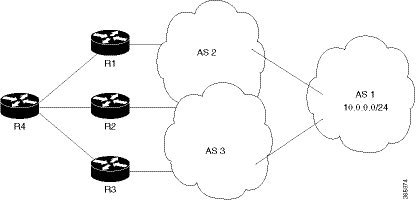
Topology for BGP selective multipath

Figure 1. Topology for BGP selective multipath


In this sample topology, router R4 receives parallel paths to the same destination from routers R1, R2, and R3. If only R1 and R2 are configured as selective multipath neighbors on R4, then only the parallel paths from R1 and R2 are installed in R4 routing table. Routes from R3 are not used for multipath unless configured.


Configure BGP selective multipath

Enable BGP selective multipath so that only selected neighbors provide multipath routes.

Use this task to control which BGP neighbors contribute multipath routes in your network, improving path management and stability.

Before you begin

Configure your network topology with iBGP or eBGP before enabling selective multipath.

  • Make sure iBGP or eBGP are already running on your routers.

  • Design your network topology and identify neighbor IP addresses for selective multipath.

Follow these steps to configure BGP selective multipath on router R4.

Procedure

1.

Enter BGP address-family configuration and set maximum selective multipaths.

  1. Configure selective multipath for iBGP and eBGP.

    Example:

    
    Router(config)# router bgp 1
    Router(config-bgp)# address-family ipv4 unicast
    Router(config-bgp-af)# maximum-paths ibgp 4 selective 
    Router(config-bgp-af)# maximum-paths ebgp 5 selective 
    Router(config-bgp-af)# commit
  2. Configure selective multipath for eiBGP.

    Example:

    Router(config)# router bgp 1
    Router(config-bgp)# address-family ipv4 unicast
    Router(config-bgp-af)# maximum-paths eibgp 6 selective
    Router(config-bgp-af)# commit

Choose the right configuration based on your network topology.

2.

Configure neighbors for selective multipath.

  1. For neighbors eligible for multipath, R1 and R2:

    Example:

    
    Router(config-bgp)# neighbor 1.1.1.1
    Router(config-bgp-nbr)# address-family ipv4 unicast
    Router(config-bgp-nbr-af)# multipath     
    Router(config-bgp-nbr-af)# commit
    
    Router(config-bgp-nbr)# neighbor 2.2.2.2
    Router(config-bgp-nbr)# address-family ipv4 unicast
    Router(config-bgp-nbr-af)# multipath
    Router(config-bgp-nbr-af)# commit
    
    
  2. For a neighbor not eligible for multipath, R3:

    Example:

    
    Router(config-bgp-nbr)# neighbor 3.3.3.3
    Router(config-bgp-nbr)# address-family ipv4 unicast
    Router(config-bgp-nbr-af)# commit

Only the specified neighbors, R1 and R2, provide parallel multipath routes in the routing table of router R4.