BGP Configuration Guide for Cisco 8000 Series Routers, Cisco IOS XR Releases

PDF

BGP dynamic neighbors

Want to summarize with AI?

Log in

Overview

Describes dynamic neighbor configuration that allows peering with multiple remote neighbors using an IP address range, reducing manual configuration and supporting both IPv4 and IPv6.

A BGP dynamic neighbor is a peer that is discovered and established using a configured IP address range, instead of an explicitly configured or static neighbor configuration.

Dynamic neighbor configuration allows a router to peer with multiple remote neighbors without explicit static entries for each one. The router accepts BGP connections from any peer whose IP address falls within a specified subnet range.

Example:

In a data center, you can configure one dynamic neighbor range to handle a pool of servers or routers that may change frequently.

Benefits of BGP dynamic neighbor support

BGP dynamic neighbor support provides these benefits:

  • Allows you to configure each range of IP addresses as a subnet.

  • Reduces CLI configuration complexity in large networks.

  • Supports both IPv4 and IPv6 peering.


Configure BGP dynamic neighbors using address range

Purpose: Configure BGP dynamic neighbors using an IP prefix, reducing manual neighbor statements in large-scale networks.

Context: Use this when you want to accept BGP peerings from a set of IP addresses, such as a subnet, instead of individually configuring each neighbor.

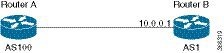
This figure illustrates a sample topology.

Figure 1. Dynamic neighbor connection topology

After you configure the subnet range for dynamic neighbors on Router A, Router B can initiate a TCP session from any IP address within that range. Router A then automatically establishes the BGP neighbor connection with Router B, with no further CLI configuration required after the initial setup.

In this example, local autonomous system (AS) is 100 and remote AS is 1.

Follow these steps to configure BGP dynamic neighbors using an address range.

Before you begin

  • Identify the IP subnet that should be allowed as dynamic neighbors.

  • Ensure you know the remote AS number and the local interface for source IP.

Procedure

1.

Enter BGP configuration mode with your AS number and configure the dynamic neighbor prefix.

Example:

Router#configure
Router(config)# router bgp 100
Router(config-bgp)# neighbor 10.0.0.0/16
2.

Assign the remote AS number and specify the update source interface.

Example:

Router(config-bgp-nbr)# remote-as 1
Router(config-bgp-nbr)# update-source FourHundredGige 0/0/0/0
3.

Enable the address family for IPv4 unicast and commit the configuration.

Example:

Router(config-bgp-nbr)# address-family ipv4 unicast
Router(config-bgp-nbr)# commit
4.

Verify the active configuration.

Example:

Router# show running-config
router bgp 100
 neighbor 10.0.0.0/16
  remote-as 1
  update-source FourHundredGige 0/0/0/0
  address-family ipv4 unicast
 !
!

The router accepts BGP sessions from any peer with an IP address within the specified range, creating dynamic neighbor entries automatically.


Configure remote AS list

Configure a list of remote autonomous system (AS) numbers for dynamic BGP neighbors.

Context: Use this procedure when you have dynamic neighbors from multiple remote ASes and want to control which AS numbers are accepted.

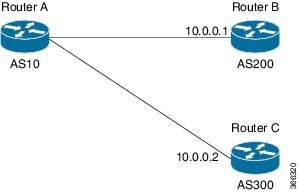
This figure illustrates a sample topology.

Figure 2. Connection topology with dynamic neighbors from multiple remote ASes

In this example topology, Router B and Router C are configured as remote BGP peers. Both Router B and Router C are in different autonomous systems.

A list of the autonomous systems of the remote routers is created and the list is then configured in Router A under neighbor mode using the remote-as-list command.

Before you begin

  • Identify the IP subnet that should be allowed as dynamic neighbors.

  • Ensure you know the remote AS number and the local interface for source IP.

Procedure

1.

Enter BGP configuration mode and define your local AS number.

Example:

Router#configure
Router(config)# router bgp 100
Router(config-bgp)#
2.

Run the as-list command to create an AS list.

Example:

Router(config-bgp)#as-list test
Router(config-bgp-as-list)#200
Router(config-bgp-as-list)#300
Router(config-bgp-as-list)#exit
Router(config-bgp)#
3.

Run the neighbor address/prefix command to configure the dynamic neighbor prefix.

Example:

Router(config-bgp)# neighbor 10.0.0.0/16
4.

Run the remote-as-list command to assign the remote AS list to the neighbor.

Example:

Router(config-bgp-nbr)# remote-as-list test
5.

Enable the address family for IPv4 unicast and commit the configuration.

Example:

Router(config-bgp-nbr)# address-family ipv4 unicast
Router(config-bgp-nbr)# commit

Dynamic neighbor sessions are accepted only if their AS number is in the configured remote AS list.


Configure maximum peers and idle-watch timeout

Limit the number of dynamic BGP neighbors and set the idle timeout for TCP instances.

Context: Use these settings to manage router resources and avoid excessive neighbor creation.

Before you begin

None

Procedure

1.

Enter BGP configuration mode with your AS number and configure the dynamic neighbor prefix.

Example:

Router#configure
Router(config)# router bgp 100
Router(config-bgp)# neighbor 10.0.0.0/16
2.

Run the maximum-peers command to set the maximum number of dynamic neighbors for this neighbor address range.

Example:


Router(config-bgp-nbr)# maximum-peers 16
3.

Run the idle-watch-time command to set the idle-watch timeout in seconds and save the configuration.

Example:


Router(config-bgp-nbr)# idle-watch-time 120
Router(config-bgp-nbr)# commit

The router limits dynamic neighbor creation for the range and removes idle TCP sessions after the specified time.