BGP Configuration Guide for Cisco 8000 Series Routers, Cisco IOS XR Releases

PDF

Convergence for BGP labeled unicast PIC edge

Want to summarize with AI?

Log in

Overview

Introduces BGP labeled unicast PIC edge functionality, explaining fast convergence methods, supported features, limitations, and configuration steps for robust and resilient MPLS routing at network edges.

A convergence for BGP labeled unicast PIC edge is a routing resiliency feature that

  • allows you to store both primary and backup paths in the Routing Information Base (RIB), Forwarding Information Base (FIB), and Cisco Express Forwarding,

  • enables the router to switch immediately to the backup path when a failure is detected, and

  • provides subsecond convergence and fast failover for BGP-labeled prefixes.

Table 1. Feature History Table

Feature Name

Release Information

Feature Description

Convergence for BGP Labeled Unicast PIC Edge

Release 25.4.1

Introduced in this release on: Fixed Systems (8700 [ASIC: K100], 8010 [ASIC: A100])(select variants only*)

*This feature is supported on: Cisco routers.

  • 8711-48Z-M

  • 8011-32Y8L2H2FH

  • 8011-12G12X4Y-A

  • 8011-12G12X4Y-D

Convergence for BGP Labeled Unicast PIC Edge

Release 25.1.1

Introduced in this release on: Fixed Systems (8010 [ASIC: A100])(select variants only*)

*This feature is supported on Cisco 8011-4G24Y4H-I routers.

Convergence for BGP Labeled Unicast PIC Edge

Release 24.4.1

Introduced in this release on: Fixed Systems (8200 [ASIC: P100], 8700 [ASIC: P100, K100])(select variants only); Modular Systems (8800 [LC ASIC: P100])(select variants only*)

*This feature is supported on:

  • 8212-48FH-M

  • 8711-32FH-M

  • 8712-MOD-M

  • 88-LC1-36EH

  • 88-LC1-12TH24FH-E

  • 88-LC1-52Y8H-EM

Convergence for BGP Labeled Unicast PIC Edge

Release 7.7.1

This feature improves the convergence time of BGP labeled unicast (LU) routes to subseconds when an ingress provider edge router fails or loses PE router connectivity, and another PE router needs to be connected. This feature minimizes traffic drops when the primary paths fail for the BGP LU routes.

Table 2. BGP LU PIC edge vs. standard BGP LU
BGP LU PIC edge

Standard BGP LU

Backup path preprogrammed

Yes

No

Failover speed

Subsecond

Slower, may take seconds

Service disruption

Minimal

Possible disruption

Note

You must ensure that your edge iBGP devices, such as ingress PEs and ASBRs, support BGP PIC and receive backup BGP next hops for PIC edge features to function.
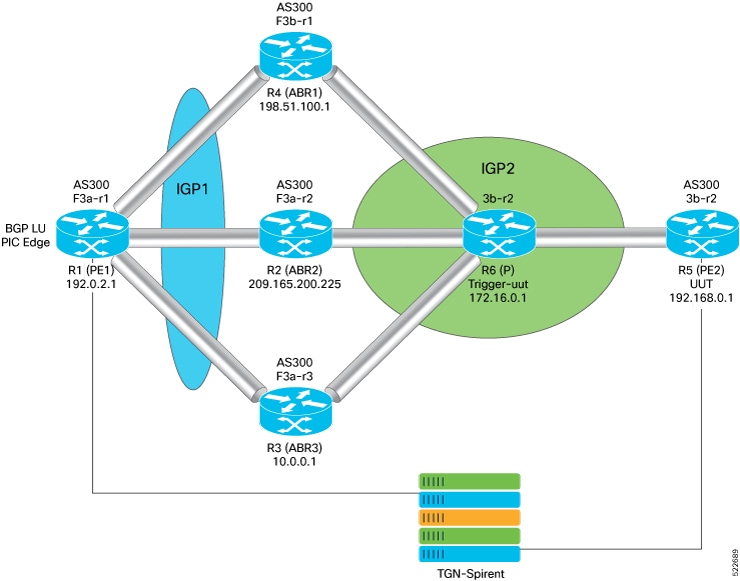

How BGP labeled unicast PIC edge ensures fast convergence

This process applies to provider networks using BGP labeled unicast (LU) prefix independent convergence (PIC) edge to ensure rapid failover and maintain uninterrupted traffic during path or router failures.

Summary

  • PE1 (Provider Edge Router): Enables BGP LU PIC edge, learns BGP LU prefixes, programs primary and backup paths, detects failures, and switches traffic to the backup path when needed.

  • PE2 (Remote Provider Edge Router): Provides BGP LU prefixes to PE1 and serves as a backup or alternate next hop.

  • ABR1, ABR2, ABR3 (Area Border Routers): Serve as primary and backup transit paths for traffic between PE1 and PE2; if one ABR fails, another ABR takes over as the active path.

This process enables rapid failover in provider networks using BGP LU PIC edge by preprogramming primary and backup paths, ensuring fast, automatic rerouting and uninterrupted traffic during failures.

Workflow

Figure 1. BGP labeled unicast prefix independent convergence edge

These stages describe how BGP labeled unicast (LU) PIC edge enables fast convergence and failover in the provider network work.

  1. Enable BGP LU PIC edge on the provider edge router (PE1).
  2. PE1 learns BGP LU prefixes from the remote provider edge router (PE2).
  3. PE1 programs both the primary and backup paths through area border routers (ABR1, ABR2, and ABR3) into the forwarding information base (FIB).
  4. Program PE2 as the backup or alternate next hop in the FIB of PE1.
  5. Under normal conditions, PE1 forwards traffic to the customer edge (CE) device through the primary ABR.
  6. If the primary ABR fails, PE1 immediately activates the preprogrammed backup path and forwards traffic through an alternate ABR.
  7. When PE1 detects that PE2 is not reachable via the primary ABR, it switches the BGP next hop for the prefix to the alternate ABR without delay.
  8. The switchover to the backup path occurs in less than a second, even if multiple BGP prefixes are updated at once.

Result

This process ensures subsecond convergence and uninterrupted traffic flow during ABR or path failures in the network.


Supported features and limitations of BGP LU PIC edge

Supported features:

  • BGP LU PIC edge supports BGP multipaths, allowing routers to install multiple internal and external BGP paths in the forwarding table.

  • Multiple paths enable BGP to load balance traffic across several links.

Limitation::

  • Convergence time is independent of the BGP LU route scale.


Configure convergence for BGP labeled unicast prefix independent convergence edge

Configure BGP LU PIC edge and multipath to enable fast convergence and backup path installation.

Use this task when you need to configure BGP labeled unicast PIC edge and multipath on Cisco routers to ensure fast convergence and automatic traffic failover in service provider or large enterprise networks.

Before you begin

  • Ensure you have access to the router prompt in configuration mode.

  • Verify that BGP is enabled and address families are configured as needed.

Procedure

1.

Configure BGP labeled unicast and attach a route-policy to BGP address families.

Example:

Apply the route policy to the BGP address family.

Router(config)# route-policy BGP-PIC-EDGE
Router(config-rpl)# set path-selection backup 1 install
Router(config-rpl)# end-policy

Apply the route policy to the BGP address family.

Router(config)# router bgp <ASN>
Router(config-bgp)# bgp router-id <Router-ID>
Router(config-bgp)# address-family ipv4 unicast
Router(config-bgp-af)# additional-paths receive
Router(config-bgp-af)# additional-paths send
Router(config-bgp-af)# additional-paths selection route-policy BGP-PIC-EDGE
2.

Configure BGP labeled unicast multipath and attach a route-policy to BGP address families:

Example:

Define the multipath route policy.

Router(config)# route-policy BGP-PIC-EDGE-MULTIPATH
Router(config-rpl)# set path-selection backup 1 install multipath-protect
Router(config-rpl)# end-policy

Apply the multipath route policy to the BGP address family.

Router(config)# router bgp <ASN>
Router(config-bgp)# bgp router-id <Router-ID>
Router(config-bgp)# address-family ipv4 unicast
Router(config-bgp-af)# maximum-paths ibgp 2
Router(config-bgp-af)# additional-paths receive
Router(config-bgp-af)# additional-paths send
Router(config-bgp-af)# additional-paths selection route-policy BGP-PIC-EDGE-MULTIPATH
3.

Use the show running-config to verify if the feature has been configured.

Example:

Router# show running-config
route-policy BGP-PIC-EDGE 
 set path-selection backup 1 install
 end-policy
router bgp 200
 bgp router-id 192.168.1.0
 address-family ipv4 unicast
  additional-paths receive
  additional-paths send
  additional-paths selection route-policy BGP-PIC-EDGE

route-policy BGP-PIC-EDGE-MULTIPATH
 set path-selection backup 1 install multipath-protect
 end-policy
router bgp 200
 bgp router-id 192.168.1.0
 address-family ipv4 unicast
  maximum-paths ibgp 2
  additional-paths receive
  additional-paths send
  additional-paths selection route-policy BGP-PIC-EDGE-MULTIPATH
4.

Use the show cef to verify that the backup path is established.

Example:

Router# show cef 192.0.2.1/32

192.168.0.0/32, version 31, internal 0x5000001 0x40 (ptr 0x901d2370) [1], 0x0 (0x90d2beb8), 0xa08 (0x91c74378)
 Prefix Len 32, traffic index 0, precedence n/a, priority 4
   via 203.0.113.1/32, 3 dependencies, recursive [flags 0x6000]  << Primary Path
    path-idx 0 NHID 0x0 [0x90319650 0x0]
    recursion-via-/32
    next hop 192.51.100.1/32 via 24006/0/21
    next hop 209.165.200.225/32 Hu0/0/0/25   labels imposed {24002 24000}
    next hop 10.0.0.1/32 Hu0/0/0/26   labels imposed {24002 24000}
   via 203.0.113.2/32, 2 dependencies, recursive, backup [flags 0x6100]  << Backup Path
    path-idx 1 NHID 0x0 [0x903197b8 0x0]
    recursion-via-/32
    next hop 209.165.200.225/32 via 24005/0/21
    next hop 192.51.100.1/32 Hu0/0/0/25   labels imposed {24001 24000}
    next hop 10.0.0.1/32 Hu0/0/0/26   labels imposed {24001 24000}

BGP labeled unicast PIC edge and multipath are configured, enabling the router to install backup paths and achieve fast, automatic convergence and failover during link or path failures.