Use this procedure to map device affinity names to TE link affinity bits, providing consistent link attribute definitions across your network.
Affinity mapping allows you to define link attributes (affinities) in Crosswork Network Controller with the same names and bit positions that are used on the device. This helps maintain consistency and improve visualization. The affinity is represented as a 32-bit value, where each bit (0–31) corresponds to a link attribute such as service profile colors (for example, low delay, high bandwidth, and so on).
If an affinity mapping is not defined in the UI, the affinity name will appear as "UNKNOWN".
Before removing an affinity, remove any associated TE tunnels to avoid orphan tunnels. If an affinity is removed while still associated with a TE tunnel, it will show as "UNKNOWN" in the SR policy / RSVP-TE tunnel details window.
On devices, affinity maps are configured by setting bits for each affinity name. The following example shows an SR-TE affinity configuration ( affinity-map ) on a device:
RP/0/RP0/CPU0:c12#sh running-config segment-routing traffic-eng affinity-map
                Wed Jul 27 12:14:50.027 PDT
                segment-routing
                traffic-eng
                affinity-map
                name red bit-position 1
                name blue bit-position 5
                name green bit-position 4
                !
                !
                !
See SR, Tree-SID, or RSVP-TE configuration documentation for your specific device to view descriptions and supported configuration commands (for example, Segment Routing Configuration Guide for Cisco ASR 9000 Series Router)
To map the affinity names to the bits, complete these steps:
Procedure
| 1. | Choose . Alternatively, you can define affinities while provisioning an SR-TE policy, Tree-SID, or RSVP-TE tunnel by clicking Manage mapping under the Constraints > Affinity field. |
|
| 2. | Click + Create to add a new affinity mapping. |
|
| 3. | Enter the name and the bit position corresponding to the device configuration. For example, using the configuration described earlier: 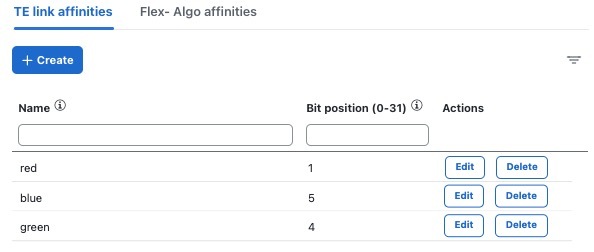
|
|
| 4. | Click Save to save the mapping. To create another mapping, you must click + Create and save the entry. |