This section explains how to configure flexible algorithms to exclude certain groups of links that share common risks (called Shared Risk Link Groups or SRLGs). By doing this, the network avoids using links that might fail together, improving overall network reliability and helping to find safer, more resilient paths.
Flexible algorithms can be configured to exclude groups of links that share common risks, known as Shared Risk Link Groups (SRLGs). This allows operators to prune links from the flexible algorithm topology based on shared risk attributes, ensuring that paths avoid common failure points and enhance network resiliency. When you set an SRLG exclusion for a flexible algorithm, the excluded SRLGs are automatically filtered out from the topology visualization and routing calculations. This helps operators plan alternate, protected paths and avoid risks tied to certain links.
This feature is supported on all devices running Cisco IOS XR software version 25.1.1 or later.
To configure flexible algorithm SRLG exclusion:
Procedure
| 1. | Configure SRLGs on your devices. Create a group to identify specific SRLG and give a unique value. By associating an interface with an SRLG, you can apply policies or constraints based on these groups.
Example: |
|
| 2. | Configure the flexible algorithm definition with the SRLG exclusion constraint on your devices. Example:This configuration advertises the relevant link and SRLG attributes via IS-IS, so other routers can also compute consistent, SRLG-aware paths. It ensures that for Flex-Algo 129, any links that are part of groupB are excluded from path computation and routing.
|
|
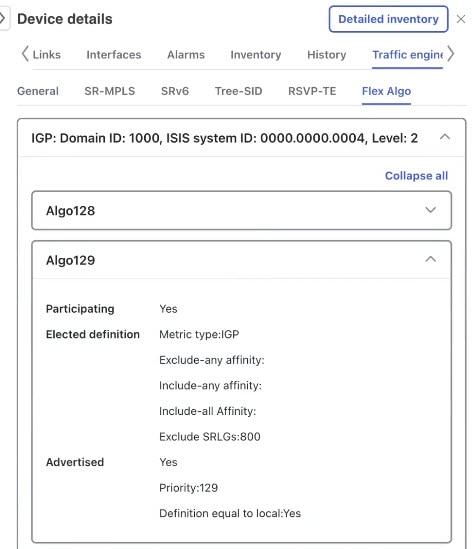
| 3. | Crosswork Network Controller automatically discovers these SRLG exclusion constraints from the network. The flexible algorithm for the device then reflects the exclusion. To view these details:
|
|
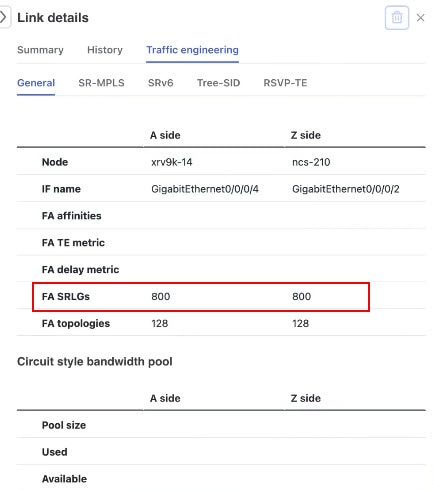
| 4. | To view whether a link is part of a flexible algorithm topology:
|
|
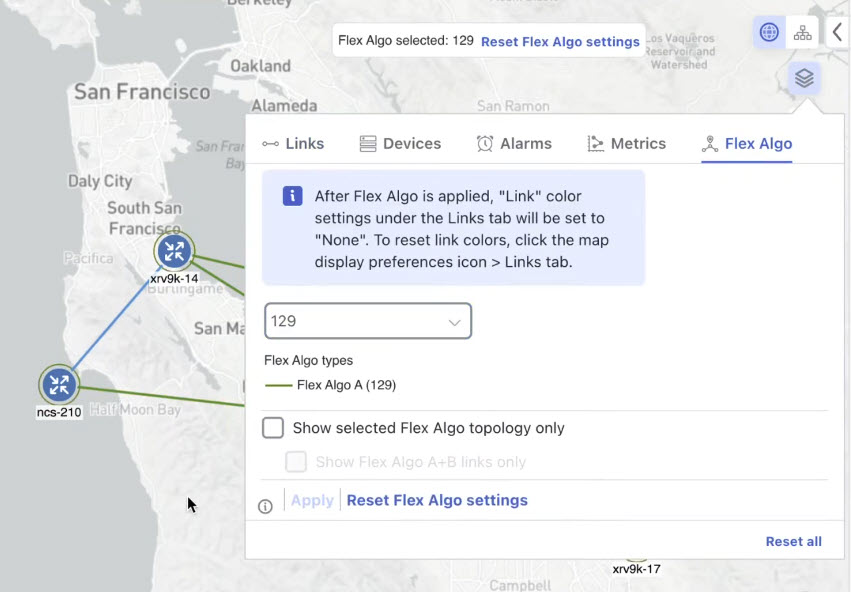
| 5. | To visualize the flexible algorithm topology with SRLG exclusions:
|
 and then click