This section describes the device and configuration requirements for enabling DDM visibility into network traffic demands. It also lists important considerations when using DDM.
For DDM to provide visibility into traffic demands, your network devices must meet these requirements and configurations.
Platform compatibility
Your devices must meet these requirements.
Devices must be running Cisco IOS-XR version 7.10.1 or higher to support the LOC.INT.E counters. Most platforms support this by version 24.3.1.
Note
Currently, there is no support for Cisco XE or multi-vendor environments.
Enable gNMI for all participating devices, by adding gNMI credentials profile, and gNMI protocol connectivity. For more infomation, see Add and Configure Devices in Cisco Crosswork Network Controller Administration guide.
Configure and activate performance policy
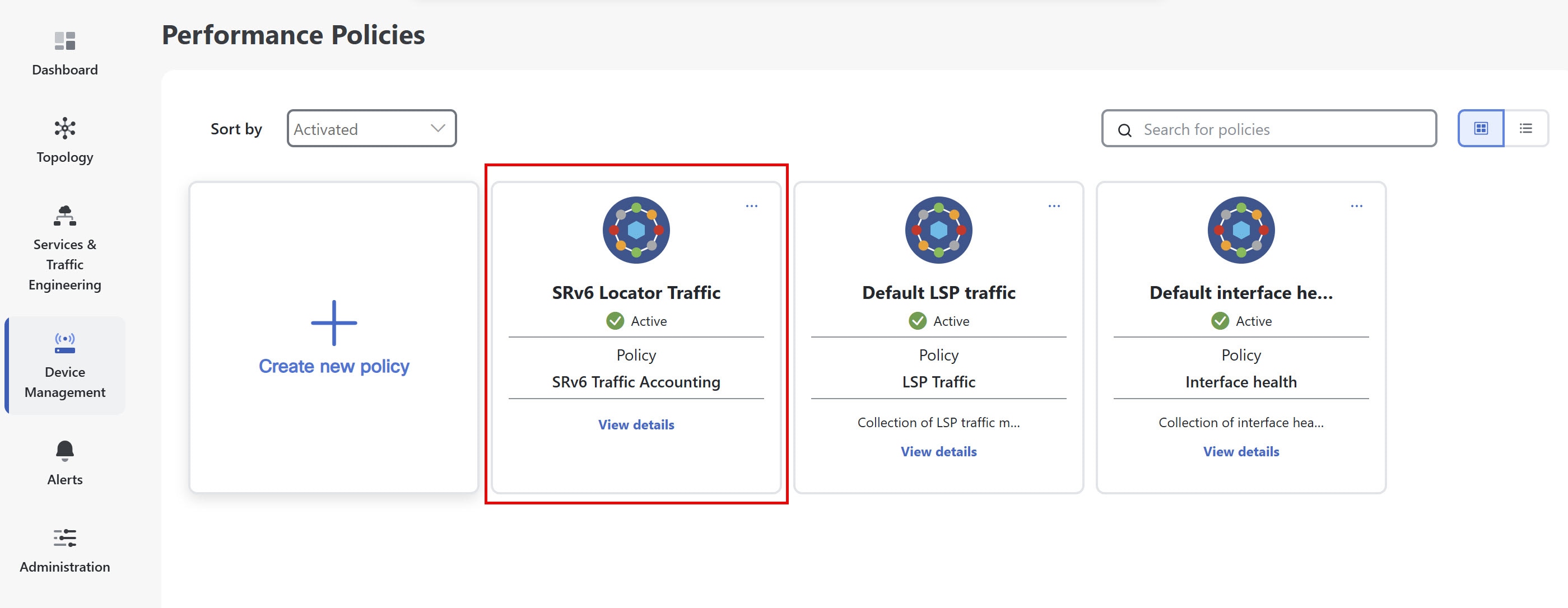
DDM relies on specific performance policies to collect necessary SRv6 locator from devices. To collect locator counters, you must configure and activate an SRv6 traffic accounting policy.
To create the policy, complete these steps:
Procedure
1.
From the main menu, choose Device Management > Performance Policies. Click Create new policy.
2.
Configure these policy parameters:
Choose SRv6 traffic accounting as the policy type.
Enter a policy name.
Select devices and choose Cisco IOS-XR devices with gNMI enabled.
Click Next.
3.
Set polling frequency to define how often devices should be polled for this policy. By default data will be collected according to the polling frequency.
4.
Click Activate to apply the policy. The policy appears under Performance Policies.
These configurations are required on your Cisco IOS-XR devices to enable SRv6 data collection and traffic steering for DDM integration.
Procedure
1.
Enable SRv6 locator accounting.
This configuration enables the router to perform detailed accounting for IPv6 traffic specifically related to SRv6 locators. By tracking traffic on a per-prefix and per-nexthop basis, operators gain granular visibility into the usage and flow of SRv6-enabled services.
This configuration sets up model-driven telemetry on the router to stream SRv6 accounting data to external collectors. By defining specific sensor paths, the router can push operational data related to SRv6 locator accounting, enabling real-time monitoring, analysis, and orchestration of SRv6 network performance and traffic patterns.
Enable customer/VRF traffic steering to SRv6 locators via BGP
This configuration enables an edge router to steer customer or VRF (Virtual Routing and Forwarding) IPv4 and IPv6 traffic into specific SRv6 locators using BGP.
RP/0/RP0/CPU0:L1-NCS5501#sh running-config router bgp
router bgp 60
bgp router-id <ROUTER_ID_IP>
segment-routing srv6
locator L1algo0
!
address-family ipv4 unicast
network <ROUTER_ID_IP>/32
!
address-family vpnv4 unicast
vrf all ! If there are multiple VRF where traffic is ingressing, add srv6 locator in vrf all.
segment-routing srv6
locator L1algo0
alloc mode per-vrf
!
!
!
vrf ntt
rd 200:200
address-family ipv4 unicast
segment-routing srv6 ! If there is only one VRF where traffic is ingressing, add srv6 locator in this vrf alone, if there is no VRF, then add the locator in neighbor address family
locator L1algo0
alloc mode per-vrf
!
redistribute connected
!
neighbor <NEIGHBOR_IP>
remote-as 61
update-source GigabitEthernet0/0/0/0
address-family ipv4 unicast
route-policy PASS_ALL in
route-policy PASS_ALL out
!
!
!
4.
Verify SRv6 traffic steering via CEF accounting
To verify that IPv6 traffic is being steered into SRv6 locators, rather than MPLS labels, use the sh cef ipv6 accounting command on the device.
sh cef ipv6 accounting
fccc:cc3e:3::/48
Accounting: 0/0 packets/bytes output (per-prefix-per-path mode)
via fe80::2/128, Bundle-Ether1201
path-idx 0
next hop fe80::2/128
Accounting: 200000/58400000 packets/bytes output <<< Traffic packets for prefix fccc:cc3e:3::
Important considerations when using DDM
Before using DDM, review these important considerations applicable for Crosswork Network Controller version 7.2.
SRv6 policy accuracy: The demand matrix may be inaccurate in the presence of SRv6 policies. Full incorporation of these policies is planned for future phases.
Summarized locators: There is no current support for redistributed or summarized locators across IGP domain boundaries. While demands for these locators are computed, they will appear as unrouted.
Locator leaking: Locator leaking is assumed to occur at IS-IS level boundaries.
High availability (HA): DDM does not support HA. This means there is no built-in redundancy or failover capability, and data loss may occur during upgrades or unexpected restarts.
User permissions: Users must have admin permissions to modify global configurations and perform enable/disable actions on domains. Read-only users can only view demand matrices.
Locator accounting coverage: For the most accurate and complete SRv6 demand matrix, Locator counter collection should include every device in the IGP domain. See "Locator counter collection coverage" for the effects of partial coverage.
Locator counter collection synchronization: Collecting locator counters from nodes at different times during the collection interval can result in transient false demands. See "Locator Counter Collection Synchronization" for details and mitigation steps.