Overview
This chapter provides configuration guidelines to implement Local Area Bonjour enabling end-to-end policy-based mDNS service discovery and distribution across multilayer wired and wireless FlexConnect local-switching mode. The first hop mDNS gateway at Layer 2 access switch must be implemented in service peer mode and paired with common distribution-layer switch in SDG agent role IP gateway function to wired and wireless clients. The network-wide distributed SDG agent can be paired alternatively with the Cisco Catalyst Center to enable mDNS service-routing across IP core network providing mDNS service assurance, monitoring and troubleshooting.
The following figure illustrates unicast mode bonjour network environment with AirPrint capable printer and wireless user computer (macOS, Microsoft Windows, and so on.) connected to the same Ethernet switch. The network administrator implements the policy permitting additional endpoints associated to nearby location Ethernet switch to discover and use remote AirPrint capable Printer without flooding mDNS over wired and wireless networks.
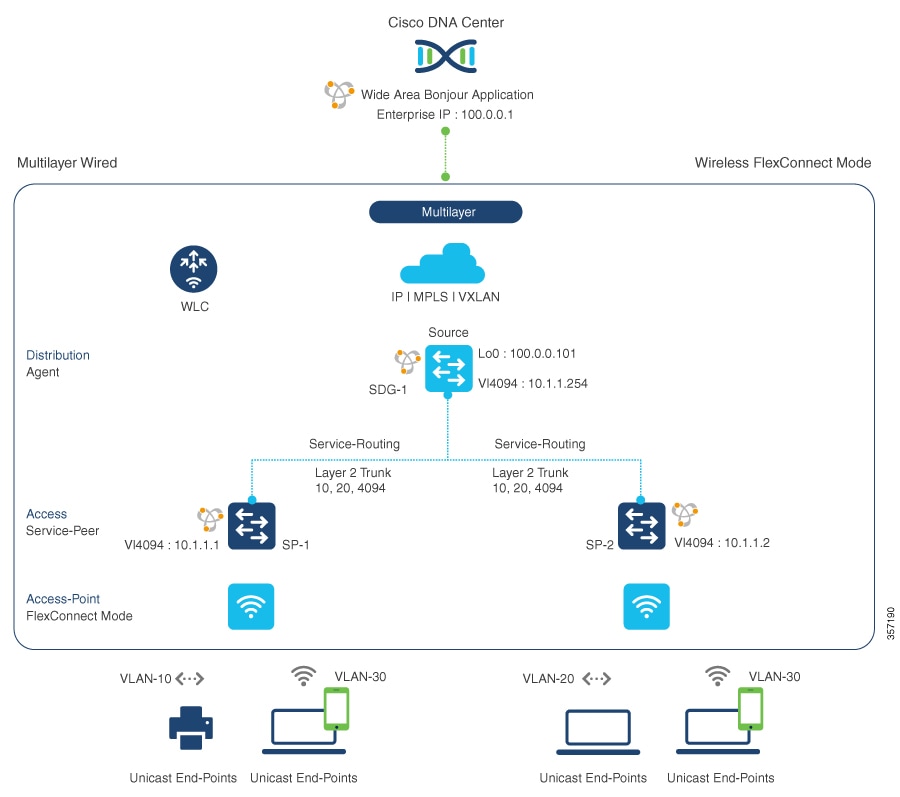
Configuration Example for Default Service List and Policy in FlexConnect Mode - Wireless and Wired
This section provides guidance on configuring Service-Peer, SDG Agent, and Cisco Catalyst Center, allowing the wired and wireless endpoints to dynamically discover the default service list using Layer 2 unicast and policy.
Example: Wired and Wireless Access Layer Service Peer Configuration
The following table provides a sample configuration of wired and wireless controller access layer service peer.
|
Configuration Step |
Sample Configuration: SP-1 Service-Peer Configuration |
Sample Configuration: SP-2 Service-Peer Configuration |
||
|---|---|---|---|---|
|
Step-1: Enable mDNS gateway and set the gateway mode. |
|
|
||
|
Step-2: Create unique mDNS inbound policy to permit ingress AirPrint service announcement and query on the Catalyst Switch in service peer mode. |
|
|
||
|
Step-3: Create unique mDNS outbound policy to permit egress AirPrint service response on the Catalyst Switch in service peer mode |
|
|
||
|
Step-4: Associate inbound and outbound service list to a unique service policy. |
|
|
||
|
Step-5: Activate unicast mDNS gateway and attach service policy on wired VLAN and wireless FlexConnect user VLAN of SP-1 and SP-2 Layer 2 access switch. |
|
|
||
|
Step-6: Enable service routing on wired service peer mDNS between mDNS source and receiver local VLANs.
|
|
|
||
|
Step-7: Enable unicast service routing between wired and wireless service peer and SDG agent using wired management source VLAN ID and IP address. |
|
|
Example: Wired and Wireless Distribution Layer SDG Agent Configuration
The following table provides a sample configuration of distribution layer SDG agent.
|
Configuration Step |
Sample Configuration: SDG-1 – SDG Agent |
|---|---|
|
Step-1: Enable mDNS gateway and set the gateway mode. The default mode is sdg-agent. |
|
|
Step-2: Create a unique mDNS inbound policy to permit ingress AirPrint service announcement and query the Catalyst Switch in Service-Peer mode. |
|
|
Step-3: Create a unique mDNS outbound policy to permit egress AirPrint service response on Catalyst Switch in Service-Peer mode. |
|
|
Step-4: Associate the inbound and outbound service-list to a unique service-policy. |
|
|
Step-5: Activate unicast mDNS gateway on wired VLAN and wireless user VLAN on SDG agents. |
|
|
Step-6: Configure the service peer-group and attach service-policy on the SDG agent distribution switch and enable service-routing between the assigned Service Peer switch group. |
|
|
Step-7: Create a unique controller bound mDNS policy to permit egress AirPrint service discovery and distribution from Catalyst Switch in SDG agent mode. Inbound policy towards controller is not required. |
|
|
Step-8: Associate outbound service-list to a unique service-policy. |
|
|
Step-9: Enable Wide Area Bonjour service-routing with service export configuration association controller IP Address, source interface for stateful connection, and mandatory egress policy for Wide Area service-routing. |
|
Configuration Example for Customized Service List and Policy in FlexConnect Mode - Wireless and Wired
This section provides guidance on configuring Service-Peer, SDG Agent, and Cisco Catalyst Center, allowing the wired and wireless endpoints to dynamically discover printer using Layer 2 unicast and policy.
Example: Wired and Wireless Access Layer Service Peer Configuration
The following table provides a sample configuration of wired and wireless controller access layer service peer.
|
Configuration Step |
Sample Configuration: SP-1 Service-Peer Configuration |
Sample Configuration: SP-2 Service-Peer Configuration |
||
|---|---|---|---|---|
|
Step-1: Enable mDNS gateway and set the gateway mode. |
|
|
||
|
Step-2: Create unique mDNS inbound policy to permit ingress AirPrint service announcement and query on the Catalyst Switch in service peer mode. |
|
|
||
|
Step-3: Create unique mDNS outbound policy to permit egress AirPrint service response on the Catalyst Switch in service peer mode |
|
|
||
|
Step-4: Associate inbound and outbound service list to a unique service policy. |
|
|
||
|
Step-5: Activate unicast mDNS gateway and attach service policy on wired VLAN and wireless FlexConnect user VLAN of SP-1 and SP-2 Layer 2 access switch. |
|
|
||
|
Step-6: Enable service routing on wired service peer mDNS between mDNS source and receiver local VLANs.
|
|
|
||
|
Step-7: Enable unicast service routing between wired and wireless service peer and SDG agent using wired management source VLAN ID and IP address. |
|
|
Example: Wired and Wireless Distribution Layer SDG Agent Configuration
The following table provides a sample configuration of distribution layer SDG agent.
|
Configuration Step |
Sample Configuration: SDG-1 – SDG Agent |
|---|---|
|
Step-1: Enable mDNS gateway and set the gateway mode. The default mode is sdg-agent. |
|
|
Step-2: Create a unique mDNS inbound policy to permit ingress AirPrint service announcement and query the Catalyst Switch in Service-Peer mode. |
|
|
Step-3: Create a unique mDNS outbound policy to permit egress AirPrint service response on Catalyst Switch in Service-Peer mode. |
|
|
Step-4: Associate the inbound and outbound service-list to a unique service-policy. |
|
|
Step-5: Activate unicast mDNS gateway on wired VLAN and wireless user VLAN on SDG agents. |
|
|
Step-6: Configure the service peer-group and attach service-policy on the SDG agent distribution switch and enable service-routing between the assigned Service Peer switch group. |
|
|
Step-7: Create a unique controller bound mDNS policy to permit egress AirPrint service discovery and distribution from Catalyst Switch in SDG agent mode. Inbound policy towards controller is not required. |
|
|
Step-8: Associate outbound service-list to a unique service-policy. |
|
|
Step-9: Enable Wide Area Bonjour service-routing with service export configuration association controller IP Address, source interface for stateful connection, and mandatory egress policy for Wide Area service-routing. |
|
Cisco Catalyst Center Traditional Multilayer Wired and Wireless Configuration
Configuring Service Filters for Traditional Multilayer Wired and Wireless FlexConnect Local- Switching Mode (GUI)
This procedure implements global service filters, which permit the Cisco Wide Area Bonjour application to dynamically discover and distribute service information between trusted Cisco Catalyst SDG agent switches across the IP network.
Procedure
|
Step 1 |
Navigate to the Configuration tab in the Wide Area Bonjour application. |
|
Step 2 |
From the sidebar, select the sub-domain for which you want to create the service filter. |
|
Step 3 |
Check the Service Filter box. |
|
Step 4 |
Click Service Filter icon from the topology to view a list of the service filters for the selected domain. You can also manually edit existing service filters from this list. |
|
Step 5 |
Click Create Service Filter. |
|
Step 6 |
From the Network Mode drop-down list, choose Traditional (the default mode). |
|
Step 7 |
Enter a unique name for the service filter. |
|
Step 8 |
(Optional) Enter a description for the service filter. |
|
Step 9 |
Select one or more service types to permit announcements and queries. |
|
Step 10 |
Enable or disable service filters after creating them. By default, service filters are enabled. |
Configuring Source SDG Agents in Traditional Multilayer Wired and Wireless FlexConnect Local- Switching Mode (GUI)
This procedure configures discovery of wired printer sources from the LAN distribution switches paired with Layer 2 Catalyst Switches in a service peer role. The wireless distribution switches paired with a controller in a service peer role receive query responses for wired printers and distribute the responses to querying devices over the wireless FlexConnect local switching mode network.
Procedure
|
Step 1 |
Click Add on the upper-right of Cisco Catalyst Center. |
||
|
Step 2 |
Click the Source radio button to select a source SDG agent. By default, this radio button is selected. |
||
|
Step 3 |
From the SDG Agent/IP drop-down list, select an SDG agent (100.0.0.101) which announces the services, for example, Printer. |
||
|
Step 4 |
Select Peer from the Service Layer drop-down list. |
||
|
Step 5 |
Uncheck the box Any. By default, this is unchecked. |
||
|
Step 6 |
Select the query VLAN (Vlan-10) to distribute services (Printer) from a specific network. |
||
|
Step 7 |
Enable or disable services from the selected query IPv4 subnet. By default, this is enabled. |
||
|
Step 8 |
Enable or disable services from the selected query IPv6 subnet. By default, this is enabled. |
||
|
Step 9 |
Enter the service peer IPv4 address (10.1.1.1).
|
||
|
Step 10 |
(Optional) Click Add Next to add more source SDG agents. (Repeat the preceding steps.) |
||
|
Step 11 |
Click DONE. |
||
|
Step 12 |
Click CREATE. |
Configuring Query SDG Agents in Traditional Multilayer Wired and Wireless FlexConnect Local- Switching Mode (GUI)
This procedure configures distributed services to query SDG agents connected to a controller in service peer mode, based on a policy.
f you are using wide area network, see the Cisco Wide Area Bonjour on Cisco Catalyst Center User Guide at https://www.cisco.com/c/en/us/support/cloud-systems-management/dna-center/products-user-guide-list.html.
Procedure
|
Step 1 |
Click Add on the upper-right of Cisco Catalyst Center. |
|
Step 2 |
Select the Query SDG agent radio button. By default, the Source radio button is selected. |
|
Step 3 |
From the SDG Agent/IP drop-down list, select an SDG agent (100.0.0.102) that receives queries for the services (Printer). |
|
Step 4 |
Select Peer from the Service Layer drop-down list. |
|
Step 5 |
Uncheck the box Any. By default, this is enabled. |
|
Step 6 |
Select the query VLAN (Vlan-30) to distribute services (Printer) to a specific network. |
|
Step 7 |
Enable or disable services from the selected query IPv4 subnet. By default, this is enabled. |
|
Step 8 |
Enable or disable services from the selected query IPv6 subnet. By default, this is enabled. |
|
Step 9 |
Enter the service peer IPv4 address (10.2.1.254). |
|
Step 10 |
Click the + icon to add more service-peers, if any. Select Any to accept services from any peer on a selected VLAN. |
|
Step 11 |
(Optional) Click Add Next to add more query agents. (Repeat the preceding steps.) |
|
Step 12 |
Click DONE. |
|
Step 13 |
Click CREATE. |
Verifying Configuration Example for FlexConnect Mode - Wireless and Wired
This section provides step-by-step mDNS configuration and service discovery and distribution status based on applied policy on Wired Layer 2 access switch in service peer and SDG agent mode.
Verifying Wired Service-Peer Configuration
Use the following commands on the Cisco Catalyst switch in service peer (SP-1 and SP-2) mode to determine the operational status after applying configuration and discovering the AirPrint service from the local network.
Device# show mdns-sd summary vlan 10
VLAN: 10
==========================================
mDNS Gateway: Enabled
mDNS Service Policy: LOCAL-AREA-POLICY
Active Query: Enabled
: Periodicity 3600 Seconds
Transport Type: IPv4
Service Instance Suffix: Not Configured
mDNS Query Type: ALL
SDG Agent IP: 10.1.1.254
Source Interface: Vlan4094
Device# show mdns-sd service-policy name LOCAL-AREA-POLICY
Service Policy Name Service List IN Name Service List Out Name
===============================================================================
LOCAL-AREA-POLICY LOCAL-AREA-SERVICES-IN LOCAL-AREA-SERVICES-OUT
Device# show mdns-sd cache vlan 10
|
Name |
Type |
TTL/ Remaining |
Vlan-Id/ Interface-name |
MAC Address |
RR Record Data |
|---|---|---|---|---|---|
|
_universal. _sub. _ipp. _tcp.local |
PTR |
4500/4486 |
Vl10 |
ac18.2651.03fe |
Bldg-1-FL1-PRN. _ipp. _tcp.local |
|
_ipp. _tcp.local |
PTR |
4500/4486 |
Vl10 |
ac18.2651.03fe |
Bldg-1-FL1-PRN. _ipp. _tcp.local |
|
Bldg-1-FL1-PRN. _ipp. _tcp.local |
SRV |
4500/4486 |
Vl10 |
ac18.2651.03fe |
0 0 631 Bldg-1-FL1-PRN.local |
|
Bldg-1-FL1- PRN.local |
A |
4500/4486 |
Vl10 |
ac18.2651.03fe |
10.153.1.1 |
|
Bldg-1-FL1- PRN.local |
AAAA |
4500/4486 |
Vl10 |
ac18.2651.03fe |
2001:10:153: 1:79:A40C:6BEE: AEEC |
|
Bldg-1-FL1-PRN. _ipp. _tcp.local |
TXT |
4500/4486 |
Vl10 |
ac18.2651.03fe |
(451)'txtvers=1''priority=30'' ty=EPSON WF-3620 Series'' usb_MFG=EPSON'' usb_MDL=W~'~ |
Device# show mdns-sd statistics vlan 10
mDNS Statistics
Vl10:
mDNS packets sent : 612
IPv4 sent : 612
IPv4 advertisements sent : 0
IPv4 queries sent : 612
IPv6 sent : 0
IPv6 advertisements sent : 0
IPv6 queries sent : 0
Unicast sent : 0
mDNS packets rate limited : 0
mDNS packets received : 42
advertisements received : 28
queries received : 14
IPv4 received : 42
IPv4 advertisements received: 28
IPv4 queries received : 14
IPv6 received : 0
IPv6 advertisements received: 0
IPv6 queries received : 0
mDNS packets dropped : 0
=========================================
Query Type : Count
=========================================
PTR : 12
SRV : 0
A : 0
AAAA : 0
TXT : 0
ANY : 3
=================================================
PTR Name Advertisement Query
=================================================
_ipp. _tcp.local 9 4
Verifying Wired SDG Agent Configuration and Service-Routing Status
This section provides information on mDNS configuration and service-routing on Wired and Wireless SDG Agent (SDG-1) with locally attached Layer 2 access switches in Service-Peer (SP-1 and SP-2) mode and with centrally paired Cisco Catalyst Center for Wide Area Bonjour service-routing.
Device# show mdns-sd summary vlan 10
VLAN: 10
==========================================
mDNS Gateway : Enabled
mDNS Service Policy : LOCAL-AREA-POLICY
Active Query : Disabled
Transport Type : IPv4
Service Instance Suffix : Not Configured
mDNS Query Type : ALL
SDG Agent IP : Not-Configured
Source Interface : Not-Configured
Device# show mdns-sd cache vlan 10
|
Name |
Type |
TTL/ Remaining |
Vlan-Id /Interface-name |
MAC Address |
RR Record Data |
|---|---|---|---|---|---|
|
_universal. _sub. _ipp. _tcp.local |
PTR |
4500/4500 |
Vl10 |
ac18.2651.03fe |
Bldg-1-FL1-PRN. _ipp. _tcp.local |
|
_ipp._tcp.local |
PTR |
4500/4500 |
Vl10 |
ac18.2651.03fe |
Bldg-1-FL1-PRN. _ipp. _tcp.local |
|
Bldg-1-FL1- PRN. _ipp._tcp.local |
SRV |
4500/4500 |
Vl10 |
ac18.2651.03fe |
0 0 631 Bldg-1-FL1-PRN.local |
|
Bldg-1-FL1 -PRN.local |
A |
4500/4500 |
Vl10 |
ac18.2651.03fe |
10.153.1.1 |
|
Bldg-1-FL1- PRN.local |
AAAA |
4500/4500 |
Vl10 |
ac18.2651.03fe |
2001:10:153: 1:79 A40C:6BEE: AEEC |
|
Bldg-1-FL1-PRN. _ipp._tcp.local |
TXT |
4500/4500 |
Vl10 |
ac18.2651.03fe |
(451)'txtvers=1''priority=30'' ty=EPSON WF-3620 Series'' usb_MFG=EPSON''usb_MDL=W~'~ |
Device# show mdns-sd sp-sdg statistics
One min, 5 mins, 1 hour
Average Input rate (pps) : 0, 0, 0
Average Output rate (pps) : 0, 0, 0
Messages received:
Query : 15796
ANY query : 0
Advertisements : 28
Advertisement Withdraw : 0
Interface down : 0
Vlan down : 0
Service-peer ID change : 0
Service-peer cache clear : 12
Resync response : 6
Messages sent:
Query response : 5975
ANY Query response : 0
Cache-sync : 61
Get service-instance : 0
Device# show mdns-sd controller detail
Controller: DNAC-Policy
IP: 100.0.0.1, Dest Port : 9991, Src Port : 42446, State : UP
Source Interface: Loopback0, MD5 Disabled
Hello Timer 30 sec, Dead Timer 120 sec, Next Hello 00:00:24
Uptime 2d05h (17:02:37 UTC Jan 15 2021)
Service Buffer: Enabled
Service Announcement:
Filter: DNAC-CONTROLLER-POLICY
Count 50, Delay Timer 30 sec, Pending Announcement 0, Pending Withdraw 0
Total Export Count 56, Next Export in 00:00:24
Service Query:
Query Suppression Enabled
Query Count 50, Query Delay Timer 15 sec, Pending 0
Total Query Count 15791, Next Query in 00:00:09
Verifying Cisco Catalyst Center Configuration and Service Routing Status
The Cisco Wide Area Bonjour application supports comprehensive assurance capabilities to manage service routing with network-wide distributed Cisco Catalyst switches in SDG Agent role and mDNS services discovered over Wide Area Bonjour domain. The assurance capabilities in Cisco Wide Area Bonjour provides the ability to determine service routing state, mDNS service state, and many more information at various levels for day-2 operations, analysis and troubleshooting. Each category serves unique function to manage and troubleshoot Wide Area Bonjour service routing for day-2 operation.
This sub-section provides brief overview for each category of monitor function:
-
Dashboard: The landing page of Cisco Wide Area Bonjour application provides key statistics in various formats to quickly determine service routing health across the network. The network administrator can monitor operational status of service routing with SDG Agent devices, historical chart of service discovery request, processing and drops from network-wide distributed devices and top five talkers across the network.
-
Sub-Domain 360°: The network administrator can briefly collect statistics and status counts in 360° view. The left-panel monitoring, and configuration bar is automatically open upon clicking selected sub-domain to verify configured policies, discovered service-instances on per sub-domain basis of the configuration section.
-
Monitor: A comprehensive 3-tier monitoring and troubleshooting function of Cisco Wide Area Bonjour application for various day-2 operations. The detail view of SDG Agent, Service-Instance, and advanced Troubleshooting capabilities allows network administrator to manage and troubleshoot Wide Area Bonjour domain with a single pane of glass on Cisco Catalyst Center.
For more information, see Cisco Wide Area Bonjour on Cisco Catalyst Center User Guide, Release 2.1.2 guide. The assurance capabilities and operation details are explained in Monitor the Cisco Wide Area Bonjour Application chapter to manage Cisco Wide Area Bonjour application with various supporting service routing assurance function.
Reference
|
Related Topic |
Document Title |
|---|---|
|
DNA Service for Bonjour Deployment on Cisco Catalyst 9600 Switch |
Cisco Catalyst 9600 Series Switch Software Configuration Guide, Release 17.5.X |
|
DNA Service for Bonjour Deployment on Cisco Catalyst 9500 Switch |
Cisco Catalyst 9500 Series Switch Software Configuration Guide, Release 17.5.X |
|
DNA Service for Bonjour Deployment on Cisco Catalyst 9400 Switch |
Cisco Catalyst 9400 Series Switch Software Configuration Guide, Release 17.5.X |
|
DNA Service for Bonjour Deployment on Cisco Catalyst 9300 Switch |
Cisco Catalyst 9300 Series Switch Software Configuration Guide, Release 17.5.X |
|
Cisco Wide Area Bonjour Application on Cisco Catalyst Center User Guide |
Cisco Wide Area Bonjour Application on Cisco Catalyst Center User Guide, Release 2.2.2 |
Feedback