L2VPN Configuration Guide for Cisco 8000 Series Routers, Cisco IOS XR Releases

PDF

L2VPN Configuration Guide for Cisco 8000 Series Routers, Cisco IOS XR Releases

VPLS preferred path over SR-TE policy

Want to summarize with AI?

Log in

Outlines VPLS pseudowire path selection using SR-TE policies, integration with VPLS services, operational workflows, and provides configuration instructions for deploying VPLS preferred paths using Segment Routing Traffic Engineering.


VPLS preferred path over SR-TE policy is a traffic engineering feature that

  • steers VPLS pseudowire traffic through explicit SR-TE policies

  • overrides default IGP shortest-path behavior when a preferred path is configured, and

  • uses LDP for signaling while SR-TE determines forwarding.

Feature history

The feature history table lists release support for this feature.

Table 1. Feature History Table
Feature Name

Release Information

Feature Description

VPLS preferred path over SR-TE policy

Release 25.4.1

Introduced in this release on: Fixed Systems (8100 [ASIC: Q200], 8200 [ASIC: Q200, P100], 8700 [ASIC: P100, K100], 8010 [ASIC: A100]); Centralized Systems (8600 [ASIC: Q200]); Modular Systems (8800 [LC ASIC: Q200, P100])

You can now steer VPLS pseudowire traffic over a specific SR-TE policy, ensuring precise control over routing, bandwidth, or latency for Layer 2 VPN services. This feature allows you to bind a VPLS pseudowire to an SR-TE tunnel interface, overriding the default IGP shortest path. By doing so, you can enforce traffic engineering constraints and optimize network performance.

This feature is only supported with static neighbors and is not supported when neighbor discovery is used.

SR-TE preferred-path behavior

  • VPLS preferred paths over SR-TE policies steer VPLS pseudowire traffic over specific SR-TE policies.

  • This behavior provides precise control over routing, bandwidth, or latency for Layer 2 VPN services.

  • The feature binds a VPLS pseudowire to an SR-TE tunnel interface and overrides the default IGP shortest path.
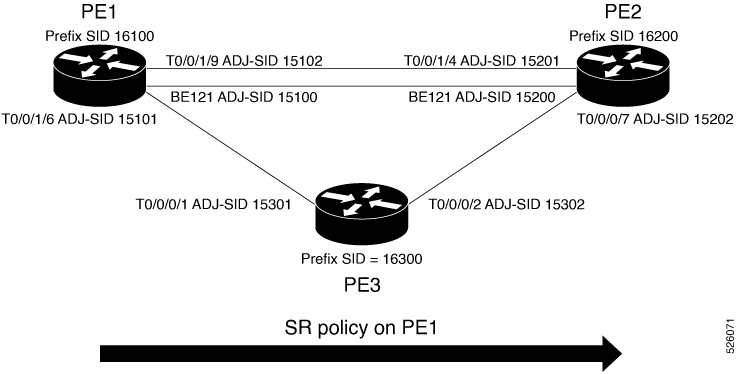

SR-TE policy pseudowire path options

VPLS pseudowires traditionally select paths based on the shortest IGP route between Provider Edge (PE) routers. When you associate a VPLS pseudowire with a Segment Routing Traffic Engineering (SR-TE) policy, the default path selection is overridden. This association directs the pseudowire to use the SR-TE tunnel as its forwarding path, offering several traffic engineering advantages:

  • Explicit path steering: Enables the use of a defined segment list for precise control of the traffic path.

  • Resource reservation: Supports bandwidth or latency guarantees as specified by the SR-TE policy.

  • Predictable and stable routing: Ensures the pseudowire uses the chosen path regardless of IGP recalculations, giving consistent service delivery.

By provisioning an SR-TE policy with a specific segment list, you can route VPLS service traffic through a preferred set of routers. Binding the VPLS pseudowire to this policy keeps service traffic on paths with guaranteed latency and bandwidth, independent of IGP changes or default routing decisions.


VPLS and SR-TE preferred path attributes

VPLS and SR-TE preferred paths are network features that establish connectivity and optimize traffic steering in service provider networks. The following reference highlights their operational characteristics:

  • Virtual Private LAN Service (VPLS)

    • Uses the Label Distribution Protocol (LDP) control plane to establish a full mesh of pseudowires (PWs) between Provider Edge (PE) routers.

    • Creates a virtual bridge that emulates LAN service, allowing transparent connection across multiple customer sites.

  • SR-TE preferred path

    • Defines explicit, source-routed paths across the network using Segment Routing Traffic Engineering (SR-TE) policies.

    • SR-TE policies use a list of segment IDs (SIDs) to steer traffic.

    • The preferred-path feature enables existing services to direct traffic onto a particular SR-TE policy tunnel, overriding the network’s default shortest path selection (through IGP or LDP).


How VPLS services use SR-TE policies for preferred path selection

Describes how VPLS, LDP signaling, SR-TE policy, and pseudowire forwarding work together to ensure VPLS traffic follows an explicitly defined, preferred path across the MPLS core rather than the default IGP path.

Summary

The key components involved in the process are:

  • VPLS service: Signals pseudowires using LDP, negotiating parameters such as VC IDs, status, and MTU between PE routers.

  • PE routers: Configure the VPLS service and steer pseudowire traffic using a specified SR-TE policy as the transport tunnel.

  • SR-TE policy: Defines the explicit, preferred path through the MPLS core, with the destination set to the loopback address of the remote PE.

  • MPLS label stack: Encapsulates VPLS Ethernet frames, where the outer labels correspond to the SR-TE path and the inner label is the VPLS service label negotiated by LDP.

This process enables service providers to control the forwarding path of L2VPN VPLS traffic within an MPLS core by leveraging SR-TE policies. This ensures traffic takes an explicitly defined path, overriding the default IGP shortest path routing.

Workflow

These stages describe how the VPLS preferred path over SR-TE policy works.

  1. Control plane signaling: The VPLS service on the PE routers uses LDP to signal and establish pseudowires, negotiating necessary parameters such as VC IDs and MTU.
  2. SR-TE policy configuration: The ingress PE router is configured with an SR-TE policy specifying the preferred explicit path through the core network, targeting the remote PE's loopback address.
  3. Data plane steering: The ingress PE router directs pseudowire traffic into the SR-TE tunnel, ensuring packets follow the explicitly defined path provided by the policy.
  4. Encapsulation: VPLS Ethernet frames are encapsulated using an MPLS label stack. The inner label identifies the VPLS service (negotiated by LDP) and the outer labels correspond to the SR-TE path.
  5. Traffic forwarding: The ingress PE forwards customer packets through the VPLS instance, applies the service label, pushes the segment routing label stack, and the MPLS core forwards packets based on these labels.
  6. Decapsulation and delivery: The egress PE router removes the segment routing labels, processes the VPLS service label, and delivers the original Ethernet frame to the customer-facing interface.

Result

VPLS traffic reliably follows the preferred SR-TE policy-defined path across the MPLS core, while the VPLS pseudowire remains established by LDP, ensuring predictable and controlled service delivery.


Configure VPLS preferred path over SR-TE policy

Ensure VPLS traffic uses Segment Routing Traffic Engineering (SR-TE) policies as preferred paths for pseudowires.

This task applies when you want to control the forwarding path of VPLS services by leveraging explicit SR-TE policies using prefix and adjacency SIDs. The procedure is intended for networks running IS-IS routing across PE routers.

Before you begin

Ensure IS-IS routing is operational on all PE routers and that you have administrative access to configure the routers.

Follow these steps to configure VPLS preferred path over SR-TE policy:

Procedure

1.

Configure prefix-SID on PE1, PE2, and PE3.

  1. Configure prefix-SID on PE1.

    Example:

    Router# configure
    Route(config)# router isis core
    Route(config-isis)# is-type level-2-only
    Route(config-isis)# net 49.0002.0330.2000.0031.00
    Route(config-isis)# nsr
    Route(config-isis)# nsf ietf
    Route(config-isis)# log adjacency changes
    Route(config-isis)# address-family ipv4 unicast
    Route(config-isis-af)# metric-style wide level 2
    Route(config-isis-af)# mpls traffic-eng level-2-only
    Route(config-isis-af)# mpls traffic-eng router-id loopback0
    Route(config-isis-af)# segment-routing mpls sr-prefer
    Route(config-isis-af)# segment-routing prefix-sid-map advertise-local
    Route(config-isis-af)# exit
    Route(config-isis)# interface loopback 0
    Route(config-isis-if)# address-family ipv4 unicast
    Route(config-isis-af)# prefix-sid index 16100
    Route(config-isis-af)# commit
  2. Configure prefix-SID on PE2.

    Example:

    Router# configure
    Route(config)# router isis core
    Route(config-isis)# is-type level-2-only
    Route(config-isis)# net 49.0002.0330.2000.0021.00
    Route(config-isis)# nsr
    Route(config-isis)# nsf ietf
    Route(config-isis)# log adjacency changes
    Route(config-isis)# address-family ipv4 unicast
    Route(config-isis-af)# metric-style wide level 2
    Route(config-isis-af)# mpls traffic-eng level-2-only
    Route(config-isis-af)# mpls traffic-eng router-id loopback0
    Route(config-isis-af)# segment-routing mpls sr-prefer
    Route(config-isis-af)# segment-routing prefix-sid-map advertise-local
    Route(config-isis-af)# exit
    Route(config-isis)# interface loopback 0
    Route(config-isis-if)# address-family ipv4 unicast
    Route(config-isis-af)# prefix-sid index 16200
    Route(config-isis-af)# commit
  3. Configure prefix-SID on PE3.

    Example:

    Router# configure
    Route(config)# router isis core
    Route(config-isis)# is-type level-2-only
    Route(config-isis)# net 49.0002.0330.2000.3030.0030.0035.00
    Route(config-isis)# address-family ipv4 unicast
    Route(config-isis-af)# metric-style wide level 2
    Route(config-isis-af)# mpls traffic-eng level-2-only
    Route(config-isis-af)# mpls traffic-eng router-id loopback0
    Route(config-isis-af)# segment-routing mpls sr-prefer
    Route(config-isis-af)# segment-routing prefix-sid-map advertise-local
    Route(config-isis-af)# exit
    Route(config-isis)# interface loopback 0
    Route(config-isis-if)# address-family ipv4 unicast
    Route(config-isis-af)# prefix-sid index 16300
    Route(config-isis-af)# commit
2.

Configure adjacency-SID on IS-IS interfaces on PE1, PE2, and PE3.

  1. Configure adjacency-SID on IS-IS interfaces on PE1.

    Example:

    Router# configure
    Route(config)# router isis core
    Route(config-isis)# interface Bundle-Ether121
    Route(config-isis-if)# circuit-type level-2-only
    Route(config-isis-if)# point-to-point
    Route(config-isis-if)# hello-padding disable
    Route(config-isis-if)# address-family ipv4 unicast
    Route(config-isis-if-af)# adjacency-sid absolute 15100
    Route(config-isis-if-af)# exit
    Router# configure
    Route(config)# router isis core
    Route(config-isis)# interface HundredGigE 0/0/0/24
    Route(config-isis-if)# circuit-type level-2-only
    Route(config-isis-if)# point-to-point
    Route(config-isis-if)# hello-padding disable
    Route(config-isis-if)# address-family ipv4 unicast
    Route(config-isis-if-af)# adjacency-sid absolute 15101
    Route(config-isis-if-af)# exit
    Router# configure
    Route(config)# router isis core
    Route(config-isis)# interface HundredGigE 0/0/0/23
    Route(config-isis-if)# circuit-type level-2-only
    Route(config-isis-if)# point-to-point
    Route(config-isis-if)# hello-padding disable
    Route(config-isis-if)# address-family ipv4 unicast
    Route(config-isis-if-af)# adjacency-sid absolute 15102
    Route(config-isis-if-af)# commit
  2. Configure adjacency-SID on IS-IS interfaces on PE2.

    Example:

    Router# configure
    Route(config)# router isis core
    Route(config-isis)# interface Bundle-Ether121
    Route(config-isis-if)# circuit-type level-2-only
    Route(config-isis-if)# point-to-point
    Route(config-isis-if)# hello-padding disable
    Route(config-isis-if)# address-family ipv4 unicast
    Route(config-isis-if-af)# adjacency-sid absolute 15200
    Route(config-isis-if-af)# exit
    Router# configure
    Route(config)# router isis core
    Route(config-isis)# interface HundredGigE 0/0/0/22
    Route(config-isis-if)# circuit-type level-2-only
    Route(config-isis-if)# point-to-point
    Route(config-isis-if)# hello-padding disable
    Route(config-isis-if)# address-family ipv4 unicast
    Route(config-isis-if-af)# adjacency-sid absolute 15201
    Route(config-isis-if-af)# exit
    Router# configure
    Route(config)# router isis core
    Route(config-isis)# interface HundredGigE 0/0/0/21
    Route(config-isis-if)# circuit-type level-2-only
    Route(config-isis-if)# point-to-point
    Route(config-isis-if)# hello-padding disable
    Route(config-isis-if)# address-family ipv4 unicast
    Route(config-isis-if-af)# adjacency-sid absolute 15202
    Route(config-isis-if-af)# commit
  3. Configure adjacency-SID on IS-IS interfaces on PE3.

    Example:

    Router# configure
    Route(config)# router isis core
    Route(config-isis)# interface HundredGigE 0/0/0/20
    Route(config-isis-if)# circuit-type level-2-only
    Route(config-isis-if)# point-to-point
    Route(config-isis-if)# hello-padding disable
    Route(config-isis-if)# address-family ipv4 unicast
    Route(config-isis-if-af)# adjacency-sid absolute 15301
    Route(config-isis-if-af)# exit
    Router# configure
    Route(config)# router isis core
    Route(config-isis)# interface HundredGigE 0/0/0/19
    Route(config-isis-if)# circuit-type level-2-only
    Route(config-isis-if)# point-to-point
    Route(config-isis-if)# hello-padding disable
    Route(config-isis-if)# address-family ipv4 unicast
    Route(config-isis-if-af)# adjacency-sid absolute 15302
    Route(config-isis-if-af)# commit
3.

Configure segment-list on PE1, PE2, and PE3.

  1. Configure segment-list on PE1.

    Example:

    Router# configure
    Router(config)# segment-routing
    Router(config-sr)# global-block 16000 23999
    Router(config-sr)# local-block 15000 15999
    Router(config-sr)# traffic-eng
    Router(config-sr-te)# segment-list segment-list name PE1-PE2
    Router(config-sr-te-sl)# index 1 mpls label 16200
    Router(config-sr-te-sl)# exit
    Router(config-sr-te)# segment-list segment-list name PE1-PE3
    Router(config-sr-te-sl)# index 1 mpls label 16300
    Router(config-sr-te-sl)# exit
    Router(config-sr-te)# segment-list segment-list name PE1-PE2-PE3
    Router(config-sr-te-sl)# index 1 mpls label 16200
    Router(config-sr-te-sl)# index 2 mpls label 16300
    Router(config-sr-te-sl)# exit
    Router(config-sr-te)# segment-list segment-list name PE1-PE3-PE2
    Router(config-sr-te-sl)# index 1 mpls label 16300
    Router(config-sr-te-sl)# index 2 mpls label 16200
    Router(config-sr-te-sl)# exit
    Router(config-sr-te)# segment-list segment-list name PE1-PE2_BE121
    Router(config-sr-te-sl)# index 1 mpls label 15100
    Router(config-sr-te-sl)# exit
    Router(config-sr-te)# segment-list segment-list name PE1-PE3-PE2_link
    Router(config-sr-te-sl)# index 1 mpls label 15101
    Router(config-sr-te-sl)# index 2 mpls label 15302
    Router(config-sr-te-sl)# exit
    Router(config-sr-te)# segment-list segment-list name PE1-PE3-PE2-t0016
    Router(config-sr-te-sl)# index 1 mpls label 15101
    Router(config-sr-te-sl)# index 2 mpls label 16200
    Router(config-sr-te-sl)# commit
  2. Configure segment-list on PE2.

    Example:

    Router# configure
    Router(config)# segment-routing
    Router(config-sr)# global-block 16000 23999
    Router(config-sr)# local-block 15000 15999
    Router(config-sr)# traffic-eng
    Router(config-sr-te)# segment-list segment-list name PE2-PE1
    Router(config-sr-te-sl)# index 1 mpls label 16100
    Router(config-sr-te-sl)# exit
    Router(config-sr-te)# segment-list segment-list name PE2-PE3-PE1
    Router(config-sr-te-sl)# index 1 mpls label 16300
    Router(config-sr-te-sl)# index 2 mpls label 16100
    Router(config-sr-te-sl)# commit
  3. Configure segment-list on PE3.

    Example:

    Router# configure
    Router(config)# segment-routing
    Router(config-sr)# global-block 16000 23999
    Router(config-sr)# local-block 15000 15999
    Router(config-sr)# traffic-eng
    Router(config-sr-te)# segment-list segment-list name PE3-PE1
    Router(config-sr-te-sl)# index 1 mpls label 16100
    Router(config-sr-te-sl)# exit
    Router(config-sr-te)# segment-list segment-list name PE3-PE2-PE1
    Router(config-sr-te-sl)# index 1 mpls label 16200
    Router(config-sr-te-sl)# index 2 mpls label 16100
    Router(config-sr-te-sl)# commit
4.

Configure SR-TE policies with candidate paths and preferences.

Example:

On PE1
Router# configure
Router(config)# segment-routing
Router(config-sr)# traffic-eng
Router(config-sr-te)# policy 100
Router(config-sr-te-policy)# color 1 end-point ipv4 192.0.2.2
Router(config-sr-te-policy)# candidate-paths
Router(config-sr-te-policy)# preference 400
Router(config-sr-te-pp-info)# explicit segment-list PE1-PE3-PE2
Router(config-sr-te-pp-info)# exit
Router(config-sr-te-policy)# preference 500 <-----------------largest number takes the precedence
Router(config-sr-te-pp-info)# explicit segment-list PE1-PE2
Router(config-sr-te-pp-info)# commit
Router(config-sr-te-pp-info)# exit
Router# configure
Router(config)# segment-routing
Router(config-sr)# traffic-eng
Router(config-sr-te)# policy 1013
Router(config-sr-te-policy)# color 1013 end-point ipv4 192.0.2.2
Router(config-sr-te-policy)# candidate-paths
Router(config-sr-te-policy)# preference 100
Router(config-sr-te-pp-info)# explicit segment-list PE1-PE2_BE121
Router(config-sr-te-pp-info)# exit
Router(config-sr-te-policy)# preference 200
Router(config-sr-te-pp-info)# explicit segment-list PE1-PE3-PE2-t0016
Router(config-sr-te-pp-info)# exit
Router(config-sr-te-policy)# preference 500
Router(config-sr-te-pp-info)# explicit segment-list PE1-PE2
Router(config-sr-te-pp-info)# exit
Router(config-sr-te-policy)# preference 600
Router(config-sr-te-pp-info)# explicit segment-list PE1-PE3-PE2
Router(config-sr-te-pp-info)# exit
Router(config-sr-te-policy)# preference 700
Router(config-sr-te-pp-info)# explicit segment-list PE1-PE3-PE2_link
Router(config-sr-te-pp-info)# commit
Router# configure
Router(config)# segment-routing
Router(config-sr)# traffic-eng
Router(config-sr-te)# policy 1300
Router(config-sr-te-policy)# color 1300 end-point ipv4 192.0.2.10
Router(config-sr-te-policy)# candidate-paths
Router(config-sr-te-policy)# preference 100
Router(config-sr-te-pp-info)# explicit segment-list PE1-PE3
Router(config-sr-te-pp-info)# commit

The highest preference number determines the active path.

5.

Configure VPLS to use SR-TE policies as preferred path.

  1. Attach the auto-generated SR-TE policy name to the L2VPN PW class.

    Use the auto-generated SR-TE policy name to attach the policy to the L2VPN instance. The auto-generated policy name is based on the policy color and end-point. Use the show segment-routing traffic-eng policy candidate-path name policy_name command to display the auto-generated policy name.

    Example:

    Router# show segment-routing traffic-eng policy candidate-path name 100
    
    SR-TE policy database
    ---------------------
    Color: 1, End-point: 192.0.2.2
     Name: srte_c_1_ep_2.2.2.2
    
    Router# show segment-routing traffic-eng policy candidate-path name 1013
    
    SR-TE policy database
    ---------------------
    Color: 1013, End-point: 192.0.2.2
     Name: srte_c_1013_ep_2.2.2.2
    
    Router# configure
    Router(config)# l2vpn
    Router(config-l2vpn)# pw-class pw100
    Router(config-l2vpn-pwc)# encapsulation mpls
    Router(config-l2vpn-pwc-mpls)# preferred-path sr-te policy srte_c_1_ep_2.2.2.2
    Router(config-l2vpn-pwc-mpls)# exit
    Router(config-l2vpn)# pw-class pw1013
    Router(config-l2vpn-pwc)# encapsulation mpls
    Router(config-l2vpn-pwc-mpls)# preferred-path sr-te policy srte_c_1013_ep_2.2.2.2 fallback disable
  2. Configure fallback disable.

    By default, fallback is enabled. If the SR-policy is down, then L2VPN VPLS will try to be UP using the regular IGP path, and not using the SR policy. If Fallback Disable is configured, the L2VPN PW will be down when the SR-policy is down. Preferred-path is the action of pinning down a PW to a SR TE policy.

    Example:

    Router(config-l2vpn)# pw-class pw1013
    Router(config-l2vpn-pwc)# encapsulation mpls
    Router(config-l2vpn-pwc-mpls)# preferred-path sr-te policy srte_c_1013_ep_2.2.2.2 fallback disable
  3. Configure VPLS bridge groups and domains.

    Example:

    Router(config)# l2vpn
    Router(config-l2vpn)# bridge group bg1
    Router(config-l2vpn-bg)# bridge-domain vpls501
    Router(config-l2vpn-bg-bd)# interface Bundle-Ether41.501
    Router(config-l2vpn-bg-bd-ac)# exit
    Router(config-l2vpn-bg-bd)# interface HundredGigE 0/0/0/24.1
    Router(config-l2vpn-bg-bd-ac)# split-horizon group
    Router(config-l2vpn-bg-bd-ac)# exit
    Router(config-l2vpn-bg-bd)# vfi vpls1
    Router(config-l2vpn-bg-bd-vfi)# neighbor 192.0.2.2 pw-id 501
    Router(config-l2vpn-bg-bd-vfi-pw)# pw-class pw100
    Router(config-l2vpn-bg-bd-vfi-pw)# exit
    Router(config-l2vpn-bg-bd-vfi)# neighbor 192.0.2.10 pw-id 501
    Router(config-l2vpn-bg-bd-vfi-pw)# commit
6.

Verify the VPLS preferred path over SR-TE policy configuration.

Example:

PE1# show segment-routing traffic-eng ipv4 topology | inc Prefix
  Prefix SID:
    Prefix 192.0.2.11, label 16100 (regular)
  Prefix SID:
    Prefix 192.0.2.10, label 16300 (regular)
  Prefix SID:
    Prefix 192.0.2.2, label 16200 (regular)

Example:

PE1# show segment-routing traffic-eng ipv4 topology | inc Adj SID
Adj SID: 61025 (unprotected) 15102 (unprotected)
    Adj SID: 61023 (unprotected) 15101 (unprotected)
    Adj SID: 65051 (unprotected) 15100 (unprotected)
    Adj SID: 41516 (unprotected) 15301 (unprotected)
    Adj SID: 41519 (unprotected) 15302 (unprotected)
    Adj SID: 46660 (unprotected) 15201 (unprotected)
    Adj SID: 24003 (unprotected) 15202 (unprotected)
    Adj SID: 46675 (unprotected) 15200 (unprotected)

Example:

PE1# show segment-routing traffic-eng policy candidate-path name 100

SR-TE policy database
---------------------

Color: 100, End-point: 192.0.2.2
 Name: srte_c_1_ep_2.2.2.2

Example:

PE1# show segment-routing traffic-eng policy name 100
SR-TE policy database
---------------------

Name: 100 (Color: 1, End-point: 192.0.2.2)
  Status:
    Admin: up  Operational: up for 05:44:25 (since Feb  1 17:32:34.434)
  Candidate-paths:
    Preference 500:
      Explicit: segment-list PE1-PE2 (active)
        Weight: 0, Metric Type: IGP
          16200 [Prefix-SID, 192.0.2.2]
    Preference 400:
      Explicit: segment-list PE1-PE3-PE2 (inactive)
      Inactive Reason: unresolved first label
        Weight: 0, Metric Type: IGP
  Attributes:
    Binding SID: 27498
      Allocation mode: dynamic
      State: Programmed
      Policy selected: yes
    Forward Class: 0

Example:

PE1# show segment-routing traffic-eng forwarding policy name 100

Policy        Segment         Outgoing    Outgoing            Next Hop        Bytes
Name          List            Label       Interface                           Switched
------------- --------------- ----------- ------------------- --------------- ------------
100           PE1-PE2         Pop        HundredGigE 0/0/0/23 192.0.2.12        0
                              Pop         BE121               192.0.2.13       0

The prefix-SID and adjacency-SID must be in the SR topology.

The VPLS service uses SR-TE policies as preferred pseudowire paths. The configuration completes successfully when verification commands show the intended state.